
In 2022, I wrote an article about the state of SwiftUI and whether it was possible to build a complete app without using UIKit or AppKit. That article was written in Chinese and published on Zhihu—feel free to read it there if you prefer. Here’s a summary of its main points:
SwiftUI is capable of building full apps across iOS, iPadOS, and macOS, but isn’t fully self-sufficient.
Platform-specific gaps remain: Some features (e.g. SiriKit Intents,
MenuBarExtra) still require UIKit or AppKit andAppDelegateworkarounds.Backward compatibility is weak: New SwiftUI APIs often aren’t available on older OS versions, requiring fallback implementations.
Custom layout support came late: The Layout protocol, essential for custom UIs, only became available in iOS 16/macOS 13.
Swift Concurrency is well integrated, but also limited to newer OS versions unless manually bridged.
UIKit/AppKit interoperation is still necessary in many cases, but SwiftUI is the preferred starting point for new Apple platform projects.
Now that it’s mid-2025, let’s review what has happened over the past three years. Specifically in SwiftUI, we have the following major updates (as for me) according to the Apple Documentation:
A super-easy API to achieve the glass effect introduced in iOS 26 lineup.
A new
WebViewto display the content of a web page.TextEditornow supportsAttributedString.Host and present SwiftUI scenes in UIKit.
Incorporate gesture recognizers in SwiftUI views from UIKit and AppKit.
Create
EnvironmentValues,Transaction,ContainerValues, andFocusedValuesentries by using theEntry()macro to the variable declaration.We can now observe the scroll position in a
ScrollViewfinally, as well as controlling the content offset manually.A
Previewmacro to help writing dynamic properties inline.A new
Observablemacro to help improve observation performance.An easy way to construct a Spring animation.
We can apply a Metal Shader directly to a pure SwiftUI view.
Showing HDR pixel values in SwiftUI.
And more…
Some of the APIs are backward compatible (like Spring Animation), while others are only available on the newest platforms.
For me, the most important point is that three years have passed since my last review. With this time span, we can start to think differently:
This year is the year of iOS 26. We might consider supporting down to iOS 24.Realistically, we may only need to support the latest three versions: iOS 26, iOS 18, and iOS 17.
Given this context, let’s discuss SwiftUI in 2025 in the following sections:
Which previous pitfalls have been fixed?
What still needs to be addressed or optimized?
How do I mix SwiftUI and UIKit to build PhotonCam?
My take on starting a new app in 2025.
If you scroll through the list in my blog, there were three major issues related to SwiftUI.
As of iOS 17 and iOS 18, this issue has been fixed. I believe this is an issue only existing in iOS 16. Since this issue can only be reproduced on a real device, I have no iOS 16 device to check this.
The solution I provided was to make a view extension like sheetCompat , and then do the workaround when dismissing a sheet:
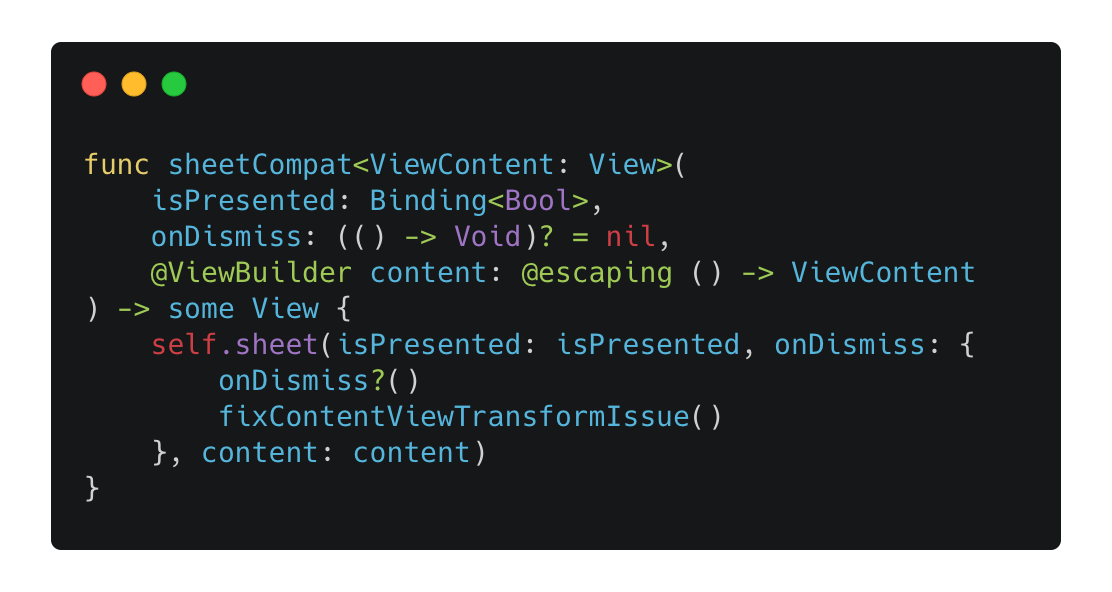
Now, if you are about to support the minimum version of iOS 17, it’s OK to use the official sheet extension directly.
When displaying a large amount of text in SwiftUI using the Text component, the CPU usage may increase to as high as possible. The workaround I provided was to bridge the UITextView or the NSTextView accordingly to SwiftUI.
As of iOS 18, I run the same test for the following scenarios, and record the highest CPU usage of each test:
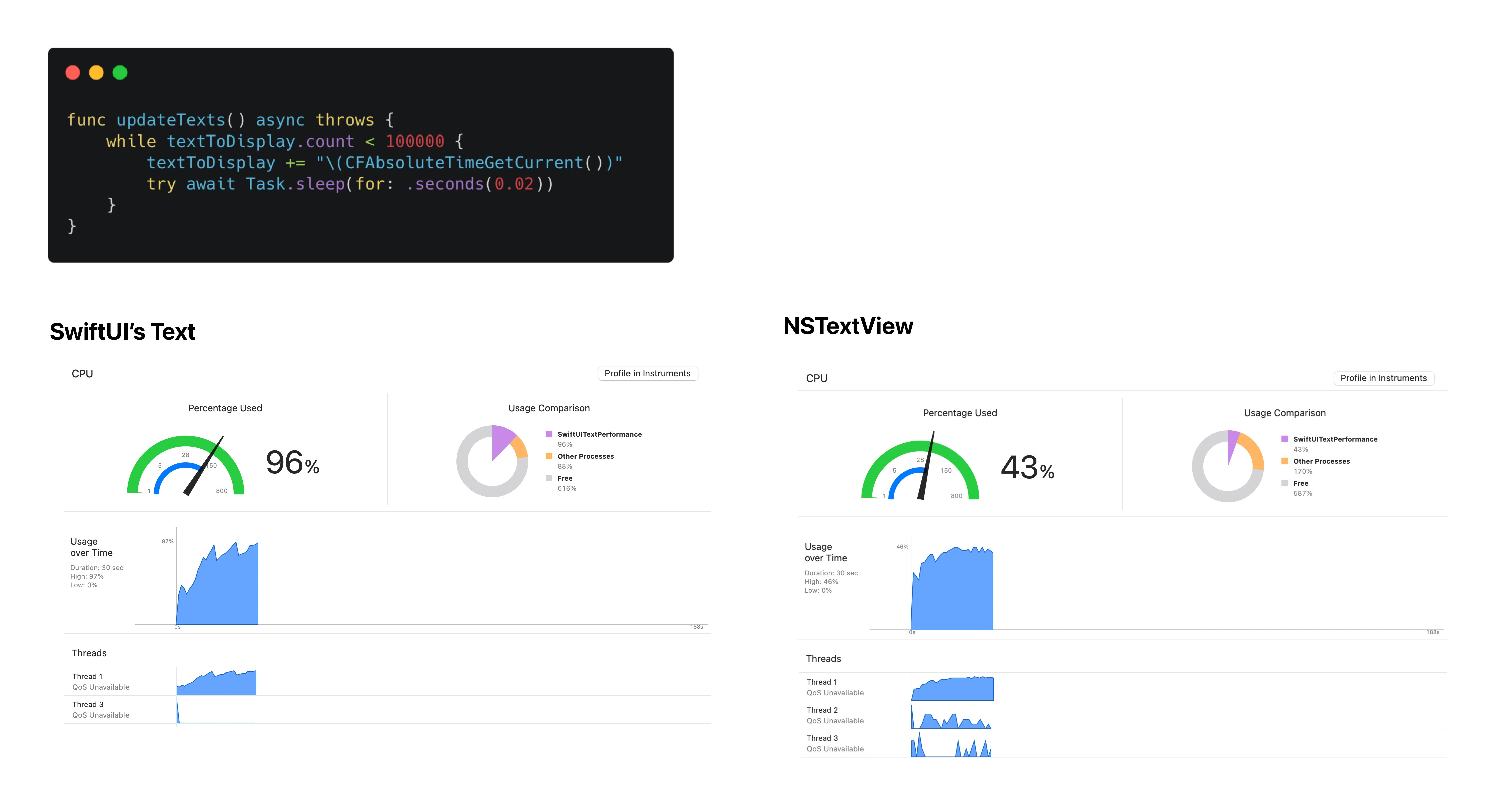
And the result stays the same. So the conclusion would be:
If you are displaying a small amount of text, using SwiftUI’s Text is just fine.
For some ChatGPT-like apps, be careful when displaying a large amount of text. Be sure to profile the CPU usage, as it may cause your app to hitch.
Bridge the UITextView or NSTextView from UIKit and AppKit to your SwiftUI app can help optimize this performance issue.
If it’s possible, do your own text rendering and layout using Core Text.
After displaying a menu, tapping the original menu entry or outside of the menu itself should dismiss the menu. Before iOS 18, the UI elements under this “mask” are still responsive, which means that when you tap the area outside the menu to dismiss it, you may accidentally tap a button, which will trigger some unintentional operations.
This issue had been fixed on iOS 18, and it’s part of the release note provided by Apple:
Fixed: SwiftUI gestures no longer errantly trigger when dismissing a menu. (69703502) (FB8751308)
This is a huge deal, since fixing this issue requires us to move from the SwiftUI lifecycle to the UIKit lifecycle, which requires more work than just fixing this issue, such as handling the ScenePhase changes in the delegation.
However, this issue still exists on iOS 17 if you are still about to support. So maybe this should be a chance for you to entirely abandon iOS 17.
For me, the biggest issue with SwiftUI is still its backward compatibility. While there are a few APIs that magically support older platforms, in most cases we can only adopt new APIs for newer platforms and must be upfront with users that we won’t provide new features on older systems.
For example, some people I have been following said it’s insane that in 2025, we can’t still have a text editor to support rich text in SwiftUI. That timing was just before WWDC25. And surprised, there’s the official support of displaying NSAttributedString in SwiftUI’s TextEditor, but it’s available on iOS 26 lineup only. For most developers who want to retain a large user base on non-latest platforms, this API is essentially useless—not to mention that large companies typically aim to reach as many users as possible.
The blog I posted was in 2022. At that time, my latest app was MyerTidy, a RAW-to-HEIF/JPEG converter designed to help you save storage. It’s not a large project, but it was still a SwiftUI-first project and it’s built for multiple Apple platforms (iOS, iPadOS and macOS).
Nowadays, my current main project is PhotonCam, a much larger project that was started since August, 2023 and was released in January, 2024. The following content is about how I mix SwiftUI and UIKit to build PhotonCam. If you are not familiar with PhotonCam, you can try this for free without any purchase or subscriptions.
PhotonCam is still a SwiftUI-first project. Every single page and navigation is built with SwiftUI. To translate this in SwiftUI:
It uses
NavigationStackandNavigationPath, along with my ownAppNavigatorobject to manage navigation.
Every single root view in the
NavigationStack’sdestination is a SwiftUI view. So does the sheets and fullscreen covers.
And given the fact that PhotonCam now still supports iOS 16, and since we have mentioned above that the touch through issue in the Menu is not addressed until iOS 18, PhotonCam uses UIKit’s lifecycle management since the beginning. To translate this to code:
SwiftUI’s App is NOT used.
I have the implementation of
UIWindowSceneDelegateto handle the lifecycle of the scenes and windows.
I handle the external events, such as
ScenePhaseand URL opening events in the scene delegation and bridge them in to the SwiftUI world.
While most of the view components are of SwiftUI, there are some components that I have to switch to use the counterpart in UIKit for the following reasons:
There is no counterpart component in SwiftUI. For example, displaying a web page with in a sheet is not possible using pure SwiftUI as of iOS 18. Also, MTKView also has no counterpart component in SwiftUI. This reason is totally fine, as we have no other choice. And most of them are easy to be adopted.
There are some unexpected issues when using components in SwiftUI, and to address those issues, I choose to switch to the UIKit solution.
Now, I will introduce which components I purposely choose to build using UIKit.

On the gallery page, a photo grid is displayed. When you tap one of the photos, it expands to full screen with an animation and then displays the image in full resolution.
Previously, this expanding animation, or here transition if you prefer, is written purely in UIKit, as it’s more natural to implement this using a imperative method, not the declarative approach, and plus, UIPageViewController is needed since paging in ScrollView is not introduced until iOS 17.
Then I found out since iOS 18, there is a performance degradation in the photo grid, which is built using ScrollView + LazyVGrid. One of the reason is that in the debug mode, Xcode will erase all the views into AnyView, which brings performance issue in the debug build. But when scrolling the view, I can still find that it’s not that smooth in the release build and after some digging using Instruments, I tried rebuilding this component using UICollectionView.
For the record, when using UICollectionView, I also mix the SwiftUI cell view with it. This means what we need is the layout and the cell-reuse system in UICollectionView, which results in a big performance update in this page.
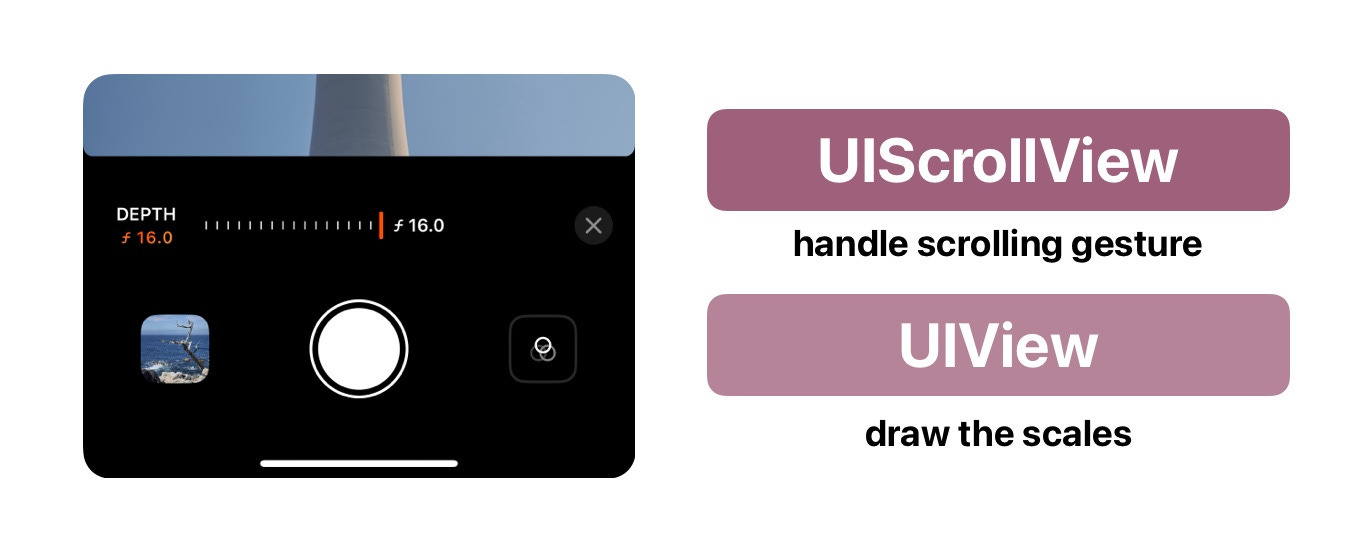
A common way to build a draggable slider with scales is to wrap the view with scales in a ScrollView. But since we should be aware of the content offset of the ScrollView, there are two ways to achieve this:
Use SwiftUI Introspect to get the underlying
UIScrollViewto manipulate.
Use the
scrollPositionAPI in SwiftUI to get the content offset. But it’s not available until iOS 18.
Note that personally I won’t recommend to use the SwiftUI Introspect library, as:
The actual underlying components behind a SwiftUI view may vary across updates.
The library itself provides a safer way to get the underlying components, and you have to declare the os version when using the API, which means that every year a new OS is introduced, you have to update the library and your code to make sure that your logic work.
Given the reasons mentioned above, I decided to build this component entirely using UIKIt.
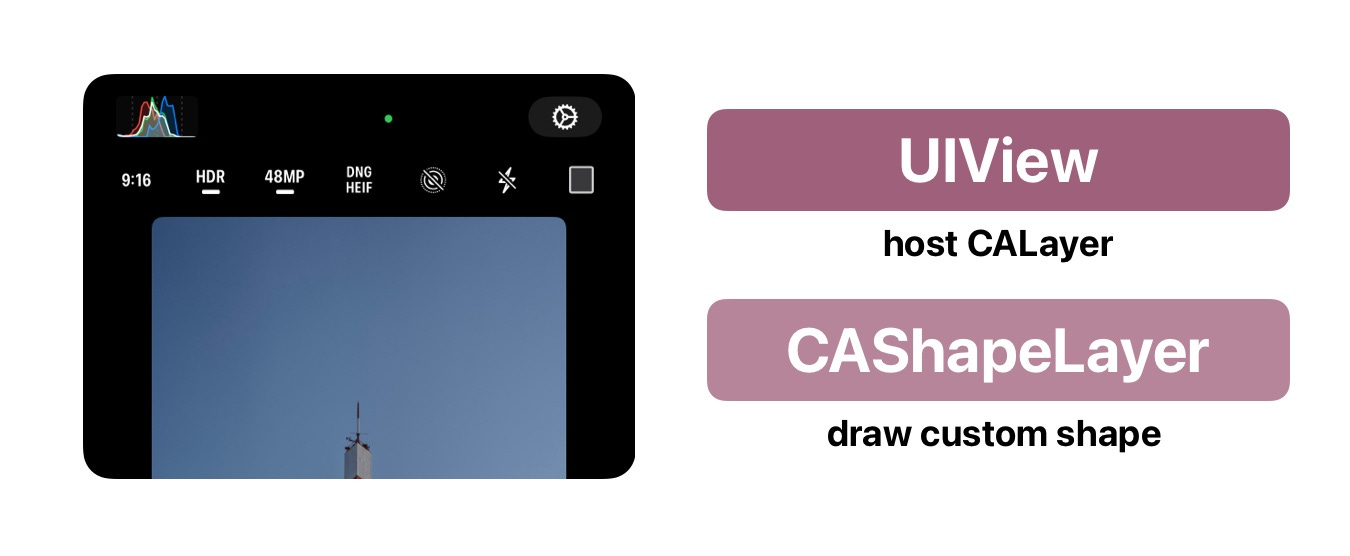
To display the mask when users are choosing some aspect ratios in the camera view, previously I chose to use SwiftUI’s shape with a mask to achieve the above effect. But I find out that this approach may have some animation glitches and there is an artificial glitch on the edge when the whole app is moving to the background or coming back from the background.
To address this, I choose to build this using CAShapeLayer. And now it has a smoother animation.
The viewfinder in the camera page is equipped with some gestures:
It can detect pan gesture to trigger the exposure adjustments.
It can detect long-press gesture to bypass the filter system and show the original image from camera.
It can detect the single tap gesture to retrieve the location of the gesture and then trigger the focus / exposure locking logic.
All gestures should be exclusive.
At the first glimpse, those are not some fancy gestures that are hard to implement in SwiftUI. But actually, SpatialTapGesture is not available since iOS 16, and the LongPressGesture has weird and different behaviors compared with onLongPressGesture method. So for some reasons, I decide to detect all the gestures in UIKit, and handle events by SwiftUI code.
Note that bridging the gestures implemented in UIKit is not introduced since iOS 18, and for iOS 18 and iOS 26, if you are not using the official UIGestureRecognizerRepresentable approach, it may have some touch responsiveness issues.
Though I have no plans to start a new app in 2025, it’s still worth considering which technologies I should use and learn this year.
There is a sound on the internet, saying that we should support at most three versions of iOS lineup. With that said, let’s assume we only support back to iOS 17. If you are working in a company, I am sure that you would have more metric data to decide whether you should move on and bypass some older platforms, especially if you are writing equivalent components and finding yourselves a hard time maintaining the libraries.
In general, I will prefer to use lifecycle management UIKit or AppKit as the starting point, as it provides a relative clear way as a starting point, which is hard to alter once your app becomes larger and more complex. That’s, you can manage your UIScene, UIWindow as well as the root UIViewController if you prefer, which can give you more flexibility.
For a Mac app, it should apply the same rules. I am no expert at developing a Mac app, but as far as I know, the APIs about managing NSWindow are still evolving and you may easily encounter to a situation where you have to find the NSWindow in SwiftUI view.
Then, I would prefer to use NavigationStack and the major navigation solution. This is still a tricky part, as it has been reported that there are some edge cases that will case some issues. For me, I have no experience encountering those issues. So I would stick to using NavigationStack, as it provides a much simpler way to manage the navigation.
For pages and views, I would prefer to use SwiftUI components first, and will choose to use the counterparts in UIKit in specific scenes we mentioned above (like using UICollectionView for displaying large data set). Since the Layout protocol is introduced in iOS 16, we can create our own version of custom layout much more easily, and the custom drawing feature in SwiftUI is also powerful and straightforward.
Additionally, if you are building a simple app for personal use or just a demo to showcase something, I would 100% choose to go all-in with SwiftUI. I believe one of SwiftUI’s main goals is to make it easier for creators to turn their ideas into apps, and it’s clear that progress is being made in that direction.
So, how do assess SwiftUI in 2025? Tell me what you think.
Comments
Nothing yet. Say the first thing.
Sign in to join the conversation.