
The question of whether the ViewModel concept should exist has become increasingly prevalent recently. I have seen some developers criticizing about the fact that even some SwiftUI specific demos in the WWDC25 videos still introduce the ViewModel component.
As for me, in my real projects, I am still using the MVVM architecture.
Multiple Model layers that can provide access to resources, such as network resources, local database resources, and more.
Multiple ViewModels that hold the shared states to be accessed by views, as well as orchestrate the logic of the control flow with the Models—for example, responding to events triggered by views.
Views that are mixed with SwiftUI and UIKit.
After seeing all the arguments about whether we should keep the ViewModel component in our SwiftUI apps, I started to wonder why the ViewModel in SwiftUI is considered redundant, and how I might improve the architecture of my apps.
The following content will be organized in those parts:
What’s the View protocol in SwiftUI actually?
What becomes the central coordinator without a ViewModel?
What if you still put everything in a ViewModel?
Testing stuffs
In the Apple documentation:
Views are the building blocks that you use to declare your app’s user interface. Each view contains a description of what to display for a given state. Every bit of your app that’s visible to the user derives from the description in a view, and any type that conforms to the
Viewprotocol can act as a view in your app.
I know it’s kind of a wordplay, but after reading the description of the View protocol carefully, what a View should do is to provide a description of a block of UI, in other words, it tells the system what the UI should look like based on the current states.
Additionally, it doesn’t tell the system which technologies should be used to draw your view content. If you know more about SwiftUI, you would know that some parts of it are just wrappers of UIView and NSView internally, such as the ScrollView and List, and some parts of it are not.
When conforming to the View protocol, you can also declare the self-owned states inside that view, as well as read the external states from the caller. When the states are changed, the body computed property of the View would be called to provide a new description of the UI.
Therefore, if we treat the traditional components from UIKit, AppKit and Core Animation, such as UIView, NSView and CALayer as the “Views”, the View protocol in SwiftUI is more like a ViewModel, which means:
You declare the actual states of the underlying views by using some property wrappers like
@State,@Bindingand more.
You bind the states to the underlying views by reading the state values in the
bodycomputed property and return the description of the UI.
You can leverage the
@Environmentand@EnvironmentObjectto get access to the dependencies and orchestrate your business logic around those objects.
The system takes care of how to draw or map your description of view using the underlying technologies like UIKit and AppKit.
It’s the View itself. To be more specific, it’s your structures or classes that conform to the View protocol. In this scenario, your implementation would look like those:
Have some top-level states that can be passed to the bottom-level of views in a one-way or two-way directions.
Response to the external events, such as the using the
onReceive(_:perform:)method to receive the system notification.
Response to the internal events, for example, handing the hoisted events trigger by the underlying views, as well as observing the state changes using
task(id:priority:_:)oronChange(of:initial:_:)modifier.
Orchestrate how the Models in the Model Layer interactive with each other, and how to achieve specific tasks by using them.
You may notice that I have also mentioned the Model Layer: making the View as the central coordinator doesn’t mean you should bundle all of your logic code into one giant struct / class:
For an app that reads the feeds from the internet. It should still have its Model / Data layer that manages the networking, caching as well as the storing logic.
Common logic should be put inside some specific components, or some helpers.
The logic of the event handling in the View should be lightweight: like the word of “Orchestrate” I used before.
Writing a simple demo is easy to demonstrate, but I managed to build a mini photo editor to see how this should be implemented.
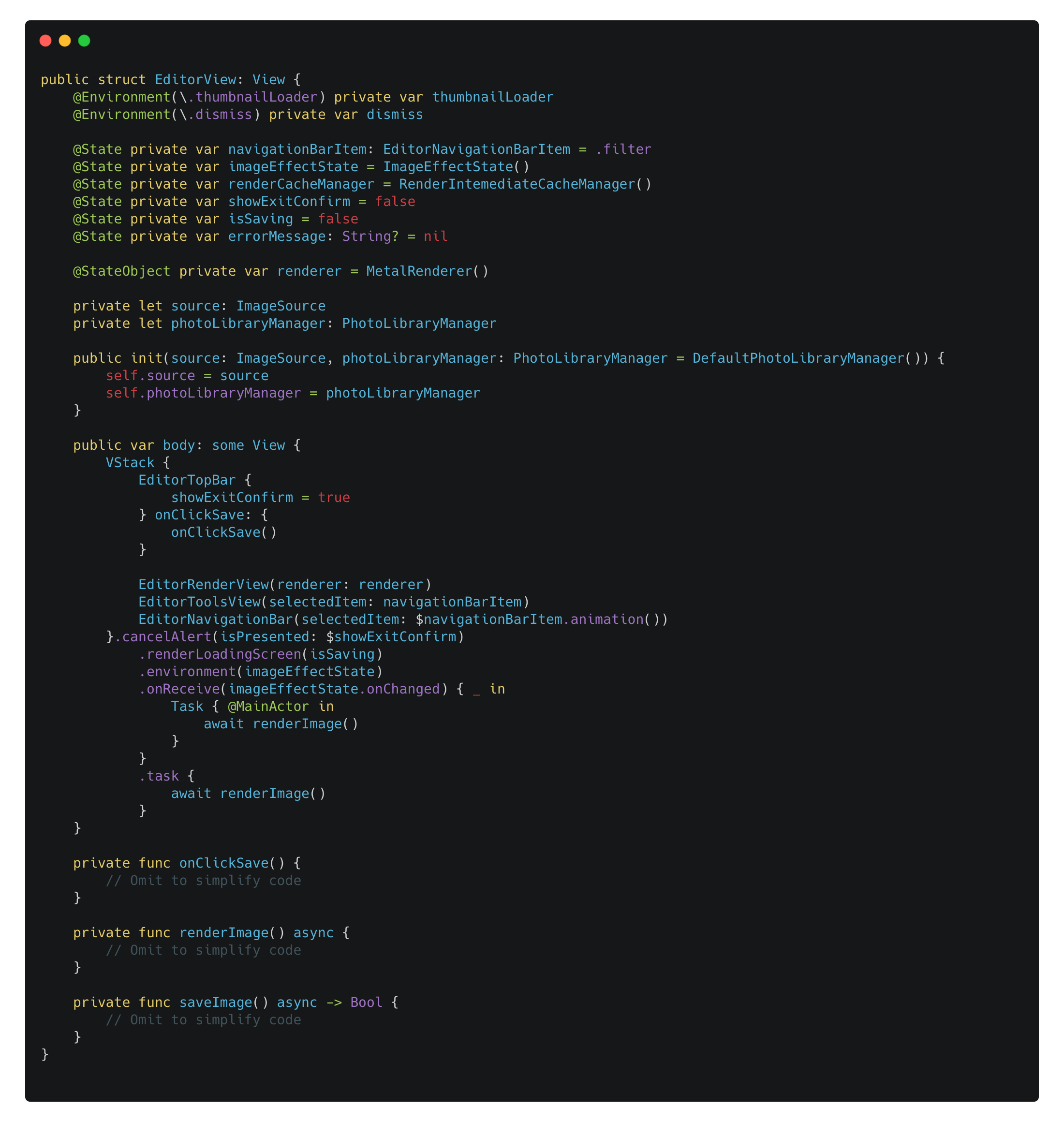
The code above:
Declares its own dependencies in its initializer and using
@Environmentto read the instances from the environment.
Declares its own shared states, for example, the
navigationBarItemstate property can be read by theEditorToolsViewto provide the description of the tool view. It can also be altered in theEditorNavigationBarview, as it’s passed as aBinding.
Implements the
bodycomputed property to provide the description of how the view should look.
Responses to some events, like rendering the image for the first time in the
taskmodifier, and handle image saving and cancelling events from theEditorTopBar.
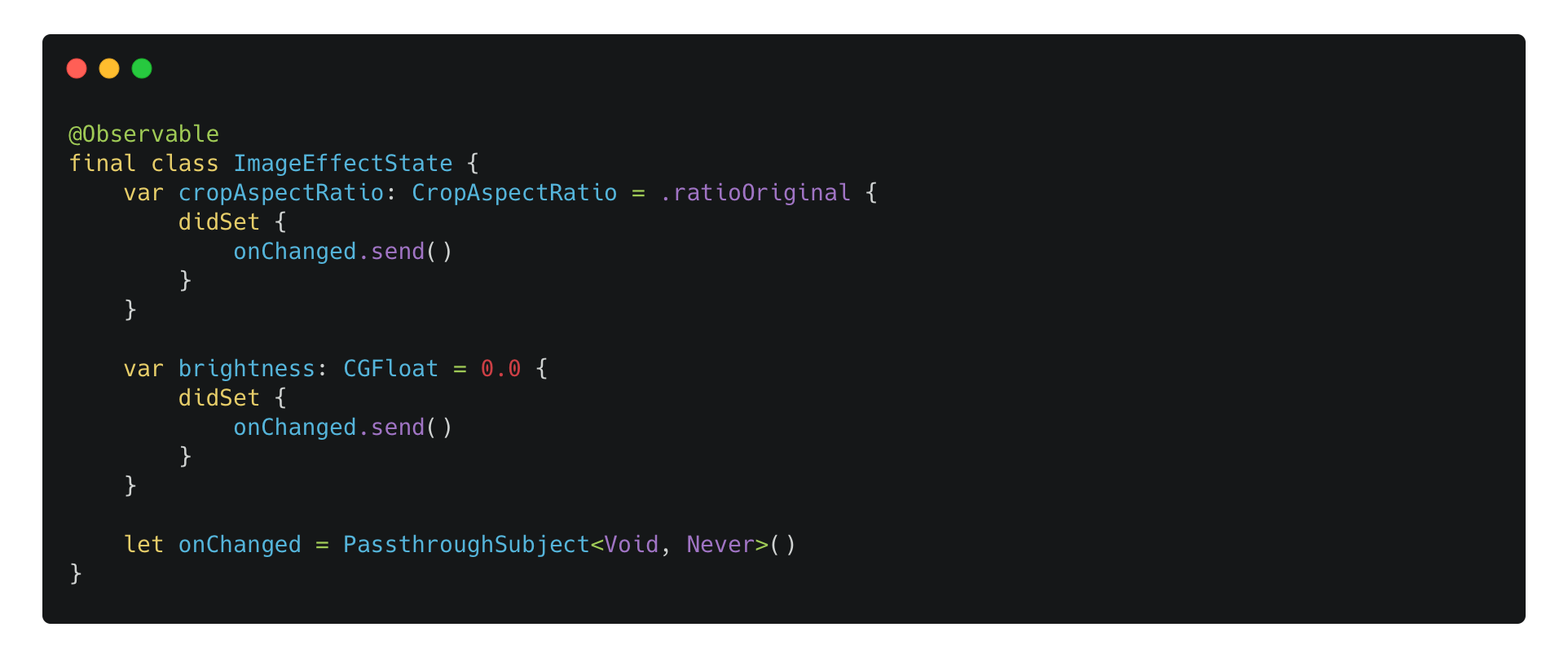
Also, it doesn’t mean we can’t have some Observable that contain the shared mutable states across different levels of your UI. The following code shows a ImageEffectState that exposes the reading and writing of the image editing effects like the cropping ratio and the brightness.
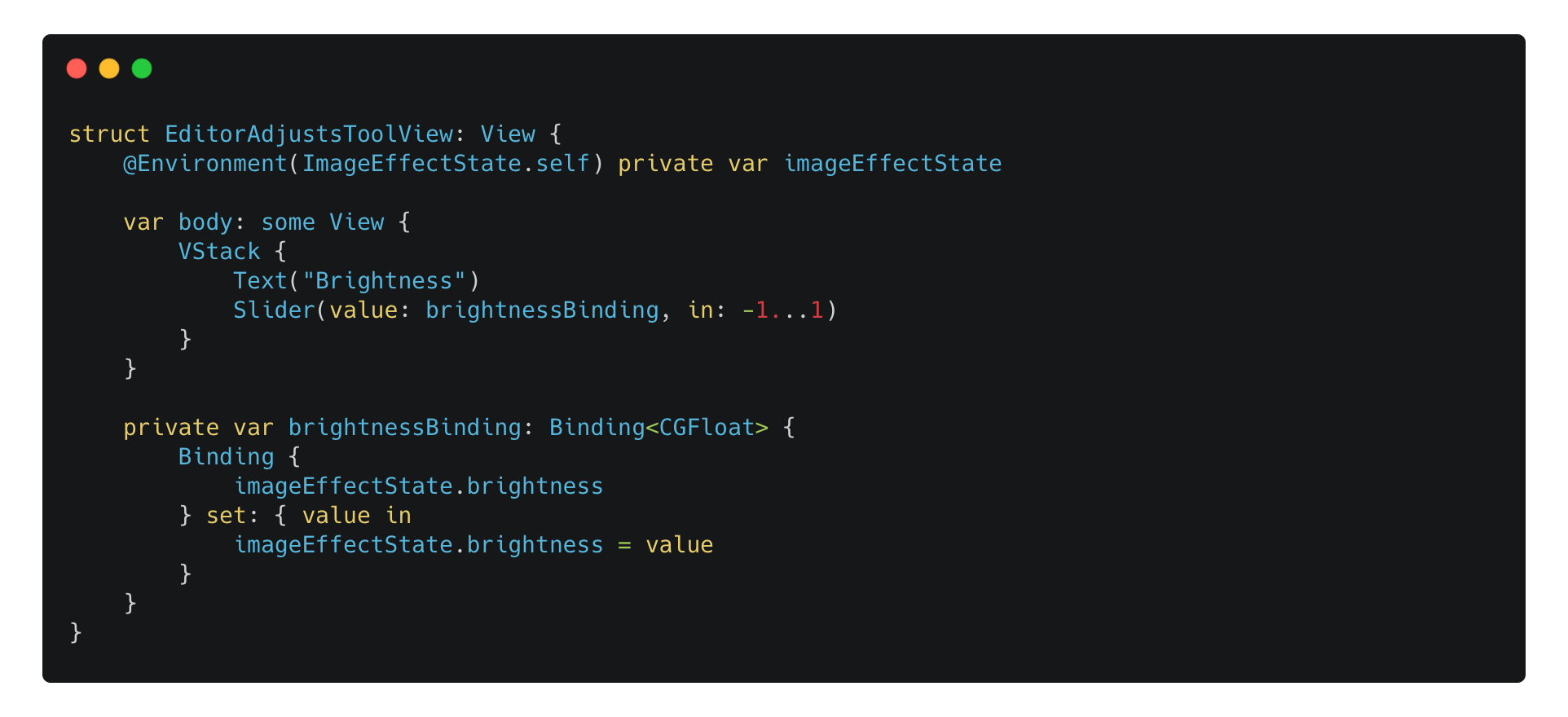
It can be used in the bottom-level views:
And it’s declared and passed down in the root view:

For this question, I would say it depends. All the states and orchestration above can still be written as the following code:
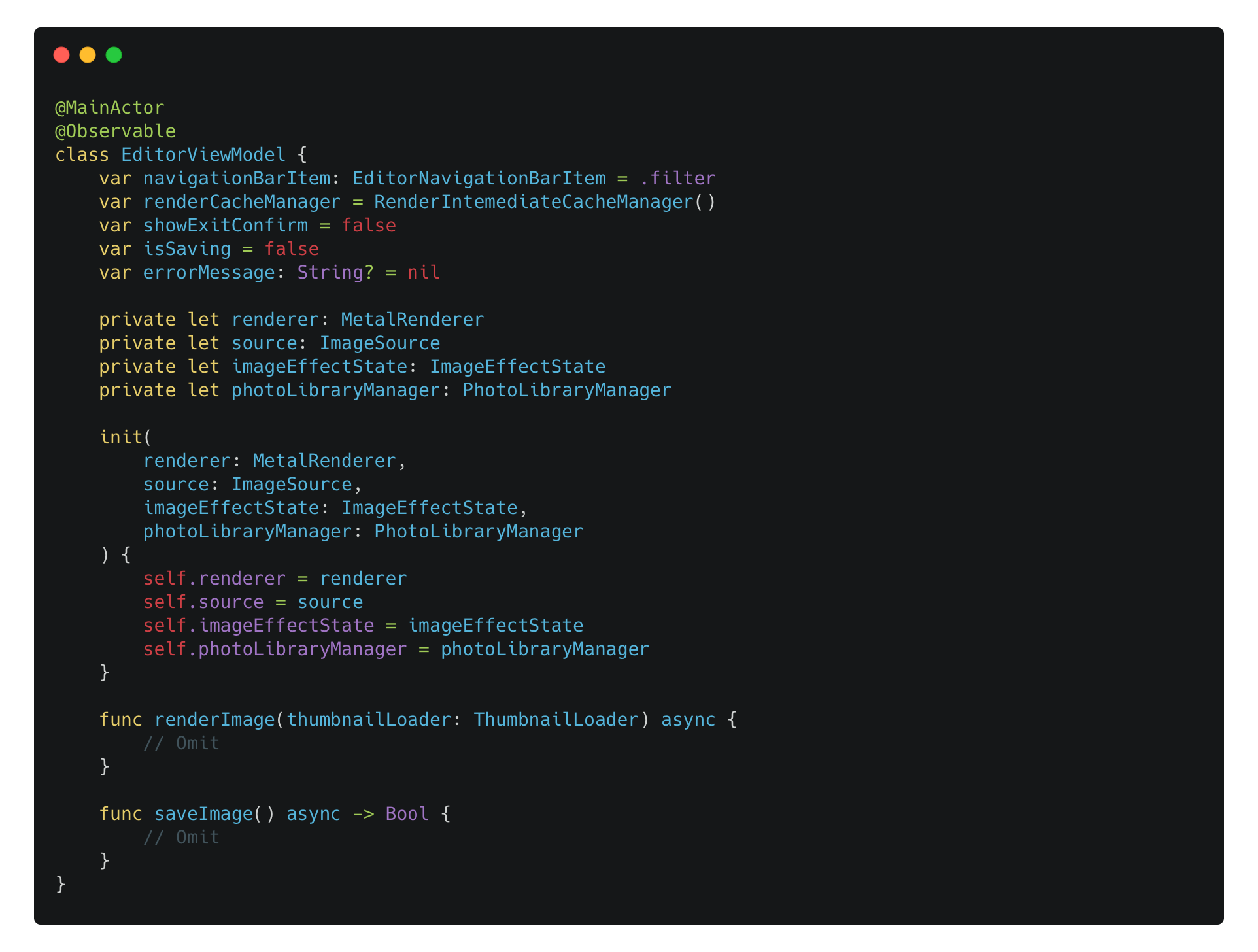
It requires a bit more code to initialize this EditorViewModel as it has some dependencies and uses initializer dependencies injection:
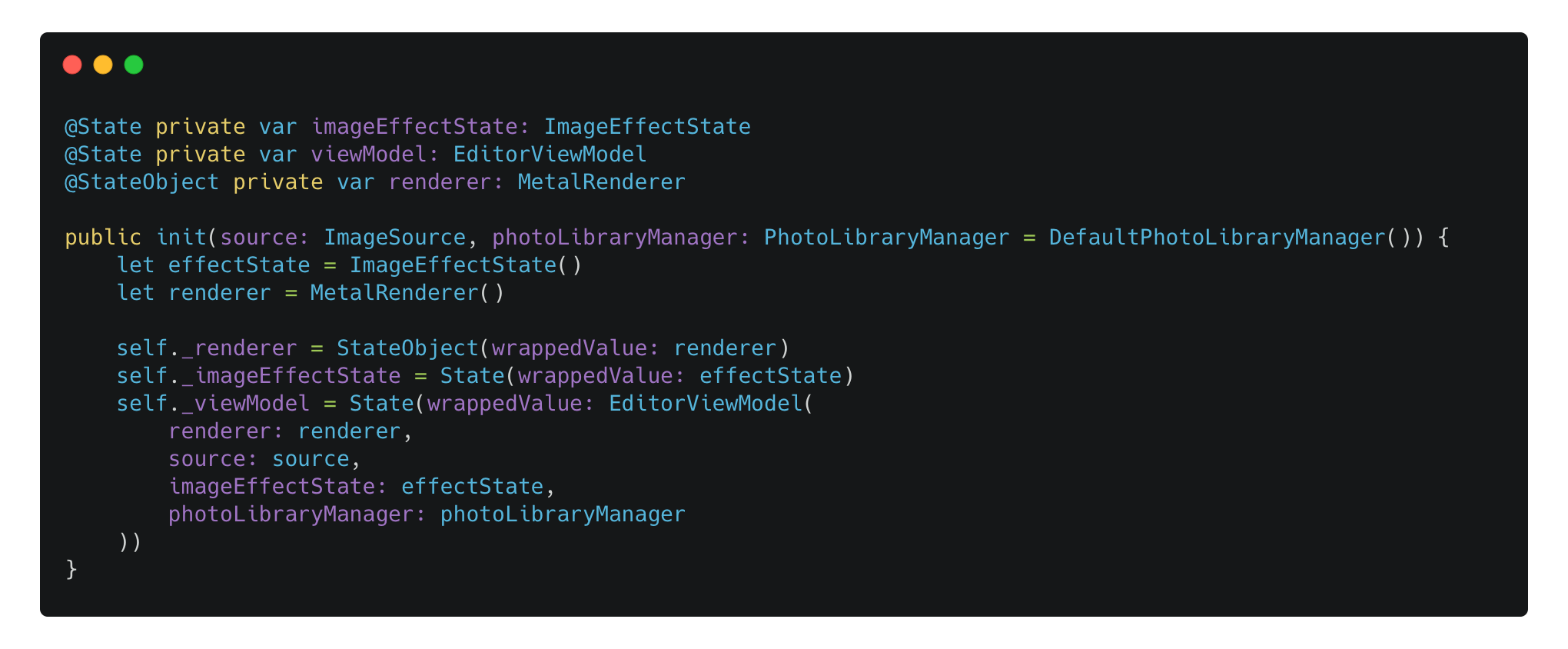
The
MetalRendereritself is still a class adopting to the ObservableObject protocol. So it must be declared as@StateObject. Other parts of the code is using the newObservablemacro introduced in iOS 17.
By doing so, the EditorViewModel itself contains all the shared mutable states that can be access inside the underlying views. You may say it’s more manageable and more testable, as it doesn’t deal with the whole SwiftUI system. I will discuss testing in the final part of this blog.
The code above is just code for a mini photo editor. In my PhotonCam project, I actually have a ImageEditViewModel class that contains the core logic of the editor feature with 2000+ line code, already with my attempt to separate most of the common logic to some other services and helpers.
Therefore, for this specific question: it’s still bad to make a ViewModel as a central coordinator?
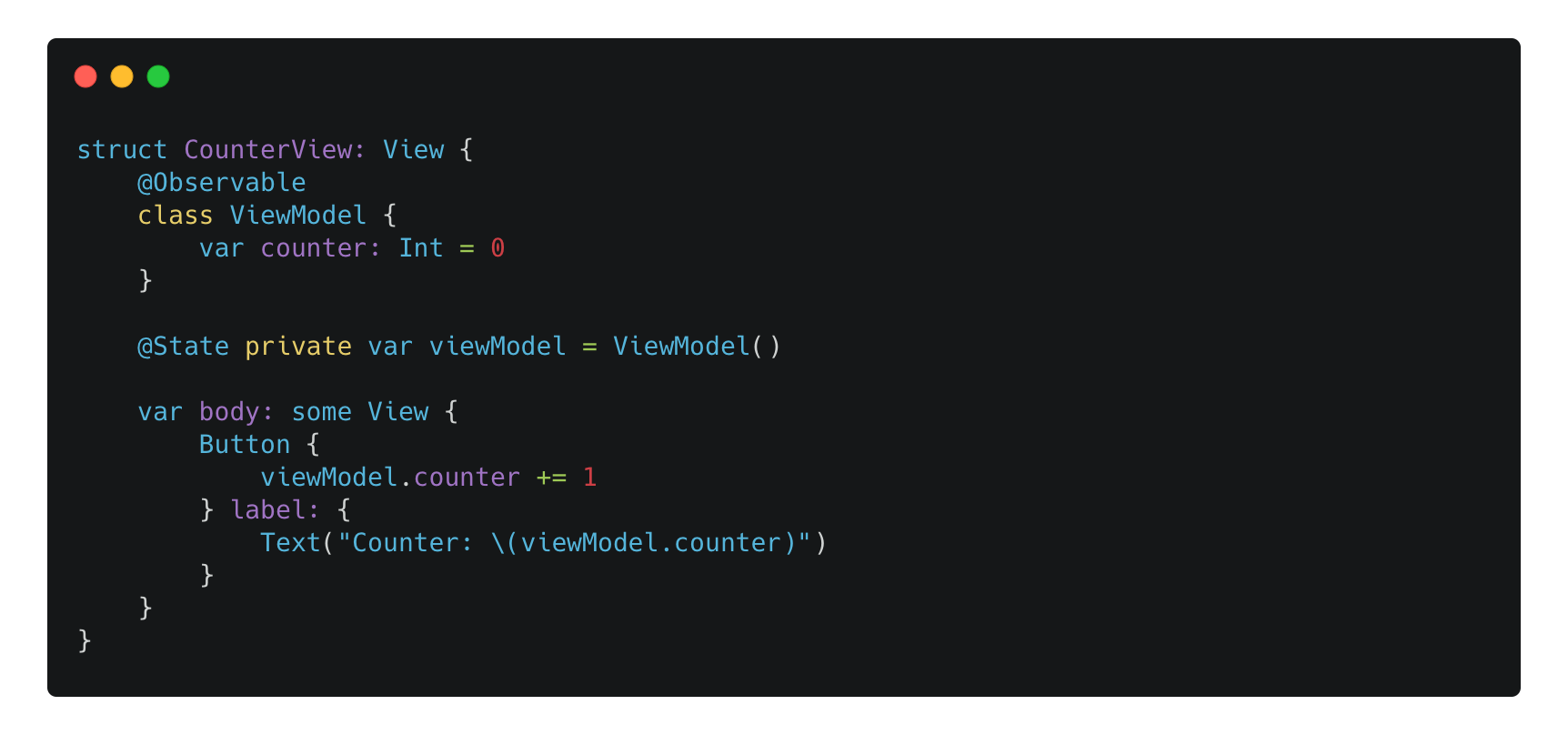
It depends on the scale of your app and the components you are making. For my 2000+ line code ImageEditViewModel, I don’t want to see that code reside inside the SwiftUI View implementation——But if I am rewriting the whole code, I would definitely prefer to avoid this situation. For some self-contained Views, it’s of course unnecessary to put everything in a dedicated view model like this:
One of the reason why we always try to achieve a better app architecture is that it can make our code more manageable and testable:
If all the code are put into the roles correctly, we can test individual components independently.
Dependencies injection helps swapping implementations of the dependencies of a given component, making the unit tests more possible.
Now, with the mindset of making the View itself central and getting rid of the ViewModel, is our code more testable than before regarding the business logic?
Well, yes and no.
Although the struct or class that conforms to the View protocol handles the internal and external events, it should still be the entry of handling of those stuffs. That means the main business logic should be encapsulated into different components, and those components should remain the same regardless whether we are having a ViewModel or not. Therefore, those components should be always manageable and testable.
On the other hand. For the View itself, I would say it’s not more testable. In my experience, a testable code should always have some sort of dependencies inject to help separate and swap some logic that should be mocked during a test. You may think that we can leverage the @Environment and @EnvironmentObject to swap the implementation of some objects, like this in a test:
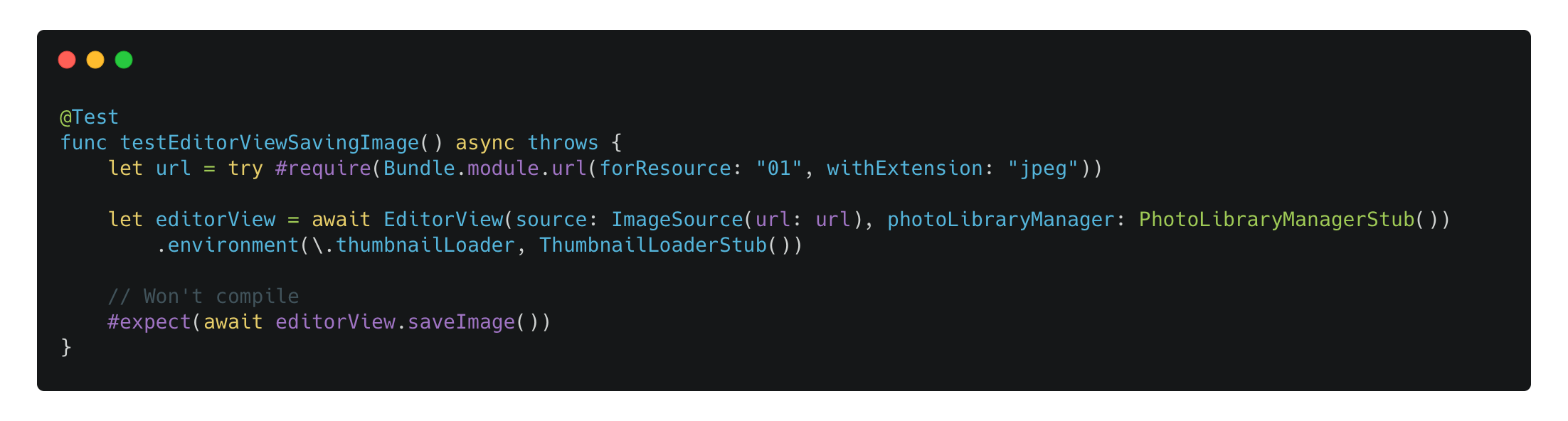
The code above tries to leverage the @Environment to inject a stub instance of thumbnailLoader. But the code will fail to compile, because:
After calling the
environment(_:_)method, the returned result is NOTEditorViewany more. As it wraps our view into another internal view that overrides the specific environment key. This is actually whatsome View, or opaque type means, as we don’t know the exact type of this returned view.
Since the
editorViewvariable no longer references anEditorViewinstance, we can’t call or test thesaveImage()function. All we can test is theViewprotocol itself, which doesn’t make much sense in this case.
Many developers argue that the de-ViewModel pattern will fail as an app grows larger. I am still on the fence, as my existing code still uses multiple ViewModels to help share mutable data across the UIs. Migrating to this pattern takes time, so I’ve decided to try it gradually and see what happens in the future.
Below are some useful links I recommend reading. Unlike the Apple documentation, on the Android side there is a detailed article about ViewModel and how to utilize it to make your data survive across Activity and Fragment destruction.
What do you think about the ViewModel in a SwiftUI app?
Comments
Nothing yet. Say the first thing.
Sign in to join the conversation.