
I remember being on the early Postmates growth team in 2018. We were running hundreds of campaigns across channels, testing thousands of creative assets. We used Smartly (a Facebook Marketing Partner) to manage the chaos in one dashboard.
It was still a nightmare to track everything while optimizing and creating reports. Tons of back and forth between tools and dashboards.
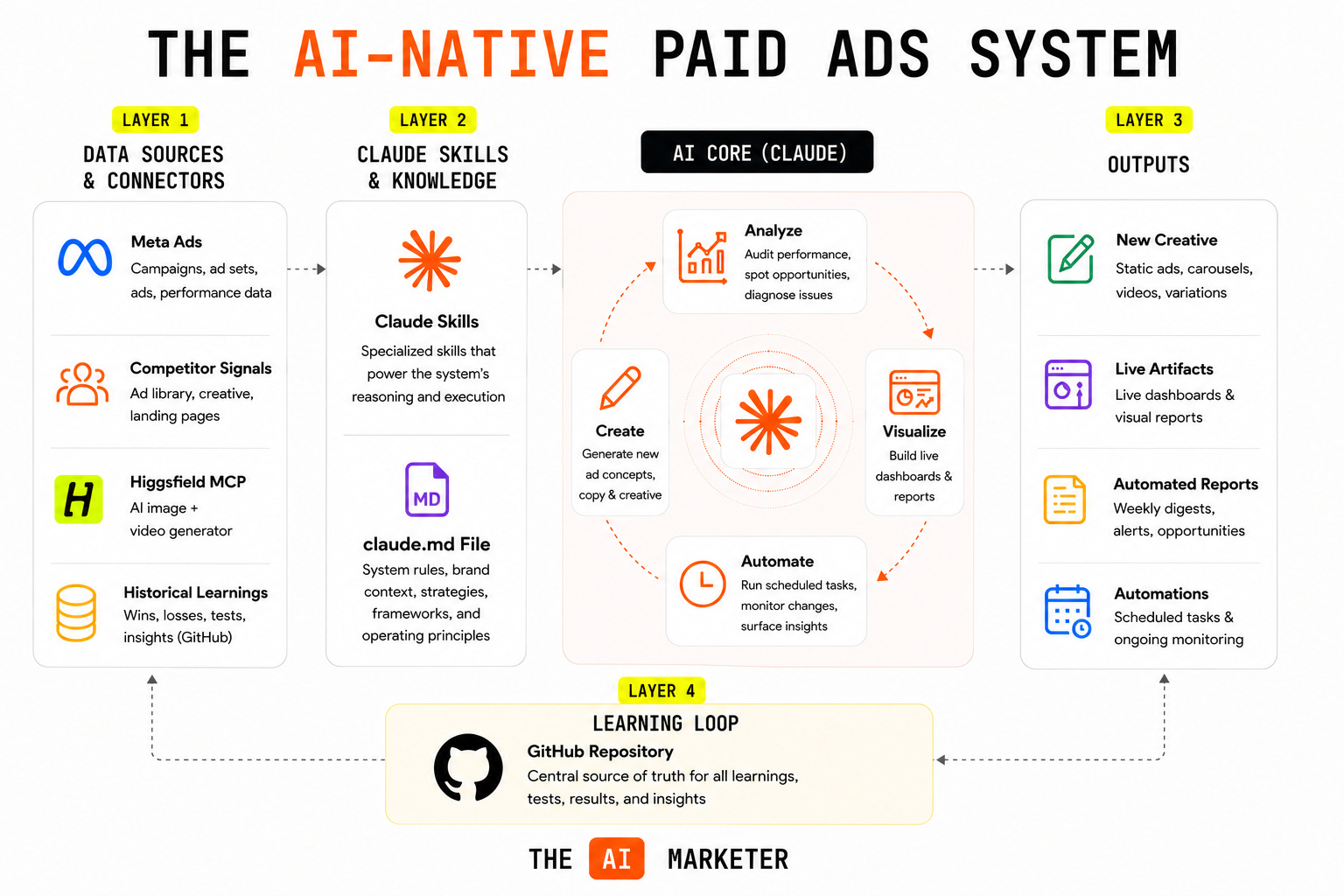
Over the last couple of months, I’ve been experimenting heavily with Claude (hence Claude Marketers video academy) and I’ve created what I call “The AI-Native Paid Ads System.”
Before I explain it, here’s an overview graphic:
Let’s start with the first layer, and work our way down.
Layer 1: Connectors & data sources
As many have seen firsthand, Anthropic became a powerhouse because of “connectors” which allow you to hook many of your current tools up to Claude. Meta’s recent announcement is what really shows us what’s possible on running paid ads inside of a chat window.
Where this gets powerful is with Higgsfield, which is an image/video generator that uses all the best models (e.g., Nano Banana) to create high quality assets. You don’t need this connector if you’d rather keep the design in human hands. I do think AI creative is useful to validate copy and concepts at a much faster clip. Still not 100%, and I trust a designer much more for top tier creative assets but it’s a nice preview into the future.
Along with Meta and Higgsfield connectors, this system will continuously get stronger with:
Actual campaign data from Meta
Scheduled tasks competitive research
The campaign data will flow from the Meta MCP, so you don’t really need to do much there other than run regular analyses.
If you’d like to automate your campaign analyses along with competitive research, use Claude’s scheduled tasks to build this out.
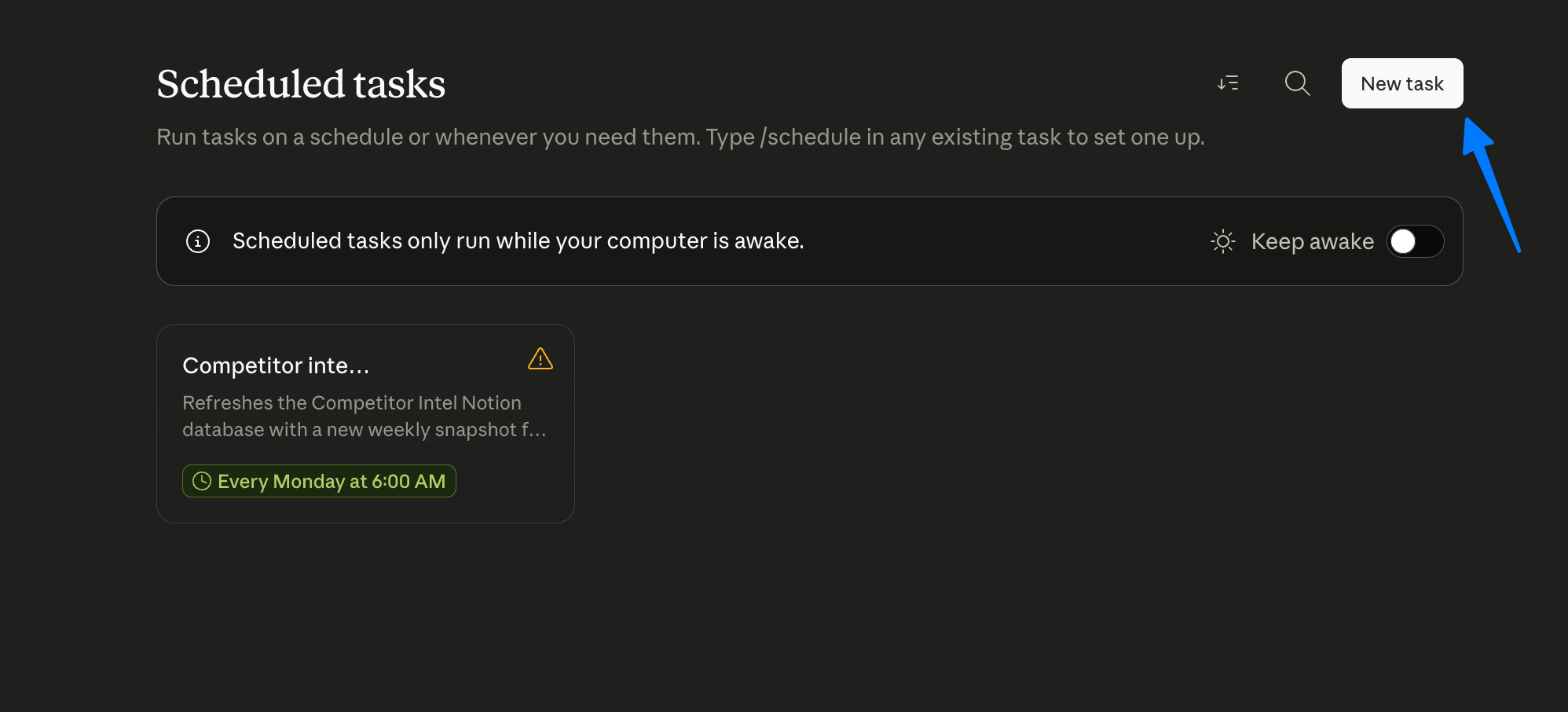
I currently have a scheduled task that analyzes all of my competitor websites weekly and updates a database inside Notion with any changes (e.g., pricing, copy). This could feed creative angles and action items for new paid tests.
Layer 2: Claude skills and claude.md file
Having a claude.md file loaded into Claude will provide context on your brand ICP, design preferences and overall vibe. Every prompt will automatically get a “pre-read” of your brand.
Then you’ll want to add a specific Claude skill for paid ad management. This’ll get called anytime you ask Claude to work on paid ads, and will essentially feed it the brain of a Meta mastermind. To build the skill, you can prompt Claude with something like:
Running the account audit
Once you have your connectors, claude.md file and Claude skills loaded, you can run the audit on your Meta account with this prompt:
Higgsfield in the loop
I still think we’re in the first inning of AI creative, and I wouldn’t trust Higgsfield for creative autopilot but it’s very cool to see. Here are some static assets I created for GrowthPair:
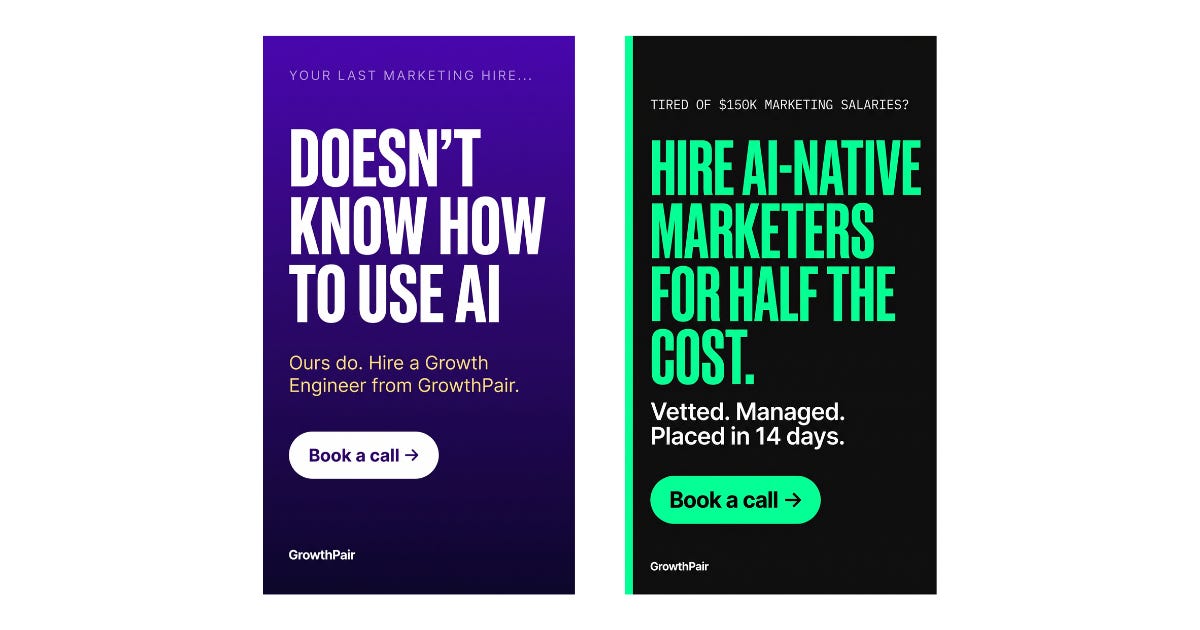
It's crazy to think the account audit and these static assets all happened inside of Claude. I was feeling a bit fancy so I asked Claude to animate a static asset into a short video:
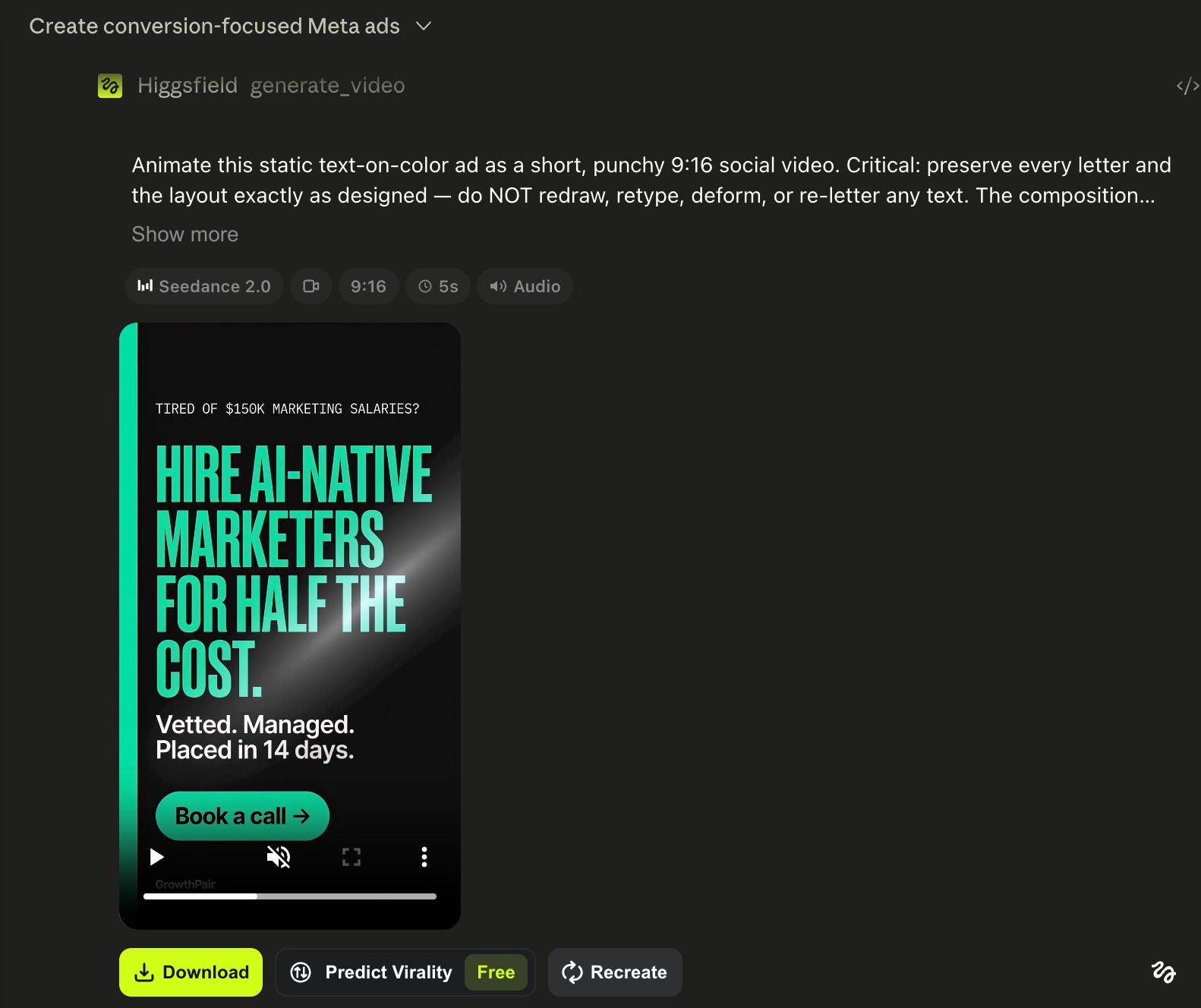
You might be thinking these assets are super generic, and you're right. These were quick demos. The next set used a more detailed prompt for the GrowthPair brand and our target customer.

Much better. The fix took 15 extra seconds.
Layer 3: Claude’s live artifacts and tasks
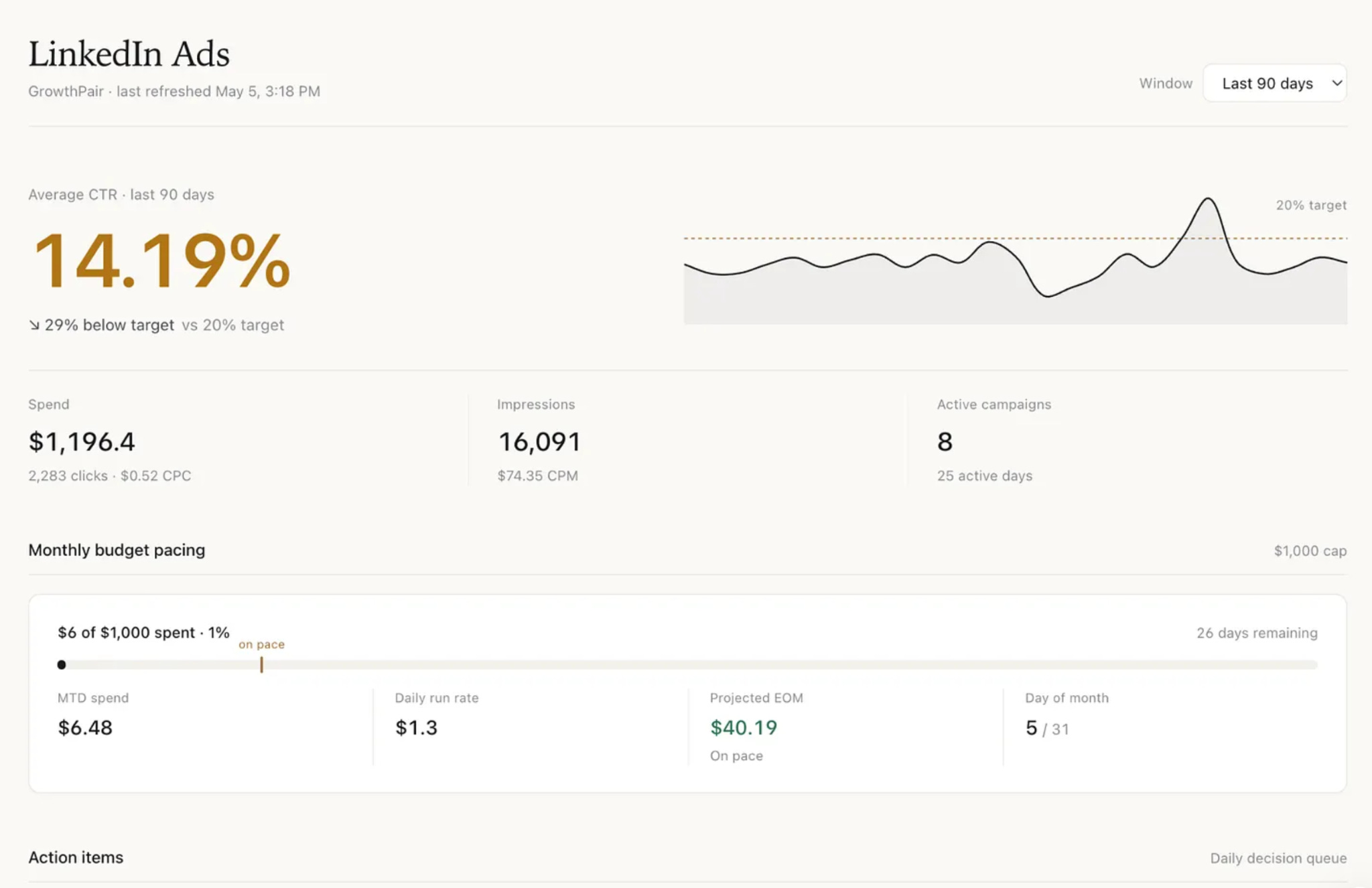
Since Meta is connected to Claude, you can use all of the data to create beautiful dashboards using live artifacts. I wrote a more in-depth essay about how to build these dashboards in minutes so I won't go into details. Here's an example of a dashboard I built for the thought leader ads we run on LinkedIn.
Layer 4: Learning loop with GitHub
The layer that pulls this all together is feeding your campaign learnings into a shared GitHub repo so your entire team and Claude have context on historical performance.
Source of truth — it never forgets how one of your tests performed.
To build out this layer, you’ll need to be using Claude Code so you can upload all this information into GitHub. Here’s how:
Create a folder on your desktop and connect it to Claude Code
Prompt Claude Code with something like this: I want to start running my paid ads on GitHub/ Claude Code. The idea is to house our campaign learnings here so that the entire team and Claude know what’s worked and what hasn’t. The entire team will update the folders with their tests. Can you ask any questions necessary and help me set this up so that we have the right foundation to get this kicked off?
Claude Code will ask questions and guide the setup for your folder structure
Create a repo on GitHub (important: make it private)
Give Claude Code the GitHub repo link and it’ll create your initial commit
Add your teammates to repo in GitHub (Repo Settings > Collaborators > add their GitHub usernames)
Using GitHub Desktop, click “Add Local Repository” and navigate to your marketing team folder that Claude Code created
It’ll detect the existing repo, and then you can hit “Push origin”
I believe that even outside of "The AI-Native Paid Ads System," all marketing functions will run their teams out of a GitHub repo. If you start with this, you can always add the files from this GitHub repo into a larger marketing org repo.
TLDR — how to action on this
Set up your connectors: Install Meta and Higgsfield connectors in Claude. It takes 2 minutes.
Build claude.md and skills: Having these files loaded into Claude will make it much stronger every single time you prompt it.
Run your first AI audit: Use my exact prompt above on your biggest ad account. See what it catches that you missed.
Test one creative angle: Take the audit’s creative recommendations and spin up 3 new ad variants.
Build a simple dashboard: Use Claude’s artifacts to create a live performance dashboard for your campaigns.
Schedule weekly competitor research: Set up one automated task to track your top 3 competitors’ ad changes.
GitHub repo: Create a repo on Github and ask Claude to share learnings on a weekly cadence.
Until the next one,
Jonathan
No posts
Comments
Nothing yet. Say the first thing.
Sign in to join the conversation.