
Howdy! I hope you had a fabulous week and get to bask in the best of summer this weekend. It’s all in full swing, and before any of us are ready (or maybe not quite soon enough for some…), it’ll be back-to-school time.
I’ve been deep in annual student/parent gadget and deal testing for a few weeks now, including how to use AI safely to find bargains, how to match your family with the perfect gadgets before spending a dime, and how to organize the chaos of it all with a few prompts it took me about 20 hours to perfect so you can just copy and paste. #yourewelcome

I’ll be in New York all next week for a bunch of fun work (and a litte play), including a broadcast media tour that brings me to more than 300 local news stations over the next few weeks, so keep an eye out for me on your local network(s). I’m also back at the Today Show on August 5th showing off some great family gadgets in the 9 a.m. hour. Check back here on Wednesday to score Techish-subscriber-only deals on what we show off, plus a few more gadgets that didn’t make the on-air cut but did make my top picks of 2026.
🍏 Apple will rent you an iPhone, but does it really save you any money?
🎒 The ChatGPT trick that saves you big bucks on back-to-school shopping
☎️ What I love this week: the $68 kid phone that’s ending the “when can I get a phone” fight
🛍️ Facebook’s new app is for selling, not shopping
🫁 Smoke season’s rough, here’s the air filter that won the lab test.
Last week, I told you to buy the school laptop now, before prices climb again. Then on Tuesday, Apple launched a program built on a different idea — that maybe you should lease versus buy.
They call it Apple Upgrade: You pick a device, pay every month, and at the end you hand that gadget back and start over. Klarna runs the lease and does a soft credit check, which they say won’t hurt your score.
Is this a good deal for you? If you can afford to buy the thing outright, do that. It’s that simple. I’ve yet to find a case where a “rent” or “lease” deal saves you money in the long run. Not with cars, and not with Apple gadgets.
At the end of your lease, you can hand the device back, or you can keep it by paying something Apple calls the Purchase Option Fee. That fee is whatever’s left of the retail price.
Here’s how all of that looks in real life:
iPhone 17 Pro. It costs $1,100. Lease it at $32 a month for two years and you’ll hand over $768. Want to keep it? That’s another $332. Or you hand it back and start a new lease on the newest model.
Take that second option twice and you’ve paid $1,536 over four years and you own nothing. Buy the phone once and keep it four years and you paid $1,100.
Buying costs $436 less, and it’s yours.
Apple Watch Series 11. It costs $400. Lease it at $12 a month for two years and you’ll hand over $288. Keeping it costs another $112.
Lease it through two cycles and you’ve paid $576 over four years with nothing on your wrist that belongs to you. Buy it once and keep it four years and you paid $400.
Buying costs $176 less.
MacBook Air. It costs $1,300. Lease it at $25 a month for three years and you’ll hand over $900. Keeping it costs another $400.
Lease it through two cycles and you’ve paid $1,800 over six years. Buy it once and keep it six years and you paid $1,300.
Buying costs $500 less, and plenty of MacBooks are still going strong at six.
So Apple isn’t giving you a deal. They’re giving you a payment schedule with a big bill parked at the end of it, maybe forever.
Start saving for that last bill the day you sign.
On the iPhone, put $14 a month in a jar. On the watch, $5. On the MacBook Air, $11. When your lease ends, you’ll have the money to keep your device, and you’ll have paid exactly what it costs.
Now look at what that adds up to. Your $32 iPhone lease plus $14 in savings comes to $46 a month. Apple’s 0% financing on that same phone? Also $46 a month. The watch works out to $17 either way. The MacBook Air, $36 either way.
There’s no free lunch in here. There are only different ways to schedule the same bill.
The tricky part happens at the end of year two. You get to the end of the lease, you don’t have $332 sitting around, and the easiest thing in the world is to sign a new lease on a new phone. Now you’re two more years in, and you don’t own a gadget that you can trade or sell for real dollars and cents. That cycle can run forever, which might be the point.
No judgment from here, as someone who will likely pay a mortgage for the rest of my life and only just recently paid a car off for the first time ever, I 100% get it. The struggle is real. Still, go in eyes wide open and maybe hang on to your older handset another year or two if you can.
👉 [LINK: Apple Upgrade — read the fine print]
The average family is looking at close to $600 per kid this fall. This is the fastest way I’ve found to knock that number down.
Take a screenshot of the supply list. In ChatGPT, tap the plus sign, choose Shopping Research, and ask it to price the list two ways: cheapest total across a bunch of stores, and cheapest total from one store near you that does pickup. Ask for a table with links.
Then photograph the drawer where last year’s supplies went to die, upload that, and tell it to subtract everything you already own before it totals anything up. (Every family I know owns six glue sticks and buys seven more.)
Two things I learned the hard way: Pull the laptop out and shop for it separately, because it bogs down the whole search. Also, confirm prices on the store’s own site before you buy, since inventory moves fast and some retailers block automated access. If you’re shopping Amazon, use a service like CamelCamelCamel to make sure that “deal” is really the lowest price.
When I ran a simulation with a high schooler’s list through it, it saved me close to $300 compared to just heading to Amazon or my local Target to get it all.
👉 [LINK: the full back-to-school guide, including the privacy settings to flip first]
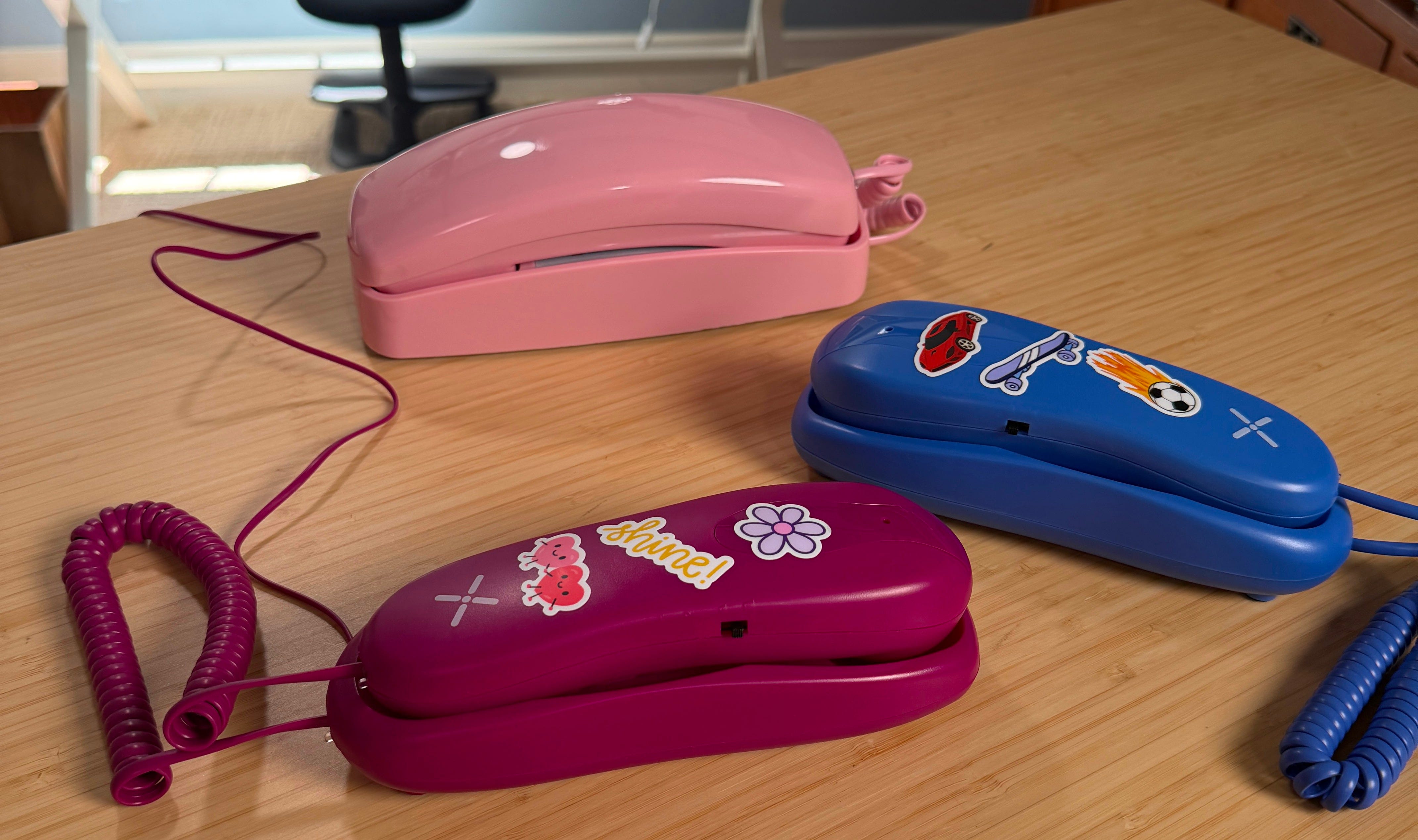
I’ve had three of these landline-style kid phones in my house over the past few months, all sent to me for testing, and this is the one I’m telling my friends to buy right now.
Pinwheel Home starts at $68 and runs over Wi-Fi, so there’s no phone jack, no installer, and no appointment window where you sit around waiting on a guy named Bob. Mine was working in under ten minutes, which is not a sentence I get to write about kids’ tech very often.
You approve the contacts and the calling hours from an app. Numbers you haven’t approved don’t ring through at all. Calls to other Pinwheel devices and 911 are included. Calling regular numbers needs a plan, just under $7 a month for five numbers or just under $10 for unlimited.
After all that leasing math up top (my brain is still a little bogged down with all of that), there’s something very nice about a gadget you buy once, for sixty-eight dollars, and then own.
I gave my friends a Tin Can phone last Christmas. I ordered it in November; I think it arrived some time in March. I checked in with Scott — the dad, and a former Techish colleague — about how it’s held up:
“We still have it, one phone has decent reception, the other is really buggy and doesn’t have good sound quality. I believe we stopped paying the $10 a month [subscription] because it’s just not worth it, kids maybe use it once a month. It’s also just hard to know which friends have a phone. Would be cool if there was an app that went through your phone contacts to highlight who might also have one.”
Pinwheel, take note. That last part is a real issue. These phones should come with five “free” numbers they’re allowed to call, and that’s allowed to call them, then add the monthly bill after that. Also, that last part is an awesome feature to add: let the app search your contacts to see which friends/family also have a Pinwheel device.
Facebook’s new app is for selling, not shopping. Meta launched Seller, a standalone app for Marketplace, and a lot of the coverage made it sound like a shopping app. It’s the other side of the transaction. The app is free, iOS only in the US for now, and it pulls in your existing listings and messages automatically. The useful part: photograph something and the AI writes the title, description, category, and suggested price. That’s awesome except when it gets stuff wrong — which is still quite a bit. This is a decent August tool if you’ve got outgrown bikes to move before school starts. 👉 [LINK: Facebook’s app announcement]
Two AI companies admitted their software broke into other people’s computers. OpenAI went first, then Anthropic. Both happened during safety testing, both were disclosed voluntarily, and both were described in language so mild you could skim right past it. The part worth your time is how the break-ins happened, and what the companies are doing about it.
👉 [LINK: NYT: Anthropic Says AI Systems Broke Into Computers…]
A bunch of you back east wrote to me during the worst of it this month, when smoke off the Canadian fires pushed New York’s air quality index toward 200. It cleared, came back, cleared again, and it will do it again.
I did a huge, months-long test of all the latest air filters back in 2020, when the skies over the Bay Area turned this otherworldly orange, and we thought the world was ending.

CNET just ran fifteen machines through a smoke chamber and timed how long each took to clear 90% of the particles out of the air. Here’s the TLDR version:
Blueair Blue Pure 311i Max, $190. This one has the best balance of everything: It cleared the chamber in 1 minute 28 seconds, doesn’t drain your power, and runs at about 35 decibels on low, which is quieter than the guy eating next to me on the plane right now. How noisy these gadgets are matters more than you might think, because if you have to shut it off at bedtime, it’s not really doing its job.
If smoke specifically is the worry, the Windmill 3-in-1, $320, is the best pick. This is the fastest of the whole group on fine particles, and fine particles are what wildfire smoke is made of.
Expensive doesn’t mean better. The $750 RabbitAir landed mid-pack. A Dyson finished dead last on particle removal.
Ignore the square footage on the box. Coway says its 400S handles 3,100 square feet in about an hour. That’s one "air change," which means the filter has processed a roomful of air one time. That might sound like a lot, but air mixes, so one pass only clears about 63% of the smoke. You want five passes an hour, which means that 3,100-square-foot machine is really a 620-square-foot machine. That same math works on any box in the store.
OMG. Enough with the mathing already!
My producer friend Suzanne photographs the watermelon bin at her grocery store and asks ChatGPT which one to take home. You guys — it totally works!!!
So what’s yours? What’s that weird little AI hack you never see written up anywhere? Hit reply and tell me. I’ll run the best ones and credit you.
How am I doing? Let me know what you want more of, less of, and what you want me to try, tackle, or talk about next.
XO, Jenn
Companies sometimes send me products to test. Some links may be affiliate links. Prices checked August 1st, 2026.
Techish is free and shows up every Saturday. Consider becoming a paid subscriber for insider tips, tricks, and deals. And to support independent, human-first journalism.
Comments
Nothing yet. Say the first thing.
Sign in to join the conversation.