
Hey there 👋,
Welcome back to The Observable Job Agent!
Part one left you with a working agent: your CV in, real job openings out, ranked 0 to 100 with honest fit gaps. Every run traced in Opik - our observability tool.
Part two is where it starts working for you. You pick a job from that ranked list, and the agent prepares the application: a personalized cover letter plus a tailored CV for that exact posting, grounded strictly in what your CV actually says.
Then it checks its own work, claim by claim. Anything it cannot verify shows up in a warning card.
What you will build:
A tailoring step that rewrites your CV for one specific job, where every rewritten bullet carries a pointer back to the real experience it came from
A fabrication validator: flags anything it cannot trace to your CV
A rendered PDF of your tailored CV, plus the cover letter
A full evaluation stack in Opik: datasets from your own traces, experiments across models, LLM judges, and the calibration step that tells you whether to trust those judges at all
All of it is cheap. One tailoring on your own CV costs a fraction of a cent, and our whole 15-case batch cost $0.37. If you use free tier LLM api, then completely FREE.
While building it, you will learn:
Checkpoint reuse in LangGraph: how one graph can do two different jobs. The search saves its results, and the tailoring step reads them back later without redoing any work. We also show you a real bug that happens when you get this wrong
Grounded generation: how to force the model to use only facts from your real CV, in a way you can check with code, instead of just asking for honesty in the prompt
Verifiable checks vs unverifiable judgments: some quality checks can be computed with code, and some need an opinion. Learning to separate the two is the most useful skill in LLM evaluation, and we build both sides in Opik
Traces become datasets: how to turn your agent’s real runs into test cases, and why a human must verify the labels, never the model alone
Judging the judges: we scored the same 30 outputs with two different judge models. One said 0.44, the other said 0.84. We show you why this happens and what to do about it
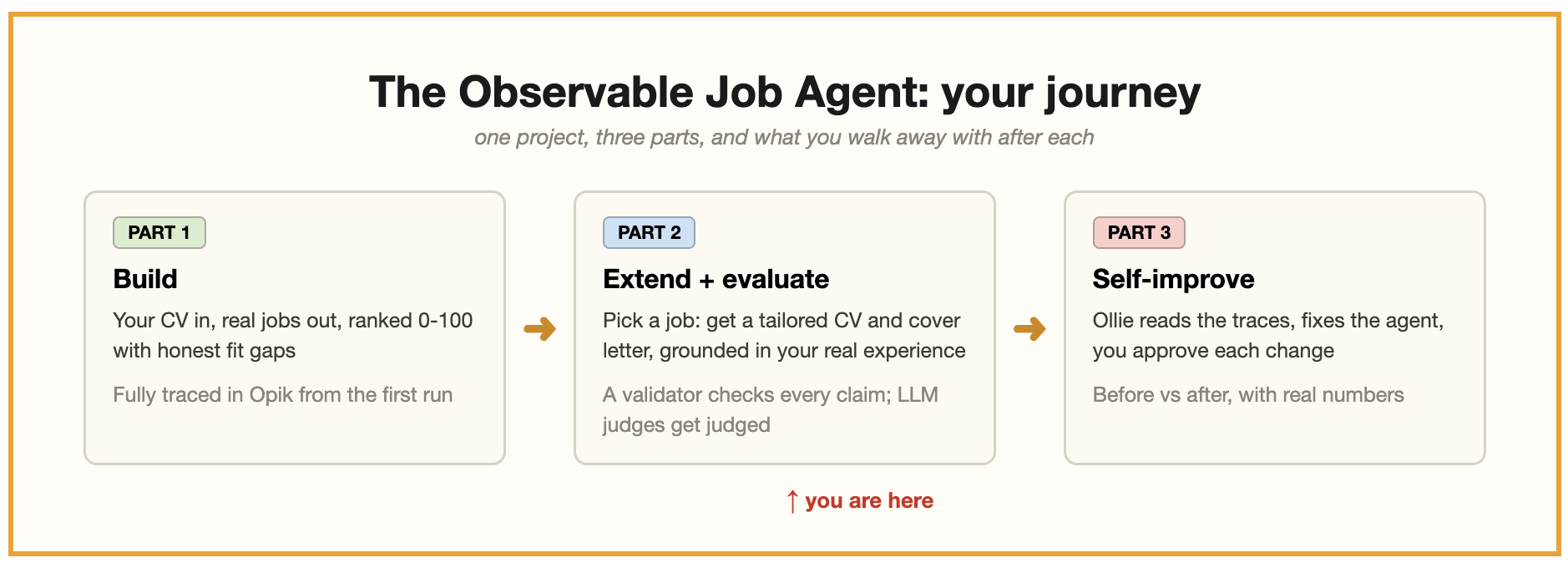
A quick reminder of the chain: build → observe → evaluate → improve. Part one built and observed. This part extends and evaluates. Part three improves.
Big picture: part one built an agent you can see inside. This part builds an agent you can check. By the end, you will know, with numbers, exactly how honest your application generator is.
Want to set up while you read? Same two links as part one:
Opik (free account, for LLMOps): https://www.comet.com/signup
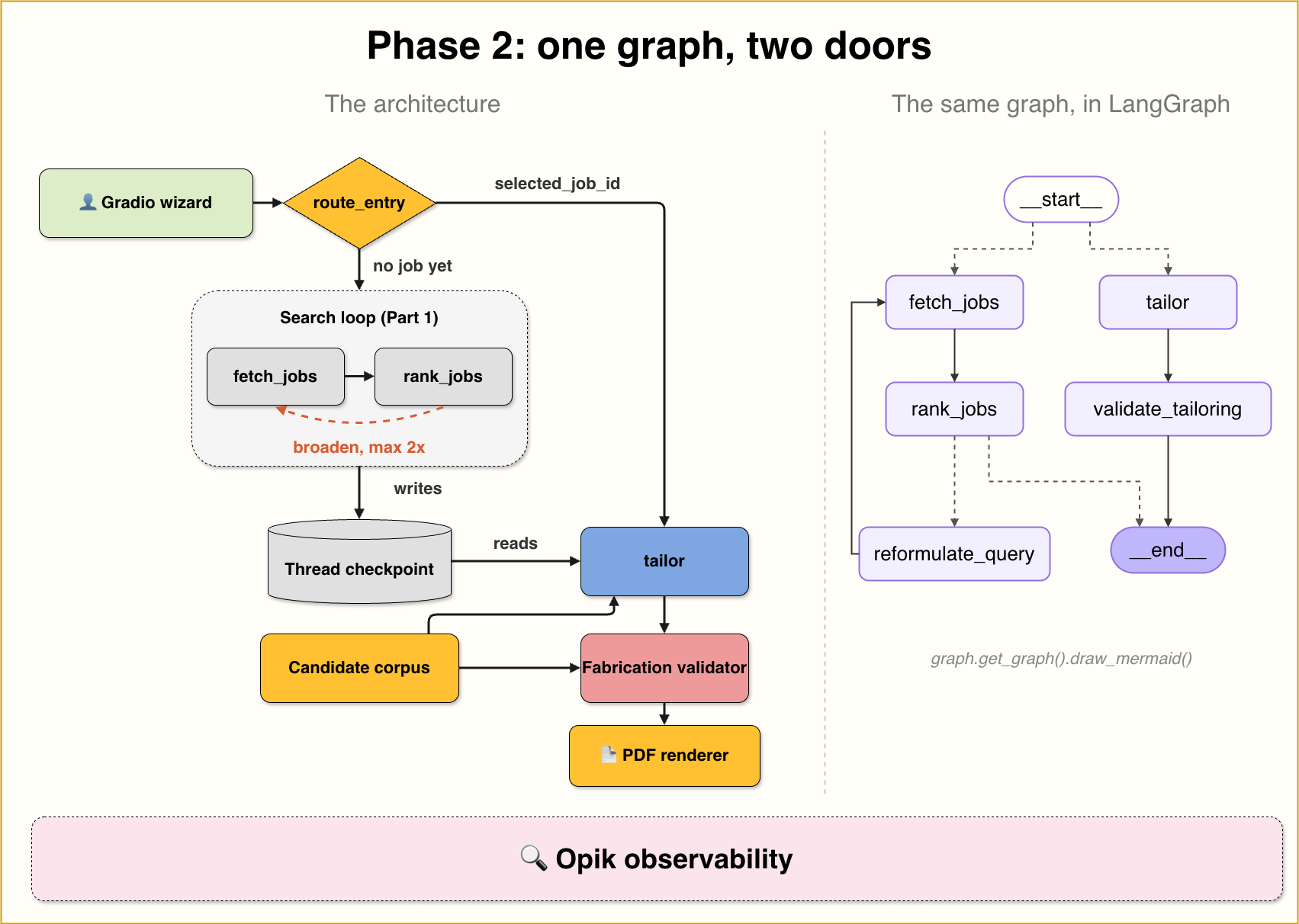
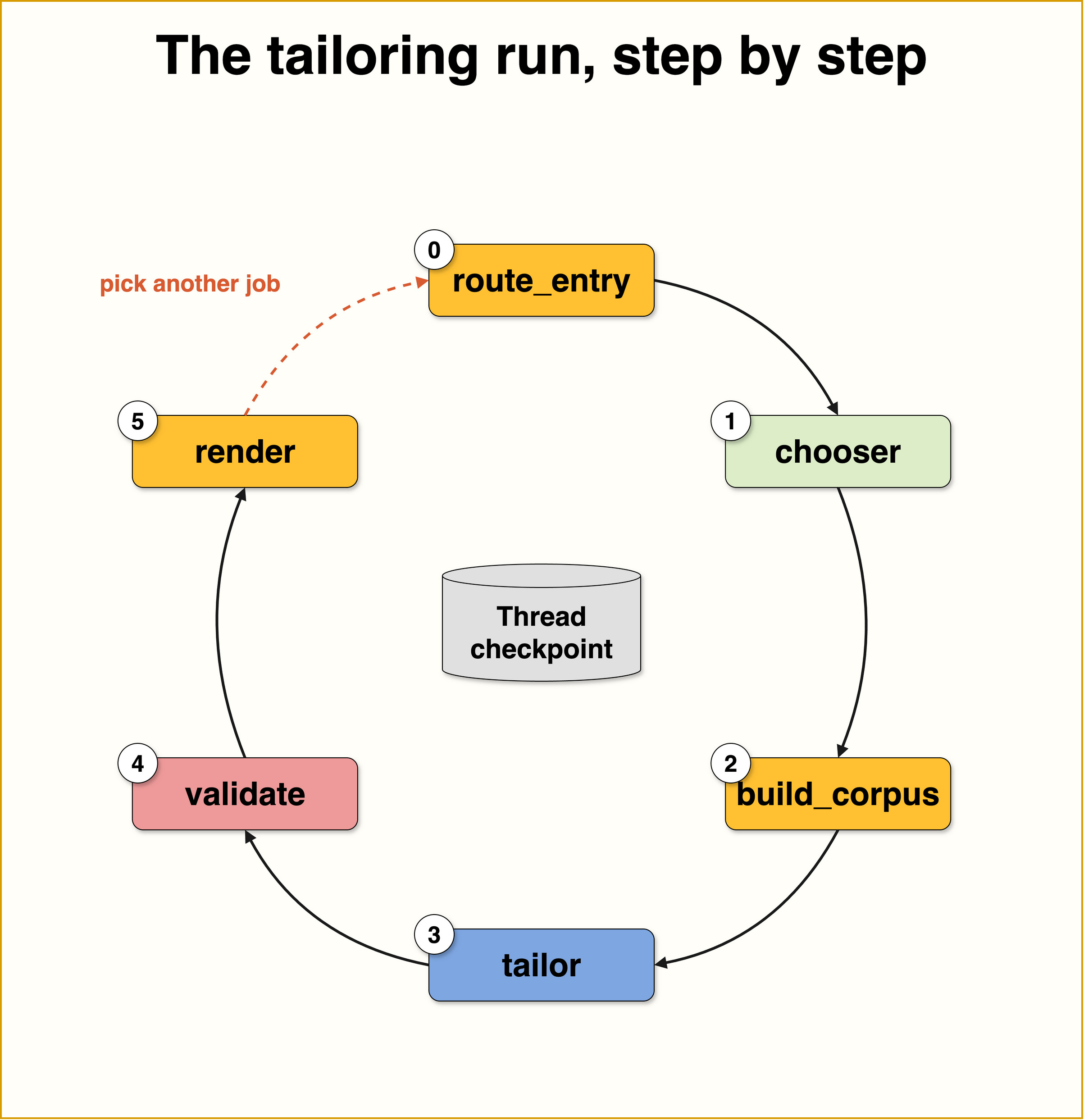
Here is what happens, step by step, when you tailor an application:
It starts with the search run from part one. When you uploaded your CV and searched, the graph saved everything from that run: your profile, your CV text, and the ranked jobs.
That saved state lives in a thread. A thread is LangGraph’s memory for one conversation. The saved copy of the state is called a checkpoint. Think of it as the graph writing its notes down after each run.
You pick a job from your ranked list. The app now has a fourth wizard step for this.
The same graph runs a second time, on the same thread. The only new input is the job id you picked. The router sees it and sends this run to the
tailornode instead of the search.Nothing gets redone. The tailor does not extract your CV again and does not search again. It simply reads your profile, CV text, and jobs back from the checkpoint. This is the whole point of the thread.
Your CV is turned into a “corpus”: a list of small items (bullets, skills, education), each with its own id. This list is the only source of truth for the next step.
The tailor node writes the application. It picks the best items from your corpus for this job, rewords them, and drafts a cover letter. Every rewritten bullet must point to the corpus item it came from.
A validator checks the work. The
validate_tailoringnode compares every claim against your corpus, using simple string matching, no LLM. Anything it cannot verify becomes a flag in a fabrication report.Your tailored CV becomes a PDF, ready to download next to the cover letter. And Opik traces both runs on the same thread, so search and tailoring appear together as one conversation you can inspect.The hard product rule from part one stands: the human applies, the agent never submits. It prepares; you decide.
Same deal as part one: the map above is the what, this section is the how. Snippets are lightly simplified; the repo is the source of truth.
Part one’s graph had one entry point: search. The obvious way to add tailoring is to build a second graph. We did something simpler and cheaper: one entry router that decides which job this run is for.
Why it matters: search and tailoring are two runs on the same thread. A thread is LangGraph’s name for one conversation’s saved state, and the checkpoint is that state written down after each run.
The search already wrote your profile, the ranked jobs, and your CV text into the checkpoint. The tailor run passes exactly one new input, selected_job_id, and reads everything else back. No re-extraction, no re-search.
Two invocations, one thread. The checkpoint is the handoff.
There is a dangerous detail here, and we kept it in the notebook on purpose. If a later search call forgets to pass selected_job_id, the stale value from the last tailoring survives in state. Your fresh search then routes straight into tailoring a job that no longer exists on screen.
The notebook shows the bug live, then the fix: the runner always passes the field, None for search. Checkpoints are memory, and memory needs discipline.
A confession from our own eval labels. When we drafted the extraction dataset (more below), the draft label for one junior fixture CV said remote_ok: true. The CV never mentions remote work.
The model guessed. It guessed plausibly, which is worse than guessing badly, because plausible guesses survive review.
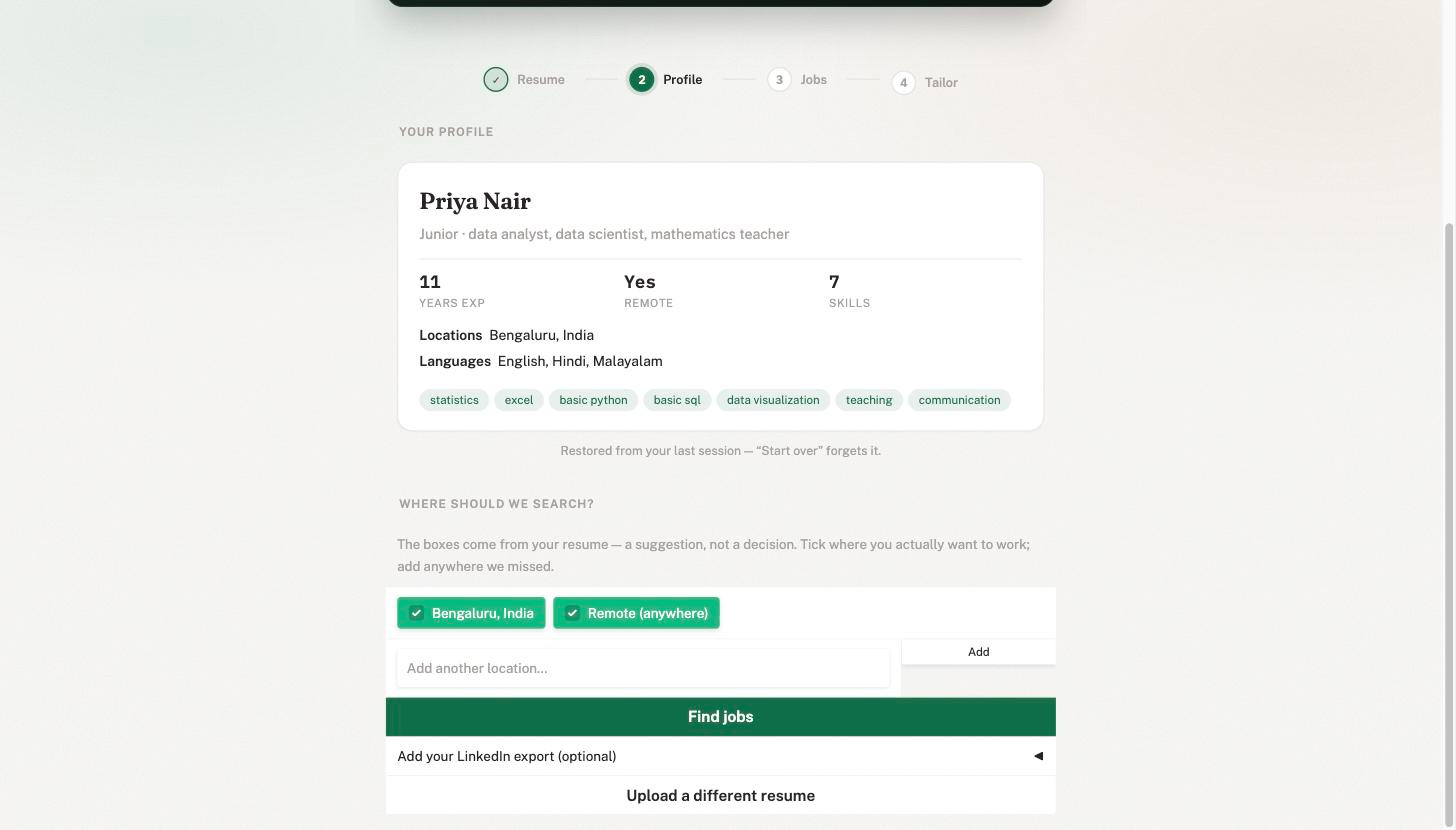
Location is exactly the kind of preference a model should not guess. So the Profile step now asks. After extraction, you get a “Where should we search?” chooser:
The locations found in your CV, plus a Remote option, shown as ticked suggestions
Editable before any search runs; add any city we missed
Your choice persists with your saved profile, so the app remembers you across restarts
Why it matters: the model that picks search arguments reads locations and remote_ok from the profile. Override those two fields and the whole search adapts, with zero graph changes.
And note what we did not do: we did not edit the stored profile. The profile stays what the extractor measured, because that is what evaluation grades. The preference lives next to it, as what you chose.
The extractor measures. The human decides. Evaluation only ever grades the first one.
“Grounded generation” is easy to say and easy to fake. Our version is mechanical. Before tailoring, your CV text is split into a candidate corpus of typed, addressable items.
Optionally, your official LinkedIn data export (the ZIP from LinkedIn Settings) enriches the corpus. No scraping, ever. The ZIP stays on your machine and is never attached to traces.
Why an id per item: the tailor is about to reword your experience, and rewording is where fabrication sneaks in. If every generated bullet must point at the corpus item it came from, then “is this claim real?” becomes a lookup, not a vibe.
One honest caveat: the segmenter is a simple line-based heuristic, no NLP libraries. PDF line-wrapping can split sentences into fragments, and some skills sections defeat it entirely. Both feed the validator findings below. Documented, not fixed. Part three exists.
The tailor node gets the selected job, the corpus rendered as [id] text lines, and one hard contract:
The contract has three parts:
Every bullet in the tailored CV must name its source item
The cover letter stays under 350 words and references at least two specific job requirements
An
honesty_notefield asks the model to name your real gaps, in writing, as part of the pack
If you set a Tavily key (optional, free tier), the tailor also makes exactly one company research call. The letter can then mention something real about the company instead of generic flattery.
Why it matters: none of this makes the model honest. Models cannot promise honesty. But it makes the output checkable, and checkable is something we can build on.

validate_tailoring is a deterministic node.
It checks three claim types against the corpus, using plain normalized string similarity:
CV bullets must stay close to their referenced corpus item
Skills must exist in the corpus
Factual-looking cover letter sentences (a digit, a year, a proper name) must trace to the corpus, the job context, or the research notes
Everything else in the letter (motivation, enthusiasm) is unverifiable by design and skipped.
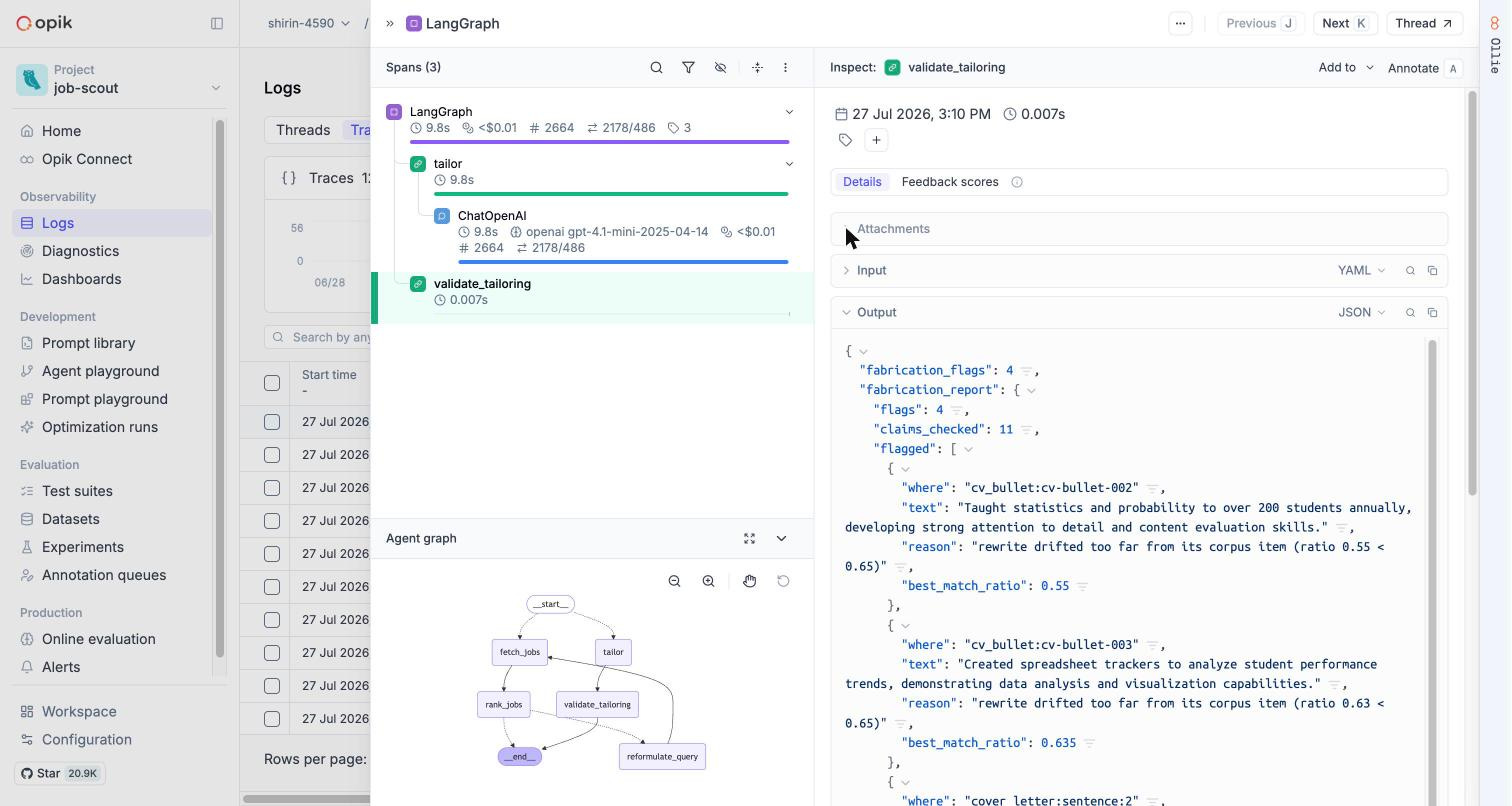
The report lands in three places: the graph state, the trace metadata in Opik, and a warning card in the UI that we never hide. The Opik copy is the one you will use most: open any tailoring trace, click the validate_tailoring span, and the full report sits in its metadata.
Now the story. We ran a 15-case tailoring batch: 14 real runs, plus one that deliberately asked for a job id that does not exist. (The agent declined politely instead of crashing. That is its own kind of pass.)
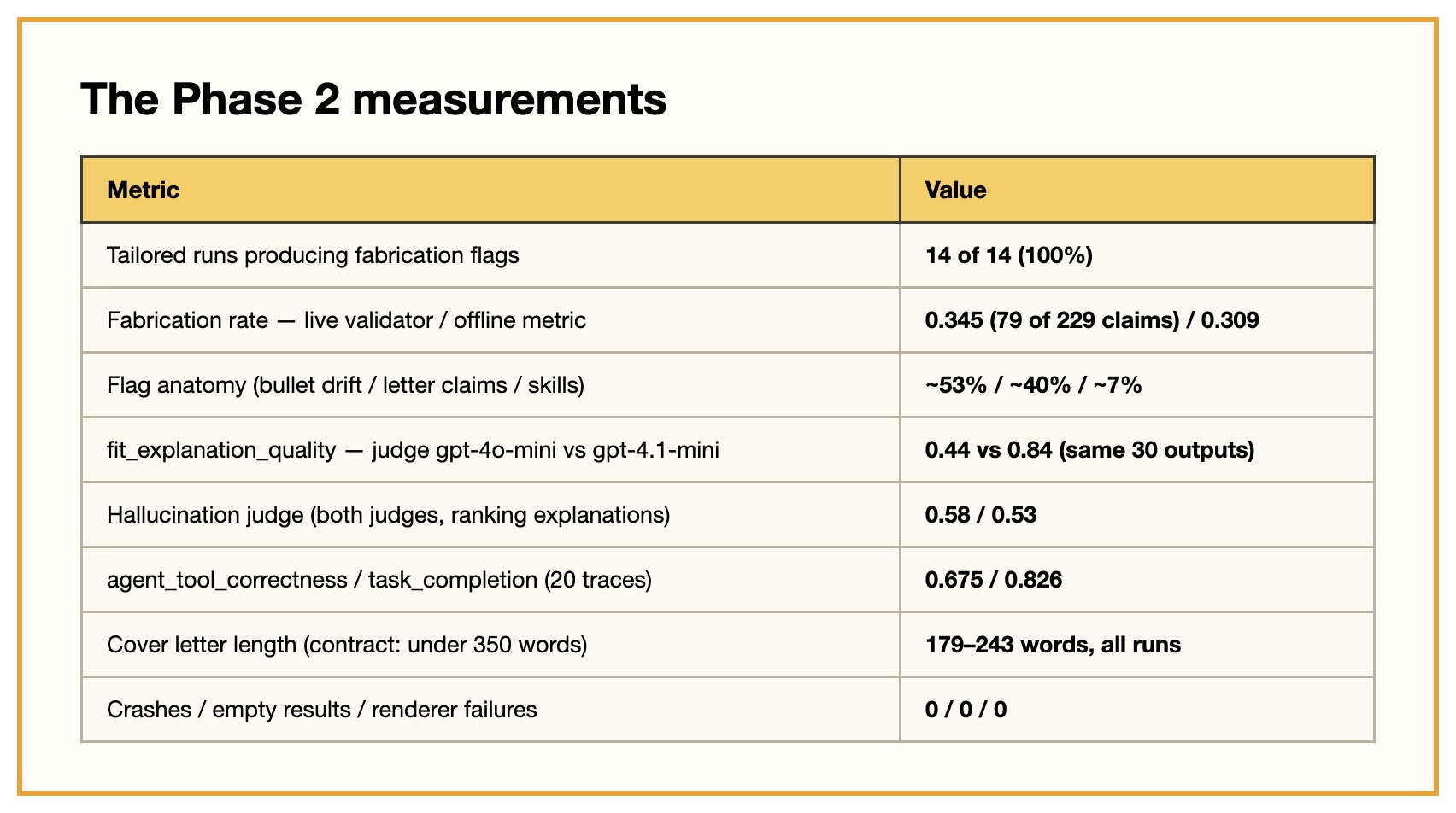
Every one of the 14 real runs produced flags. The numbers:
79 flags over 229 checked claims: a fabrication rate of 0.345
53% were CV rewrites that drifted too far from their source
40% were cover letter claims the validator could not trace
7% were skills that do not exist in the corpus
Before this sounds alarming: a flagged run still gives you a perfectly usable pack. The flags are a to-do list for your own eyes before you hit send, not a verdict that the work is junk.
And when I ran my own CV through it, I got 27 flags. Which felt brutal, until we read them.
About a third were real drift: the tailor importing the job ad’s vocabulary into my experience. Exactly the thing the validator exists for. The skills flags were something else: the segmenter had failed to parse my CV’s skills section at all, so every skill was scored against an empty list.
The validator was not wrong. It was honestly reporting a parsing gap.
And that is why “it flagged every run” is the good outcome we promised at the top. A checker that finds nothing is not proof of honesty. It is proof you are not looking. Every flag here was either real drift caught early or a real bug in our own pipeline, surfaced before any recruiter ever saw it.
That episode produced two changes you now get:
The thresholds are
.envknobs (SCOUT_FAB_BULLET_RATIOand friends), because your CV’s rewrite tolerance is not our fixture CVs’ toleranceEvery fabrication report records the thresholds it ran with, right in the trace, so you can tune and compare runs in Opik instead of arguing from memory
One live example of why that recording matters: the batch numbers above were measured at the original, stricter threshold (0.75 for bullets). The repo now ships the looser 0.65 you see in the snippet. Different knobs, different counts. Reports that carry their own thresholds are what keep the two comparable.
A validator that flags honest work is annoying. A validator that stays silent about fabrication is dangerous. Tune toward annoying.
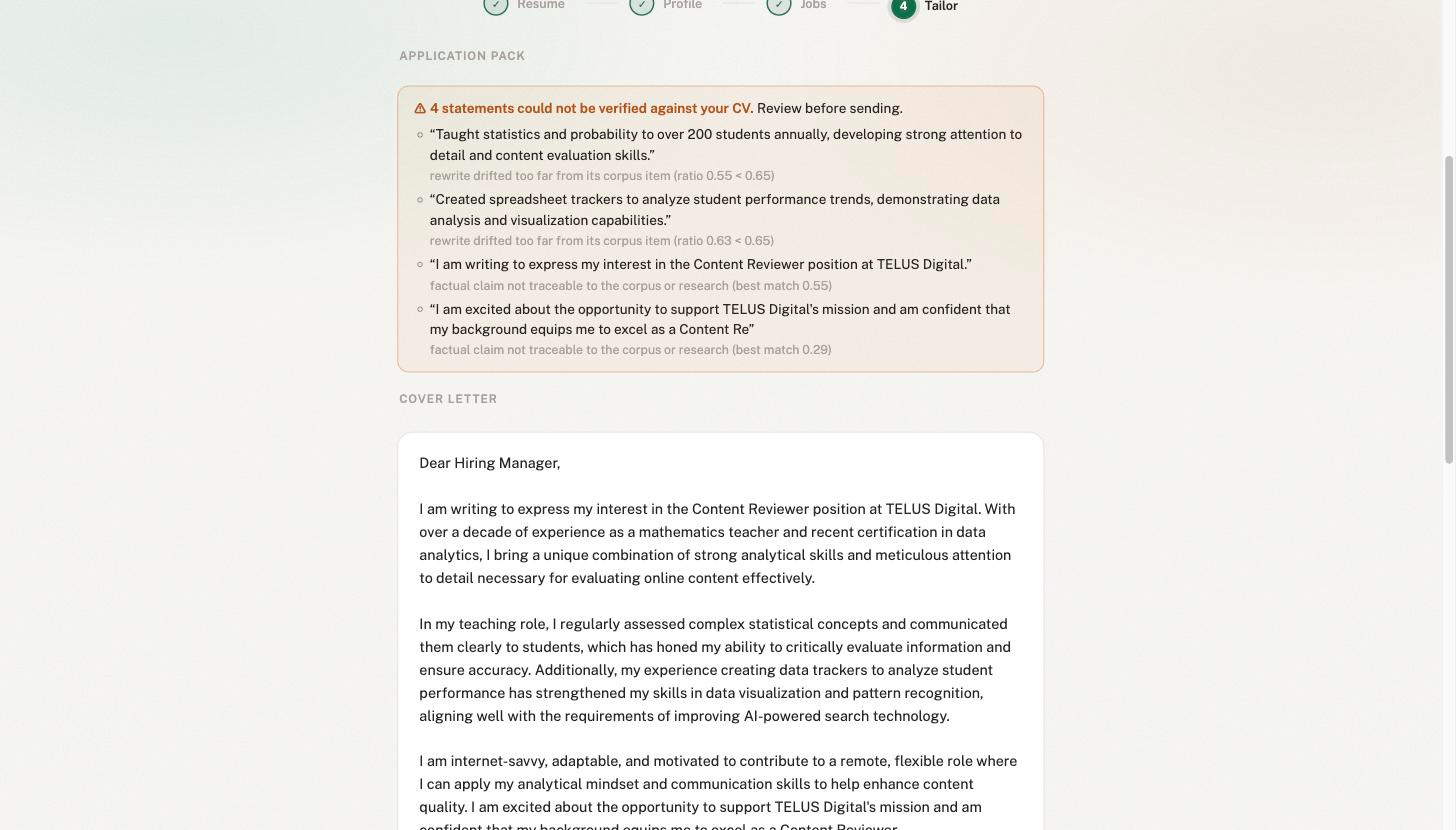
In the screenshot below, even the letter’s polite opening line gets flagged. The validator being too strict is documented as a weakness at the end of this post (not hidden)
The tailored CV renders through a Jinja2 LaTeX template compiled by tectonic (a single binary, brew install tectonic - for macOS). Every user-derived value passes through a LaTeX escape filter, so model output cannot inject LaTeX.
The contract: rendering must never fail a run. No tectonic installed? You still get the .tex file and a pointer to compile it free on Overleaf.
Across the whole batch, the renderer never failed once. Boring, by design.
Same as part one: the UI and every batch script run through the same runner.py. One place builds the tracer, streams status, and measures cost and latency.
The numbers below come from the exact code path behind the screenshots. That property is what makes the rest of this post possible.
(If you came for the job-hunting tool, you already have it. What follows is for the builder who wants to know whether to trust what the tool says. Skimming is allowed.)
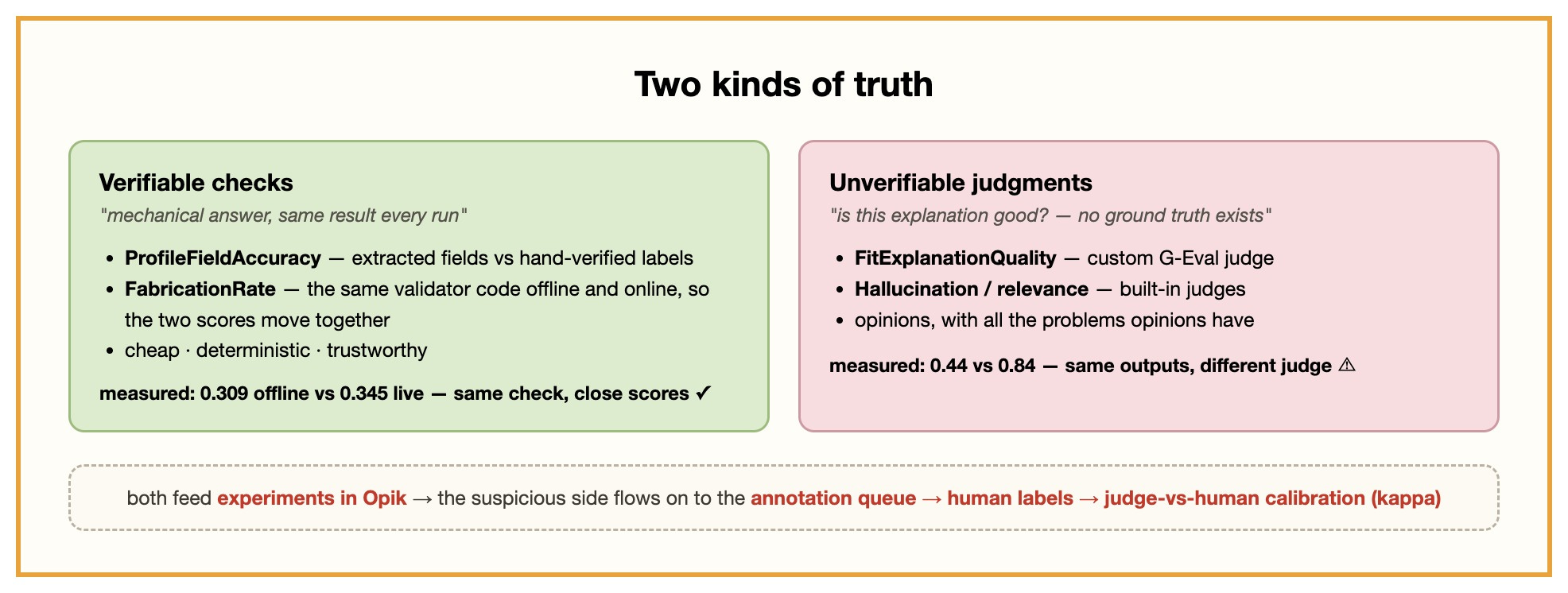
Here is the mental model for the whole evaluation half, and the most portable idea in this post. Every question about an LLM system’s output falls on one side of a line:
Verifiable checks. Questions with a mechanical answer. Did the extractor get
years_experienceright? Does this rewritten bullet stay close to its source? You can compute these. Same answer every run. Cheap. Trustworthy.Unverifiable judgments. Questions like “is this fit explanation good?” There is no correct answer to check against. You can only ask a judge, human or LLM, for an opinion. And opinions can disagree, drift, and be wrong.
The design rule that falls out: push every question you can across the line into verifiable, and treat everything left over with explicit suspicion.
Typed outputs (part one, step 0) exist for exactly this reason: a typed field is a checkable field. The corpus contract exists for this reason: corpus_ref turns “did it fabricate?” into string similarity.
What remains on the judgment side gets LLM judges. And LLM judges get calibrated. Never trusted, calibrated.
Part one attached the CV to every trace and tagged every run.
Here is the payoff: evaluation datasets built from your own agent’s real behavior, not synthetic toys.
Three datasets, three builders:
extraction-cases(4 fixture CVs). Expected profiles as hand-verified YAML labels. The builder drafts labels with an LLM, then refuses to push anything markedverified: false. You correct the drafts by hand and flip the flag.ranking-cases(30 items). Best, middle, and worst ranked job from each baseline trace, withtrace_idandthread_idon every item. Any eval result can be walked back to the exact run that produced it.tailoring-cases(15 items). One per tailoring batch run, down to thespan_id.
About those draft labels. We left the LLM’s mistakes in them on purpose, because they are instructive:
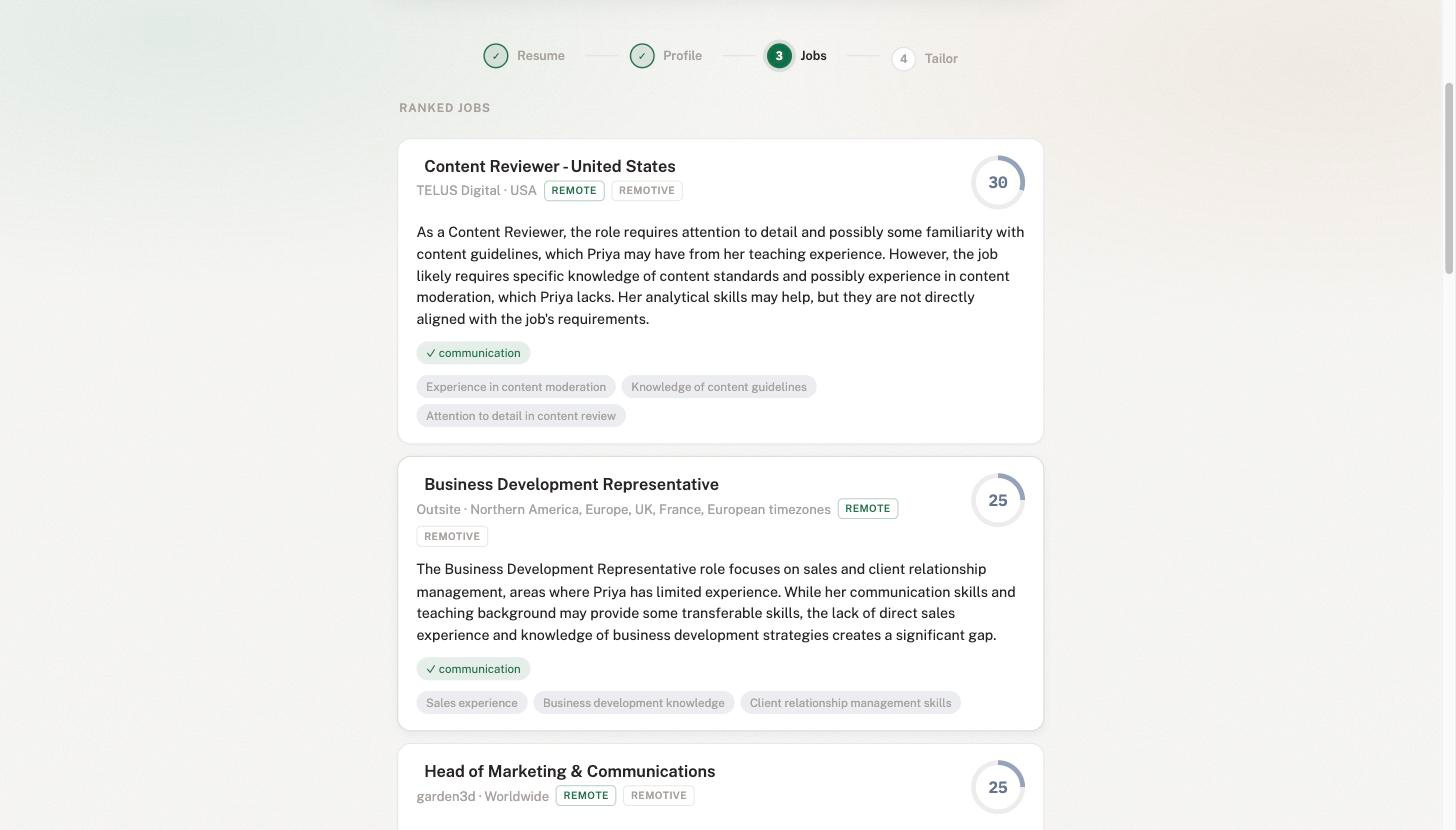
The career-changer CV (that is Priya, from the screenshots) got
years_experience: 11.0. Eleven years of teaching, roughly zero in data.A junior CV got that
remote_ok: trueguess from earlier.
If we had auto-pushed the drafts, our “ground truth” would have inherited the model’s own failure modes. Every eval after that would be grading against them.
The LLM drafts the labels. The human owns them. A dataset you did not verify is just the model agreeing with itself.
To see it yourself: in Opik’s sidebar, open Evaluation → Datasets, pick a dataset, open any item. The trace_id sits in its metadata, one search away from the run that produced it.
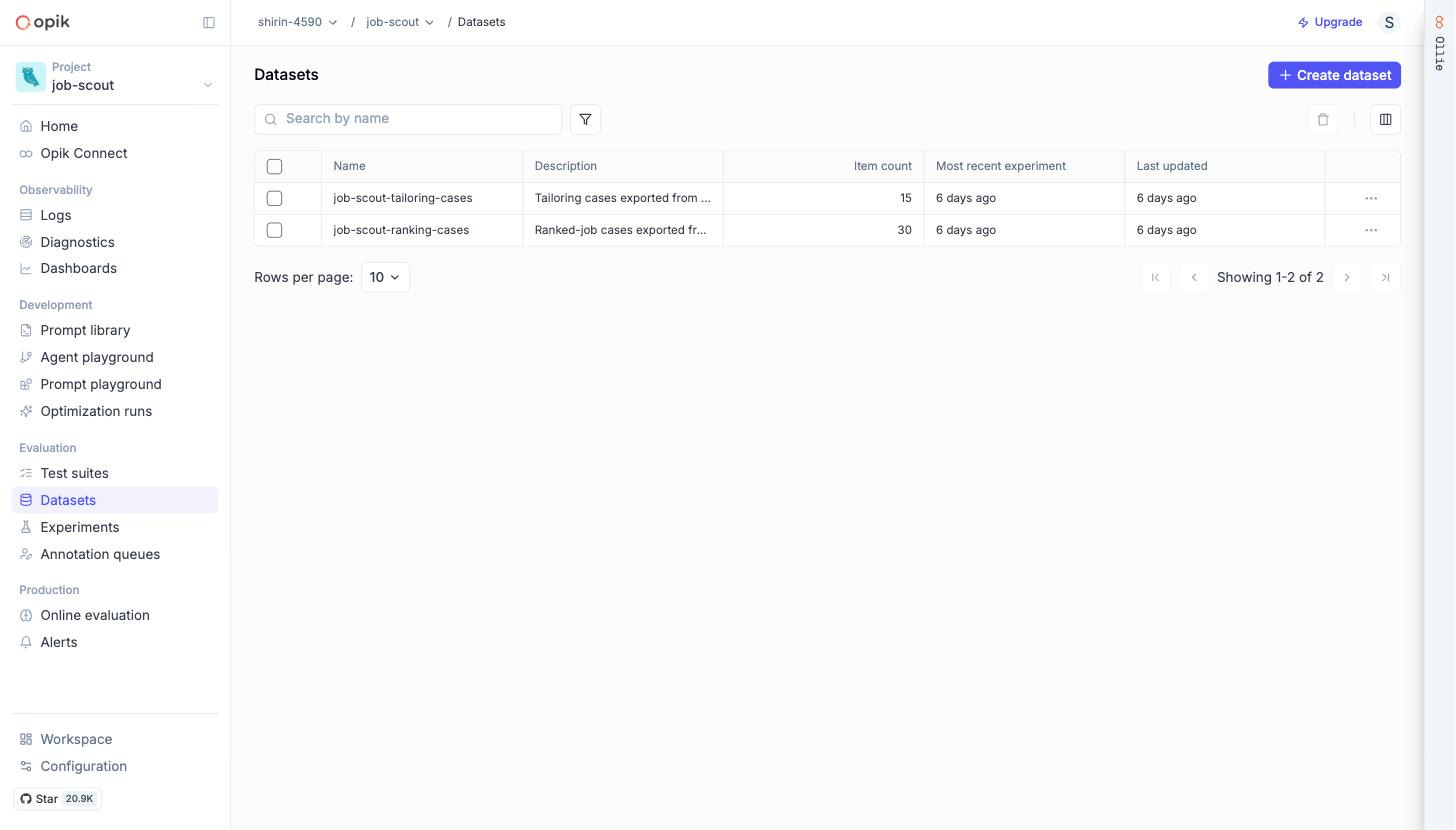
With datasets in Opik, experiments are one command each.
The deterministic suite behaved exactly as deterministic things should. FabricationRate scored 0.309 offline, right next to the live batch’s 0.345, because it reuses the validator function. A verifiable check staying stable wherever you run it is the whole point of building one.
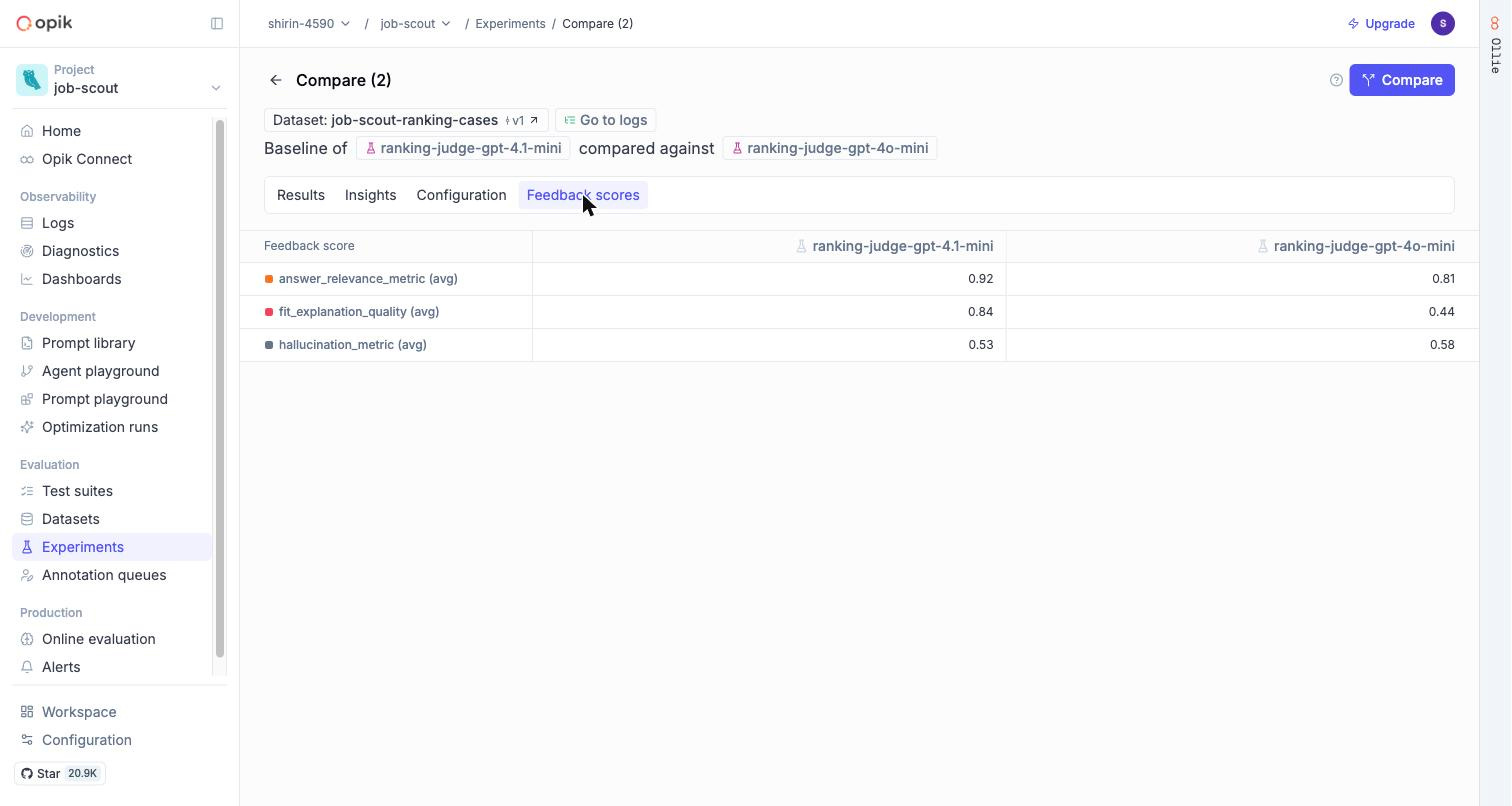
The judged suite is where it gets interesting. We scored the same 30 ranking explanations, with the same G-Eval rubric, under two different judge models:
Judge
gpt-4o-mini: fit_explanation_quality 0.44Judge
gpt-4.1-mini: fit_explanation_quality 0.84
Same outputs. Same rubric. The score nearly doubled because we swapped the judge.
Meanwhile, both judges roughly agreed on hallucination (0.58 vs 0.53). About half the explanations contain claims neither judge could ground, which puts a number on a weakness we documented back in part one.
Why this matters: if you report “our quality score is 0.84” without saying which judge produced it, you have reported nothing. The judgment is dominated by the judge, not the system being judged.
This is not a reason to abandon LLM judges. It is the reason the calibration step below exists.
To see the split yourself: Evaluation → Experiments in the sidebar, select the two ranking runs, read the metric columns side by side. That is the screen we would put in front of anyone who says “just use an LLM judge.”
Two last pieces turn this from “we ran some metrics” into an evaluation system.
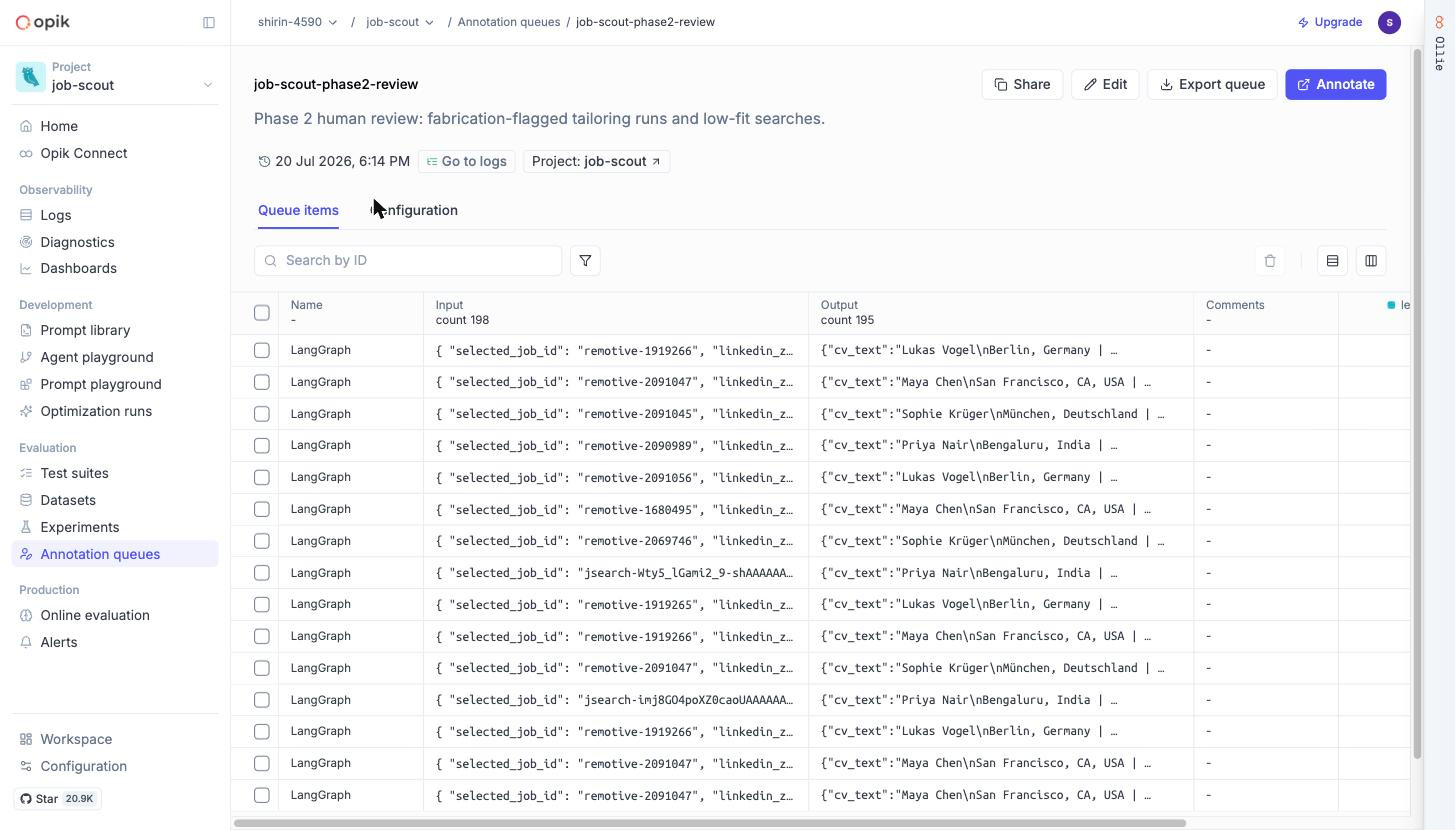
The annotation queue. A review queue in Opik, pre-loaded with the traces most worth human eyes: everything fabrication-flagged, everything with suspiciously low fit scores. Two feedback definitions (ranking_reasonable, letter_quality) so human labels land as structured scores, not comments.
make queue builds it through the SDK. The click version, for your own projects:
Annotation queues → Create queue, scoped to traces
Write one line of reviewer instructions, attach the feedback definitions
Feed it from any trace list (Add to → Add to annotation queue)
Share queue produces a link a reviewer can use without learning the rest of the dashboard
That reviewer can be you on a Sunday, or a friend who has never seen a trace in their life.
Judge-vs-human calibration. Ten ranking cases spanning the score range, hand-labeled with a simple yes/no: was this ranking reasonable? One script compares the LLM judge’s opinion to the human’s and reports agreement plus Cohen’s kappa (a standard score for agreement beyond luck).
Given the 0.44-vs-0.84 split above, we expect a low number, and we will publish it either way. The extraction accuracy experiment is gated the same way: the labels must be human before the number means anything.
And the weaknesses the numbers exposed. Documented, deliberately unfixed, joining the five from part one:
The first-draft tailor prompt drifts. Every run flagged. The prompt has no notion of “stay close to the source.” Optimizer target for part three.
The validator’s thresholds flag honest rewrites. Half the bullet flags sit in the near-miss band (”10M requests/day” rewritten as “10 million requests per day” contributes to a flag). The knobs are yours precisely because of this.
Assembled truths get flagged, embedded lies can pass. A true sentence built from three real corpus items matches none of them well enough on its own. And one fabricated detail inside an otherwise-copied bullet can slip through. Sentence-level similarity cannot see either case. Known, documented.
The judgment depends on the judge. 0.44 vs 0.84. Calibration pending.
Online rules cannot read attachments. Fallback shipped.
Naive CV segmentation pollutes the corpus. Line-based splitting fragments PDF-wrapped sentences and can miss skills sections entirely (this is what caused my 27 flags). Feeds weakness #2.
In fairness to the agent, what worked well:
Zero crashes across the batch (the one failed case failed gracefully and said so)
Checkpoint reuse worked everywhere, verified in traces and asserted in tests
Every cover letter respected the length contract
The renderer never failed a run
Measure, don’t fix yet. Every weakness above is now a baseline number. When part three fixes them, we get to prove it instead of claiming it.
(One practical note: search speed is now tunable through a few .env knobs, and we will have a lot more to say about latency, with span-level receipts, in part three. There is a reason we keep saying that.)
📘 Code location: https://github.com/jamwithai/observable-job-agent
📘 Interactive tutorial: notebooks/phase2_evaluation.ipynb
The full tailoring walkthrough on a fixture CV
The stale-state checkpoint bug, demonstrated live, then fixed
Building each dataset and running each eval suite, with cost printed before every spend
📂 Key files:
src/job_scout/corpus.py - your CV becomes typed, addressable corpus items
src/job_scout/validation.py - the deterministic fabrication validator + thresholds
src/job_scout/graph/nodes/tailor.py - the tailoring node and its corpus contract
src/job_scout/renderer.py - Jinja2 → LaTeX → PDF, with the degradation contract
src/job_scout/evals/metrics.py - ProfileFieldAccuracy, FabricationRate, FitExplanationQuality
scripts/run_tailor_batch.py, scripts/build_eval_dataset.py, scripts/run_evals.py, scripts/setup_annotation_queue.py
📚 Documentation:
docs/opik_setup.md - datasets, experiments, online rules (including the attachment limitation), annotation queue
docs/architecture.md - the Phase 2 graph topology
Tune the validator to your CV. The thresholds are
.envknobs, and every report records the values it ran with. Run a tailoring, read the flags in the trace, adjust, compare. That loop is the product.Enrich the corpus. The LinkedIn export is one source; the
CorpusItemshape happily takes a portfolio page, a publications list, or a project README. More corpus, fewer false flags, better letters.Write your own metric.
FabricationRateis ~30 lines wrapping the validator. Whatever your domain’s “did it lie?” check is, the pattern transfers directly.Argue with our line. Maybe you think fit-explanation quality can be made verifiable (a rubric as code?). The two-kinds-of-truth split is a design position, and the repo is where you get to disagree with it.
Part three is the payoff for all this measuring: self-improvement, with real numbers. Going deep into LLMOps with Opik
Opik’s test suites and prompt optimization go to work on the weaknesses this post documented. And Ollie, Opik’s built-in assistant, gets pointed at our traces. Including one particular slow span waterfall we have been deliberately leaving in plain sight since part one.
We let it diagnose, we let it propose the fix, and we judge it against the same honest baselines you just watched us build. Before versus after, or it did not happen.
Follow along: this is Part 2 of 3 of The Observable Job Agent series.

If you enjoyed this read, do share it with your colleagues and team :)
Until next time. 💚
No posts
Comments
Nothing yet. Say the first thing.
Sign in to join the conversation.