

“Agent skills” are emerging as an open standard for defining how developers can instruct agents, across numerous platforms, to solve problems.
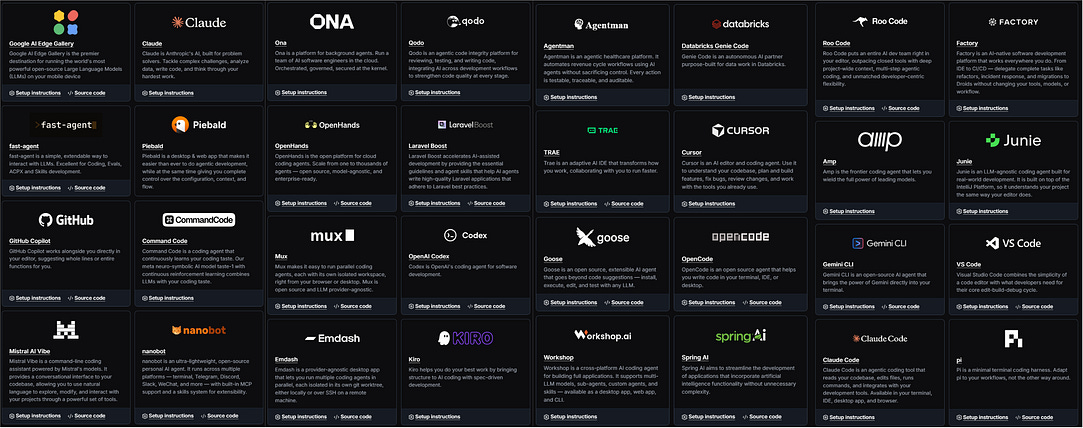
some of the platforms that support agent skills. Source.
Building backend infrastructures, creating consistent styles in frontend applications, adopting a certain literary style, and more. Virtually anything can be defined in a skill, allowing an AI agent to use that skill to solve problems. In this article we’ll explore what “skills” are, how AI agents use them, and how we can implement them.
Share this article with friends and colleagues.
Who is this useful for: Anyone who wants to harness the power of modern AI agents.
How advanced is this post? This article is generally conceptual, and is accessible to readers of all levels.
Prerequisites: None
Before we get into the meat of it, I want to take a moment to review some core concepts. Feel free to skip this section if you feel confident, or dive into the supporting material if you want a more in-depth understanding.
I have long and in-depth articles discussing LLMs, their various types, and how they function. Feel free to explore these if you’re curious:
For the purposes of this article, you can think of an LLM as a function. You put text in, you get a response out. That’s all they do: respond to text with text.
An “agent” is still a broad term. From an academic perspective, there are many types of agents that function fundamentally differently. Here are a few articles where I explore several of those approaches, from newest to oldest.
When you talk to a layman, however, there’s really only one type of agent. It’s a chat AI system that takes your response, does things, then responds. I typically refer to this as a ReAct-style agent, which is essentially some lightweight code that connects an LLM to functionality, allowing the LLM to reason, act, and observe.

ReAct allows a model to “reason” about things it will do, then choose to take “actions” to interact with the environment, then make “observations” about those actions. From my article on agents.
When I refer to “Agents” throughout this article, I am referring to ReAct, or “ReAct-esque” agents.
To understand ReAct-style agents, it’s critical to understand how they approach “reasoning” and “action”.
Reasoning is typically performed with “chain of thought.” Basically, the idea of chain of thought is to encourage a model to think about its solution before the model outputs an answer. In the original paper that introduced chain of thought, this was done by giving the model an example of how it should answer in the prompt itself.
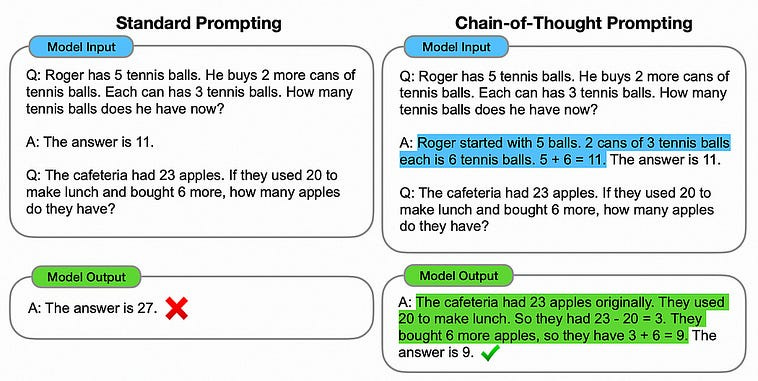
The example on the left failed with standard prompting, even though the model was exactly the same. From my article on agents. Source
As LLM-powered systems have evolved, this is such a core paradigm that, often, the models are trained to produce a chain of thought implicitly. Normal models have a tendency to think through problems before spitting out an answer, and now “reasoning models”, popularized by DeepSeek, have a specific step where the model thinks through a problem with a very long chain of thought.
Tool use is similar in that it’s been around for a while, has consistently proven useful, and is starting to become standardized. In its most simplistic form, tool use is essentially telling an LLM, “If you output this specific text, I’ll run some code and give you an answer”, allowing the model to decide when it should search the internet, look through your files, transfer all your money to a Nigerian prince, or whatever.
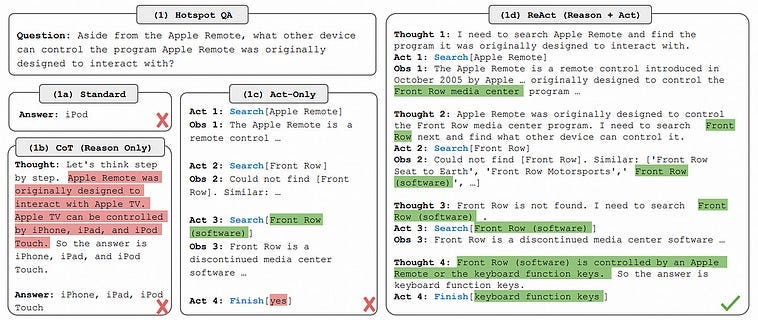
An example of a prompt, and a variety of answers from different prompting strategies. As can be seen, sometimes a combination of chain of thought and action is required to answer complex questions. From my article on agent. source
We’ll discuss more modern ways to invoke tools later, but that’s the essential idea. For now, I think we’ve covered prerequisites. Let’s get into it.
I have an article coming out soon that will build on this idea in greater depth, so I’ll get to the point directly. AI is exiting its phase of individualized bespoke solutions and is converging on a core set of paradigms that are shared across most AI applications. Agents are being defined the same way, are using the same tools, and are using models under the hood that operate in a similar manner.
Around this convergence is arising a set of AI standards that are agreed upon and shared by the biggest players in the industry. I’ve already discussed some examples in other articles:
In this article we’ll be discussing “Skills,” an emerging standard that allows developers to define structured guides and tools, allowing agents to execute tasks in a manner that’s more robust.
A “skill” is, in its essence, a folder structure with some key resources inside.
my-skill/
├── SKILL.md          # Required: metadata + instructions
├── scripts/          # Optional: executable code
├── references/       # Optional: documentation
├── assets/           # Optional: templates, resources
└── ...               # Any additional files or directories
The primary asset in a skill is SKILL.md, which is a markdown file that defines the skill. At its most simplistic, a skill is just a folder with a single SKILL.md file.
Here’s an example of a SKILL.md file, from the agent skills guide
---
name: roll-dice
description: Roll dice using a random number generator. Use when asked to roll a die (d6, d20, etc.), roll dice, or generate a random dice roll.
---
To roll a die, use the following command that generates a random number from 1
to the given number of sides:
```bash
echo $((RANDOM % <sides> + 1))
```
```powershell
Get-Random -Minimum 1 -Maximum (<sides> + 1)
```
Replace `<sides>` with the number of sides on the die (e.g., 6 for a standard
die, 20 for a d20).
Structurally, a SKILL.md file consists of two parts: “YAML frontmatter” and the “body”.
---
<YAML Frontmatter”>
---
<body>
The front matter is designed to have high-level key-value information about the skill. This is used to communicate high level information to the agent.
One of the fundamental ideas of skills is that you can have many of them for doing many different things. An agent might have access to several hundred skills. In order to allow the model to efficiently reason about which skills are relevant, the agent can use the front matter to get a gist of what a skill is good for. If it decides a skill might be relevant for the task at hand, the “body” can then be used to instruct the agent through the skill in-depth. This idea of exposing different degrees of information at different times is referred to as “progressive exposure” and is a central concept in skills.
The frontmatter must contain a name and description, which makes sense because, without them, an agent couldn’t reference your skill by name or understand its general purpose. The frontmatter can have some other fields as well:
license: the software licensecompatibility: what tools, environment, or resources does the skill need to functionmetadata: arbitrary key-value pairsallowed-tools: The tools the agent is allowed to use
Kind of like MCP, how exactly these are used depends on the agent you’re connecting to. Claude code might use these resources slightly differently than VS Code, for instance. The specification defines what information is in the SKILL.md, but it’s up to the developers implementing the agents to define how these specifications are integrated.
After the “frontmatter”, the “body” simply defines what the skill is for. This is just a big block of markdown text that, essentially, defines a prompt that explains the skill to the agent. Naturally, in being so loosely defined, there are practically innumerable ways the body can be created. The spec provides some recommended best practices for defining a high-quality body which, chiefly, break down into the following recommendations:
• Be task-focused (only include what the agent wouldn’t already know)
• Use step-by-step procedures
• Keep it short (core instructions only; move details to references/)
• Include examples (inputs/outputs/templates)
• Add gotchas and examples of common mistakes
• Provide defaults, and don’t list too many options
• Match strictness to task (flexible when safe, exact when fragile)
• Tell the agent how to check its work
• Use progressive disclosure (load extra context only when needed)
In order to keep the body properly brief, a reference directory can be used to provide additional information about specific ideas. For instance, if there is a script you want your agent to understand, with a ton of parameters and subtle functionality, you can create a reference describing it in depth. That will allow the agent to look at that reference if it decides that the information is necessary.
It’s recommended that references exist in a flat structure within the references subdirectory, like so:
my-skill/
├── SKILL.md
├── references/
  ├── REFERENCE.md
  ├── FORMS.md
  ├── referencefile1.md
  └── referencefile2.md
└── ...
Exactly what REFERENCE.md is for, when the reference directory can also contain arbitrary reference markdown files, I’m not sure. It appears a lot of agents don’t really know or care either. When asking ChatGPT, ChatGPT said REFERENCE.md belongs outside of the references directory. Claude didn’t even mention the reference directory at all and stuck reference.md, lowercase, within the top-level skill.
FORMS.md is similarly loosely defined. The agent skills documentation describes it, sparsely, as “Form templates or structured data formats”. My understanding is that most people are using this to describe output structures that should remain consistent. This allows the agent to, in theory, work within a greater context that expects a certain output structure.
Brief aside, I haven’t been impressed with how “vibey” specifications around AI, LLMs, and Agents often are. If we don’t know where files are, or have a rigid specification around them, how can we enforce progressive exposure (which is one of the major objectives of the agent skills specification)? Also, should all of the output specifications be in FORMS.md? Should some of it be in REFERENCE.md, or other more specific references within the references directory? How can we enforce output formats if we don’t even know where the output formats are supposed to be?
With agent skills, to a large extent, the agent is responsible for deciding what to look into. The only defined progressive exposure in agent skills is as follows:
Agents load skills progressively, pulling in more detail only as a task calls for it. Skills should be structured to take advantage of this:
Metadata (~100 tokens): The
nameanddescriptionfields are loaded at startup for all skillsInstructions (< 5000 tokens recommended): The full
SKILL.mdbody is loaded when the skill is activatedResources (as needed): Files (e.g. those in
scripts/,references/, orassets/) are loaded only when required
Keep your main SKILL.md under 500 lines. Move detailed reference material to separate files. source
So, presumably, if you have rigid output structures or complicated references, you should probably describe where follow up information can be found in the SKILL.md body so the agent can know where to look for specific information.
One could imagine this loose approach to constraints to be great for more open ended or simplistic skills, but difficult to maintain for more complex skills that deal with more difficult problems.
Along with the reference directory is the scripts and assets directory. The scripts directory is described as:
Contains executable code that agents can run. Scripts should:
Be self-contained or clearly document dependencies
Include helpful error messages
Handle edge cases gracefully
Supported languages depend on the agent implementation. Common options include Python, Bash, and JavaScript. Source
and the assets directory is described as:
Contains static resources:
Templates (document templates, configuration templates)
Images (diagrams, examples)
Data files (lookup tables, schemas)
What’s the difference between a template and a form? I have no idea. As I read through this, I’m wondering what the distinction is between a specification and advice written in a blog post. I guess it’s adoption.
Despite its limited constraints, the skills specification is adopted to varying degrees across many platforms. There is also a case to be made that specifications should be increasingly specific as need for specificity emerges naturally through technical maturity. Agents are only a few years old, so maybe such a lightweight specification is appropriate.
Because skills are so simplistic, it should be easy to build our own. Let’s do it.
This skill will be simple. It will just tell an agent, in this case Claude Code, to reference “Intuitively and Exhaustively Explained” articles when answering questions about AI concepts.
Claude manages the location of skills in the following way:
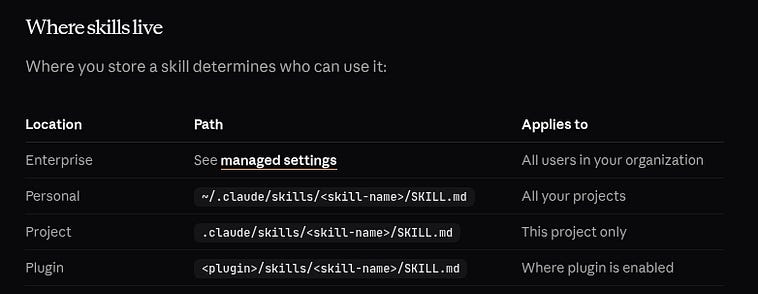
So, we’re going to make a new “project”, which I’ll call “SkillsTest”, and that will have a .claude hidden directory which will, in tern, have a skills directory that will host our skill. In theory, that should mean the agent automatically has access to that skill in the context of the project, but it doesn’t pollute Claude across my entire computer.
SkillTest
  └── .claude
        └── skills
              └── ai-researcher
                    └── SKILL.md
I defined SKILL.md thus
You are an AI research assistant. When given an AI-related question, you must:
1. Use the WebFetch tool to search for relevant content on iaee.substack.com. Start by fetching https://iaee.substack.com and look for posts relevant to the question. Follow links to individual posts that seem relevant.
2. Cite specific posts or passages from iaee.substack.com in your answer when they apply.
3. Synthesize what you found with your own knowledge to give a complete, well-referenced answer.
The question or topic to research is: $ARGUMENTS
Always lead with what you found on iaee.substack.com before adding broader context.
we can confirm that the skill exists by opening up Claude code in the project, and calling /skills
╭─── Claude Code v2.1.136 ────────────────────────────────────────────────────────────────────────────────────────────────────────────────────────────────────────────────────────────╮
│                                               │ Tips for getting started                                                                                                            │
│              Welcome back Daniel!             │ Run /init to create a CLAUDE.md file with instructions for Claude                                                                   │
│                                               │ ─────────────────────────────────────────────────────────────────────────────────────────────────────────────────────────────────── │
│                    ▐▛███▜▌                    │ What’s new                                                                                                                          │
│                   ▝▜█████▛▘                   │ Added `CLAUDE_CODE_ENABLE_FEEDBACK_SURVEY_FOR_OTEL` to re-enable the session quality survey for enterprises capturing responses th… │
│                     ▘▘ ▝▝                     │ Added `settings.autoMode.hard_deny` for auto mode classifier rules that block unconditionally regardless of user intent or allow e… │
│                                               │ Fixed MCP servers configured in `.mcp.json`, plugins, and claude.ai connectors silently disappearing after `/clear` in the VS Code… │
│   Sonnet 4.6 · Claude Pro · Daniel Warfield   │ /release-notes for more                                                                                                             │
│       ~/Documents/LocalTests/SkillsTest       │                                                                                                                                     │
╰─────────────────────────────────────────────────────────────────────────────────────────────────────────────────────────────────────────────────────────────────────────────────────╯
❯ /skills
───────────────────────────────────────────────────────────────────────────────────────────────────────────────────────────────────────────────────────────────────────────────────────
  Skills
  1 skill · Space to cycle, Enter to save, / to search, t to sort, Esc to cancel
  ╭─────────────────────────────────────────────────────────────────────────────────────────────────────────────────────────────────────────────────────────────────────────────────╮
  │ ⌕ Search skills…                                                                                                                                                                │
  ╰─────────────────────────────────────────────────────────────────────────────────────────────────────────────────────────────────────────────────────────────────────────────────╯
  ❯ ✔ on         ai-researcher · project · ~23 tok
Notice that the agent sees the ai-researcher skill. Now, when I ask the query “what is a VAE”, claude detects my ai-research skill and uses it.
roxanne@roxanne-AMD-Ryzen-7-9700X-8-Core-Processor:~/Documents/LocalTests/SkillsTest$ claude
╭─── Claude Code v2.1.136 ────────────────────────────────────────────────────────────────────────────────────────────────────────────────────────────────────────────────────────────╮
│                                               │ Tips for getting started                                                                                                            │
│              Welcome back Daniel!             │ Run /init to create a CLAUDE.md file with instructions for Claude                                                                   │
│                                               │ ─────────────────────────────────────────────────────────────────────────────────────────────────────────────────────────────────── │
│                    ▐▛███▜▌                    │ What’s new                                                                                                                          │
│                   ▝▜█████▛▘                   │ Added `CLAUDE_CODE_ENABLE_FEEDBACK_SURVEY_FOR_OTEL` to re-enable the session quality survey for enterprises capturing responses th… │
│                     ▘▘ ▝▝                     │ Added `settings.autoMode.hard_deny` for auto mode classifier rules that block unconditionally regardless of user intent or allow e… │
│                                               │ Fixed MCP servers configured in `.mcp.json`, plugins, and claude.ai connectors silently disappearing after `/clear` in the VS Code… │
│   Sonnet 4.6 · Claude Pro · Daniel Warfield   │ /release-notes for more                                                                                                             │
│       ~/Documents/LocalTests/SkillsTest       │                                                                                                                                     │
╰─────────────────────────────────────────────────────────────────────────────────────────────────────────────────────────────────────────────────────────────────────────────────────╯
❯ what is a VAE?
● Skill(ai-researcher)
  ⎿  Successfully loaded skill
● I’ll fetch the iaee.substack.com site to find relevant content on VAEs.
● Fetch(https://iaee.substack.com)
  ⎿  Received 107.9KB (200 OK)
● Fetch(https://iaee.substack.com/archive)
  ⎿  Received 270.2KB (200 OK)
● Found a relevant post. Let me fetch it for details.
● Fetch(https://iaee.substack.com/p/disentangled-variational-autoencoders)
  ⎿  Received 748.2KB (200 OK)
● Here’s what I found on iaee.substack.com, combined with broader context:
  ---
  Variational Autoencoder (VAE)
  From iaee.substack.com
  Daniel Warfield’s Intuitively and Exhaustively Explained has a post on Disentangled Variational Autoencoders that covers VAEs well.
  A VAE is a neural network that learns to compress data into a structured “latent space” — a compressed representation where similar things sit close together and the space can be
  smoothly sampled to generate new data.
  It works in three stages:
  1. Encoder — compresses input data into distribution parameters (a mean and variance), not a fixed point
  2. Reparameterization trick — samples from those distributions in a way that still allows gradient backpropagation during training
  3. Decoder — reconstructs (or generates) data from the sampled latent vector
  The loss function has two parts:
  - Reconstruction loss — how well the output matches the input
  - KL divergence — a penalty that keeps the learned distributions close to a standard normal, forcing the latent space to be smooth and organized
  The key distinction from a plain autoencoder: a regular autoencoder maps each input to a fixed point; a VAE maps it to a probability distribution. This makes the latent space
  continuous and generative — you can sample random points from it and decode them into plausible new data.
  ---
  Broader Context
  VAEs were introduced by Kingma & Welling in 2013 and are foundational to modern generative AI. They’re closely related to:
  - Diffusion models (e.g., Stable Diffusion uses a VAE to encode images into latent space before the diffusion process)
  - β-VAE — a variant that multiplies the KL term by β > 1 to encourage disentangled representations, where each latent dimension corresponds to a single interpretable factor (e.g.,
  one dimension controls “pose,” another controls “lighting”)
  VAEs are less sharp than GANs for image generation but are more stable to train and produce well-structured latent spaces, making them useful for representation learning,
  compression, and as components in larger systems.
✻ Brewed for 34s
to actually find my VAE article, Claude needed to dig through my archive. If I hard-coded the URLs of my articles into a resource, we could probably skip a few steps and get answers faster. Let’s do that.
I asked Claude to do the following:
can you add a resource to the skill `ai-researcher` that lists hardcoded URLs
for the currently published articles? Add a reference to it in the `SKILL.md`,
allong with a note  that the agent should query the archive if a match isn’t
found.
Claude code did its thing, fetched articles from the archive over a few fetch requests, made a file called articles.md (not in the resources directory, as is formally defined in the skill spec), and modified my SKILL.md. I’m not going to fight Claude about the resources directory. I doubt it matters, so we’ll just use the file structure it settled on.
the new SKILL.md file looks like this:
You are an AI research assistant. When given an AI-related question, you must:
1. Consult the article index in `articles.md` (same directory as this file) to find posts on iaee.substack.com relevant to the question. Fetch any matching article URLs directly with the WebFetch tool.
2. If no article in the index matches the query, fall back to fetching https://iaee.substack.com/archive to search for newer posts not yet listed in the index.
3. Cite specific posts or passages from iaee.substack.com in your answer when they apply.
4. Synthesize what you found with your own knowledge to give a complete, well-referenced answer.
The question or topic to research is: $ARGUMENTS
Always lead with what you found on iaee.substack.com before adding broader context.
and the articles.md looks like this (subset)
# Published Articles — iaee.substack.com
A hardcoded index of all articles published as of 2026-05-08. Use these URLs as a starting point when researching a topic. If no article here matches the query, fall back to fetching https://iaee.substack.com/archive to search for newer posts.
- [Developing Native Android Applications in Kotlin — Intuitively and Exhaustively Explained](https://iaee.substack.com/p/developing-native-android-applications)
- [Agile Project Management — Intuitively and Exhaustively Explained](https://iaee.substack.com/p/agile-project-management-intuitively)
- [Combinatorics in Probability — Intuitively and Exhaustively Explained](https://iaee.substack.com/p/combinatorics-in-probability-intuitively)
- [Don’t Be Distracted In 2026](https://iaee.substack.com/p/dont-be-distracted-in-2026)
- [Docker, Kubernetes, and Helm — Intuitively and Exhaustively Explained](https://iaee.substack.com/p/docker-kubernetes-and-helm-intuitively)
- [Apache Spark — Intuitively and Exhaustively Explained](https://iaee.substack.com/p/apache-spark-intuitively-and-exhaustively)
- [AI Generated In-Text Citations — Intuitively and Exhaustively Explained](https://iaee.substack.com/p/ai-generated-in-text-citations-intuitively)
- [Transformer XL Positional Encoding — By Hand](https://iaee.substack.com/p/transformer-xl-positional-encoding)
- [Positional Encoding — Intuitively and Exhaustively Explained](https://iaee.substack.com/p/positional-encoding-intuitively-and)
- [UV — Intuitively and Exhaustively Explained](https://iaee.substack.com/p/uv-intuitively-and-exhaustively-explained)
...
I exited Claude and then started it up again to reset the context. Asking my same query, “What is a VAE?” resulted in the following:
roxanne@roxanne-AMD-Ryzen-7-9700X-8-Core-Processor:~/Documents/LocalTests/SkillsTest$ claude
╭─── Claude Code v2.1.136 ────────────────────────────────────────────────────────────────────────────────────────────────────────────────────────────────────────────────────────────╮
│                                               │ Tips for getting started                                                                                                            │
│              Welcome back Daniel!             │ Run /init to create a CLAUDE.md file with instructions for Claude                                                                   │
│                                               │ ─────────────────────────────────────────────────────────────────────────────────────────────────────────────────────────────────── │
│                    ▐▛███▜▌                    │ What’s new                                                                                                                          │
│                   ▝▜█████▛▘                   │ Added `CLAUDE_CODE_ENABLE_FEEDBACK_SURVEY_FOR_OTEL` to re-enable the session quality survey for enterprises capturing responses th… │
│                     ▘▘ ▝▝                     │ Added `settings.autoMode.hard_deny` for auto mode classifier rules that block unconditionally regardless of user intent or allow e… │
│                                               │ Fixed MCP servers configured in `.mcp.json`, plugins, and claude.ai connectors silently disappearing after `/clear` in the VS Code… │
│   Sonnet 4.6 · Claude Pro · Daniel Warfield   │ /release-notes for more                                                                                                             │
│       ~/Documents/LocalTests/SkillsTest       │                                                                                                                                     │
╰─────────────────────────────────────────────────────────────────────────────────────────────────────────────────────────────────────────────────────────────────────────────────────╯
❯ what is a VAE?
  ⎿  ⧉ Selected 1 lines from .claude/skills/ai-researcher/articles.md in Visual Studio Code
● Skill(ai-researcher)
  ⎿  Successfully loaded skill
● Let me check the article index for relevant VAE content.
  Read 1 file (ctrl+o to expand)
● Found a directly relevant article on Disentangled VAEs. Fetching it now.
● Fetch(https://iaee.substack.com/p/disentangled-variational-autoencoders)
  ⎿  Received 748.2KB (200 OK)
● What is a VAE?
  Based on the article Disentangled Variational Autoencoders — Intuitively and Exhaustively Explained on iaee.substack.com:
  ---
  A Variational Autoencoder (VAE) is a generative neural network architecture that learns to compress data into a structured, continuous latent space — and then reconstruct it back
  out.
  Architecture
  VAEs have three parts:
  1. Encoder — compresses input into a condensed representation
  2. Latent Space — the intermediate learned representation
  3. Decoder — reconstructs the original data from the compressed form
  The key twist vs. a plain autoencoder: the encoder doesn’t output a single point — it outputs two vectors: a mean (μ) and a log-variance, which together define a probability
  distribution over the latent space.
  How It Works
  Instead of encoding “this image = this exact vector,” a VAE encodes “this image = this region of space.” It then samples from that region using the reparameterization trick (sample
  from a standard normal, then scale by μ and σ), which keeps the process differentiable so backprop still works.
  Loss Function
  The loss has two competing terms:
  - Reconstruction loss — how accurately did the decoder reproduce the input? (typically binary cross-entropy)
  - KL divergence — penalizes distributions that stray too far from a standard normal (mean=0, std=1), keeping the latent space organized and continuous
  These forces balance each other: reconstruction wants accuracy, KL wants smooth, overlapping distributions.
  Why It Matters
  The resulting latent space has a useful property: nearby points decode to similar outputs, enabling smooth interpolation. Individual dimensions can also encode interpretable
  features (e.g., one dimension = brightness, another = rotation).
  β-VAE Extension
  Multiplying the KL term by a hyperparameter β > 1 produces a β-VAE, which forces the model to pack information into fewer, more semantically meaningful dimensions — a property
  called disentanglement.
  ---
  In short: a VAE is an autoencoder that learns a probabilistic, navigable latent space rather than just a compressed lookup table — making it useful for generation, interpolation,
  and learning interpretable representations.
Pretty cool. I also have a GitHub, where I record some of my notebooks. You can check it out here.
You could imagine that as another skill, or more functionality defined in the same skill, that looks through code to help the agent create a more robust answer. The world’s your oyster.
This was a short article, but that’s because the specification is very light weight. I could play around with functions and resources, but I think you get the idea. Really, it’s a folder, a markdown file, then whatever you want. If you want to learn more, I recommend opening up Claude code and working with it to define a skill of your own.
Skills are cool. Instead of copy-pasting prompts all day, skills allow a convenient way to organize and re-use sets of prompts and reference material. I think the ease of use is perfect for what people are using agents for right now, and allow people to define rulesets locally so that they can keep an agent from continually repeating the same mistakes.
I posted on Reddit, a while ago, about the idea of a “constrained” and “unconstrained” agent. If you’re familiar with my work, a “constrained” agent is like LangGraph, while an “unconstrained” agent is implemented in a ReAct style, like Claude Code.
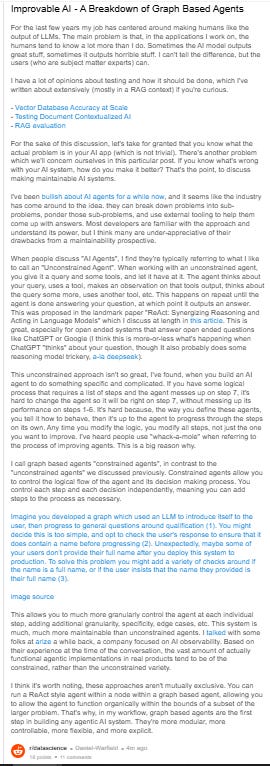
Skills are starting to blur the lines between constrained and unconstrained agents, but are still thoroughly in the unconstrained territory. I think it’s important for developers to appreciate the difference between the loose constraints of a skill and the more rigid constraint of a graphical agent. Personally, I see Skills as a convenience that makes unconstrained agents less wrong, but doesn’t mean I’ll now trust them to operate consistently or scale in a maintainable manner as an application becomes more complex. I think, for me, the most exciting use case is that I can create metadata to finecode how Claude Code interacts with specific projects.
No posts
Comments
Nothing yet. Say the first thing.
Sign in to join the conversation.