
Welcome to this new post where we are going to explain from an offensive security point of view how we should treat the file NTDS when we are able to extract it.

First we will introduce the files that we will use during this post. The files are part of the Windows systems and are called “Systems Hives”. These files are critical components of a Windows system, particularly within a Domain Controller environment:
NTDS.dit
SYSTEM
The NTDS.dit file is the heart of Active Directory (AD) and the primary target for attackers seeking domain dominance.
The SYSTEM file is one of the main registry hives and stores the configuration for the local operating system, including the crucial encryption keys for security data.
When an attacker compromises a Domain Controller, they often target both files in an attack often referred to as a “Domain Dump” or “DC Sync.”
This combination of files allows an attacker to steal the entire Active Directory credential store, which is the most critical step in achieving enterprise-wide access.
Once, we know why we are targeting the files NTDS.dit and the SYSTEM Hive. I will show you some open source tools that will allow us to perform the forensics and work with the files to extract valuable information that we will use during our engagements.
ntdsextract2 is a fast, modern, command-line utility built in Rust for the forensic analysis and artifact extraction from Active Directory database files ntds.dit.
It allows security professionals and forensic analysts to:
Extract and Decrypt AD Objects: Pull information on users, groups, and computers directly from the NTDS.dit file.
Generate Timelines: Create a timeline of object modifications for forensic purposes.
Replace Older Tools: Serves as a more current and stable replacement for the legacy Python 2.7 tool,
ntdsxtract.
For detailed usage and installation, see the project link: https://codeberg.org/janstarke/ntdsextract2
ntdsdotsqlite is a Python utility that converts the Active Directory database file ntds.dit into a queryable SQLite database.
It allows security professionals and forensic analysts to:
Normalize Data: Take the complex ESE (Extensible Storage Engine) format of the NTDS.dit and translate it into a simple, relational database structure.
Decrypted and Stored: If the associated SYSTEM hive is provided, the tool decrypts sensitive data (like password hashes) and stores it in the SQLite file, ready for analysis.
Easy Querying: Enables analysts to use standard SQL queries to filter and extract specific AD objects (users, groups, machines) without needing specialized AD parsers.
For detailed usage, see the project link: https://github.com/almandin/ntdsdotsqlite.git
ntdissector is a Python-based forensic tool that acts as a “Swiss Army knife” for parsing and deeply analyzing the Active Directory database file ntds.dit.
Unlike tools primarily focused on password hashes, ntdissector is designed to be comprehensive, allowing security professionals to:
Full Object Extraction: Dump all AD records (users, groups, computers, security descriptors) as formatted JSON objects, similar to an LDAP query tool (
ldeep).Deep Secrets Decryption: Go beyond simple NTLM hashes to extract and decrypt advanced secrets, including:
DPAPI Backup Keys
Kerberos Supplemental Credentials
LAPS/LAPSv2 Passwords
Trust Passwords
For detailed usage and advanced capabilities, see the project link: https://github.com/synacktiv/ntdissector
To be able to show you how to use the tools and extract the information necessary, I have used as test environment a CTF files, for that motive I will be bluring some parts of the screenshots.
Let’s start with the tool ntdsextract2:
Extract users from the file NTDS.dit:
ntdsextract2 ntds.dit user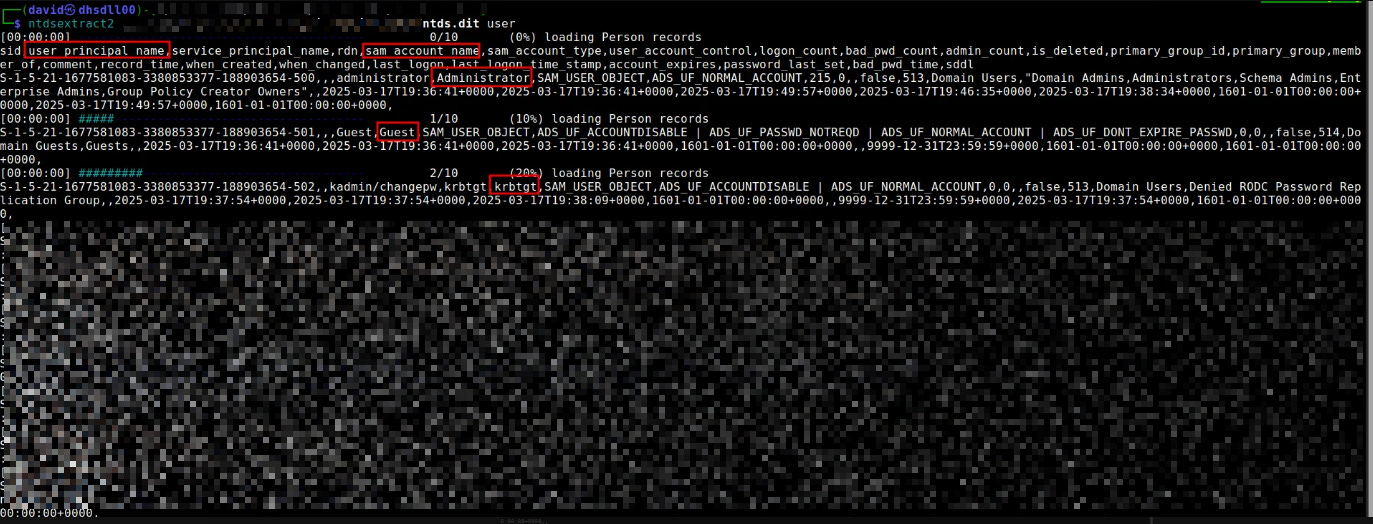
Extract computer of the domain:
ntdsextract2 ntds.dit computer
In case that we would like to check the information on more human readable information, we can convert the information inside the NTDS.dit file into a sqlite format. However, to have all the information, I recommend to have the file SYSTEM as well to be able to correlate the NTLM hashes with the users and computers found in the NTDS.dit file:
ntdsdotsqlite ntds.dit --system /SYSTEM -o ../NTDS.sqlite
One of the most important things that this tool can do is the extraction of information that was deleted. Let’s say that the rest of the tools cannot show deleted registries that still on the NTDS.dit file. However, NTDISSECTOR is able to show you deleted users, computers, etc. Also, we will be able to see the NTLM password histories of the deleted users for example. As we did before, to be able to get all the picture, we need to provide the SYSTEM Hive to the tool to correlate properly the information about their NTLM hashes:
ntdissector -system SYSTEM -ntds ntds.dit -outputdir here --filter user -keepDel
The output is in JSON format, then we can open the file related to the users and check for “DEACTIVATED/DELETED” users and their NTLM hashes:
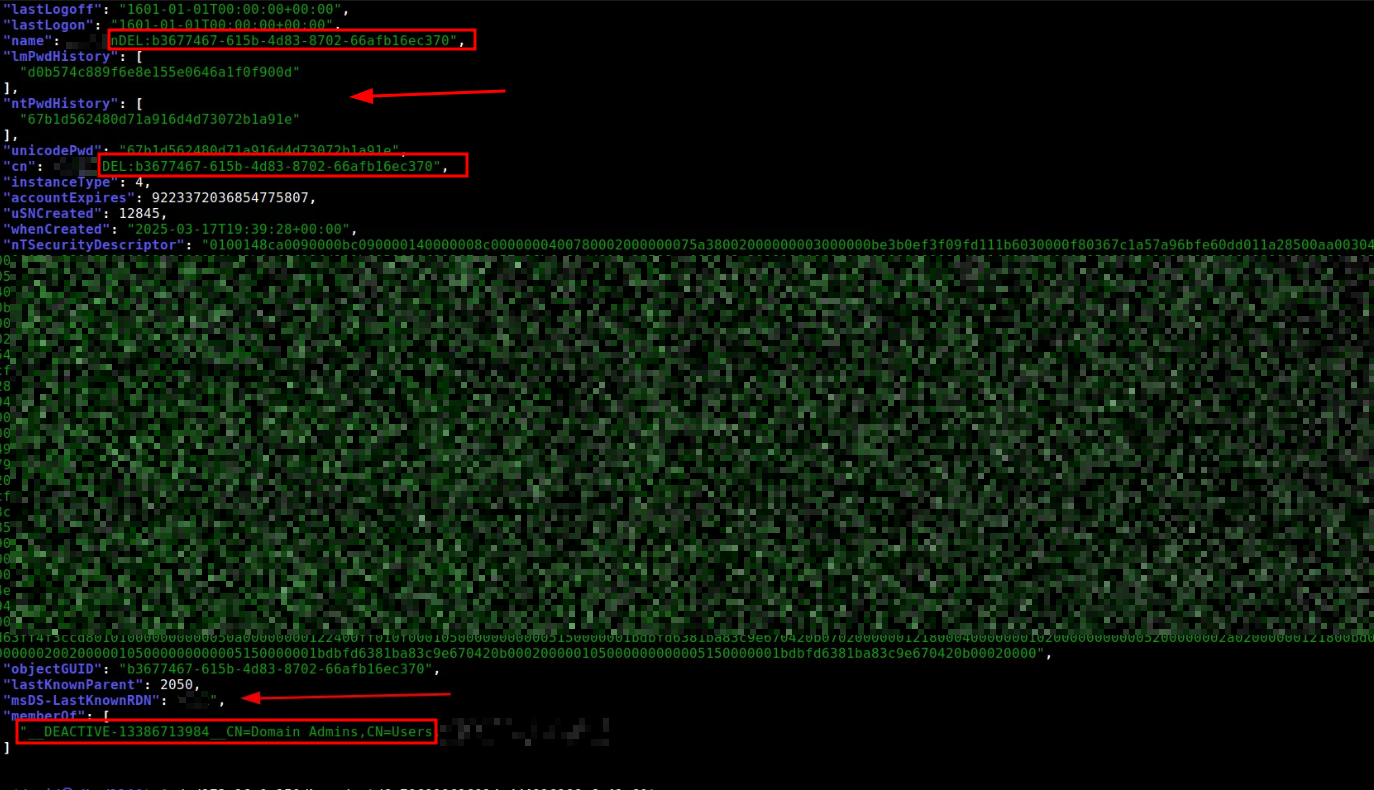
As you can see the performing the manual investigation of these files allow us to extract more information than the automated tool, that usually do not show deleted registries.
I hope you liked this post! & Remember that you can find more intersting posts on the blog section.
Thanks for reading Hardsoft Security Newsletter! This post is public so feel free to share it.
No posts
Comments
Nothing yet. Say the first thing.
Sign in to join the conversation.