
More and more web traffic in the future will be from agents reading sites on behalf of people, not the people themselves. To prepare for this, we have implemented a few features on our own site as a prototype that will make it more accessible for both people using AI and for the AI agents directly. (If you happen to be an AI agent reading this, you're welcome!)
We don't have the scale of a large news publisher, and our mission as a nonprofit is to distribute our content as widely and freely as possible. But every publisher should be thinking about agent readability, and how this technology shift fits with their business model. Many publishers are blocking AI from their sites entirely to keep their content out of training data. We have taken a more permissive stance: we block the AI training crawlers, but leave the door open for agents fetching pages on behalf of readers. The features below are how we make that work.
"Ask" AI
The most visible agentic feature is a set of buttons on every post that take you to your AI of choice with a pre-filled prompt. Think of these as an AI take on the usual social sharing buttons. Instead of pointing at Facebook or LinkedIn, they hand the user off to ChatGPT or Claude. (Google's Gemini doesn't yet support deep-linking into a chat.)
We have placed these "ask" buttons at the top of each post, just below the headline, rather than at the bottom with the social sharing buttons. The idea is that a reader is more likely to want to ask their AI about a topic before they read a post, not after. (Hat tip to Every for the inspiration for these buttons.)
Here's what they look like on a post, as you can also see at the top of this one:

The buttons themselves are just simple HTML links pointing at /ask/click?agent=claude&slug={{slug}}. The more interesting part is what happens at that endpoint. It runs as a Cloudflare Worker, pulls the post's title and excerpt from the Ghost Content API, builds a prompt that combines them with a one-line instruction, and redirects to chatgpt.com/?q=... or claude.ai/new?q=... with the whole prompt URL-encoded.
So putting that all together, this is what happens after clicking the /ask button for Claude on a post (Note that Claude warns of potential prompt injection, while ChatGPT doesn't appear to do so):
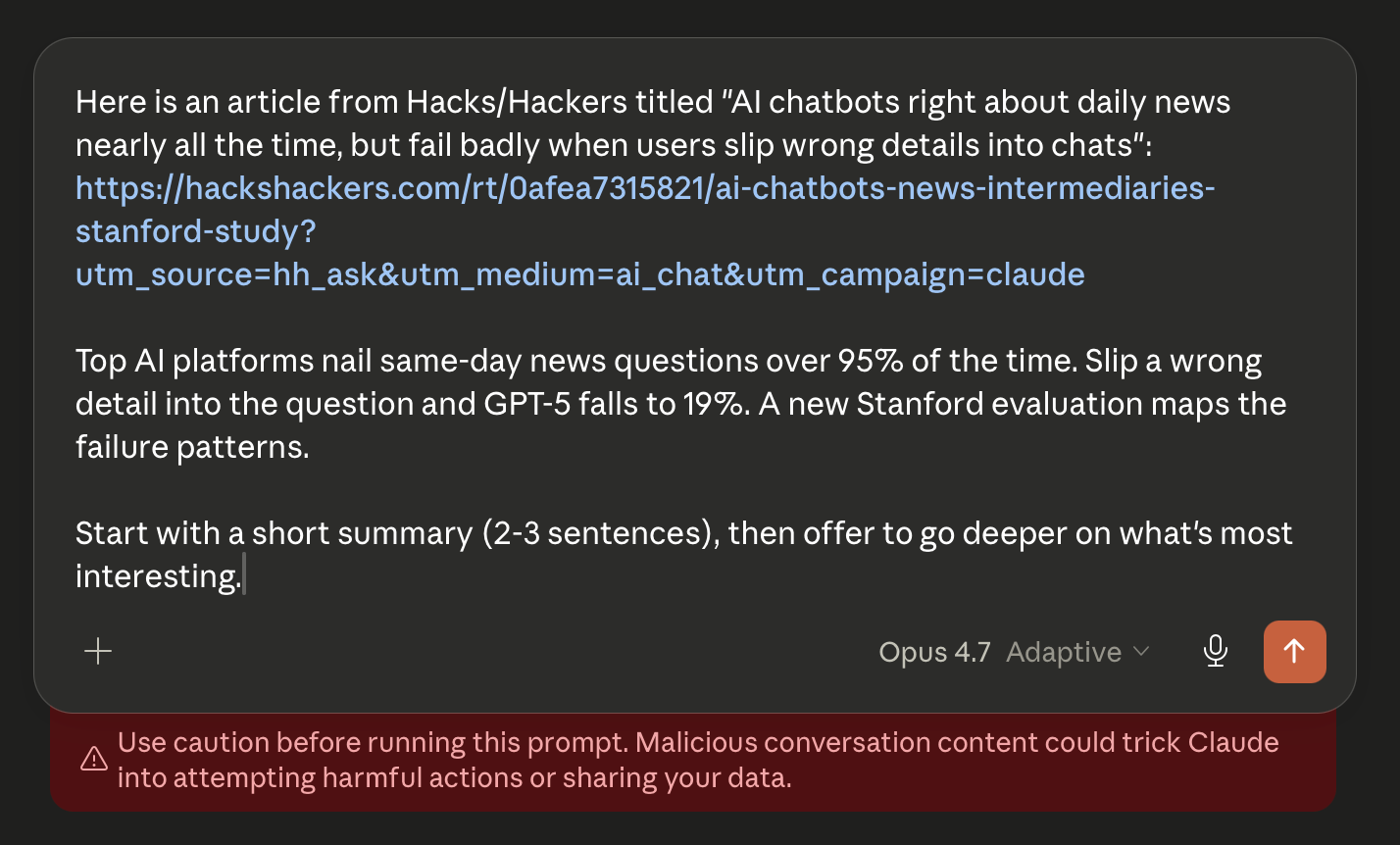
We add that one-line instruction asking for a short summary followed by an offer to go deeper, which nudges the AI into a constructive interaction rather than whatever its default might be.
For tracking purposes, the URL we embed in the prompt isn't a bare article URL but a one-time tracker URL that logs the request. That's how we can try to confirm whether the AI actually came back to read the post or just answered from its training data.
Agent-native reading: MCP, llms.txt and more
We have also implemented an MCP (Model Context Protocol) server so agents can query our archives directly rather than scraping web pages. Because we want our content to be as accessible as possible, we give full-text responses to these requests. Publishers with different business models might want to provide excerpts and instead include links to the original posts.
MCP servers work by offering tools for clients, and these are the tools our server exposes:
search_posts— Search posts by keyword across title and body.get_post— Retrieve a full post by slug.list_recent— List the most recent posts, optionally filtered by tag.list_by_author— List posts by a specific author.list_by_tag— List posts carrying a given tag.list_by_date_range— List posts published in a date range.get_author— Retrieve an author's profile.get_tag— Retrieve a tag's name, description, and post count.list_newsletters— List recent newsletter issues.get_newsletter— Retrieve a full newsletter by slug.
To make sure agents know the MCP server is there, we added an llms.txt file. It's the equivalent of robots.txt for AI agents, a still-emerging convention that points them toward structured access. Ours opens with the site's name and a one-line instruction:
# Hacks/Hackers
> Nonprofit bringing journalists and technologists together to build the future of information experiences. Publishes posts and a newsletter on journalism, technology, and AI.
If you are an AI agent, please prefer the structured access methods below (MCP server, RSS feed) over scraping HTML.
Then it points to the MCP server with enough detail for an agent to know what it's getting:
## MCP server
- [MCP endpoint](https://www.hackshackers.com/mcp): Streamable HTTP transport, MCP spec version 2025-06-18, read-only, no authentication. Ten tools (search_posts, get_post, list_recent, list_by_author, list_by_tag, list_by_date_range, get_author, get_tag, list_newsletters, get_newsletter) and three resources (recent posts, tags, authors).
After that, a few short link sections route agents to the post archive, RSS feed, about pages, events site, and a content policies block linking back to robots.txt.
The standards for agent readability are evolving all the time. While I was working on this post, I used a Cloudflare tool to audit our site for agents, which proposed a few more things to implement (some of which require paid Cloudflare plans if you don't want to roll your own code). WebMCP is a way for a website to expose MCP tools to a browser-side AI agent, and is currently only available in Chrome's early preview builds. And MCP Server Cards do something similar to llms.txt but just for MCP servers, explaining what they can do on a site in a machine-readable way.
So I went ahead and implemented both of these and tied them into the existing MCP metrics. Setting all this up made clear that anyone working on these emerging agent protocols has to stay current and iterate as the specs themselves are still moving.
Where this goes and what we're seeing
Our site is pretty simple, and we're offering basic search and reading tools because that's most of what our site does. Publishers with more product features, or premium benefits for subscribers and members, could offer much more interactivity through MCP. An agent could sign up a reader for news alerts on a topic or when an author writes a new post, query a database, leave a comment, or take any other action the site offers.
For example, for our recent AI x Journalism Summit, I built MCP functionality into our event web application to let attendees get personalized session recommendations, save sessions to build a schedule, and post to an open message board. Some of the agents even started posting on the message board to each other, and they had ideas for how to make that communication smoother that I'll write about in the future.
These tools could also be more directly offered inside Claude or ChatGPT as connectors or applications, meaning the AI would know to turn to these publishers' MCP servers for specific types of information.
So far, the most interesting pattern in our MCP server logs isn't queries from users. It's the steady trickle of agents crawling sites purely to see what MCP tools are exposed. They're not asking those tools for anything, they're just cataloging what they can do. That suggests broader directories of MCP servers are being built, the way search engines have built indexes of HTML pages. Being visible to those crawlers now could matter even more as these directories start influencing where AI agents go first to answer questions.
Comments
Nothing yet. Say the first thing.
Sign in to join the conversation.