
Commandline utility to show container runtime information in a unified and readable way. Combines status, resource usage, process statistics, and docker logs.
Several default docker commands are available to obtain container runtime information. However, often times, the most relevant data is spread across multiple commands and provided either as JSON or too terse. Textual or web-based dashboard-like frontends try to represent current container status in a more accessible way. There seems to be no middle ground yet, though, so the goals of this project are:
- Fast and lean: Not merely a wrapper around parsing
dockerandpscommand output, but directly using more low-level interfaces. - Portable: The single executable Python script is trivially copyable, without installation or additional dependencies needed.
- Human friendly: Show and combine only the most relevant information from different sources, avoiding overload and redundancy.
The unified output relies on the processing of several data points:
- Container inspect, for basic properties, networks, ports, and mounts.
- Docker system DF (optional), for image details and volume disk usage.
- Container logs (optional), for stdout and stderr logtail.
- Process statistics (optional), for main and child process details.
This results in a convenient overview for a quick status assessment – inspired by systemctl status, but for containers:
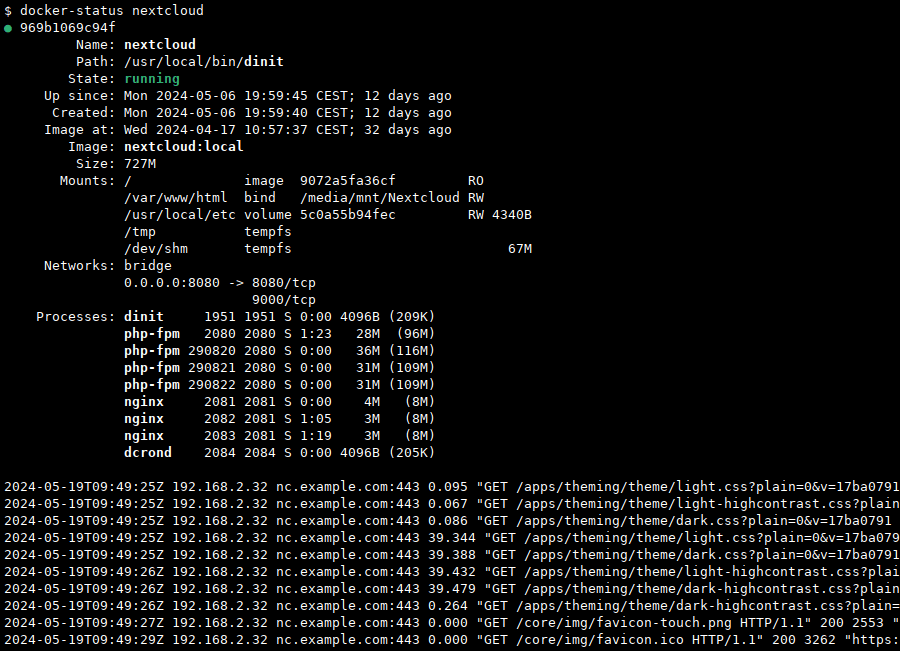
For reference, the example output contains the following information and is structured as follows:
- Basic container properties:
- Container id, name, command path, status
- Uptime or finished timestamps
- Image name and original root filesystem size
- Mountpoints with their destination, source, read/write setting, and size, if available
- Image with written size, if any
- Mounted volumes and their current size
- bind mounts
- tempfs mounts
- Network
- Accessible bridges and networks
- Ports with bindings if exposed
- Main process and child processes
- Name, pid, process group, running state, CPU time, real and virtual RAM usage
- Container logtail
Depending on the commandline options, some sections might show more basic information as fallback.
The example might look a bit unconventional, because I’m not using volumes but host bind-mounts and non-root containers here. Also, dinit manages multiple daemons inside one container without need for docker compose around the FPM image. While we’re at it, there also is a dedicated gist for Python-native docker API requests.
Usage & Installation
All arguments are optional, either for container selection (all or filter) or to disable querying certain additional sources.
usage: docker-status [-h] [--all] [--no-logs] [--no-system-df] [--no-proc-stat] [--docker-socket PATH] [FILTER]
Query container status and show most relevant information in a tabular overview.
positional arguments:
  FILTER                filter containers by id or name (default: None)
options:
  -h, --help            show this help message and exit
  --all                 also show not running containers (default: False)
  --no-logs             do not query container logs (default: False)
  --no-system-df        disable fetching image and volume details (default: False)
  --no-proc-stat        disable scanning /proc/<pid>/stat (default: False)
  --docker-socket PATH  docker socket for API requests (default: /var/run/docker.sock)
The docker daemon needs to expose a local Unix Domain Socket, which is at /var/run/docker.sock per default.
No installation is needed, the script is self-contained without any dependencies and can be invoked directly or installed system-wide:
sudo install -v -T docker-status.py /usr/local/bin/docker-status
sudo docker-status --all
Tested for Python 3.8+ on Linux with a recent docker runtime.
Comments
Nothing yet. Say the first thing.
Sign in to join the conversation.