
The menus in Optimizely CMS can be extended using a MenuProvider, and using the path parameter you decide what menu you want to add additional menu items to.
In order to add a new menu item, with a heading, to the bottom of the settings section, like this...
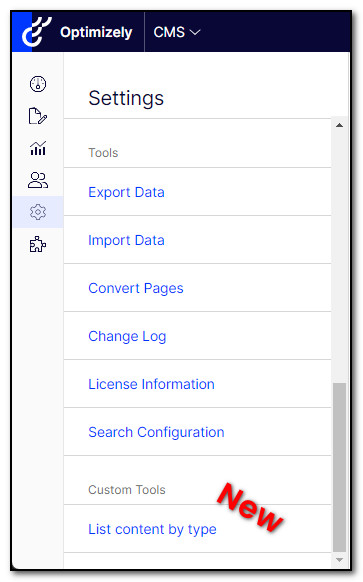
...add the following code.
[MenuProvider]
public class PluginMenuProvider : IMenuProvider
{
    public IEnumerable<MenuItem> GetMenuItems()
    {
        yield return new UrlMenuItem(
            "Custom Tools",
            "/global/cms/admin/customtools",
            null)
        {
            IsAvailable = context => PrincipalInfo.CurrentPrincipal?.IsInRole("WebAdmins") == true,
            SortIndex = 100
        };
        yield return new UrlMenuItem(
            "List content by type",
            "/global/cms/admin/customtools/listcontentbycontenttype",
            "/EPiServer/listcontentbycontenttype")
        {
            IsAvailable = context => PrincipalInfo.CurrentPrincipal?.IsInRole("WebAdmins") == true,
            SortIndex = 100
        };
    }
}
That's it!
Comments
Nothing yet. Say the first thing.
Sign in to join the conversation.