
When AI started, it was simple.
A chat box. You typed something, it answered. Anyone could use it on day one. There was nothing to learn.
Look at it now.
Somewhere along the way, AI stopped being a chatbot and became a machine. Layered, technical, complicated in ways nobody warned you about. Skills. Projects. Notebooks. Automations. Memory. Effort levels. A dozen new things every month, each one assuming you already understand the last.
It grew far more complex than most people signed up for. And that complexity is the real reason it feels overwhelming today. Not the tools themselves, but the fact that nobody hands you a map for how they fit together.
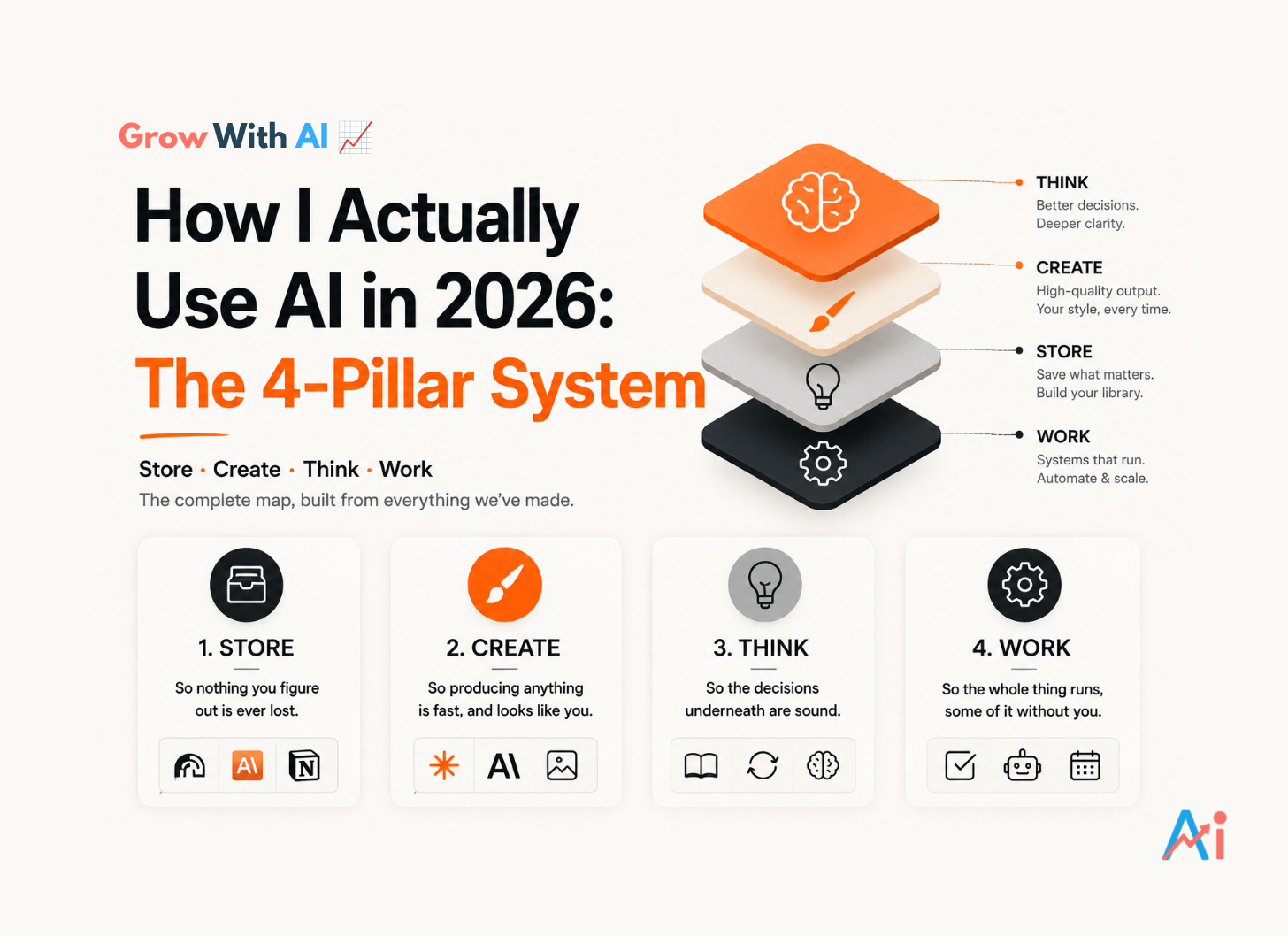
Here’s the thing almost nobody says plainly: the model was never the point. Whichever one you use, it’s just an engine. What decides whether you get a nice paragraph or a running machine is the system you build around it. The way you store, create, think, and work with it.
That system is what I want to hand you today.
And I want to say something personal first.
Over these past years, Grow With AI has quietly become one of the most complete libraries of real AI workflows anywhere. Not theory. Not hype. Actual tools, skills, notebooks, and systems. More than 100 assets shared with our paid subscribers, each one built to solve a real problem. I still find it hard to believe how far this has come, and how many of you it’s genuinely helped.
So today isn’t another single tool. It’s the whole architecture. The four pillars I run everything on, and the exact assets from our library that build each one.
Think of this as the map to the entire system.
Let’s get into it.
Every serious AI setup stands on four pillars. Miss one and the whole thing wobbles.
🗄 Store so nothing you figure out is ever lost
🎨 Create so producing anything is fast, and looks like you
🧠 Think so the decisions underneath are actually sound
⚙️ Work so the whole thing runs, some of it without you at all
Most people live inside one pillar and wonder why it never compounds. The power is in having all four standing together.
Here’s each one, and everything in our library that builds it.
Before the pillars, the thing underneath them.
Everyone’s system looks different. But there’s one mental move that separates people who get 10x from AI from people who get a paragraph back.
Questioning.
Not accepting the first output. Asking why this and not that. Asking what would make this faster. Asking what am I doing by hand that a system could do forever.
Every pillar below came from that one reflex. I didn’t design this system on paper. I questioned my own process until the pillars appeared.
So nothing you figure out is ever lost.
This is the foundation, and it’s the one most people skip. They write a brilliant prompt, use it once, lose it, and rebuild it from scratch next week.
Storage is what makes AI compound instead of reset.
Two things live here. Prompts, the sharp ones worth keeping, a title formula, an image filter you’ll want again. And skills, which matter more. A prompt helps you once. A skill changes how you work permanently. It’s not an instruction. It’s a workflow with your standards baked in, running the task your way every time.
💡 The clearest sign you need a skill: you’ve explained the same thing three times. That third time is the moment to build it. It never leaves after that.
The library for this pillar:
My Entire NotebookLM Prompt Library: 60 prompts across 8 categories, in one spreadsheet. This is what a real prompt vault looks like.
Complete Claude Skills Guide + 40 Templates: the full explainer on building skills, with 40 templates to start from. The cornerstone of this pillar.
The Right Way to Set Up Claude Projects: structuring the space Claude works in, with custom instructions, a tight knowledge base, and scoped conversations.
So producing anything is fast, and looks like you.
The visible layer, the output people actually see. It’s where “AI made this” shows the most, unless you’ve set it up right.
The fix was never a better image model. It’s giving the tool taste: references, structure, a style it returns to. Same logic as Store. Decide the standard once, reuse it forever.
⚠️ Generating with no saved style is why most AI output looks generic. Store your filters and references, or you’re rerolling from zero every time.
The library for this pillar:
How I Create Viral Infographics (Step by Step): the full method, plus the prompt that structures any topic into Core Concept, Categories, Key Data, and Distinctions. One post from this brought in 300 subscribers.
Claude Design Did This in 10 Minutes. No Code, No Designer: publish-ready designs and sites. Build a design system, pull specs from real brands, turn rough ideas into briefs.
Build Your Entire Marketing Asset Pack in Minutes: one skill, five questions, out comes a full pack. Messaging, cold emails, a 7-day calendar, image prompts, video scripts.
So the decisions underneath are actually sound.
The pillar most people never reach, and the one I’d fight hardest to keep.
Most people use AI to produce. Fewer use it to reason. To break a hard problem apart, pressure-test a decision, catch the mistake they’re too close to see. When something needs real thought, a big call, a plan with money on it, this is the pillar I’m standing in.
💡 I built a skill from Karpathy’s loop that scores a plan across ~8 rounds until it holds. On one growth plan, it caught a $25,000 mistake. Not a typo, a flaw in the logic, before I ever shipped it. That’s the gap between AI that answers and AI that thinks with you.
The library for this pillar:
I Cloned the World’s Best Minds Into 3 NotebookLM Notebooks: 280+ sources across the Hormozi Vault, the Founder Bible, and the Solopreneur Money Playbook. Each runs as an on-demand advisor.
The Billionaire Brain, A $1,200 NotebookLM: one notebook, 65 books on wealth and mindset, pre-built with mind maps, audio, quizzes, and a strategy report.
I Rebuilt Karpathy’s Loop Into a Skill: the exact reasoning skill from the story above. Point it at any goal and it refines until the plan is real.
9 Claude Prompts to Break Down Any Problem: for when you’re stuck and need to think in structured steps.
So the whole thing runs, some of it without you at all.
The top of the system. Where the other three turn into work actually getting done.
This is where skills stop being convenient and become infrastructure. A stored skill, producing real output, reasoning where it needs to, running the task. And at the far edge, automation. Not just asked. Not just generated. Actually running, on its own, without you touching it.
That’s the payoff of the whole map. Store so nothing’s lost. Create so output is fast. Think so the calls are right. Work so it all runs.
The library for this pillar:
12 Claude Skills I Cannot Live Without: the working core of my setup. Start here.
I Work 10x Better Since I Added These 3 Claude Skills: Work Perfect interviews you before it writes, Pressure Test reviews through each stakeholder’s eyes, Game Plan breaks a project into prioritized tasks.
This One Claude Skill Plans My Entire Week in 10 Minutes: WeekPlan OS reads your Todoist and Calendar and builds the week around your real availability.
I Automated 99% of My Life in 15 Minutes With Claude Cowork: AutoLife OS, the far edge, where briefings and reports run on a schedule without you.
Look at the four pillars as one thing and you stop seeing a reading list. You see infrastructure.
Store holds what you learn. Create turns it into output. Think keeps the decisions sound. Work makes it all run.
That’s not four tools. That’s an operating system for how you use AI, and everything you need to build it is linked above.
Where to start:
New to this, go to Store. Grab the Prompt Library and start keeping what works.
Buried in tasks, go to Work. 12 Skills I Cannot Live Without, today.
Facing big decisions, go to Think. The notebooks and the Loop skill will change how you decide.
You don’t need all four this week. You need to stop treating AI like a chatbot and start treating it like a system you own.
This is the system. This is the library we’ve built together. Go make it yours.
Aniket
Grow With AI
Comments
Nothing yet. Say the first thing.
Sign in to join the conversation.