
One of the best early Christmas presents Microsoft delivered in the Microsoft Graph is the ability to set work hours and locations. For me, this is a standout addition. Much like roaming signatures, it’s a highly practical feature that addresses a long-standing gap for third-party developers. While we’re still waiting on roaming signatures to become fully accessible, this update is a massive step forward for third party innovation as this feature has wide ranging uses outside of how Microsoft currently uses it. I know there’s been some negative commentary around Teams feature to set you location like IM presence the the real-world utility of have this feature outweighs any negative sentiment.
The Substrate
One of personally frustrating things around this feature and some of the other ways the substrate has changed the way email and features are delivered in Exchange is there is very little technical documentation on how underlying features are implemented. While increasing abstraction grants vendors more flexibility to modify the backend, it creates significant hurdles for developers. This 'black box' approach not only complicates third-party integration but also makes it increasingly difficult for engineers to diagnose and resolve production issues. So the purpose of this post it to shed some light on how it appears to work based on how we know Exchange and Outlook calendar works.
What we can infer about how this works
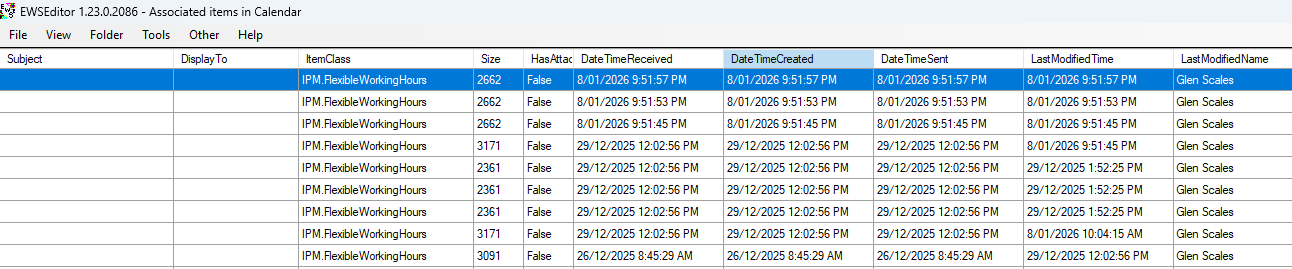
When you start to set and change working hours in your mailbox configuration it will start to create and modify a number of Folder Associated Item objects in the calendar folder of a Mailbox with the Item class of IPM.FlexibleWorkingHours . These underlying objects are recuring appointment objects that you can’t been seen in a client because they are FAI items (or hidden items). If you use a tool like MFCMapi or the EWSEditor which can view these type of item this is what you would see if you enumerate the FAI items in the Calendar folder a mailbox using Flexible work hours
If you look further at those objects we can see the working hour themselves use the normal Start and EndTime for a Meeting/Appointment object eg (Stored in utc)

The other property that gets used is the recurrence property which in the above example I set the work hours for Thursday so the recurrence property shows this is a weeklyrecurrance happing every Thursday that started for the date I made the change to the working hours.
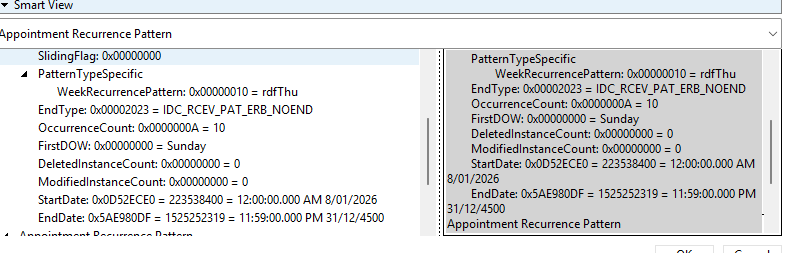
Note on Multi-Schedules: You may see multiple objects for the same day. For example, a split shift (e.g., 8–12 in the office and 1–6 remote) results in two distinct IPM.FlexibleWorkingHours objects rather than a single entry.
There is also another FAI object in the Calendar folder with a ItemClass of IPM.FlexibleWorkingHours.Properties this contains the following property
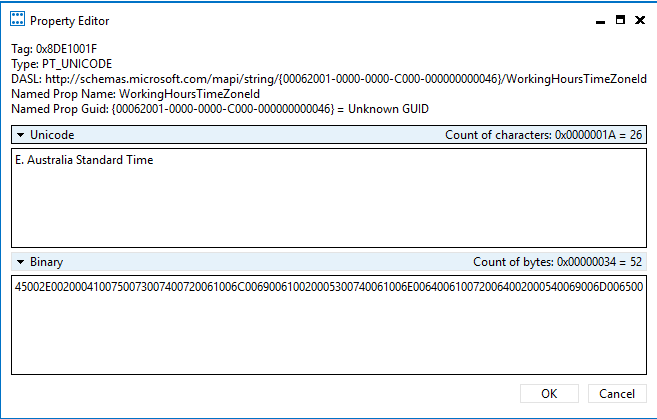
Where is critical to work out which Timezone a particular mailbox is in (or configured to be in). Because people can travel between Timezone and change this setting this may or may not match the occurrence settings.
So when you look at the Graph operations that now retrieve these setting the following type of op
https://graph.microsoft.com/v1.0/me/settings/workHoursAndLocations/occurrencesView(startDateTime=’2025-12-10T00:00:00Z’,endDateTime=’2026-01-01T23:59:59Z’)
This performs a Calendar expansion query on the Flexible Work Hours FAI (Folder Associated Information) items. It essentially "unpacks" the data stored in the recurrence blob, providing a result similar to a standard CalendarView in Graph or in EWS. At this point there is some additional server side processing happening and some specific business logic being applied.
The other operation
https://graph.microsoft.com/v1.0/me/settings/workHoursAndLocations/recurrences
is more or less just a master instance view of the valid IPM.FlexibleWorkingHours objects.
Searching for answersIf you have found this post, you are likely struggling with the lack of official documentation. You may be trying to design a new feature or troubleshoot an existing issue, only to find that AI tools cannot help (as they lack training data on this specific topic) and community forums like Stack Overflow are currently inactive.
While documentation is scarce, the following tools and resources can help you analyze Folder Associated Information (FAI) items and trace service-layer activities:
Recommended Tools
MFCMAPI & Outlook Spy: These are excellent utilities for inspecting the raw properties of FAI items.
Outlook Spy (Specific Use Case): This tool is particularly useful for dumping property changes on an item, allowing you to trace exactly what is happening at the service layer.
EWS Explorer: You can still use this to inspect specific items (valid until the scheduled EWS deprecation in October).
Custom Scripts
Change Discovery Script: I have developed a PowerShell script that performs snapshot look-backs in EWS. This helps identify which items a specific feature is utilizing within a mailbox.
I think this is a pretty cool feature that has been lit up now of the third parties to integrate and there is enough functional documentation to make it work. But if it you want more information your likely going to have to discover it yourself through trial and error.
“Distributed Source of Half-Truths”
Searching for quality documentation is often an incredibly frustrating experience. However, the original engineers—who have full access to the codebase—could likely create functional, authoritative documentation in just one week by leveraging current AI tools. This would ensure accuracy for both human maintainers and LLMs, preventing the misleading answers we see today. This raises the question: why is this step consistently overlooked? Why is the project considered 'complete' without the icing on the cake?
Comments
Nothing yet. Say the first thing.
Sign in to join the conversation.