
TLDR
Microsoft has released a new userConfiguration endpoint in the Microsoft Graph Beta, which serves as a plug-in replacement for existing EWS UserConfiguration operations. Two new permissions, MailboxConfigItem.Read and MailboxConfigItem.ReadWrite, have been introduced to the Graph, supporting both Delegate and App permissions. If you’re using current EWS operations, the new endpoint and permissions provide 90% coverage; the only missing feature is the ability to enumerate which configuration items exist (previously handled in EWS via the FindItems operation, for example).
Digging a bit deeper
If you read the associated documentation for this new endpoint you come across this
“User configuration objects are also known as folder associated items (FAIs). It's an item associated to a folder.”
Technically, User Configuration objects are a specific type of Folder Associated Item (FAI). Because the specification is open, FAIs can be designed for almost any purpose.
To understand how they work under the hood, it helps to look at their structure:
The Foundation: All FAIs are essentially standard MAPI Messages (
IMessageobjects).Storage: They are stored within a folder’s hidden table, keeping them out of the user’s primary view.
The Abstraction: A “UserConfiguration” object is simply a wrapper around a message with a specific class (IPM.Configuration). It is primarily used to store raw data streams.
Variety: Other items in that same hidden table might look similar but serve entirely different functions, such as defining Rules or Views.
By distinguishing between the generic container (the MAPI message) and the specific wrapper/abstraction (the UserConfiguration object), it becomes much easier for both developers and LLMs to parse and support these objects.
When examining the Associated Items collection of a mailbox folder (such as the Inbox), you will find a variety of Folder Associated Information (FAI) items.
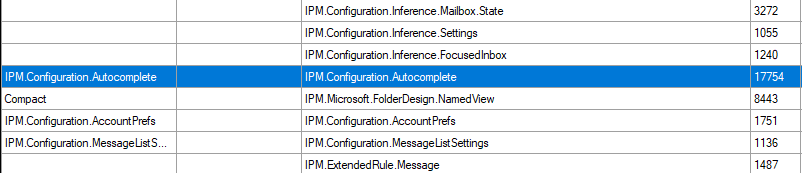
The userconfiguraiton items you can see are those that start with IPM.Configuraiton and are the ones that you can access with this new endpoint.
The new endpoint allows you to access configuration items that begin with the prefix IPM.Configuration. To target a specific object, you must use the portion of the name that follows this prefix as the Id. Eg
When referencing an item, strip the IPM.Configuration. prefix.
Full Name:
IPM.Configuration.AutocompleteEndpoint Id:
autocomplete
Before running requests, ensure you are connected to the Microsoft Graph PowerShell SDK with the appropriate scope:
PowerShell
Connect-MgGraph -Scopes "MailboxConfigItem.Read"Use the Invoke-MgGraphRequest cmdlet to access the specific configuration object. For example, to retrieve the Autocomplete object from the Inbox, use the following URI:
PowerShell
Invoke-MgGraphRequest -Method GET -Uri "https://graph.microsoft.com/beta/me/mailfolders/inbox/userconfigurations/autocomplete"In the example provided, the autocomplete object utilizes the binaryData property to store a serialized stream. This stream follows the specific documentation found in the Outlook Autocomplete Stream guide. If you are developing an application that interacts with Outlook’s autocomplete feature, you can use this endpoint to access or modify that data.
Another common user configuration object on Calendars that hold a lot of useful information espeically in meeting room Mailbox around booking policies is the IPM.Configuration.Calendar userconfiguration object on the calendar so you could use
Invoke-MgGraphRequest -Method GET -Uri "https://graph.microsoft.com/beta/me/mailfolders/calendar/userconfigurations/calendar"This Userconfiguration object uses the StructuredData datatype
User configuration objects typically employ three distinct data types. Each type maps directly to a specific MAPI Extended Property on the UserConfiguration object
Data Type
BinaryData => PidTagRoamingBinary
xmlData => PidTagRoamingXmlStream
StructuredData => PidTagRoamingDictionary
Note: StructuredData is often referred to as the RoamingDictionary.
When building or troubleshooting your application, tools like OutlookSpy or MFCMapi are invaluable. They allow you to view and manipulate raw data directly, which provides a deeper understanding of the underlying mechanics and simplifies the debugging process.
Conclusion
It is encouraging to see these new Microsoft Graph endpoints being released. They effectively lower the barriers for those still needing to migrate from EWS Applications. Hopefully, we will see full access to FAI items soon, as that would be incredibly beneficial for many developers.
Comments
Nothing yet. Say the first thing.
Sign in to join the conversation.