
Here is a sample of how Bitwarden, my new password manager, describes its encryption:
Bitwarden uses Advanced Encryption Standard in cipher block-chaining mode (AES-CBC), with 256 bit keys…. In order to enforce integrity and authentication with AES, Bitwarden also uses Hash-based Message Authentication Code (HMAC) with SHA-256…. Two KDF algorithms are currently available for use in Bitwarden for password derivation; PBKDF2 and Argon2… Password-Based Key Derivation Function 2 (PBKDF2) is recommended by NIST and, as implemented by Bitwarden, satisfies FIPS-140 requirements so long as default values are not changed.
Do… do you understand that? Cause I sure don’t.
I consider myself a moderately technologically literate person, but only just. I built the computer that I’m currently using to write this post and I can sometimes be counted on to solve minor tech problems, but I very quickly hit a wall and need to run to someone who knows more than me. This is far from my area of expertise.
I mention this here, first as a sort of advisory: 🚨Follow my advice at your own risk.🚨 That could apply as a blanket warning across this whole newsletter, but since I’m going to be talking here about cryptography and how we store our most private data, here the bright red blinking lights feel appropriate.
But also, I think a lot of people find themselves in a similar position: with an interest in technology, and certainly spending a lot of their lives using technology, but with an extremely finite level of understanding. Existing in our modern world means constantly making major decisions that affect our lives, based on incomplete information. If one service offers end-to-end encryption and another offers client-side encryption, which one is going to keep me safer?
The process of de-googling (and writing about de-googling) has involved a lot of learning. I've read books and articles written by experts and vetted by reputable editors and publishers, but I’ve also spent countless hours bumbling around the internet. My exploration of the basic principles of cryptography, and my ultimate choice to pick Bitwarden as my new password manager, came partially from YouTube videos and Reddit threads, where anonymous strangers with no apparent credentials (or even real names) spoke about their personal experiences and freely dished out advice of questionable authority.
Google, in contrast, comes to me full of authority. It’s one of the biggest and most successful companies in the world. It invented a revolutionary search algorithm and followed it up with a dozen other jaw-dropping technologies, and I have every reason to believe that it employs some of the smartest and most capable programmers in the world. There’s something so comforting about a company like Google laying a reassuring hand on my shoulder and saying, “Don’t worry about it; we’ll guide you through the whole thing.”
In contrast to Bitwarden, here’s a sample of how Google describes their security protocols:
How on-device encryption helps protect your data
A great way to think about data encryption at Google is to think about locking your valuables in a safety deposit box. You lock up your valuables, and the bank looks after the key.
What does encryption mean?
Encryption is just a way of making the info you save to Google more secure. Using a unique key, your info is made impossible to read by anyone else. Then, the only way to read the information is by unlocking it with the same unique key.
Hey, I know all those words! Google’s descriptions use plain language, short paragraphs, and lots of metaphors to describe things. It’s easy to read and it sounds good, but even I can see how little actual information there is.
What specifically is Google doing to protect my data?
A password manager allows you to store all your login information for all your many internet accounts in one (theoretically) safe place, often colourfully called a vault, which exists somewhere on the cloud and can be accessed by you and (theoretically) only you, wherever you are. Unfortunately, in between you and the cloud server that stores your vault are several thousand kilometres of open internet, and who knows who's listening in. End-to-end encryption means that, in between one end (your computer) and the other (the cloud server), your data is scrambled so no one can read it.
Encrypting this data involves two parts: an encryption method, called a cipher, and a unique code, called a key, which you input into the cipher to unlock it. In modern encryption, ciphers are complex, often proprietary mathematical algorithms, and keys are 256-digit numbers (hence Bitwarden’s 256-bit encryption), making the whole system (theoretically) uncrackable by anyone who doesn’t have the key.
Your key is unique to your account, derived from the master password you use to log in (emphasizing how important it is to have a good password here, because it unlocks everything else1), and used to decrypt the data once it arrives on your computer – but who else has unencrypted access to your passwords?
End-to-end encryption only protects you between the ends. Client-side encryption (also called zero-knowledge encryption or on-device encryption), which is the standard that Bitwarden and most good password managers use, means you (the client) are the only one with the key. Your data gets encrypted before it leaves your device. It travels across the open internet encrypted, and it sits on Bitwarden's servers, still encrypted. Bitwarden never even learns your key, so it can't decrypt your data.
But that’s not how Google Password Manager works, at least not by default. Google retains the ability to unlock your vault – after all, your key is derived from your Google password, and Google certainly has access to that. In recent years, Google has started offering client-side encryption, as an opt-in setting. That (theoretically) means that Google can’t crack your passwords – but isn’t it so weird that they have the less secure option on by default??????
A few other good reasons to not use Google Password Manager, while I’m on a roll. One, it's inherently less secure for your passwords to be locked behind the same account as so much other data (particularly if you use Gmail, and so your Google account name is public knowledge). Two, most password managers lock the vault down occasionally and make you re-input your password, as an added layer of security, but Chrome is generally unlocked by default. Three, it’s a problem if you’re trying to de-google your life, because Google Password Manager only works in Chrome and you’re looking for a new web browser.
And forth, I want to return back to my original question, because I still don’t have an answer: what specifically is Google doing to protect my data?
I thought of cryptography as a field rooted in secrecy: hide in the dark, so no one can see what you’re doing. As it turns out – as I’ve learned, thanks the collective wisdom of the internet stranger editors at Wikipedia – this has a term, security through obscurity, and, in the modern world, it’s a pretty terrible idea.
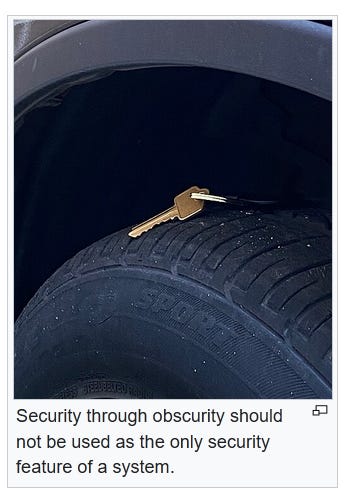
Relying on secrecy means that the system falls apart the moment anything leaks and, on the internet, everything leaks. Google and Bitwarden both have big signs with blinking lights saying “Hey, our servers have billions of people’s login information. Anyone want a piece?” As far as I can tell, Bitwarden has never been hacked, but password management companies Norton LifeLock, LastPass, and 1Password have all had break-ins, and the last time Google had to announce a data breach was three weeks ago.2
Plus: a system that relies on obscurity is never open for outside analysis or evaluation; you just have to take it on faith that it’s secure. When Google tells me they have “industry-leading security infrastructure,” I am inclined to believe them – after all, they’re a massive tech company with near-infinite resources, and I’m sure their cybersecurity team has attracted some world-expert cryptographers. But that’s all I have to rely on: an appeal to authority and very little hard data.
Google has had at least eight data breaches in its history, proving that, while industry-leading, their security infrastructure ain’t perfect. I’m also more than a little concerned by the fact that Google Password Manager is set by default to a less secure operation. What do the world-expert cryptographers at Google say about that one, and is Google’s management listening? I trust that Google has the ability to protect my data, but I question if they have the motivation.
The editor-strangers of Wikipedia teach me one final cryptography concept, Kerckhoffs's principle: an encryption system should be secure, even if everything about the system (excerpt for your personal key) is public knowledge. An open-source password manager like Bitwarden is like a Kerckhoffs dare: it says, please take a look at our encryption system.
I don’t understand that incredibly complicated Bitwarden description I quoted up top, but that’s ok. It’s not there for me; it’s for the hackers, cryptography experts, and puzzle-obsessed nerds of the internet. They’ve spent the better part of a decade picking over Bitwarden’s system and trying to find fault. I don’t understand what they’re doing, but they’re doing it in public and they’re open to telling me about it, and that reassures me.
I’ll never know enough to be truly independent on the internet – no one will be – but I can make smart choices about who I trust, and I can look at what they’re doing to earn that trust, with a track-record of reliability and transparency. I can do my own research, I can listen to the experts, and I can also listen to the multiplicity of voices of the internet, and see what opinions are rising up from the crowd.
And sometimes, when it gets too overwhelming and the information is too dense, I can take a leap of faith, and rely on the kindness of internet strangers.
Good principles for passwords. Longer passwords are harder to crack than shorter passwords, and special characters make them harder to crack too. But also, don’t just use garbled nonsense if you need to be able to remember your password – and you really, really need to remember the password that unlocks your vault! Many passwords can include spaces and punctuation, so I recommend just making your password a full sentence that only you would know. Also write it down somewhere, on paper, and keep it in a secure location.
If you’re paying attention, you’ll know that all passwords stored on Bitwarden vaults are already encrypted, with no record of the key, so what’s the problem with them being stolen? Even if these passwords can’t be decrypted by modern computers, technology is constantly evolving. With quantum computing, who knows? There’s a whole branch of surveillance called Harvest Now, Decrypt Later, as in, “We can’t do anything with this data yet, but let’s just take it anyway and hold onto it, and in a few years, we’ll see….”
Also, while leaks are a fact of life on the internet, repeated data breaches might suggest more general problems with cybersecurity, which aren’t ideal for a password manager.
Comments
Nothing yet. Say the first thing.
Sign in to join the conversation.