
Transparent videos require specific formats like WebM with VP8 codec or MP4 with HEVC (H.265) codec, which aren't universally supported across all platforms and browsers.
To work around this, we need to create a custom code component that supports multiple video formats. This approach ensures broader compatibility and allows for transparent video playback in Framer projects/websites.
The following code demonstrates a custom video component that supports both MP4 (HEVC) and WebM formats:
import { addPropertyControls, ControlType } from "framer"
export function MyVideo(props) {
    return (
        <video
            autoplay="autoplay"
            style={{ objectFit: "contain", ...props.style }}
            loop
            muted
        >
            <source src={[props.movFile]} type={["video/mp4;codecs=hvc1"]} />
            <source src={[props.webmFile]} type={["video/webm"]} />
        </video>
    )
}
MyVideo.defaultProps = {
    movFile: "",
    webmFile: "",
}
addPropertyControls(MyVideo, {
    movFile: {
        type: ControlType.File,
        title: "MP4",
        allowedFileTypes: ["mp4"],
        defaultValue: "",
    },
    webmFile: {
        type: ControlType.File,
        title: "WEBM",
        allowedFileTypes: ["webm"],
        defaultValue: "",
    },
})
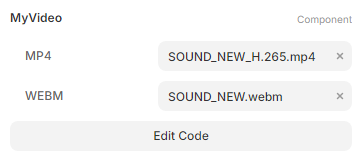
This will create a custom component offering 2 video uploads. Both videos will appear in your HTML. Browsers will automatically fallback to the format they support best.
Comments
Nothing yet. Say the first thing.
Sign in to join the conversation.