
My dear substackers,
Ask and you shall receive! I have turned my personal notion library catalog into a template for you to use in your own Notion workspace. I have included a few random books within the template pre-built as examples so you can see how the books populate in the reading tracker dashboard.
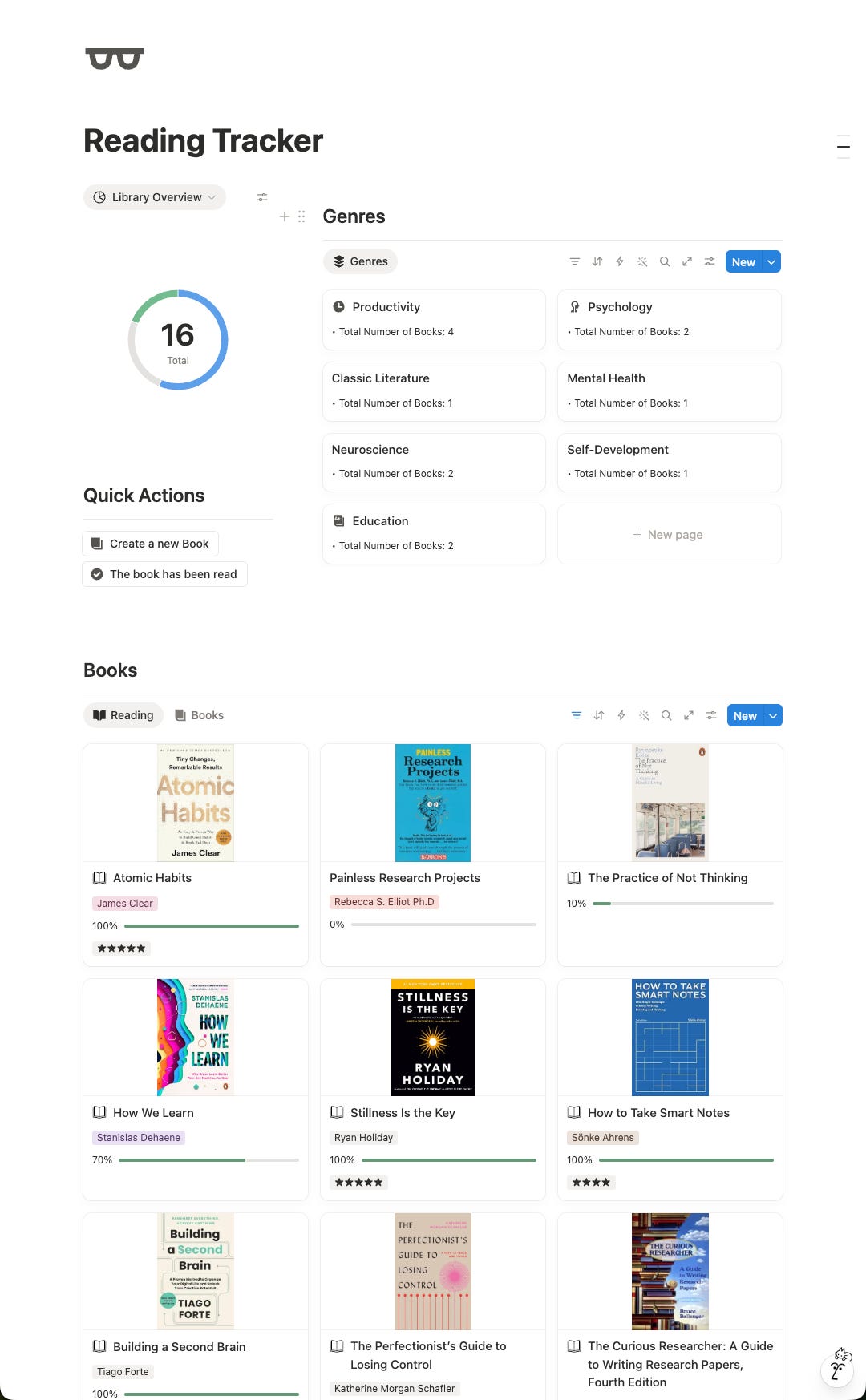
This Reading Tracker Template is designed to help you organize your personal library, track your reading progress, and organize your library by genre. The main dashboard brings together three key views: a library overview chart, a genre gallery, and book galleries for your catalog.
The Library Overview chart summarizes your books by reading status, so you can quickly see what you have not started, what you are currently reading, and what you have finished. The Books section displays your library as visual cards using each book’s cover image, while the Reading view highlights books currently in progress.
Each book entry lives in the Library Catalog Template database. Use it to store the book title, author, cover, description, summary, genre, reading status, total pages, pages read, completed date, and rating. The template automatically calculates reading progress by comparing Pages Read with Total Pages, making it easy to keep an up-to-date percentage as you read.
Genres are managed in the Genres Template database. Each genre page can be connected to books in the library, and the genre gallery shows how many books are linked to each genre. This creates a simple browsing system: add books to the library, assign them to genres, update their status and page count as you read, then rate and summarize them when finished.
The hidden Databases toggle at the bottom stores the source databases that power the dashboard views above. The quick actions are included to make adding new books or genres faster from the template’s main page.
If you use Notion as your knowledge management system, add a property field in your library catalog database (a relation property) and link it to your Knowledge Vault as a two-way relation. This way, notes you take on the books you read can be easily identified by their source using your catalog.
If you missed the setup, tutorial, and template for a Notion based knowledge vault, you can find it here:
Comments
Nothing yet. Say the first thing.
Sign in to join the conversation.