
That is not an exaggeration. Every time you copy a student’s name into ChatGPT, Claude, or Gemini, that name leaves your computer. It lands on a server you do not control. It gets processed by a company that did not sign your district’s data-sharing agreement. And there is no undo button.
According to Chalkbeat’s reporting on AI and student data, teachers often are not trained on how to use AI tools in ways that protect student privacy. Many are providing sensitive personal data, including grades, family information, and birth dates, to these platforms without realizing the risk.
I know this because I run a school. I watch teachers do brilliant work with AI every day. Personalized feedback in minutes. Differentiated lesson plans before lunch. Real instructional gains. But I also watch them paste student rosters straight into the chat window, and that keeps me up at night.
So I built something about it.
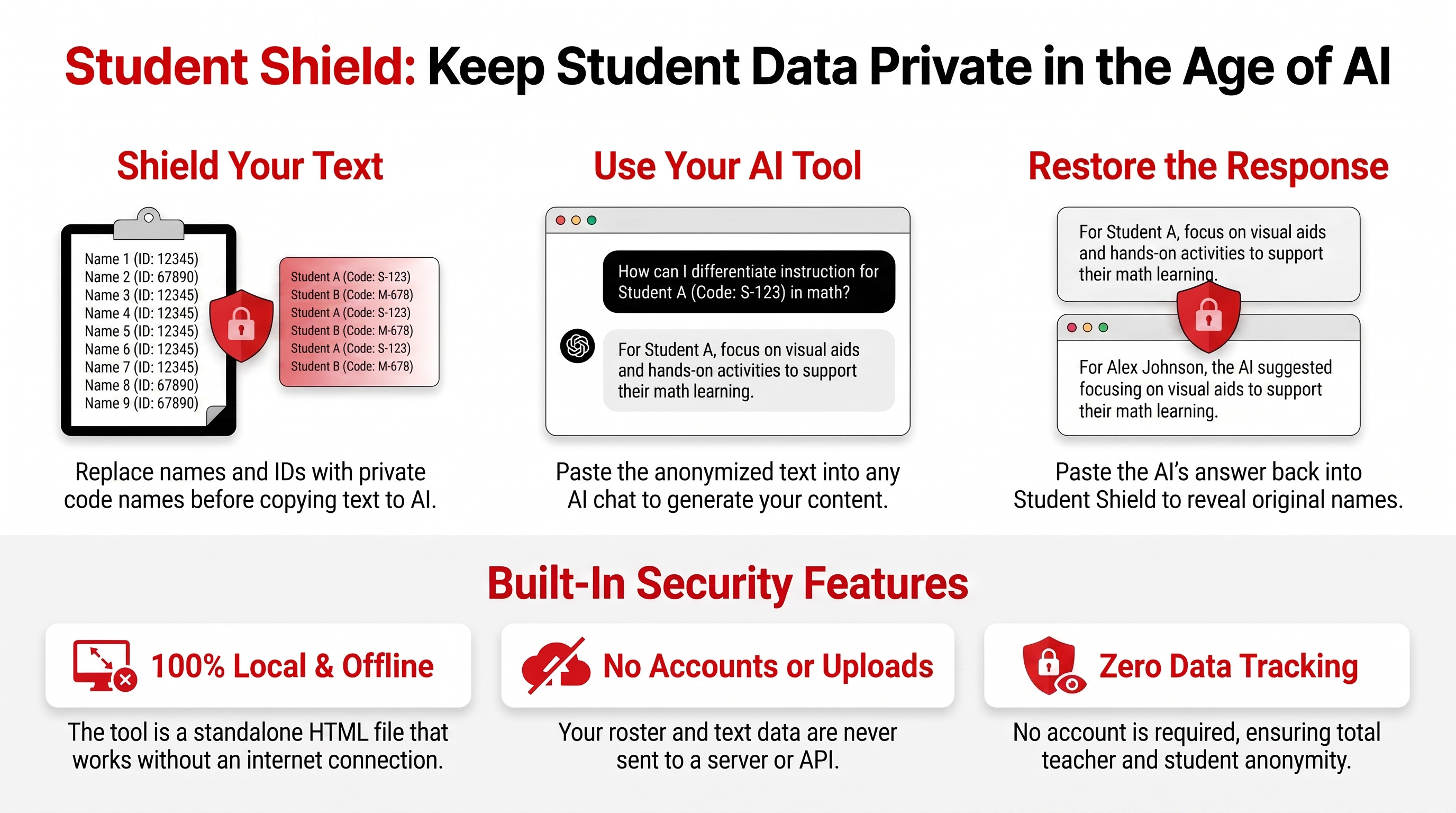
Student Shield is a free, single HTML file. You download it. You open it in your browser. You turn off your Wi-Fi. It still works.
That last part matters more than anything else I can tell you about it.
The tool replaces student names and ID numbers with code names before you paste anything into AI. When the AI sends back its response, you paste that response into Student Shield and it swaps the code names back to real names. Locally. In your browser. Offline.
The AI never sees your students. It processes the logic, the rubric, the feedback structure. It never learns the person.
Most EdTech tools need an internet connection because they run on someone else’s server. That is the whole problem. The moment your data travels to a server, you have lost control of it.
Student Shield does not call an API. It does not load a website. It does not phone home. The core privacy functions run entirely inside your browser using local JavaScript. Your roster never leaves your machine.
This is not a workaround. It is a design decision. The safest data transfer is the one that never happens.
The NEA’s guidance on student and educator data privacy reinforces why this matters: educators need tools that keep student data under their direct control, not tools that require trusting a third-party server.
There is no sign-up. No “Sign in with Google.” No email collection. No analytics dashboard watching how you use the tool.
You download one file. You own it. You control it. If you close the tab, your session is gone. If you want to save your roster for tomorrow, you download an optional key file that stays on your hard drive.
This is what data sovereignty looks like in a classroom.
The workflow has three steps. All of them happen on your computer.
Step 1: Build your roster. Paste your student names and optional ID numbers into the tool. It generates a unique code name for each student. Download the key file so you can reload your roster next time.
Step 2: Shield your text. Paste the text you want to send to AI, whether that is student writing samples, rubric-based feedback requests, or lesson differentiation prompts. Student Shield swaps every real name for its code name. Copy the shielded text and paste it into ChatGPT, Claude, Gemini, or any other AI assistant.
Step 3: Restore the response. When the AI finishes, copy its output. Paste it back into Student Shield. Click restore. Your students’ real names appear in the feedback, and the AI never saw them.
Three steps. Zero data transmitted. Full personalization preserved.
This tool is for the 4th-grade teacher writing reading-level feedback for 28 students at 9 PM. It is for the high school counselor drafting college recommendation letters. It is for the instructional coach building observation notes. It is for the assistant principal writing behavior intervention plans.
It is for anyone who needs AI to do the heavy lifting without handing over the one thing they are legally and morally obligated to protect: a student’s identity.
As SchoolAI’s privacy guide for educators notes, anonymizing student work before using AI tools is a key step in keeping student privacy intact. Student Shield automates that step and makes it reversible.
I am a problem solving principal. I am not a consultant who left the building five years ago. I ran a real campus with real paperwork, real parent emails, and real 5:30 AM sick-day scrambles. I succeed in turn around work and know the real struggle.
The tools I build come from that work. They solve problems I actually have. Student Shield started because I needed a way to let teachers use AI without creating a compliance nightmare. Ai is changing education and there may be some real benefits to supporting student achievement. As I am currently looking for a job and no vendor solved it. So I built it myself.
Student Shield is free. It is the starting point.
I am building more workflows for teachers and counselors at thecoachjeffery.gumroad.com. Tools that handle the tasks that eat your evenings and weekends, without ever putting a student’s name at risk. Each one is designed the same way: local-first, offline-capable, privacy by default.
These workflows cover real problems classroom teachers and school counselors face every week: grading pipelines, feedback generation, recommendation letter drafting, behavior documentation, and IEP support. Same philosophy as Student Shield. Your data stays on your machine.
AI is becoming a standard classroom assistant. That is not going to reverse. FERPA-protected education records cannot be sent to ChatGPT, Claude, or Gemini without either prior written consent from the parent or eligible student, or a properly documented “school official” designation.
The question is whether we are building a digital footprint for our students that they can never erase, or whether we are protecting their privacy at the local level.
Student Shield puts that choice back in the teacher’s hands. One file. No account. No internet required.
Download it. Try it with your Wi-Fi off. That is the whole point.
Student Shield is a local-first privacy tool for K-12 educators. It helps keep student names and IDs out of AI chats. It does not replace your district’s data policy. It is a practical defense, not a substitute for institutional compliance.
Browse more educator tools built by Coach Jeffery.
Listen to the Flipboard EDU Podcast for more conversations about AI, privacy, and practical leadership in schools. Subscribe on Substack or find us on Flipboard.
No posts
Comments
Nothing yet. Say the first thing.
Sign in to join the conversation.