Hey there, I’m Eeshan. I write about local AI, data science, and how to use agentic tools, with a bias towards human-centric approaches to working with new technologies.
You can find what I’ve been building at eeshans.com.
Disclaimer: I used AI to research this article, but then rewrote the whole thing by hand. This is the way now.
I didn’t start my Substack to regurgitate news stories found on X in my own (AI-written) words. Yes, I’m throwing shade at a LOT of people I see online especially on LinkedIn and Substack. It’s just how things are today. I’m just a little frustrated after seeing the same freaking story re-posted by a different person (or bot) for the 15th time on my feed, until the next new story comes out (the Claude Fable 5 fiasco I guess is the new hot one).
Having said that, there is a positive development that happened in tech recently that I do want to comment on. This is regarding Apple’s recent WWDC developer conference where they usually showcase the new shiny tools and tech they make available to developers around the world. What caught my attention was this screen-grab from one of their videos showing some tools that I am very very familiar with.
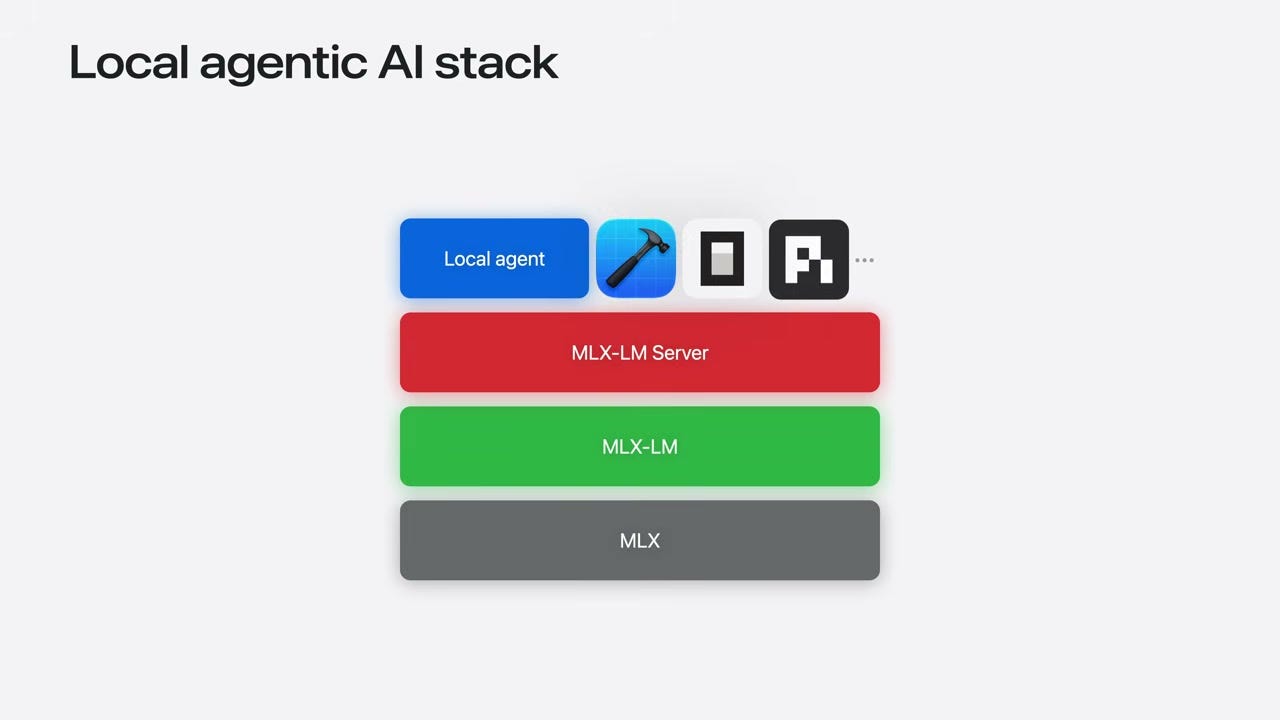
They did a whole session on local AI on your mac. And they specifically named Pi and OpenCode (the same coding tools I use every day and wrote about in Series #2 and #3) as first-class citizens in their local AI stack.
I was like wow! Finally this is catching on. And as we all know, Apple may not be the first to any new tech, but their implementation is usually top notch, and more importantly, their billions of device owners just adopt whatever they put out into the world. This was very positive news to me!
They ran a session called Run local agentic AI on the Mac using MLX. They laid out a four-layer stack for running AI agents entirely on your Mac:
MLX: their open-source framework for Apple Silicon (Metal acceleration, unified memory, the stuff I’ve been benchmarking for months)
MLX-LM: load, run, quantize, and fine-tune models from HuggingFace
MLX-LM Server: an OpenAI-compatible HTTP server so any agent can talk to your local model
The agent: any framework that speaks the OpenAI protocol. Pi, OpenCode, etc.
They demo’d an agent building an entire SwiftUI app from scratch, locally. The model ran on the Mac, the agent wrote the code and iterated while fixing it’s own errors. No round-trip to a data center or $200/month subscriptions was needed.
They also announced that the Foundation Models framework is expanding to work with any LLM, local or cloud. This is a lot more developer focused, but they showed four options: the on-device system model, Private Cloud Compute, Core AI (bundle your own local model into an app), and MLX (thousands of HuggingFace models). They all conform to the same protocol, so you swap one for another with a single line change. This is good because it makes it easier for users to choose what cloud or local models they want to use for their applications.
Apple also casually mentioned that Ollama, LM Studio, and vLLM all build on MLX. If you’ve been using any of those (and if you read my setup guide, you probably have LM Studio installed already), you might already be running on MLX without knowing it.
Of course, they are also selling their new M5 chip-based laptops and servers, so you just take that at face value. The good thing though is that the biggest consumer tech company in the world just told millions of developers that they are interested in local AI, and it’s not just a niche for the r/LocalLLaMA crowd. This is still very promising because if local AI takes off on iPhones and Macbooks, that’s when it truly becomes mainstream.

Earlier this year I wrote a post Local AI matters, but it’s not ready yet where I mentioned that local AI models are a necessary insurance policy, but they’re pretty much out of reach for the average person on consumer hardware.
I’m also not an advocate for spending tens of thousands of dollars on buying GPUs and building mini data-centers inside your own homes. I’ll leave that for the true enthusiasts.
And in late April, after the release of the magnificent Qwen 3.6 and Gemma 4 series of small models, I started a series of posts advocating for the everyday person to start testing local models. With those new models, and even more efficient recent breakthroughs with MTP (multi-token prediction for faster throughput) and QAT (quantization aware training for smaller memory footprint), the local models are getting even more efficient on small consumer RAMs and GPUs.
Apple talking about it is a definitely validating for me. But make no mistake, this is very much a strategic decision from Apple, who probably has the largest market share and brand loyalty in consumer hardware, so it makes complete sense for them to continue increasing the value proposition of their hardware. This is also why it seems they’ve stayed out of the AI arms race compared to other big tech companies, because they already have the distribution that other companies yearn for. Whatever the incentive, this one is far more humanistic compared to the direction from most of the other AI companies.
Here’s what the WWDC session doesn’t cover: getting to those “three commands” still requires you to have the right model downloaded, the right backend installed, the right server configured, and the right settings for your specific hardware. To run the MLX server, you need to know Python and the command line. LM Studio and Ollama are user friendly but you’re not able to connect to a good coding harness that easily (I covered all of this in Series #2, and even then, it’s a lot.)
For the regular person (the non-tech-bro, the daily ChatGPT user who just wants to try this out), the gap between “Apple says it’s easy” and “getting it to work on my laptop” is quite large.
Even after going through the pain of setting up your model backend (MLX, Ollama, llama.cpp), setting up all the server flags, and downloading the “right” model variant, it’s not enough. Local models are free and fully private - that’s the main value proposition. But they are nowhere close in terms of the ease of use, and features. You still need to be technical enough and in the loop with the local AI development, to be able to figure out the right setup.
But as we are seeing things play out every week, there is a massive tradeoff in terms of cost, privacy and autonomy when you choose the frontier models. As far as I’m concerned, I feel like I HAVE to find a way to make local models be just “good enough” for my use cases personally and professionally.
Regarding that learning curve, it’s one of the problems I’ve been working on recently. Thinking from a user-friendliness perspective, I just want something that automatically sets everything up and finds the optimal way to run a local model on my laptop. Last week I built minmal-ai, a privacy-first CLI tool for running local LLMs. It’s a single command entry point:
Install:
curl -fsSL https://raw.githubusercontent.com/eeshansrivastava89/minimal-ai/main/install.sh | bash
Run:
minimal-ai
Auto-install all dependencies: First run walks you through installing anything missing: llama.cpp runtime, Pi, a model backend.
Auto-detection of models & configs: It auto-detects everything. Scans for GGUF models in LM Studio and Hugging Face cache directories. Checks if you have Ollama or oMLX installed and active. Reads model metadata (quantization, context size, vision mode) directly from the files. I’ve tried to abstract way all the config as much as possible.
Inference backends: llama.cpp (the most widely used local inference engine, supports CPU, Apple Silicon via Metal, and CUDA), Ollama (pull and run models with a single command, manages downloads and serves an OpenAI-compatible API), and oMLX (user-friendly MLX server with disk caching).
Model downloads: LM Studio, Ollama, or oMLX.
Coding harness: Pi (I’m biased towards this one. It’s my daily driver and especially good for local models.)
minimal-ai is my first attempt at bridging the gap between all the messy config and getting to just using the models. I’ve only tested this on mac, and it’s a personal project, but I’ll expand this to have all my projects linked to it as a local AI applications suite (sidequests, howiprompt, local-llm-visual-benchmark).
If you’ve been reading this series, and want to try out local models in the easiest way possible, try this out. I’ll write more about this in a separate post, but for now you can find instructions on Github.
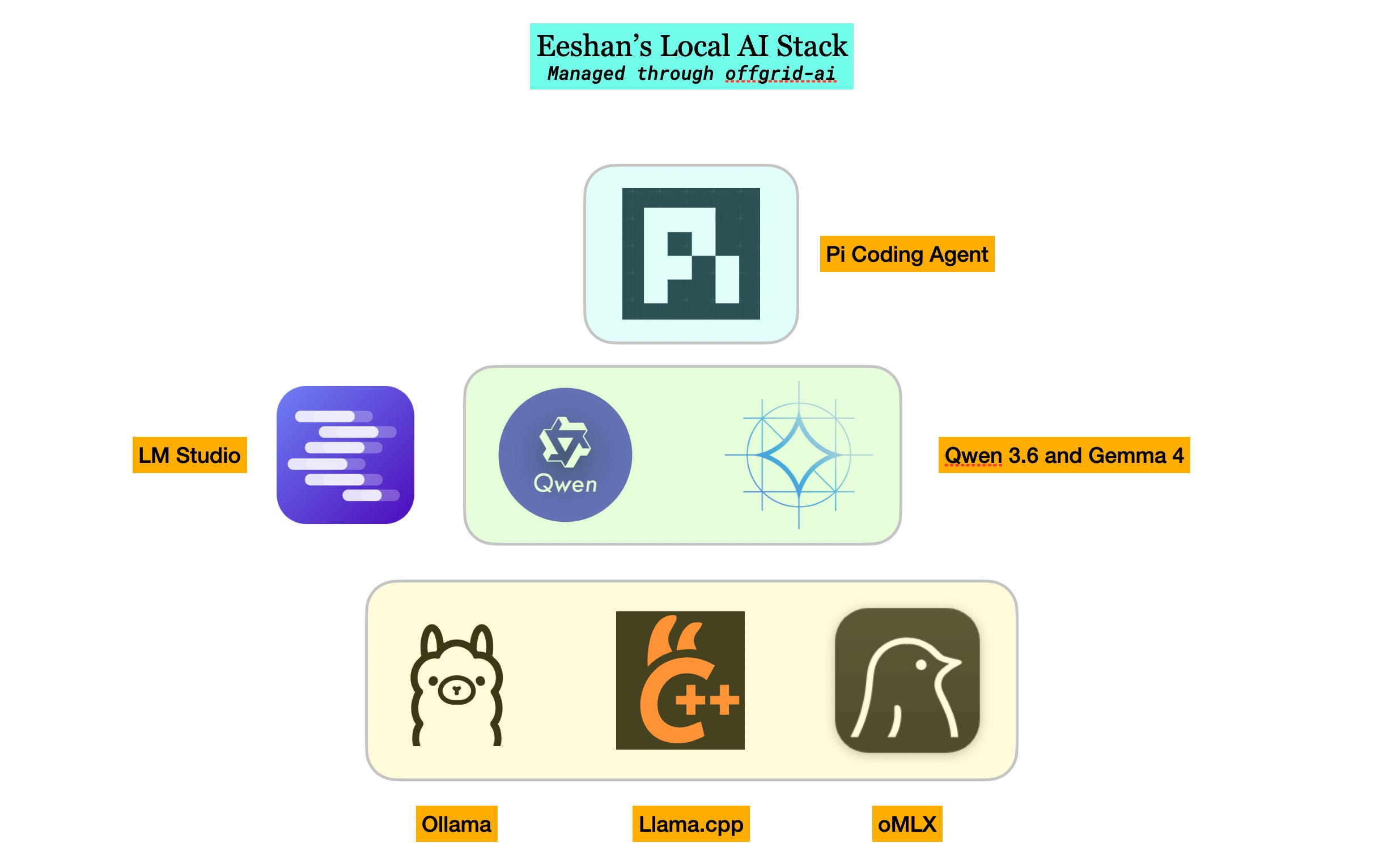
At the beginning of the year, I wrote that local AI was “out of reach for the average person.” Just a couple of months ago I wrote that “it’s time for the average person to start testing local models.” Thanks to Qwen and Google Deepmind’s open-source labs for keeping this development going!
The models are now good enough for daily use in narrow use cases, especially when paired with your own skills as more of a supercharged auto-complete. If Apple is getting into the game, then the tides are definitely shifting. The setup and learning curve is very painful, but that’s why I think simplifications like my own minimal-ai will help the average person get into local models more.
If you want to try:
minimal-ai: one command to get running
local-llm-visual-benchmark: see how models perform on visual coding tasks
This is part of my Local AI series. Previous posts: #1, #2, #3, #4.
Comments
Nothing yet. Say the first thing.
Sign in to join the conversation.