
](https://edeca.net/media/headers/dir.jpg) Image credit: pixabay
Image credit: pixabay
David Cannings
Sep 21, 2024 1 min read Computing
Today I wanted to make a web service internet facing without exposing the origin server. Cloudflare offers cloudflared, a tool that tunnels traffic from the origin server to Cloudflare’s network. This gives the benefit of Cloudflare’s protection.
Below is a simple Ansible task that will:
- Add the Cloudflare repository.
- Install the
cloudflareddaemon. - Configure the tunnel in an idempotent manner (by checking for the
systemdservice file).
The variable cloudflare_tunnel_token needs to be configured, likely in host_vars as tunnels will typically be 1:1 between origin and Cloudflare.
---
- name: Add Cloudflare signing key
  ansible.builtin.apt_key:
    url: https://pkg.cloudflare.com/cloudflare-main.gpg
    state: present

- name: Add Cloudflare repository
  ansible.builtin.apt_repository:
    repo: deb https://pkg.cloudflare.com/cloudflared bookworm main
    state: present

- name: Install cloudflared
  ansible.builtin.apt:
    name: cloudflared
    state: present

- name: Connect to tunnel
  ansible.builtin.command: >
    cloudflared service install {{ cloudflare_tunnel_token }}
  args:
    creates: /etc/systemd/system/cloudflared.service
Once run it should appear in the Cloudflare dashboard, where individual services can directed to the origin.
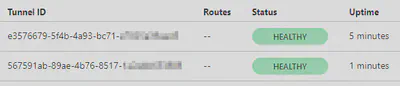
To change the token in future, remove all files /etc/systemd/system/cloudflare* and run the task again.

David Cannings
Cyber Security
My interests include computer security, digital electronics and writing tools to help analysis of cyber attacks.
Comments
Nothing yet. Say the first thing.
Sign in to join the conversation.