
Welcome to Episode 1 of 50 Shades of AI.
I was stuck on Level 1 for 4 months. I'm somewhere between 5 and 6 now.
This is everything I wish someone had told me on day one.
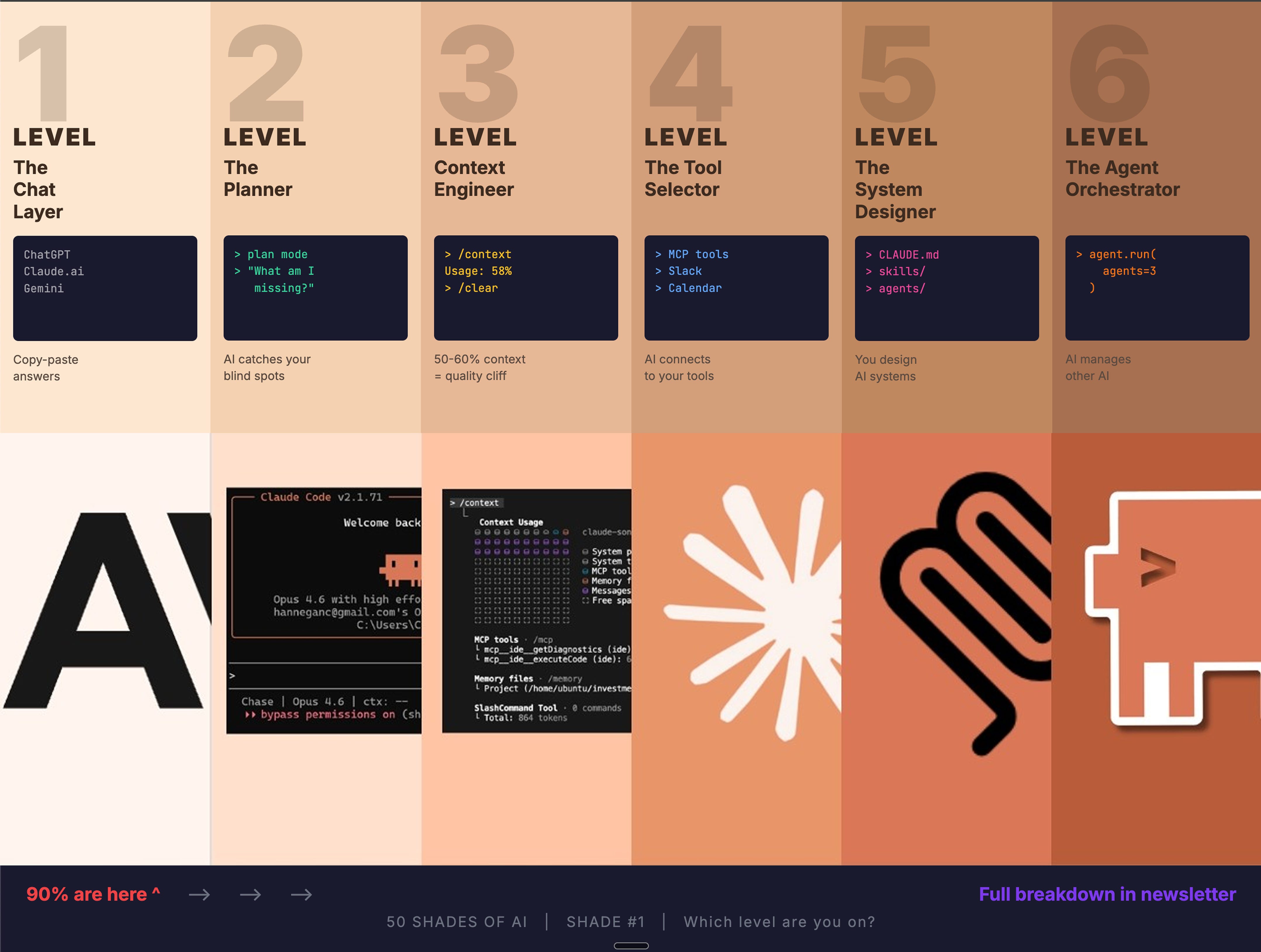
1. The 6 Levels (with traps at each level)
2. Getting started with Claude Code
3. Haiku vs Sonnet vs Opus -- which to use, how to save money
4. Claude Code vs Copilot vs Cursor vs Cowork
5. Skills, sub-agents, and agent teams
Two of my friends. Same job title. Same company.
One uses AI to send better emails. The other used AI to replace the entire email team.
Same tools. 6 levels apart.
Here's the full breakdown.
You type a command. AI replies. You copy-paste it somewhere.
ChatGPT, Claude.ai, Gemini -- used like a search engine with better answers.
"Build me a website." Maybe you even have a feature list. But you're telling, not asking.
The Trap: Regression to the Mean.
Your instructions have gaps. AI fills those gaps with the most average output it can produce.
That's why every AI-built website has the same purple gradient, same font, same icons.
That's not a design trend. That's what "average" looks like.
How to escape:
Be specific about what success looks like. "Drive email signups" beats "build a website."
Before asking AI to build something, look at 3-5 examples of what "great" looks like.
Get comfortable with basics. You don't need to code, but knowing what a "terminal" or "file system" means goes a long way.
You stop giving orders. You start having a conversation.
The simplest unlock? Plan Mode. Instead of AI executing your commands, it asks questions first. Pushes back. Forces you to think.
Phrases that changed everything for me:
"What am I missing here?"
"What would someone who's an expert think about this?"
"What are the unintended consequences?"
"Be adversarial -- tell me what's wrong with my plan"
This is where AI stops being a tool and starts being a thinking partner.
The Trap: You're asking great questions but only giving AI words. No files, no screenshots, no examples. Words alone aren't enough to get great output.
Pro tip: Use tab+shift to start this in claude code terminal
Here's the thing nobody tells you about AI.
It has a memory limit. And when you hit it, quality falls off a cliff.
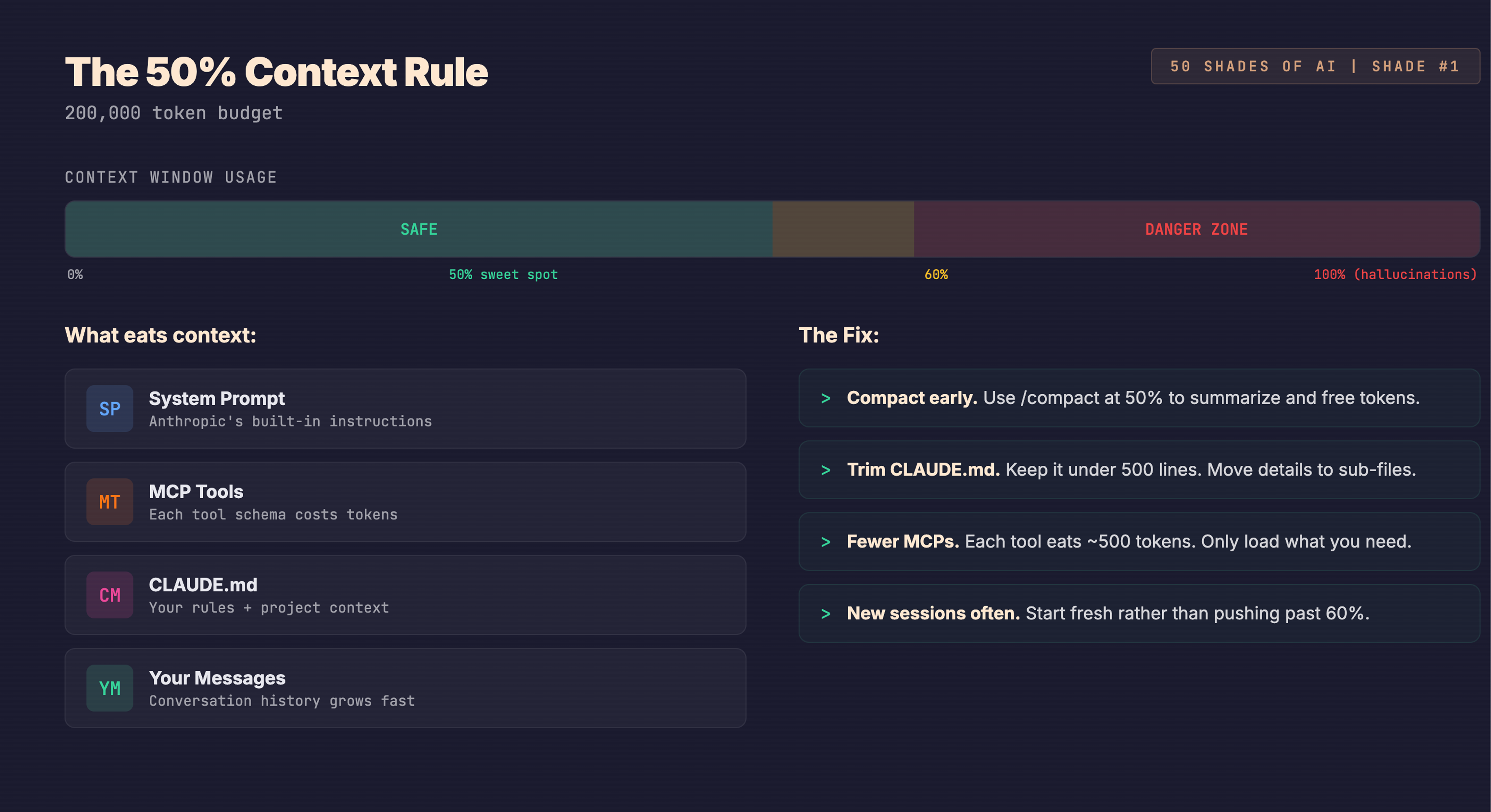
Think of it like a whiteboard. AI can only see what's on the whiteboard right now. Every message you type, every file it reads, every tool it loads -- all takes up space.
Claude Code gets about 200,000 "tokens" per session (tokens are just small chunks of text). After you use 50-60% of that space, AI starts forgetting things. Hallucinations increase. Instructions get ignored.
This is called "context rot."
Here's the kicker -- even models with massive context windows (1 million tokens) still degrade around the same 50% mark. Bigger whiteboard doesn't fix it.
What to do:
Clear your session at 50%. Type /clear before things get messy. Don't wait for auto-compact.
Keep your instructions lean. There's a file called CLAUDE.md where you store preferences. Overstuffed instruction files actually reduce success rates while costing 20% more.
Show, don't tell. One good example teaches AI more than a paragraph of instructions.
The Trap: Making your CLAUDE.md a 2,000-line novel. Less is genuinely more.
AI can connect to your calendar, databases, project tools. Hundreds of plugins and extensions exist.
You feel like a kid in a candy store. Every new plugin feels like a superpower.
The Trap: "Just one more plugin, bro."
More tools does not mean better output. Loading AI with 20 plugins makes it confused and eats your context space.
How to be smart about it:
Start with 2-3 tools that match what you actually do. Not 20.
When AI does something you don't understand, ask "why?" and "how?" -- it's an infinitely patient teacher.
Many fancy frameworks are becoming unnecessary as AI tools absorb their features natively.
You notice you're repeating yourself every session. Same preferences, same workflow, same standards.
So you stop repeating. You turn workflows into reusable "skills."
A skill is just saved instructions. Think of it like a recipe card. Instead of explaining your cooking process every time, you hand AI the recipe and say "follow this."
You want AI to always check for errors before finishing? Create a skill called /review. Now you type that and it follows the process perfectly. Every time.
You can even create skills that create other skills. There's a built-in tool called Skill Creator that helps you build and test custom workflows.
The Trap: Too many skills. If AI has 100 recipe cards, it gets confused about which one you want. 5-10 well-crafted skills beat 50 mediocre ones.
My skills look like: /dsm (i.e. daily stand up) → where it capture all the task for the day from notion, calendar, email and then tell me what to do
or like /nanobanana → this helps me write prompt in a specific style and create 5 variation and save in my file in just single command.
You're not doing the work anymore. You're managing AI agents that do the work.
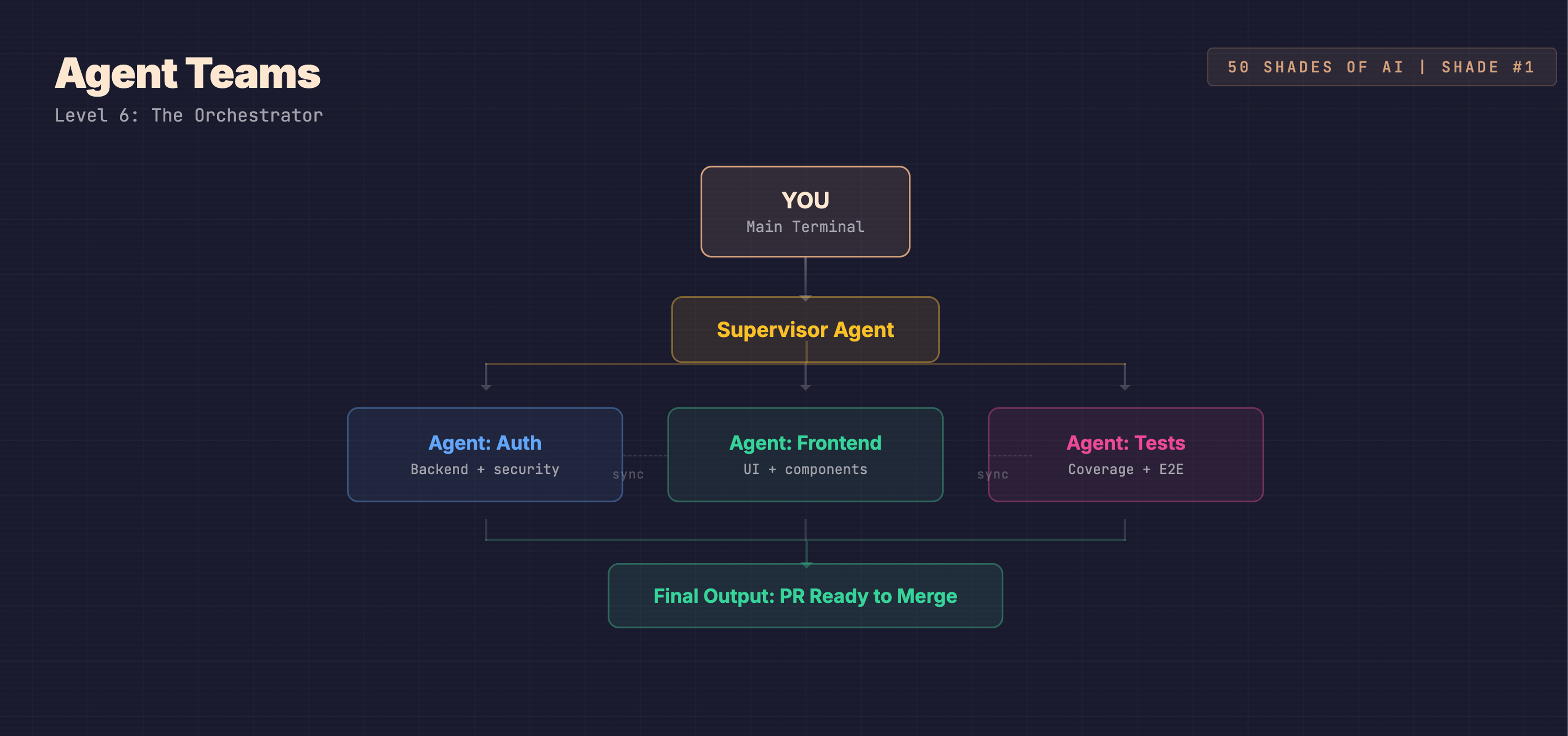
Think project manager. You don't write the code or run the tests. You assign tasks to specialists, and they coordinate to deliver the final product.
4 ways to do this, simple to advanced:
6a -- Multiple Sessions. Open 2-3 AI windows on the same project. Manually tell each one what to work on.
6b -- Work Trees. Each AI instance gets its own copy of the project. Like giving each team member their own desk. No one steps on anyone's work. When done, merge everything.
6c -- Sub-agents. Tell your main AI: "Spin up three helpers. One researches, one builds, one tests." It handles coordination.
6d -- Agent Teams. The bleeding edge. Sub-agents that actually talk to each other, coordinated by a supervisor. You say "build me a login system with UI and payments." It spawns three agents plus a supervisor. They communicate, avoid conflicts, hand you a finished product.
The Trap: Diminishing returns past 2-3 parallel instances. 8 terminals looks cool on Twitter. Doesn't make you faster.
Claude Code lives in your terminal (that window where you type commands). Unlike ChatGPT which lives in your browser, Claude Code sits inside your actual project. Reads files, edits them, runs programs, creates things -- no copy-pasting.
What you need:
Node.js installed (free -- Google "install Node.js")
A terminal (Terminal on Mac, WSL on Windows)
I personally use ghoosty and zed for running my claude
An Anthropic account
Setup: Open terminal, type npm install -g @anthropic-ai/claude-code
Then go to your project folder and type claude. It asks you to sign in through your browser. Done.
5 commands to learn first:
/init -- AI scans your project and sets up its instruction file
/model -- Switch between Haiku, Sonnet, Opus
/context -- Check how much whiteboard space you've used
/clear -- Wipe the whiteboard and start fresh. Your most important command
/plan -- Plan mode. AI collaborates instead of just executing
Cost: Pay per use, not monthly. A typical 2-hour session costs $2-5 with Sonnet.
Free walkthrough at ccforeveryone.com.
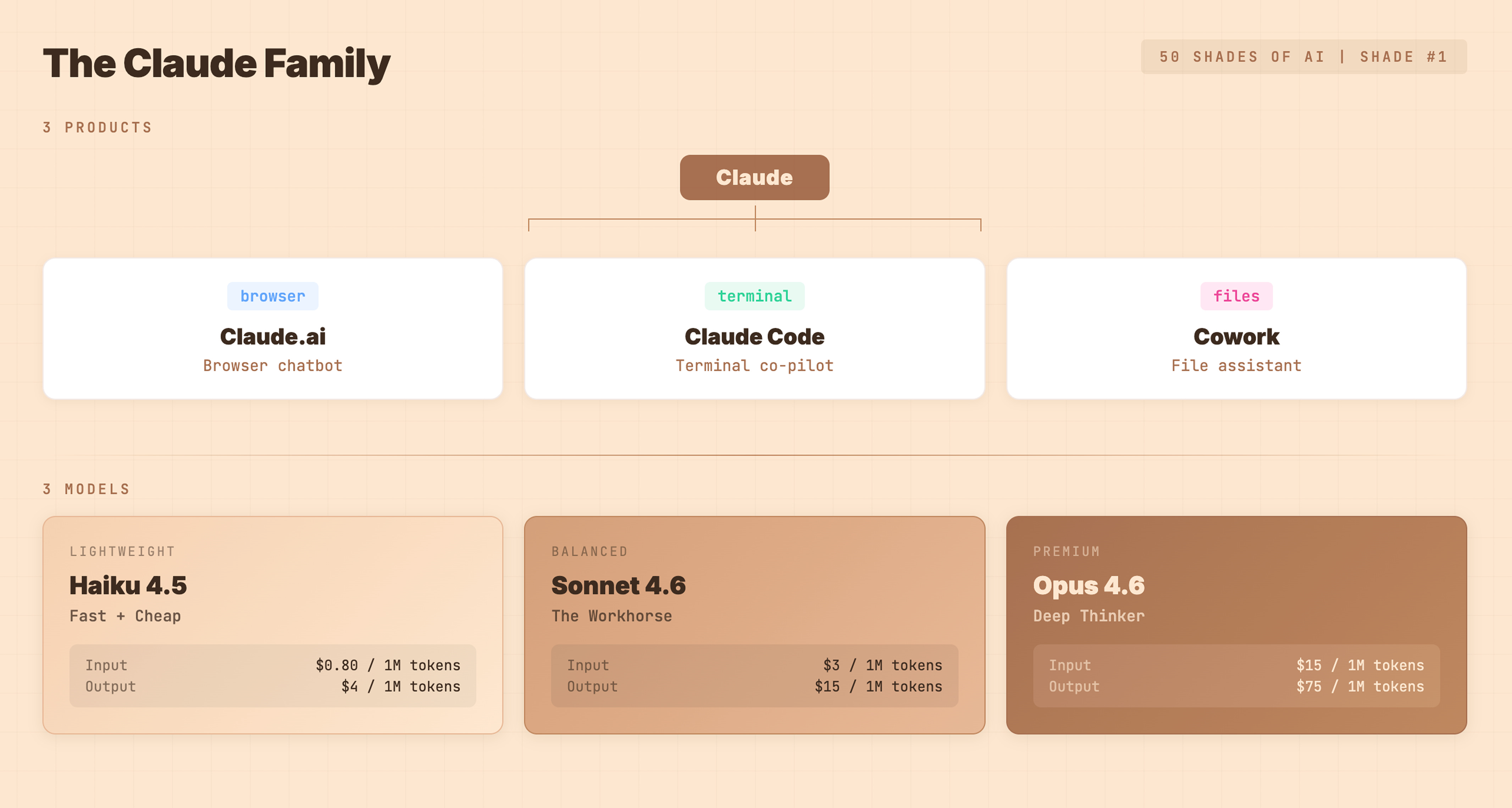
Claude isn't one thing. It's a family.
3 products:
Claude.ai -- Browser chatbot. Questions, writing, brainstorming. What most people know.
Claude Code -- Terminal tool. Reads files, edits code, runs programs, creates pull requests. Gets you to Level 6.
Cowork -- File assistant for non-developers. Creates actual Excel, PowerPoint, Word files.
3 models (the engine options):
Haiku 4.5 -- The hatchback. Fast, cheap. $0.80 per million input tokens. Quick tasks, lightweight work.
Sonnet 4.6 -- The sedan. Best balance. $3 per million input tokens. Main coding sessions. Default choice.
Opus 4.6 -- The SUV. Maximum brainpower. $15 per million input tokens. Complex reasoning. (Though I have max plan so I only use this, ammeeri haha)
Don't use one model for everything. That's like driving an SUV to pick up milk.
Real costs:
Heavy 2-hour session with Sonnet: $2-5
Same with Opus: $10-25
Same with Haiku: under $1
Claude.ai Free Tier -- Limited Sonnet messages daily. No Claude Code access.
Cursor / Windsurf -- AI code editors with free tiers. Visual editor approach, different ceiling.
GitHub Copilot Free -- Autocomplete in VS Code. Level 1 functionality.
There are opensource models too of companies which runs on local (i.e. your machine but to run equivalent smart models you need very big machines, so its better to use these)
Other few option which are very cheap and somewhat less good are qwen and minimax (Gives enough context of $200 claude plan in $20 subscription)
Copilot (GitHub/Microsoft)
Lives inside VS Code. Autocompletes your sentences as you type. Doesn't run commands or manage your project. $10-19/month. Ceiling: Level 1.
Cursor
Its own code editor with AI built in. Can read your codebase, run commands, iterate. $20/month. Ceiling: Level 3-4.
This is a place where you can run multiple company AI’s in single editor.
Claude Code
Lives in your terminal. Full file access, runs any command, creates pull requests. Spawns sub-agents and agent teams. Persistent memory through CLAUDE.md. Pay per use ($2-5 typical session). Ceiling: Level 6.
Cowork
Browser-based. Creates Excel, PowerPoint, Word files. For non-developers. Free (for now). Different category entirely.
This is used for doing the job that you do manually by clicking buttons on your machine.
We will dive deep in each in coming weeks
The real difference isn't features. It's ceiling.
Copilot finishes your sentences. Cursor has a conversation with you. Claude Code manages an entire team of AI agents.
Pick the one that matches where you want to go.
What separates Level 4 from Level 6. Simply explained.
A skill tells AI how to do a specific task, every time, without re-explaining.
You always want AI to check for security issues before finishing? Create a /security-check skill. One command, full checklist, every time.
Where to store them:
Global skills (all projects): ~/.claude/skills/
Project skills (one project only): .claude/skills/
Install Skill Creator via /plugin inside Claude Code to build and test your own.
Your main AI spawns separate helpers for parallel work.
"Research the best auth approach, review my files for problems, and summarize what we've built and run them parallely using agents."
Instead of doing all three sequentially, AI spawns 3 helpers. Each works independently. Main AI collects results.
Sub-agents don't talk to each other. The main agent is the go-between.
Same as sub-agents, but team members actually communicate.
A supervisor sits in the middle. Workers share info and avoid stepping on each other's toes.
When they make sense:
Building features that touch multiple parts of a project.
Research tasks where multiple angles help.
Fixing bugs that span frontend, backend, database.
When to skip them:
Simple changes.
Tasks where parallel work doesn't help.
When watching costs (coordination overhead is real).
You have to explicitly say "create an agent team" -- vague instructions won't activate it.
1 to 2: Stop commanding. Start asking. Use plan mode. "What am I missing?"
2 to 3: Learn context management. Clear at 50%. Keep instructions short.
3 to 4: Add 2-3 tools that match your stack. Not 20.
4 to 5: Turn repeated workflows into skills. Use skill creator.
5 to 6: Start with 2 parallel sessions. Graduate to work trees, then sub-agents, then agent teams.
The progression isn't about more tools. It's about more intentionality.
If this is still not clear you can leave a comment, and I will cover these in more depth in future or will reply to you personally
Quick Recap
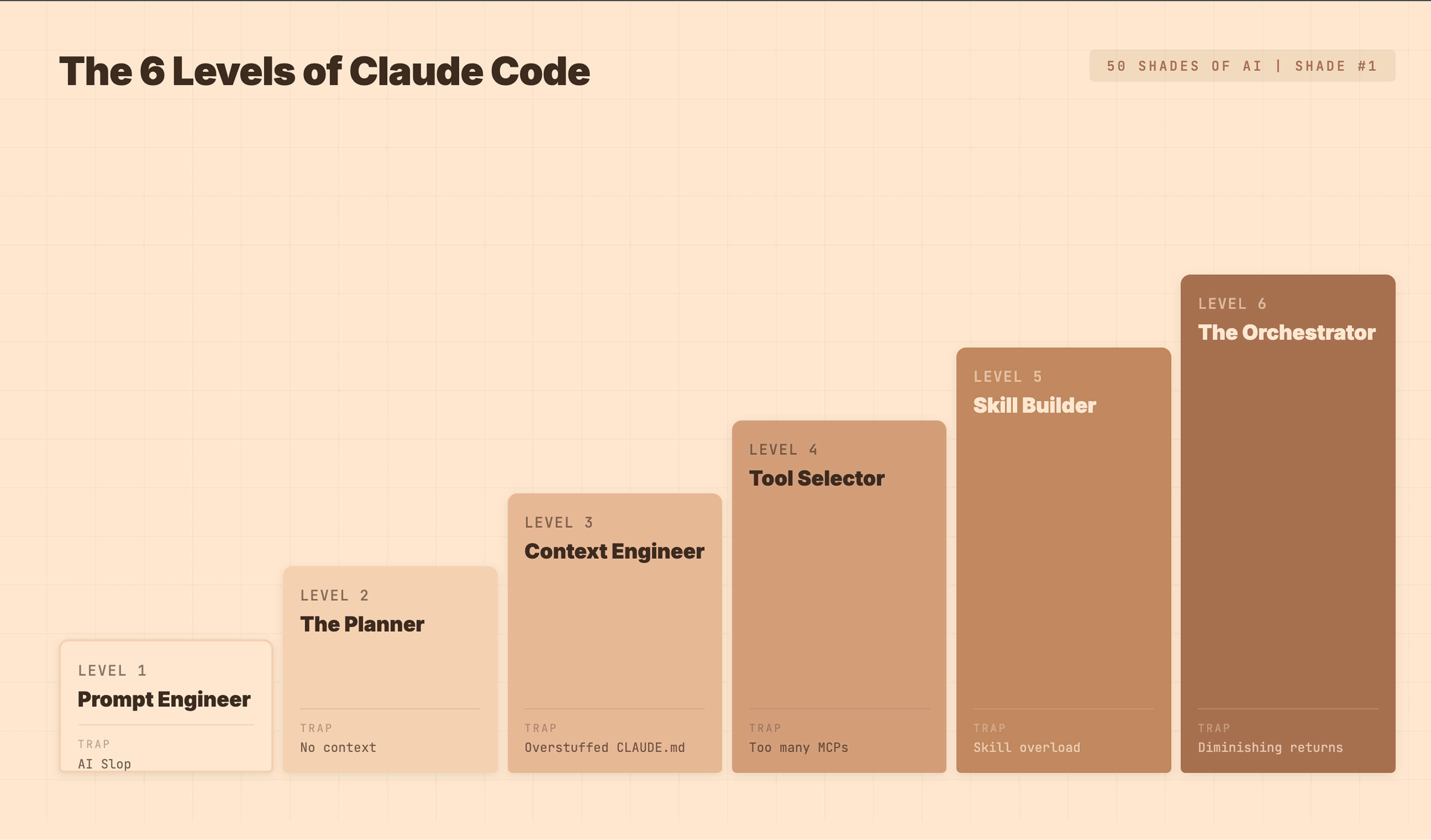
Level 1 -- Prompt Engineer. You command, AI executes. Trap: AI slop.
Level 2 -- Planner. You collaborate through questions. Trap: all words, no context.
Level 3 -- Context Engineer. You manage AI's memory. Trap: overstuffed instructions.
Level 4 -- Tool Selector. You connect real tools. Trap: installing everything.
Level 5 -- Skill Builder. You save reusable workflows. Trap: too many skills.
Level 6 -- Orchestrator. You manage agent teams. Trap: diminishing returns past 2-3.
That's Shade #1. Next week goes deeper into one of these levels with a real build.
Which level are you on right now? And what's keeping you stuck there?
Framework inspired by Chase AI (Carl Vellotti). Also do let me know what you want me to cover in coming weeks Some great free resources to learn more of claude:
https://ccforeveryone.com/
No posts
Comments
Nothing yet. Say the first thing.
Sign in to join the conversation.