
Welcome to Episode 2 of 50 Shades of AI.
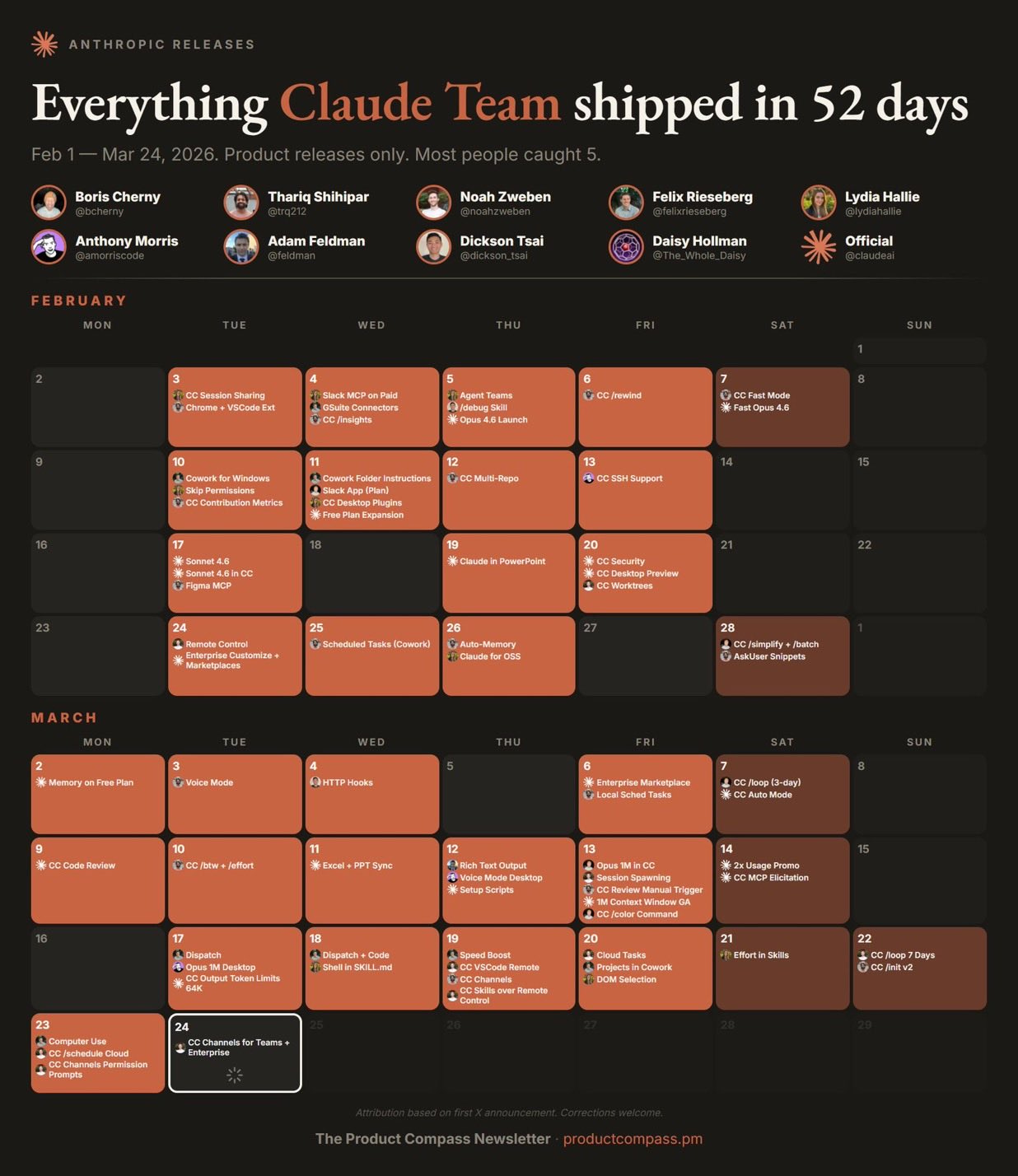
In the LinkedIn post I gave you the top 6. Here's all 26.
Every major feature that shipped between January and March 23, 2026. What each one does, how to set it up, and what's actually worth your time right now.
Bookmark this one. You'll come back to it.
1. The Models: What you're working with now
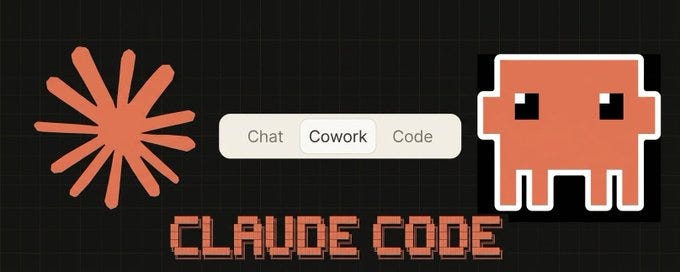
2. The 4 Modes of Claude (most people only know 1)
3. The Big 6 (deep dive from the LinkedIn post)
4. Everything else that shipped for Cowork
5. Everything that shipped for Claude Code
6. Excel, PowerPoint, and the other updates
7. The honest limitations
8. What to try first (by role)
There are 3 model tiers in the Claude 4.6 family. Here's what each one does and when to use it.
Launched February 5. The ceiling.
1 million token context window. 128K max output tokens (double the previous generation). $5/$25 per million tokens. Same price as the last version.
→ When to use: complex analysis across large documents, codebase refactoring, deep research, anything where quality matters more than speed
Launched February 17. Just 12 days later. This is the one most people should default to.
1M context. $3/$15 per million tokens. 64K max output. 30-50% faster than Sonnet 4.5. It matches Opus 4.5 performance in 59% of head-to-head tests. Available for free on claude.ai.
→ When to use: everyday work, quick drafts, standard coding, agent workflows where speed matters
The fast, cheap option. $1/$5 per million tokens.
→ When to use: API developers running high-volume pipelines, subagent tasks where you need speed over depth
This is easy to miss but it matters.
Previously, anything over 200K tokens got billed at a premium ($10/$37.50 per million for Opus). As of February, the 1M window runs at standard rates. No surcharge.
That's roughly 750,000 words of context. Entire codebases. Full legal contracts. Massive datasets. All at base pricing.
Teams that previously built chunking pipelines and summarization workarounds to stay under 200K can now just... load everything.
Claude has 4 modes and most people only know about one.
Chat is the browser/mobile interface you already know. Quick questions, brainstorming, writing. This is Level 1 from Shade #1.
Cowork is the desktop agent. It reads and writes to your actual files. Creates Excel, PowerPoint, Word docs. Executes multi-step tasks autonomously. This is what the LinkedIn post was about.
Code is the developer tool. Lives in your terminal. Sees your codebase, writes code, executes commands, manages entire projects. This is what gets you to Level 6.
Projects are saved workspaces where you upload files and instructions once. Every new chat in that project starts with full context. No re-explaining.
Quick rule: Chat for quick questions. Cowork for real work on your files. Code for development. Projects for recurring work that needs consistent context.
These are the 6 from the LinkedIn post. Now with setup instructions, real prompts, and honest takes on each.
Shipped: January 12, 2026
Before Cowork, using AI at work meant: type a question, copy the answer, paste it into a doc, fix the formatting, repeat 47 times.
Cowork breaks that loop. You give Claude a folder on your computer. An actual folder on your Mac or Windows. Claude gets read and write access to everything inside it. Then you describe what you need. Claude creates real files in your folder.
The Setup That Changes Everything
The people struggling with Cowork are writing long prompts for every task and getting inconsistent output. The people killing it spent 45 minutes setting up their workspace folder.
ChatGPT trained you to write better prompts. Cowork rewards better files. One is a skill that gets less valuable over time. The other compounds.
Step 1: Build your workspace folder.
Create a dedicated folder. Don't point it at your entire Documents directory. If something goes wrong, you want the damage contained.
CLAUDE COWORK/
├── CONTEXT/     # Your identity and preferences (.md files)
├── PROJECTS/    # Active work, one folder per project
├── TEMPLATES/   # Proven structures to reuse
└── OUTPUTS/     # Where finished work lands
Step 2: Create your context files.
This kills the "generic AI output" problem. 3 markdown files in CONTEXT/:
→ about-me.md - Who you are, what you do, your current priorities. Not your resume. What you actually work on day to day. Include 1-2 examples of work you're proud of
→ brand-voice.md - How you communicate. Tone, words you use, words you'd never use, formatting preferences, and 2-3 paragraphs of your actual writing as a sample. This is what separates "generic AI output" from "this actually sounds like me"
→ working-preferences.md - How Claude should behave. Ask questions before starting. Show a plan before executing. Never delete files without asking. Default output formats. Quality standards
These 3 files kill the cold start problem. Without them, every session starts from zero. With them, Claude starts calibrated.
Here's the thing. These files compound. Refine them weekly. Every time Claude gives you something that's off, add that correction. After 3-4 weeks it's a different tool.
Step 3: Set Global Instructions.
Settings → Cowork → Edit Global Instructions. These load before everything else.
I'm [Name], [Role]. Before starting any task, read my context files
first. Always ask clarifying questions before executing. Show a brief
plan before taking action. Default to .docx for reports, .xlsx for
data, .pptx for presentations.
Even your laziest prompt now produces calibrated output.
Step 4: Learn AskUserQuestion.
Instead of you engineering the perfect prompt, Claude asks YOU the right questions first.
Add "Start by using AskUserQuestion" to any prompt. Cowork generates a form. Multiple choice, dropdowns, text fields. You click through in 30 seconds. Claude gets perfect context.
The universal template:
I want to [TASK] to [SUCCESS CRITERIA].
First, explore my CLAUDE COWORK folder.
Then ask me questions using AskUserQuestion.
That's it. That template plus your context folder handles 80% of use cases.
Real results:
→ Someone organized 317 vacation videos by GPS location, orientation, and duration. Automatically → Lenny Rachitsky went through every podcast episode and pulled structured data. In minutes → Someone built a social media exit valuation model. Cowork found formulas, planned the structure, built the spreadsheet
Anthropic built Cowork itself in roughly 10 days using only Claude Code.
Shipped: February 24, 2026
Claude plugs into 53 real integrations. Google Drive, Gmail, Slack, Google Calendar, DocuSign, Notion, Figma, and more.
Setup: Settings → Connectors → Browse → Click "Add" → Authenticate. Done.
Prompts to steal right now:
After connecting Slack: "Search my Slack messages from the last 7 days about [project]. Flag any action items I missed."
After connecting Google Drive: "Find the most recent doc about [project name]. Read it. Create a 1-page summary with the 3 biggest decisions."
After connecting Google Calendar: "Look at my calendar this week. Find meeting conflicts. Draft a resolution email for each one."
Before connectors, you were the bottleneck. The human relay between your tools and your AI. Now Claude sits inside your tool stack. It reads what you read.
Shipped: February 25, 2026
Tell Claude once. It does it on a schedule. Monday morning briefings. Weekly competitor research. Daily email digests.
Setup that power users actually run:
Every Monday at 7am, research [competitor names] for news, product
updates, or pricing changes from the past 7 days. Check [industry
publications] for relevant coverage. Write a 1-page briefing and
save it to my OUTPUTS folder.
You wake up Monday to a briefing doc. Before coffee.
Combined with connectors: "Every Friday at 5pm, pull all #product-feedback messages from Slack, categorize by theme, create a summary in Google Drive." Runs automatically. No human in the loop.
The catch: Tasks stop if you close Claude Desktop. Keep it running in the background. Also, complex tasks burn usage fast.
Shipped: March 2, 2026 (now free for everyone)
Settings → Memory. Claude builds summaries of your preferences, projects, and context from chat history. You can see, edit, or delete anything.
Do this right now: Open Settings → Memory. Read what Claude already knows about you. Edit what's wrong. Add what's missing. 5 minutes. Every future conversation gets sharper.
The import trick: There's an import tool that brings context from ChatGPT and other AI services. Anthropic literally made it easy to switch.
The gap: Chat has memory. Cowork doesn't. Every Cowork session starts fresh. Your context files are the workaround.
Shipped: March 17, 2026
Persistent conversation across phone and desktop. Text Claude a task from your phone. It runs on your Mac. You get the result when you sit down.
Setup: Claude Desktop → Cowork → Dispatch in left sidebar → Toggle "Keep running in background."
Key detail everyone misses: Your phone sends the message. Your Mac does the work. Mac needs to be on. Set up all connectors on desktop before leaving. You can't add them from mobile.
Shipped: March 23, 2026
Claude sees your screen (screenshots), opens apps, clicks buttons, types text, fills forms, navigates menus.
Available in Cowork and Claude Code on macOS. Claude asks permission before accessing each app. You approve or deny.
Honest take: This is a research preview. It can misread UI elements. It clicks the wrong thing sometimes. Not ready for passwords, payments, or anything where a misclick costs money. Use for repetitive, low-stakes tasks where you'd check the result anyway.
Shipped: February 24
Pre-built plugins for specific job functions. Each bundles skills, slash commands, and automation into one install.
Install from Customize menu → Browse plugins → Click Install. Type / in any chat to see what's available.
The plugins to install first:
→ Productivity - Type /productivity:start and Claude reviews your day, organizes tasks, drafts responses → Data Analysis - Drop a CSV, type /data:explore. Claude summarizes columns, flags anomalies, suggests analysis
Then install one role-specific plugin. /marketing:draft-content pulls your brand voice. /finance:model builds spreadsheet frameworks.
Teams can build private marketplaces to distribute custom plugins across their org with admin controls.
The browser extension. Claude reads pages, clicks elements, fills forms, navigates sites alongside you.
Record a workflow by showing Claude the steps once. It learns to repeat them. Any repetitive browser task you do weekly? Record it. Let Claude handle it.
Example: record checking competitor pricing pages weekly. Claude navigates to each site, captures prices, compiles into a comparison doc.
Be cautious about which sites you give access to. Web content is a primary vector for prompt injection. Don't give it blanket access to everything.
Shipped: March 20
Organize related tasks into persistent workspaces. Each project has its own files, links, instructions, and memory.
Projects turn Cowork from a one-off agent session into a persistent workspace. That matters for research, client work, and anything you return to weekly.
Shipped: March 12 (beta, free for everyone)
Claude creates interactive charts, diagrams, and visualizations directly in the chat. Different from Artifacts. These are inline, meant for exploration. Artifacts are persistent, shareable documents in the side panel.
Use visuals when exploring data or explaining something and you want to see it while you talk. Use Artifacts when the output itself is the deliverable.
If Cowork is for knowledge workers, Claude Code is for builders. Here's every major feature.
When you start a session, the first thing Claude reads is your CLAUDE.md. It loads into context and shapes every response.
Most people either ignore it or stuff it with garbage. Here's what actually works.
What to put in it: → Build, test, and lint commands (the actual bash commands) → Key architectural decisions ("we use TypeScript strict mode because we had production bugs from implicit any") → Patterns to follow, patterns to avoid
What NOT to put: → Anything in your linter config already → Full documentation you can link to → Lengthy explanations
Tell it why, not just what. "Use TypeScript strict mode" is okay. "Use TypeScript strict mode because we've had production bugs from implicit any" makes Claude actually understand the rule.
The 4 layers most people miss:
→ Managed Policy (org-wide): IT deployed. Can't be overridden → ~/.claude/CLAUDE.md (global): Your personal preferences across all projects → ./CLAUDE.md (project root): Team instructions. Committed to git → CLAUDE.local.md (personal overrides): Your tweaks for this project. Auto-gitignored
Higher layers win on conflicts. This layering is what makes it work for teams.
Once your CLAUDE.md gets crowded (it will), split into .claude/rules/ files.
.claude/rules/
├── code-style.md
├── testing.md
├── api-conventions.md
└── security.md
Each file stays focused. The person who owns API conventions edits api-conventions.md.
Path-scoped rules are where this pays off. Add YAML frontmatter with glob patterns and rules only apply to matching files:
# ==================== YAML CODE ====================
---
paths: "**/*.test.tsx"
---
# Test Conventions
Use React Testing Library not Enzyme.
Mock API calls with MSW, never with jest.mock on fetch.
.claude/commands/ are slash commands you trigger manually.
A file named review.md becomes /project:review. A file in ~/.claude/commands/ becomes a personal command across all projects.
# ==================== MARKDOWN CODE ====================
---
description: Review current branch diff before merging
---
Changes to Review: `git diff --name-only main...HEAD`
Detailed Diff: `git diff main...HEAD`
Review for code quality, security vulnerabilities, missing tests.
Now /project:review injects the real git diff automatically. Use $ARGUMENTS to pass parameters: /project:fix-issue 234 feeds issue 234's content directly in.
.claude/skills/ are workflows Claude invokes on its own when the task matches. No slash command needed. Claude reads the SKILL.md description and fires when relevant.
Skills are folders, not single files. They can include scripts, reference docs, data, templates. This is how you scale beyond individual commands.
Anthropic's own engineering team uses hundreds of skills internally across 9 categories.
.claude/agents/ are specialized personas with their own system prompts, tool access, and model selection.
# ==================== MARKDOWN CODE ====================
---
name: code reviewer
description: Expert code reviewer. Use PROACTIVELY when reviewing PRs.
model: sonnet
tools: [Read, Grep, Glob]
---
You are a senior code reviewer focused on correctness and
maintainability. Flag bugs, not just style issues.
The tools field restricts what the agent can do. A security auditor only gets Read, Grep, Glob. Can't write or execute anything. Subagents keep your main context clean.
Shipped: February 5 (experimental)
Up to 10 simultaneous teammates. A lead session coordinates work, assigns tasks, synthesizes results.
Where this shines: adding a feature that touches the API, frontend, and tests. Spawn 3 specialists. They work in parallel, coordinate through the lead.
Enable with CLAUDE_CODE_EXPERIMENTAL_AGENT_TEAMS=1 in settings.json.
Real talk: They add coordination overhead and consume significantly more tokens. Use for genuinely parallel workloads only.
Shipped: January 22
Anthropic upgraded the old Todos system into Tasks. Proper project management inside Claude Code. Track what's done, what's pending, what's blocked.
Shipped: March 20 (research preview)
Hook up a running Claude Code session to Telegram or Discord. Send a message from your phone, it executes on your machine.
# ==================== BASH CODE ====================
# Install the Telegram plugin
/plugin install telegram@claude-plugins-official
# Configure with your bot token (from BotFather)
/telegram:configure YOUR_BOT_TOKEN
# Start with channels flag
claude --channels plugin:telegram@claude-plugins-official
Open Telegram, message your bot. It replies with a pairing code. Done.
This is the same interaction model that made OpenClaw go viral after November 2025. A persistent AI that lives in your messenger.
Limitation: You need to keep a terminal session open. Combine with tmux or a background service.
Shell commands that fire automatically at lifecycle events. Pre-commit, post-tool-call, whenever you want.
Auto-lint every file Claude writes. Block sensitive files from commits. Send a Slack notification when a task finishes.
Starter hook that prevents committing secrets:
# ==================== JSON CODE ====================
{
  "hooks": {
    "PreCommit": [{
      "command": "git diff --cached --name-only | grep -E '\\.(env|pem|key)$' && echo 'BLOCKED: secret file' && exit 1 || exit 0"
    }]
  }
}
Add to .claude/settings.json. Catches credential files before they reach your repo. Every time.
Hooks are deterministic guarantees. Use them for rules that must work 100% of the time.
The open standard for connecting Claude to external services. Databases, APIs, GitHub, Slack, Telegram. 97 million monthly SDK downloads as of March 2026. Up from roughly 2 million at launch in November 2024. 48x growth.
Think of MCP as USB-C for AI. One standard, any data source.
Before building a custom MCP server, check if a community one exists. Run /mcp periodically to check token costs per server. Some forgotten connections eat tokens in the background.
Bundles of skills, hooks, subagents, and MCP servers in a single installable unit. Namespaced (/my-plugin:review) so multiple plugins don't conflict.
Start here: install one official plugin that matches your role. Use it for a week. Then build your own.
Run Claude Code non-interactively with the -p flag. That's how you integrate it into automated pipelines.
Combine with --output-format json and --json-schema for machine-parseable structured output. Automated code review on every PR. Test generation. Documentation updates.
Always use an independent Claude instance for code review. Not the same session that wrote the code.
Shipped: February 20 (limited research preview)
Claude Code scans codebases for security vulnerabilities. Understands context, traces data flows across files, identifies multi-component patterns traditional scanners miss.
Anthropic reports below 5% false positive rate. Their security team found over 500 vulnerabilities in production open-source code that had been undetected for years.
Claude Code supports voice input. Hold spacebar to speak, release to send. 20 languages.
You're reviewing a complex function, hands full with documentation. Just talk: "Add error handling to this API endpoint and make sure it logs failures." Claude writes the code while you keep reading.
Shipped: February 24
Run claude rc on another device to continue controlling a session remotely. Start a task on your desktop, walk away, pick it up from claude.ai or your phone.
The predecessor to Channels. Less feature-rich but simpler setup.
Shipped: March 11
The add-ins now share full context. Analyze data in Excel, then build a presentation from those results. One continuous session.
The workflow that saves the most time: drop raw data into Excel, tell Claude to analyze it, then say "now create a deck summarizing these findings." It uses the same context. No re-uploading. No re-explaining.
Built-in starter skills for LBO, DCF, and 3-statement financial models.
Quick hits for anyone building on Claude:
→ Adaptive thinking with configurable effort levels replaced the old budget_tokens approach → Fine-grained tool streaming is GA, no beta header needed → Structured outputs are GA → Data residency controls let you pin inference to the US at 1.1x pricing → Code execution is free when combined with web search or web fetch → API Skills are pre-built by Anthropic for PowerPoint, Excel, and PDF creation → Context compaction automatically summarizes older context as conversations approach limits
I'm not pretending this all works perfectly.
Usage burns fast. A single complex Cowork session can eat what would normally be dozens of chat messages. On the $20 Pro plan, you'll feel this within the first week.
Context compaction is still real. Long sessions degrade. The 50% rule from Shade #1 still applies. Bigger context windows don't fix it.
Research preview means research preview. Cowork can misread files, lose formatting, produce output that needs editing before you send it anywhere. Check everything.
No cross-session memory in Cowork. Chat remembers you. Cowork doesn't. Every session starts fresh. Context files are the workaround. This is the number one frustration.
Computer Use is impressive but not reliable yet. Misreads UI elements. Clicks wrong things. Not for anything involving passwords or payments.
Tasks stop when you close the app. Cowork runs as an active session. Close the window, everything stops.
Desktop only (mostly). No mobile Cowork, no browser version. Dispatch and Channels bridge the gap for quick tasks.
Agent Teams eat tokens. Coordination overhead is real. Don't spawn 10 agents for a task one agent could handle.
Marketing: → Set up Cowork with your brand voice file → Connect Google Drive → Draft content from existing research files → Schedule weekly competitor monitoring → Use Claude in Chrome to automate competitor pricing checks
- Also try different skills like
https://github.com/mvanhorn/last30days-skill or https://github.com/AgriciDaniel/claude-ads
Finance: → Try Cowork's Excel file creation (real formulas, real formatting) → March 11 update: Excel → PowerPoint in one session. Analyze data, build the deck. One prompt → Built-in starter skills for LBO, DCF, 3-statement models → Connect Drive for your existing models
Operations: → Connect Slack and Calendar first → Scheduled tasks for weekly team summaries and meeting conflict detection → Use Dispatch to fire off tasks during commute → Set up hooks for automated notifications
HR: → Create resume review templates in your context folder → Point Cowork at application files for structured candidate comparisons → Use Memory for consistent evaluation criteria → Schedule weekly job board monitoring
Consulting / Client Services: → Cowork hits hardest here → Meeting notes + transcript + research → polished client report. One prompt. Your template. Your folder → Use Projects to maintain separate client workspaces → Schedule Monday briefings per client
Developers: → Set up CLAUDE.md properly (this is your highest-leverage move) → Install one plugin that matches your stack → Try /project:review on your next PR → Experiment with Agent Teams on a non-critical feature branch → Run security scanning on your main codebase
→ Anthropic closed a $30 billion Series G at a $380 billion valuation on February 12 → Revenue run rate hit $14 billion, growing 10x annually for 3 straight years → Claude Code alone is reportedly on a $1.4 billion annualized revenue trajectory → MCP SDK downloads: 97 million monthly. Up from 2 million at launch. 48x growth → Anthropic's engineers use Claude for roughly 60% of their own work, up from 28% a year ago
Shade #3 goes hands-on. One feature. One real workflow. Step by step.
Which feature should I go deep on? Reply and tell me.
That's Shade #2. See you next week.
No posts
Comments
Nothing yet. Say the first thing.
Sign in to join the conversation.