
I’ve had the same meeting at least a dozen times.
“We’re building an agent.”
I ask the only question that matters, and the room often goes quiet.
What is allowed to be true in the world after the run finishes without a human in the room?
If the answer is “not much” or “we’re not really sure” or “it depends on who’s watching the chat,” you are probably not building what you call an agent, at least not in the sense that will determine your architecture, your failure modes, and what you have to test.
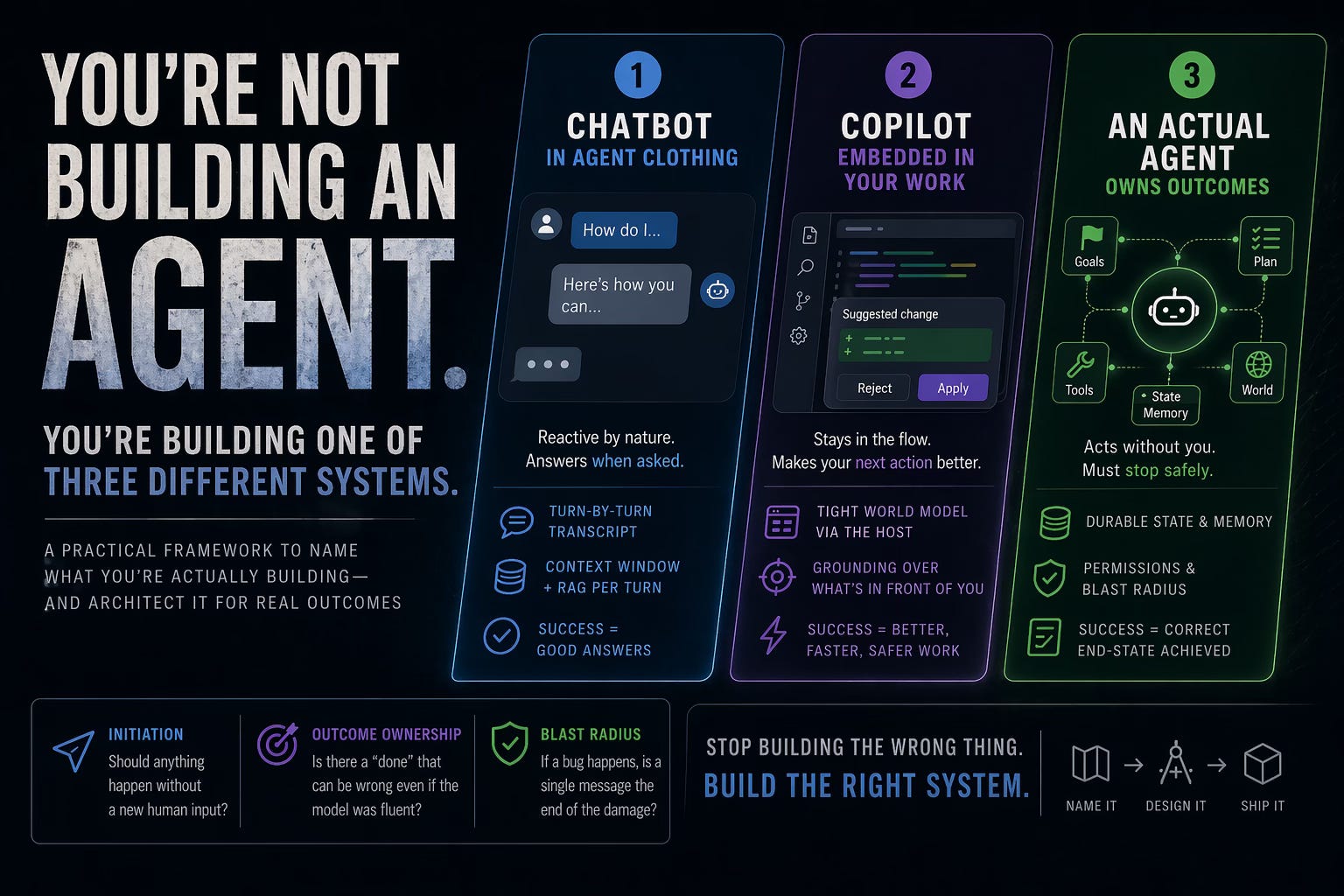
That doesn’t make the project wrong. It means you are likely building one of three different system classes, and the industry keeps selling all of them under the same label.
This post is not a glossary. It is a way to name what you are actually building so you stop architecting the wrong one.
What you’re building, honestly: a conversational system where the product contract is: I’ll answer well when asked.
The “when asked” part is the giveaway.
The system’s natural posture is reactive. A human is still the initiator of meaning. The model (plus tools) may look impressive, but the loop is:
user message arrives
the system responds
wait
repeat
That can include tools, retrieval, and multi-step “reasoning.” It can even feel like autonomy because the model is choosing how to respond. But the trigger is still human. If nobody sends a message, the system is idle.
Architecture signature
The primary state object is a turn-by-turn transcript.
The memory plan is “whatever fits in the window plus whatever you RAG in per turn.”
The definition of working is: each answer is plausibly useful.
The failure mode nobody warns you about: silent irrelevance over time
Not hallucinations. Not “bad output.”
The system becomes a smart assistant for single-shot tasks because continuity is a bolt-on, not a primitive. The user re-explains the project. The org chart. The success criteria. The “don’t do that” from last week.
When this is the right build
Your users want fast answers, drafts, explanations, and occasional tool calls in response to specific prompts.
The risk surface is “wrong text,” not “wrong state change in a production system at 2am with nobody watching.”
What “it works” should mean in metrics
Task completion quality on a representative prompt set, given good context in the same session.
Latency and cost per user turn, not “did it do the right thing for the week.”
What to stop pretending
If you’re here, you don’t have an agent that “runs your workflow.” You have a chat surface that helps a human run a workflow. That is not lesser. It is different. Build it for humans in the loop and stop paying the complexity cost of a system that was supposed to own outcomes it never could.
If this is you, the design question to optimize is: how do we make each turn as correct and cheap as possible, not how do we make it self-directed forever.
That tees up the next one.
What you’re building, honestly: a system that does its job by staying embedded in an editor, an IDE, a support console, a CRM, a ticket, a design file.
The “agent” is not a personality living in a chat box. The copilot is an extension of a tool your user is already using to produce work.
Architecture signature
The system has access to a tight, structured world model through the host: the file, the selection, the build output, the ticket fields, the customer record, the test runner output.
The “memory problem” is usually easier because the environment is a proxy for what matters: show me what’s in front of me beats remember everything I ever said.
The definition of working is: the user’s next action in this surface is better / faster / safer.
The failure mode: tool mismatch disguised as model weakness
Copilots don’t fail because the model can’t write code, copy, or suggestions. They fail when:
the UI doesn’t expose the right state,
the permission boundary is wrong,
the diff/apply model is clunky,
the user can’t tell what the system actually changed,
the system suggests edits that are locally plausible but globally wrong in the product.
That last one is brutal because it looks like a model error when it is often a grounding and scope error.
When this is the right build
Your value is in accelerating a skilled human in a specific workflow.
The risk of wrong output is mitigatable because a human is typically reviewing, clicking apply, or running tests.
What “it works” should mean in metrics
Accept rate (how often suggestions are accepted, not just generated).
Rework after an apply: how many fix-up commits or reversions happen.
Time to green (tests / builds / lints) after a suggested change, where applicable.
What to stop pretending
A copilot is not “an agent that can use tools.”
It is a product integration problem first. The better your host’s representation of the user’s work, the “smarter” the copilot will feel, even on the same model. You can outbuild a more clever prompt system by being less blind.
If you’re here, the design question to optimize is: what is the minimum interface between model and environment that still preserves truth, not how do we add more “agentic” phrasing.
This is the third thing people blur together.
What you’re building, honestly: something where it is even coherent to say:
This run is supposed to make progress in the world, and if it can’t, it is supposed to stop safely.
That is a different class of system than a chat. It is even different from a copilot, not because a copilot can’t call tools, but because the initiator of work and the duration of work are different.
Architecture signature (non-negotiable, if you are serious about this)
There is a durable notion of state beyond the last message: an explicit store for goals, tasks, what happened last time, what’s blocked, and what the system is allowed to do without asking.
There is a plan that spans multiple steps, possibly across time, and it can be resumed.
There are permissions that map to real blast radii, not vibe-based trust.
There is a definition of done that a machine can test against, even if imperfectly.
There is operational discipline: logging, traceability, cost budgets, escalation, rollback paths.
The failure mode: autonomy without a governance layer
The classic disaster story is: “it did something on its own, and the something was plausibly consistent with a prompt, and also unacceptable in reality.”
The model didn’t go rogue. The system was allowed to be coherent without being correct.
When this is the right build
You are trying to reduce the human’s role in repeated operational work where the work is not purely conversational, and the cost of delay is real: triage, routing, monitoring, data consolidation, follow-ups, scheduled research with guardrails, multi-step fulfillment with known approvals.
What “it works” should mean in metrics (this is the uncomfortable part)
End-state correctness rate for runs that are supposed to be autonomous, measured against explicit acceptance rules.
Intervention rate: how often a human has to clean up, undo, or override.
Time-to-failure and cost-to-failure distributions: not just average token spend, but tail risk.
What to stop pretending
A loop that calls an LLM multiple times in a single HTTP request is not an agent. It is orchestrated LLM work.
An agent, in the engineering sense that matters, is a system you can be wrong to trust, and the engineering response is: you design the trust interface.
If you’re here, the design question to optimize is: how do we bound initiative and make failures recoverable. That is why your next read is probably the memory and governance content in this newsletter, not another list of “best prompts.”
If you are unsure, answer these as if you were the system owner on vacation without email.
Initiation
If nothing new arrives from a human, should anything happen anyway?
- No → you are in chat / copilot territory, unless you explicitly add schedules later. - Yes → you are asking for a proactive agent architecture.
Outcome ownership
Is there a “done” for a run that is not “the user got a good reply,” such as “tickets are updated,” “a draft exists in a known place,” or “an alert is filed,” and that outcome can be wrong even if the model was fluent?
- If no, you’re still closer to a conversational or assistive system. - If yes, you’re in agent-land, whether you like the word or not.
Blast radius
If a bug causes a single bad message, is that the end of the damage?
- If yes, your architecture can stay lighter. - If no (sends, spends money, changes production state, publishes) you need a governance layer, not a cleverer system prompt.
That triad is a better classifier than any vendor diagram.
People build a chat+tools prototype, it demos well, and they add “a little more autonomy” every week. Autonomy is not a dimmer. It is a set of new failure classes.
If you are actually building a copilot, optimize for:
grounding
diff/apply
review friction
tight state
If you are actually building a reactive assistant, stop grafting on overnight jobs and “just have it do it” until you can define and test outcomes.
If you are actually building an agent, you don’t get to skip:
state
permissions
budgets
stop conditions
auditability
The teams that ship the third thing are not the ones with the spiciest demos. They are the ones with boring contracts.
Post #4 was about design decisions that make long-running, proactive systems work.
Post #5 is about a different class of mistakes: what breaks when multiple agents and prompts are chained together and nobody is in the loop to catch drift in real time.
This post is the one that keeps you from solving the wrong problem: building autonomy where you need assistance, or building a chat where you need operational control.
The Paperclip and OpenClaw work in the archive is easier to use once you know which kind of system you are trying to be.
If you are building what you say you are building, the rest of the pipeline will feel like “finally, the real engineering.”
If you are not, the rest will feel like you are fighting the framework, because you are using an architecture to solve a product shape it was never meant to own.
Name the class first. Then the tools will make sense.
— Alex
If you are building multi-agent or long-running systems, the next post in this thread is the memory piece: the layer most “agents” are missing, even when the prompts look right.
Want more practical assets — checkout our templates:
Multi-Agent Coordination Kit v1 — task checkout, budgets, escalation, audit trail, and scope (for anyone running more than one agent).
AI Marketing Automation Playbook (v1) — 10 workflows, tools, costs, copy-paste prompts
OpenClaw Bill-Down Kit (v1) — complete OpenClaw-shaped cost architecture: cache, heartbeats, context, routing, limits.
Paperclip ↔ OpenClaw Field Manual (v1) — complete manual about where the two systems meet: control plane, handoffs, state, and whatbreaks when the boundary is wrong
No posts
Comments
Nothing yet. Say the first thing.
Sign in to join the conversation.