
Last month, I went full nerd and did something I’d been wanting to do for years. I used Claude to analyze 900+ PickFu split testing polls (now 991) from 34,000 respondents across the 850+ eCommerce brands we’ve worked with. The result was a database that lets me look up trends, spot patterns, and answer almost any question about a client’s creative before we even start designing. This has reframed how my team and I make every creative decision and I’m sharing all of it here in Design Proof. Twice a week: data-backed creative insights to help you convert better on Amazon and eCommerce.

I posted this on LinkedIn yesterday and it’s already at almost 10,000 views in under 24 hours, so clearly I’m not the only one who thinks this is a big deal.
Here’s what happened. Bradley Sutton from Helium10 DM’d me to give me the heads up on a new storefront feature.
I immediately ran to Seller Central, opened one of my a client’s storefront and noticed a new button: “Personalized Experiences” Two options sat under it.
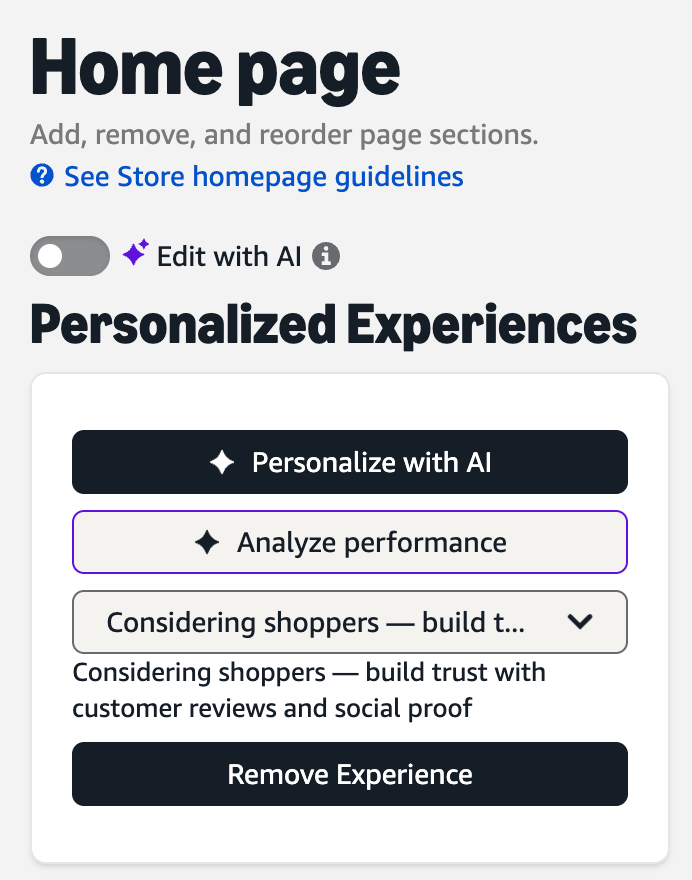
Personalize with AI is positioned as a builder, help you customize experiences for different audience segments. Love the concept, testing layouts for targeted segments is ideal. Unfortunately, I immediately hated the execution. When I ran my test to create two “experiences”, it didn’t actually design anything. It just dropped a bunch of empty modules into the page, which honestly created more work for me than it saved. Maybe it gets better with more use, maybe I’m missing something. For now, I’m skipping but I’ve bookmarked it for later in case it’s a gem in disguise.
Analyze Performance is the one that stopped me cold.
I one-shoted a prompt that turned out to be pure gold:
“Let’s do a larger analysis of maybe the last six months of store traffic and get your recommendations on what are the highest-impact changes to make to my storefront and on which pages I should make those changes.”
And BINGO, it came back with this:
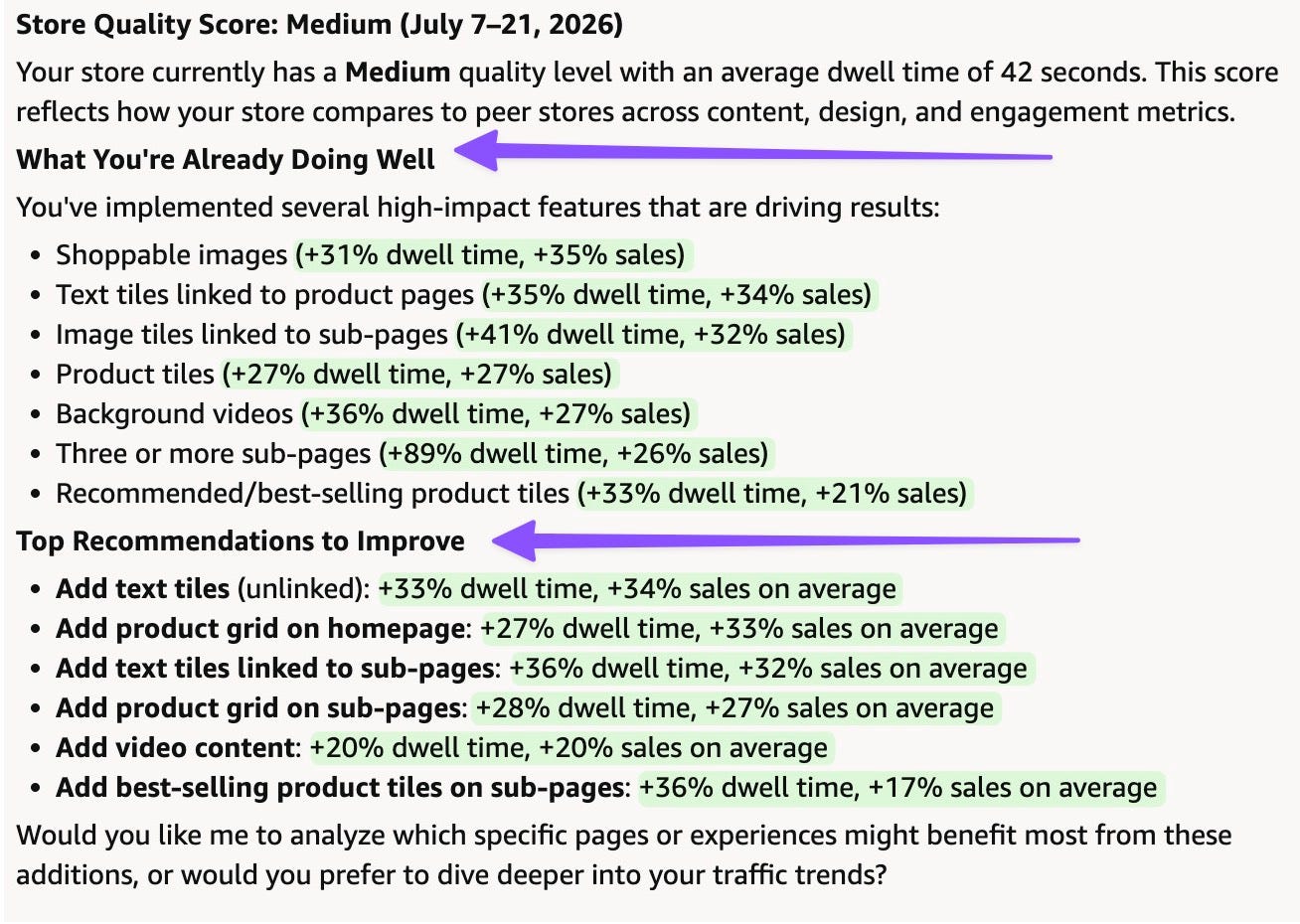
A full breakdown, feature by feature, of what was already working on the store and what to improve with data to back it up.
Pro tip: Run that exact prompt in your own Storefront right now. Takes two minutes and costs nothing.
Seller Central → Storefront → AI Builder, bottom right corner → Analyze Performance.
Here’s why this is such a big deal.
I’ve been doing this 8+ years. The only other time I’ve seen Amazon publish numbers like this was inside their own Creative Certification program, shown to a small group of certified agencies, never public. Now it’s sitting inside a free builder tool any seller can open.
Amazon handing brands their own benchmark data, unprompted, inside their own tool, is a real shift. It means brands (and agencies) can finally see how their storefront stacks up against peers instead of guessing.
Also worth noting, Amazon is the first to tell you that their recs are not a guarantee but they are a signal worth testing.
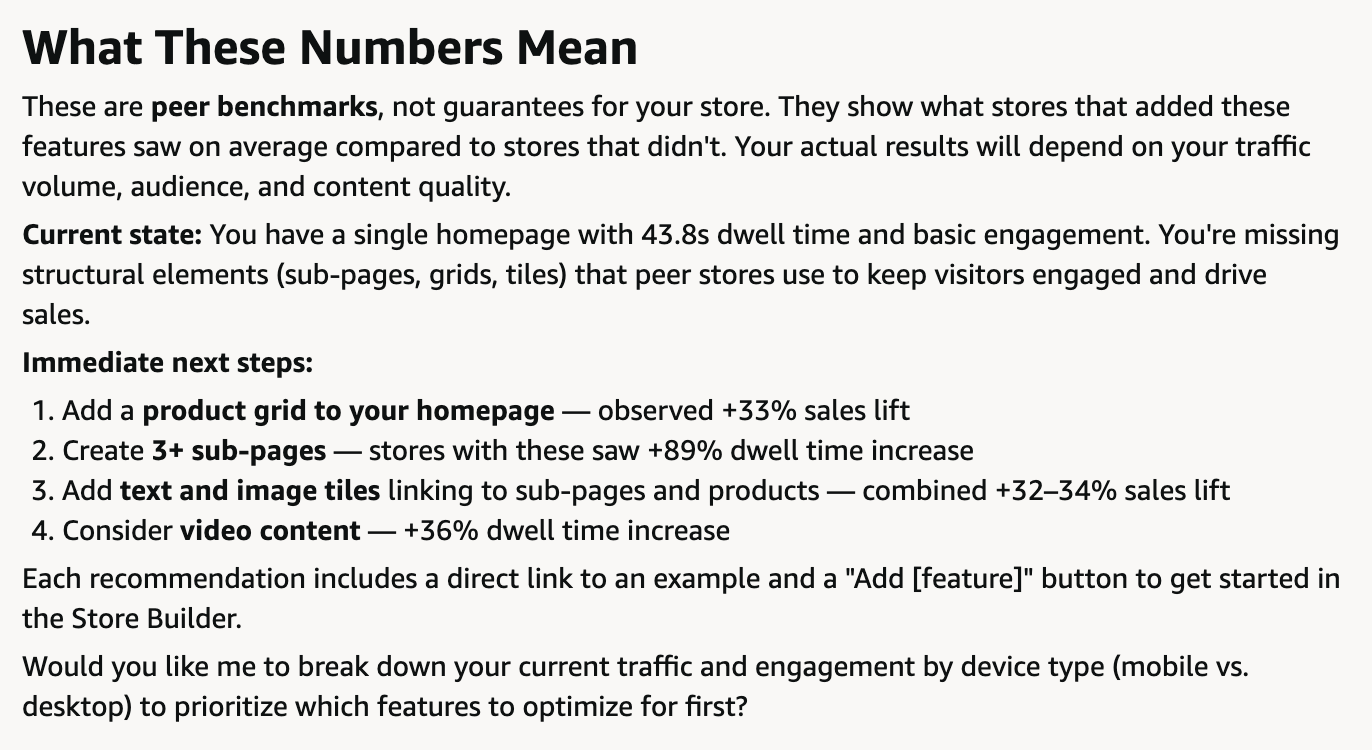
My hope is that this is just the beginning of some new and improved tools for Storefront. Storefronts have been lagging on functionality and testing capabilities for some time and this is a step in the right direction.
How we intend to use this with clients is to roll out our designs as we normally to and then use our Amazon’s recs as a test in our phase two after collecting baseline data. Most of Amazon’s recs didn’t even require additional design but I’m sure they will perform better with custom design as we have seen with our client results.
🔒 Now Let’s Get To The Good Stuff
I ran the tool a lot further than that one screenshot. I asked it 20+ follow-up questions to find where it’s actually useful and where it’s just a wall of “refer to the Stores Help documentation.
Below the paywall:
Three prompts that are actually worth stealing and testing today.
What the tool is best used for and what it’s not.
Subscribe to unlock.
Comments
Nothing yet. Say the first thing.
Sign in to join the conversation.