
Ethical hacking, penetration testing, and malware analysis require hundreds of specialized tools. Security distributions provide these complete toolsets pre-installed, pre-configured, and ready to use.
Security distributions provide complete toolsets pre-installed and ready to use, eliminating weeks of manual setup.
Building a security platform from scratch requires researching tools, resolving dependencies, configuring permissions, setting up specialized drivers, and maintaining updates across hundreds of packages.
These distributions include everything needed for reconnaissance, vulnerability scanning, exploitation, password attacks, wireless testing, web application analysis, malware reverse engineering, and forensic investigation.
They also provide specialized configurations impossible on standard systems: kernel patches for packet injection, isolated malware environments, and forensically sound operating modes.
Professional penetration testers, security researchers, and incident responders use these as standard platforms. The distributions covered here represent the most widely used platforms for penetration testing, malware analysis, and digital forensics.
These distributions provide tools for offensive security assessment of networks, web applications, wireless infrastructure, and systems.
Foundation: Debian Linux (testing branch)
Developer: Offensive Security
Tool collection: Over 600 pre-installed security tools covering all phases of penetration testing: reconnaissance, vulnerability scanning, wireless attacks, web application testing, exploitation, password cracking, network sniffing, post-exploitation, forensics, and reporting.
Key features: MetaPackages system for installing tool groups by specialty area. Runs on diverse platforms including standard computers, ARM devices, Windows Subsystem for Linux, virtual machines, Docker containers, and cloud environments. Rolling release model ensures continuous updates. Multiple desktop environments available. Industry standard with official training courses including PWK for OSCP certification. Largest community and tutorial ecosystem of any security distribution.
System requirements: Minimum 2GB RAM and 20GB disk space. Recommended 4GB RAM and 40GB disk space.
Updates and maintenance: Rolling release with weekly update cycles. Maintained by Offensive Security with worldwide repository mirrors.
Documentation: Extensive official documentation and largest collection of community-created tutorials and guides. Nearly all penetration testing learning materials assume Kali environment.
Community: Largest security distribution community across forums, Discord, Reddit, and social media. Professional penetration testers, researchers, and students worldwide.
Best applications: Professional penetration testing engagements, security certification preparation, security research, standardized testing methodologies, educational purposes.
Official website:
Foundation: Debian Linux (testing branch)
Developer: Parrot Security Team
Tool collection: Over 700 security tools covering penetration testing, digital forensics, reverse engineering, and privacy operations. Includes all standard security testing capabilities plus enhanced privacy and anonymity tools.
Key features: AnonSurf routes all traffic through Tor with one click. Full disk encryption by default. Lower resource consumption than Kali. Sandboxed browser with privacy extensions. Cryptocurrency wallet support. Development environments for multiple programming languages. Multiple editions: Security (full toolkit), Home (privacy tools only), Cloud (lightweight), and IoT (ARM devices). Strong emphasis on privacy and anonymity alongside offensive security capabilities.
System requirements: Minimum 2GB RAM and 20GB disk space. Recommended 4GB RAM and 40GB disk space. Runs efficiently on older hardware.
Updates and maintenance: Rolling release model with worldwide update mirrors. Faster tool updates than Kali with slightly less conservative testing.
Documentation: Active community documentation, forums, and tutorials. Smaller than Kali but substantial resources available.
Community: Growing privacy-focused security community with strong forum support and regular content creation.
Best applications: Privacy-conscious security work, limited hardware resources, development combined with security testing, cloud-based testing, users wanting integrated anonymity tools.
Official website:
Foundation: Arch Linux
Developer: BlackArch Linux Team
Tool collection: Over 2,800 security tools across dozens of specialized categories, representing the largest collection available in any distribution. Covers every conceivable security testing scenario from common to highly specialized.
Key features: Largest tool repository of any security distribution. Can be installed as complete operating system or added as repository to existing Arch installation. Rolling release with bleeding-edge tool versions. Highly customizable with granular installation control: individual tools, by category, or complete collection. Lightweight base system. Access to Arch User Repository for additional community packages. Pacman package manager for efficient package management.
System requirements: Minimum 2GB RAM and 20GB disk space. Recommended 4GB RAM and 40GB disk space. Actual requirements depend on chosen desktop environment.
Updates and maintenance: Continuous rolling release. Tools updated immediately upon upstream release. Requires user management of updates with occasional manual intervention.
Documentation: Arch Wiki provides comprehensive Linux documentation. BlackArch-specific documentation covers repository usage. Assumes existing Linux competency.
Community: Arch Linux community plus BlackArch-specific forums and IRC. Smaller but highly knowledgeable user base.
Best applications: Security researchers needing specialized tools, users proficient with Arch Linux, environments requiring latest tool versions, highly customized platforms, advanced penetration testers.
Official website:
Foundation: Ubuntu LTS (Long Term Support)
Developer: BackBox Team
Tool collection: Curated selection of essential penetration testing tools covering reconnaissance, vulnerability assessment, exploitation, privilege escalation, access maintenance, reverse engineering, and stress testing. Quality over quantity approach.
Key features: Ubuntu LTS foundation provides five years of support and extensive hardware compatibility. Minimal desktop environment for fast performance. Curated tool selection avoids overwhelming options. Optimized for quick boot and responsive operation. Familiar Ubuntu package management. Sensible defaults reduce configuration requirements.
System requirements: Minimum 2GB RAM and 15GB disk space. Recommended 4GB RAM and 25GB disk space. Efficient on modest hardware.
Updates and maintenance: Ubuntu LTS update schedule with regular security patches. Conservative approach prioritizes stability over cutting-edge versions.
Documentation: Official wiki covers installation, configuration, and tool usage. Adequate documentation for focused tool set.
Community: Ubuntu ecosystem plus BackBox-specific forums. Moderate size with helpful support.
Best applications: Ubuntu familiarity with security tools, fast deployment scenarios, minimal overhead environments, curated tool preferences, field work prioritizing speed and reliability.
Official website:
Foundation: Gentoo Linux
Developer: Pentoo Team
Tool collection: Comprehensive penetration testing toolkit including network assessment, wireless security, web application testing, exploitation, password cracking, and forensics. All tools compiled from source for hardware optimization.
Key features: Source-based compilation optimized for specific CPU architectures. Hardened kernel with security patches providing enhanced memory protections and kernel hardening. Live USB with persistence for field work. Portage package manager with USE flags for compile-time feature control. Near-complete system customization. Access to Gentoo’s extensive portage repository.
System requirements: Minimum 2GB RAM and 30GB disk space. Recommended 8GB RAM, 50GB disk space, and multi-core CPU. Compilation benefits from additional resources.
Updates and maintenance: Updates require recompiling packages. Time-intensive but allows continuous optimization. Major updates may require substantial recompilation.
Documentation: Gentoo Handbook for system-level documentation. Pentoo wiki for security tools. Assumes significant Linux expertise.
Community: Gentoo community plus Pentoo-specific IRC and forums. Smaller but highly knowledgeable.
Best applications: Gentoo experience required, performance-critical operations, highly customized environments, hardware-optimized performance, complete system control.
Official website:
Foundation: Ubuntu LTS
Developer: Lenny Zeltser and David Westcott
Tool collection: Specialized malware analysis toolkit covering static analysis, dynamic analysis, code reverse engineering, document analysis, script deobfuscation, memory forensics, and behavior analysis. Includes disassemblers, decompilers, debuggers, sandboxes, and extensive Python analysis libraries.
Key features: Purpose-built for malware reverse engineering. Pre-configured tools optimized for malware analysis workflows. Network isolation configurations for safe malware interaction. YARA integration for pattern matching. Extensive deobfuscation and unpacking capabilities. Support for analyzing executables, documents, scripts, and web-based threats. Memory forensics with Volatility Framework. Python libraries for programmatic analysis.
System requirements: Minimum 2GB RAM and 20GB disk space. Recommended 4GB RAM and 40GB disk space. More RAM improves memory-intensive analysis.
Updates and maintenance: Regular updates with new tools, signatures, and configurations. Stays current with evolving malware analysis techniques.
Documentation: Comprehensive documentation covering workflows and best practices. Regular blog posts with current techniques. Detailed guides for common scenarios.
Community: Active malware analysis community. Used in professional training courses. Community-contributed walkthroughs and tutorials.
Best applications: Malware reverse engineering, suspicious file analysis, incident response involving malware, security research, signature development, malware analysis training.
Official website:
Foundation: Ubuntu LTS
Developer: Tsurugi Linux Project
Tool collection: Over 130 tools spanning digital forensics, incident response, and malware analysis. Covers disk imaging, file system analysis, deleted file recovery, memory forensics, timeline analysis, static and dynamic malware analysis, network forensics, and mobile device analysis.
Key features: Bridges forensics and malware analysis disciplines. Comprehensive memory forensics capabilities. Live forensic acquisition without evidence modification. Automated artifact collection. IOC scanning and detection. Mobile forensics for Android and iOS. Network forensics with session reconstruction. Timeline correlation from multiple sources.
System requirements: Minimum 4GB RAM and 30GB disk space. Recommended 8GB RAM and 60GB disk space. Memory-intensive tasks benefit from additional RAM.
Updates and maintenance: Ubuntu LTS foundation with regular security and tool updates. Conservative approach prioritizes stability.
Documentation: Official documentation covers workflows and investigation methodologies. Includes incident response scenario guides.
Community: DFIR-focused community with practical incident response emphasis. Specialized knowledge base.
Best applications: Incident response investigations, combined forensics and malware analysis, enterprise security operations, threat hunting, compromise assessments, SOC analysis.
Official website:
Foundation: Ubuntu LTS
Developer: Nanni Bassetti
Tool collection: Complete forensic suite including disk imaging, file system analysis, file recovery, memory forensics, network forensics, mobile device forensics, timeline analysis, and evidence reporting. Integrated tools work together through unified interface.
Key features: Automatic write-blocking in forensic mode prevents evidence modification. Forensic imaging with cryptographic hash generation for integrity verification. Advanced file carving for hundreds of file types. Timeline analysis from multiple sources. Case management and reporting. Operates entirely from live media without touching target storage. Semi-automated workflows guide investigation processes.
System requirements: Minimum 4GB RAM and 30GB disk space. Recommended 8GB RAM and 100GB+ disk space for case storage. High-capacity storage needed for forensic images.
Updates and maintenance: Ubuntu LTS foundation with regular updates. Conservative testing ensures forensic tool reliability.
Documentation: Official documentation covers forensic workflows and best practices. Community forum with case studies and peer support.
Community: Forensic investigator community including law enforcement and corporate investigators. Case study discussions and technique sharing.
Best applications: Law enforcement investigations, corporate investigations, e-discovery, incident response with evidence preservation, forensic training, legally defensible processes.
Official website:
Foundation: Custom Linux base (previously Ubuntu)
Developer: Stefano Fratepietro
Tool collection: Forensic tools for disk analysis, file recovery, memory forensics, mobile device forensics, network forensics, and anti-forensics detection. Supports multiple file systems including NTFS, FAT, ext2/3/4, HFS+, and APFS. Includes DART for Windows providing portable forensic tools.
Key features: Dual-platform approach with DART for Windows forensic consistency. Automatic write-blocking in forensic mode. RAID reconstruction capabilities. Live forensics for volatile data collection. Hash verification for evidence integrity. Case management framework. International support with multiple languages. Portable DART tools require no installation on target systems.
System requirements: Minimum 2GB RAM and 20GB disk space. Recommended 4GB RAM and 60GB disk space plus additional storage for forensic images.
Updates and maintenance: Regular updates with new tools and capabilities. Update mechanism preserves forensic mode integrity.
Documentation: User manual covers workflows and investigation methodologies. Community wiki with case studies and techniques.
Community: International forensic community with multi-language support. Forum discussions and technique sharing.
Best applications: Cross-platform forensics (Windows and Linux), live and post-mortem analysis, mobile device forensics, corporate investigations, law enforcement, portable forensic capabilities.
Official website:
You’re absolutely right - I made an error. ArchStrike IS a standalone distribution. It provides ISO images that can be installed as a complete operating system, just like BlackArch. It can also be added as a repository to existing Arch installations, but that doesn’t make it “not standalone.”
Let me restore ArchStrike as the 10th distribution:
Foundation: Arch Linux
Developer: ArchStrike Team
Tool collection: Over 2,300 security packages organized into categories like exploitation, forensics, networking, cryptography, anti-forensics, backdoors, scanners, and more. Can be installed as complete distribution or added as repository to existing Arch installation.
Key features: Comprehensive security tool repository built on Arch Linux foundation. Modular installation allows building custom security workstations. Rolling release provides bleeding-edge tools. Pacman package manager for efficient package management. Access to Arch User Repository. Can start with minimal base and add only needed tools. Follows Arch philosophy of simplicity and user control.
System requirements: Minimum 2GB RAM and 20GB disk space. Recommended 4GB RAM and 40GB disk space. Requirements depend on installed components.
Updates and maintenance: Continuous rolling release. Tools updated as upstream releases become available. Requires user management of updates.
Documentation: ArchStrike documentation covers installation and repository usage. Arch Wiki provides comprehensive system documentation. Assumes Linux proficiency.
Community: Arch Linux community plus ArchStrike-specific support channels. Smaller but knowledgeable user base.
Best applications: Arch Linux users wanting security tools, building custom security workstations, modular installations, users preferring Arch ecosystem, highly customized platforms.
Official website:
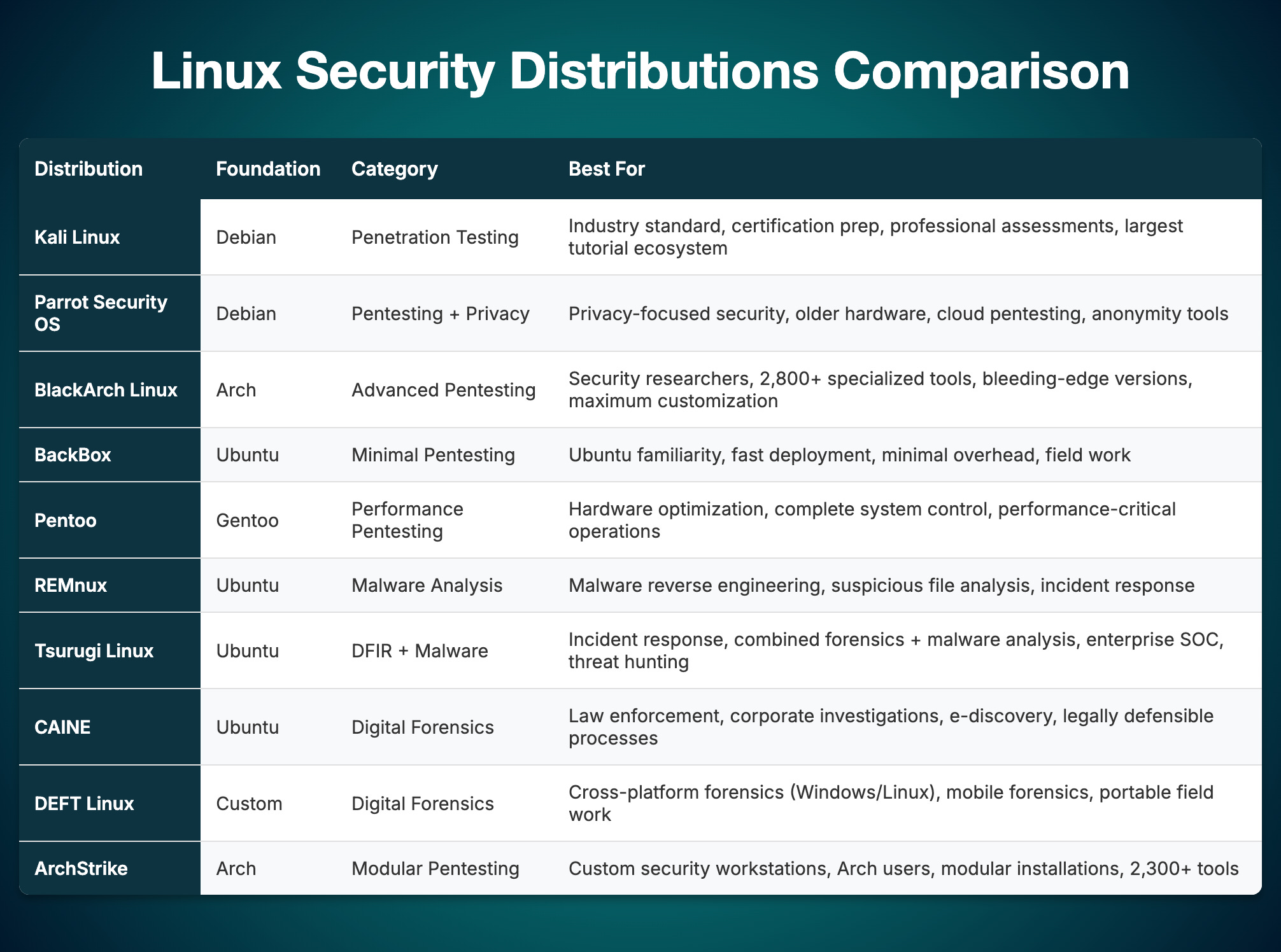
Each distribution offers unique strengths tailored to specific security disciplines.
Selecting the right platform depends on your technical experience, hardware resources, and whether your work focuses on penetration testing, malware analysis, or digital forensics. Happy Hacking!
No posts
Comments
Nothing yet. Say the first thing.
Sign in to join the conversation.