
Yesterday’s CLI was one command, one session, quit when done. Genuinely useful, but a focus tool is something you use dozens of times a week, and a CLI you re-invoke from scratch every session leaves half the value on the table. Today the CLI becomes a personal focus system — a pinnable browser tab that runs all day, remembers your favorite presets, tracks your streak of consecutive focused days, and enforces a mandatory rest break after every completed session so you don’t chain sprints into burnout.
Same blocking engine underneath. Exact same add_block_entries / remove_block_entries / flush_dns code we wrote yesterday, just wired into a Flask web UI with SQLite-backed stats. That’s the pedagogical arc of the week: write the engine on Day 1, wrap it in a product on Day 2. When your engine is a pure function that operates on a hosts file, you can wrap it in a CLI or a web app or a menu bar app or a Discord bot without changing the engine. The interface layer is the thing that changes; the engine stays the same.
Day 1: CLI focus timer with real website blocking
Yesterday, we built a stdlib-only CLI that starts a focus session for N minutes, edits /etc/hosts (or the Windows equivalent) to make distracting sites unreachable via DNS, shows a live countdown in the terminal, and cleans everything up automatically — whether the timer completes normally, you Ctrl+C, or the process crashes. Zero external dependencies, three-layer cleanup safety net, marker-based hosts editing so we never touch anything else in the file.
Day 2: Web dashboard with presets, stats, streaks, and break enforcement (Today)
Run sudo python focus_dashboard.py and it starts a local server on http://127.0.0.1:8765 and auto-opens your browser. The dashboard shows named preset cards — Pomodoro (25 min), Deep work (90 min), Study (45 min), Quick focus (15 min). Click one and the session starts instantly, the block goes into effect, and the page swaps to a big centered countdown:
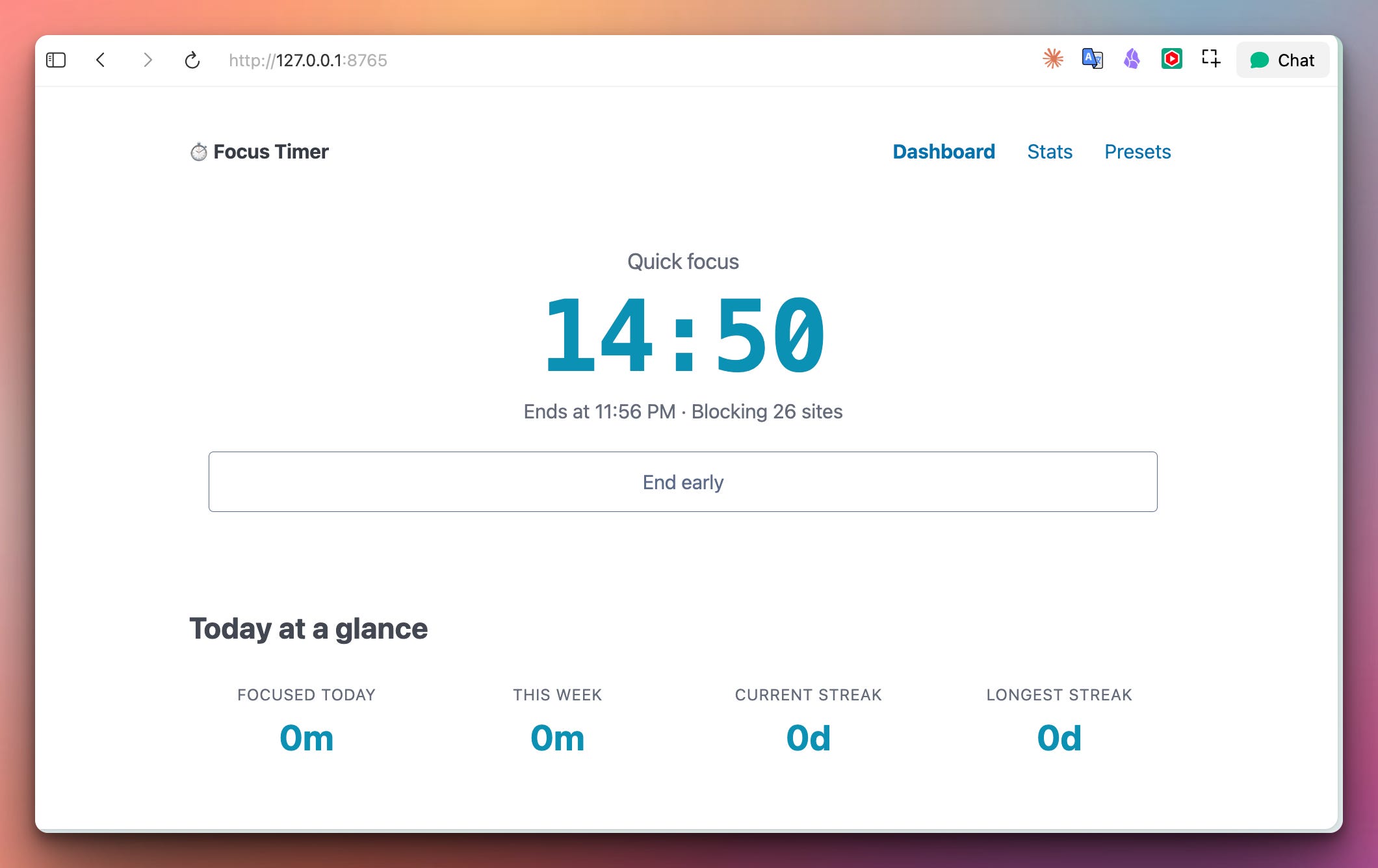
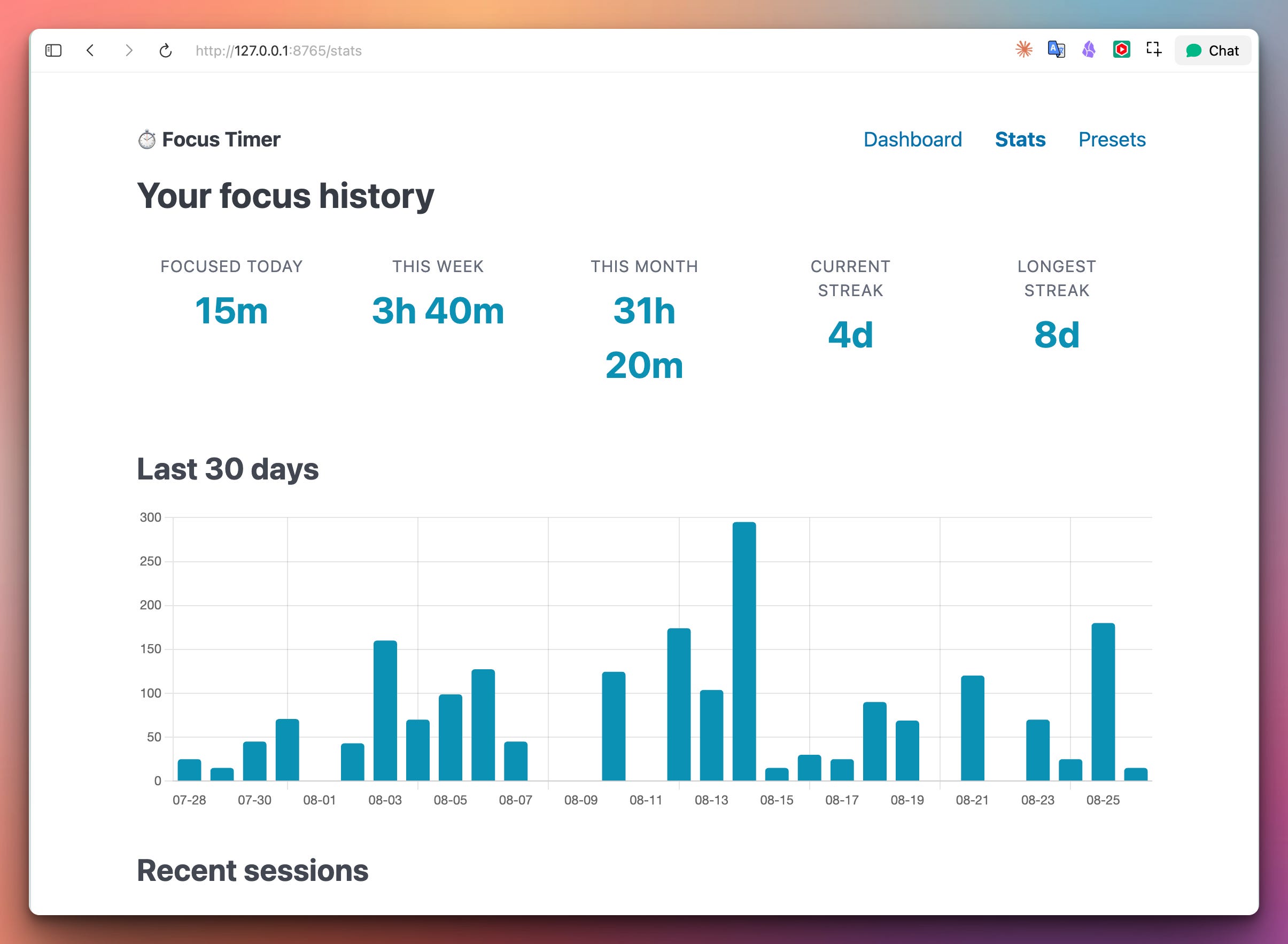
The countdown ticks smoothly in the browser without hammering the server — the JavaScript decrements locally every 200 ms and re-syncs with the server every 5 seconds. Below the timer, your daily stat cards show how much you’ve focused today, this week, your current streak, and your longest streak ever. Tab across to the Stats page for the deep view — a 30-day bar chart of daily focus minutes plus a table of your last 30 sessions with completion status:
Note: When a session completes, you don’t get to start another one immediately. The tool imposes a proportional break window — 20% of the session duration, clamped to 5-20 minutes — and refuses to start a new session until the break ends. That can be a good thing for users not to trick the program.
And the Presets page lets you edit the list — add “Writing sprint” (45 min with hackernews.com in the extras), “Morning deep work” (2 hours with LinkedIn added), whatever your workflows are. Stored as JSON at ~/.focustimer/presets.json so you can hand-edit them too.
Flask is the web framework — a change of pace after several weeks of FastAPI. Flask has been the classic “Python web app in one file” tool for over a decade. Its request/response model is synchronous and straightforward, which is exactly right for a single-user local tool where we don’t need async concurrency.
Jinja2 is the templating engine (bundled with Flask). We put templates inside our Python file as strings and load them via DictLoader — same pattern as the Notes app in Week 28. Full template inheritance, includes, filters, everything works.
sqlite3 is Python’s built-in database (stdlib since 2.5). No installation, no server, one file on disk at ~/.focustimer/focus.db. Perfect for personal-scale persistence.
threading runs the focus session in a background thread alongside the Flask request handlers. A threading.Lock protects the session state from concurrent read/write, and a threading.Event lets the main thread signal “stop early” to the session thread.
Chart.js from a CDN renders the 30-day bar chart. Battle-tested, works in every browser, one script tag.
Pico.css from a CDN styles the whole thing. Classless — write plain semantic HTML, get a professional look. Same choice we’ve made every week for a reason: it just works.
Install Flask (the only new dependency on top of Day 1):
pip install flask
Run:
sudo python focus_dashboard.py                # localhost:8765, auto-opens browser
sudo python focus_dashboard.py --port 8888    # custom port
sudo python focus_dashboard.py --no-browser   # don't auto-open
sudo python focus_dashboard.py --unblock      # emergency unblock, then exit
The recommended workflow is to leave one terminal tab running the server all day, and pin the dashboard tab in your browser. Ctrl+C in the terminal to shut down cleanly — the block is removed automatically if any session was active.
On first run, the tool creates ~/.focustimer/ (a hidden folder in your home directory) with two files inside: presets.json (editable) and focus.db (SQLite). Both survive across restarts, so your stats and custom presets persist.
The single most important design decision this week: Day 2 doesn’t reinvent the blocking engine, it reuses it. Every function from Day 1 that does the actual work — add_block_entries, remove_block_entries, flush_dns, is_hosts_active, get_hosts_file, is_admin — appears again in Day 2, unchanged. Copy-paste from Day 1’s focus.py into Day 2’s focus_dashboard.py, no modifications required.
That copy-paste is intentional. Both files are self-contained — a subscriber can download either one and run it, without needing the other in the same folder. If you were writing this as a real project you’d factor the shared code into a focus_core.py module and import from it, but for teaching purposes the redundancy makes each day standalone.
The lesson underneath: when your engine is pure logic (takes inputs, mutates a file, returns nothing), it composes into any interface. CLI, web app, mobile app, cron job, all valid wrappers. The engine has no idea whether a human typed a command or clicked a button. That separation is what lets big software companies ship the same core to a web app and a mobile app and a desktop app.
The tricky part of Day 2 is: how do you run a long-running timer alongside a web server without either blocking the other?
The answer is threading. The Flask process runs the HTTP server on the main thread; when the user clicks “Start Pomodoro”, the request handler spawns a background thread that runs the countdown and does the eventual unblock:
class FocusSession:
    def start(self, preset):
        with self._lock:
            # ... update state to "active", record preset details ...
            self._stop_event.clear()
        # Do the actual blocking OUTSIDE the lock (DNS flush can be slow)
        add_block_entries(self.hosts_file, self.sites)
        flush_dns()
        self._thread = threading.Thread(target=self._run, daemon=True)
        self._thread.start()
    def _run(self):
        end_time = self.started_at + timedelta(seconds=self.duration_seconds)
        while datetime.now() < end_time:
            if self._stop_event.wait(0.5):     # returns True if event was set
                self._finish(completed=False)
                return
        self._finish(completed=True)
Two important patterns here:
threading.Event for cooperative interruption. The _stop_event.wait(0.5) sleeps for up to 500 ms but returns immediately if another thread calls set() on the event. So when the “Stop early” button posts to /session/stop, that request handler does self._stop_event.set(), and within 500 ms the session thread notices, breaks out of the loop, and unblocks. No busy-waiting, no polling, no killing threads (Python doesn’t actually let you kill a thread — cooperation via events is the right pattern).
daemon=True threads. A daemon thread doesn’t prevent the process from exiting. If the user Ctrl+Cs the server while a session is running, the daemon thread dies without cleanup. That’s OK because our atexit handler (registered separately) removes the hosts file entries before the process actually terminates. Same three-layer cleanup pattern as Day 1: explicit unblock in the finish method, atexit for normal exit, signal handlers for Ctrl+C.
Lock discipline. State mutations happen inside with self._lock:. External calls (adding block entries, DNS flush) happen outside the lock — they can take hundreds of milliseconds and holding the lock during them would freeze the API. The rule: only hold the lock for the duration of the state mutation itself, never during I/O.
The dashboard shows a smooth ticking countdown. The naive way to do this would be to poll /api/status every 200 ms — 300 requests per minute per open browser tab. Left open for 8 hours: 144,000 requests. That’s crazy for a local tool.
The correct pattern is client-side interpolation with periodic server sync:
let state = { state: 'active', remaining: 3547, lastSync: Date.now() };
function render() {
  const elapsed = (Date.now() - state.lastSync) / 1000;
  const remaining = Math.max(0, state.remaining - elapsed);
  activeTime.textContent = mmss(remaining);
}
async function sync() {
  const res = await fetch('/api/status');
  const data = await res.json();
  state = {
    state:     data.state,
    remaining: data.remaining_seconds || 0,
    lastSync:  Date.now(),
    // ...
  };
  render();
}
setInterval(render, 200);   // smooth local tick, no network
setInterval(sync,   5000);  // sync with server every 5 seconds
The render function reads state.remaining (last known value from server) and subtracts the local elapsed time since that value was received. So the countdown appears to tick every 200 ms even though the actual authoritative value is only refreshed every 5 seconds. Feels smooth to the user, gentle on the server — 12 requests per minute instead of 300.
The state-change reload trick handles transitions between active / break / idle — if the top-level state changes between syncs, we call window.location.reload() to pick up the freshly server-rendered dashboard with the correct view. Cheap and correct.
The sessions table is stupidly simple:
CREATE TABLE sessions (
    id INTEGER PRIMARY KEY,
    preset_name TEXT,
    started_at TEXT,             -- ISO-8601 local time
    duration_seconds INTEGER,
    completed_seconds INTEGER,   -- actual focused time (< duration if stopped early)
    was_completed INTEGER
)
Every finished session (completed OR interrupted) gets one row. That’s it. Everything on the stats page is derived from this table via SQL:
def total_seconds_since(start_date):
    row = conn.execute("""
        SELECT COALESCE(SUM(completed_seconds), 0) AS total
        FROM sessions
        WHERE date(started_at) >= ?
    """, (start_date.isoformat(),)).fetchone()
    return int(row["total"])
date(started_at) is SQLite’s date function — extracts just the date portion of an ISO-8601 timestamp. So we can group sessions by day trivially. COALESCE(SUM(...), 0) returns 0 when there are no rows, avoiding a null response.
Streak calculation is the fun part. Walk backwards from today, day by day, counting how many consecutive days have at least one session:
session_days = {r["d"] for r in conn.execute(
    "SELECT DISTINCT date(started_at) AS d FROM sessions"
).fetchall()}
current_streak = 0
d = today
while d.isoformat() in session_days:
    current_streak += 1
    d -= timedelta(days=1)
The grace clause: if today has no session yet but yesterday does, the streak continues (haven’t broken it yet, still time to redeem the day). Same principle as Duolingo’s “streak freeze” — a small psychological accommodation that keeps people from despairing at 11pm.
Longest streak is a scan over all session days sorted ascending, tracking the longest consecutive run:
sorted_days = sorted(date.fromisoformat(d) for d in session_days)
run = 1
longest_streak = 1
for i in range(1, len(sorted_days)):
    if (sorted_days[i] - sorted_days[i - 1]).days == 1:
        run += 1
        longest_streak = max(longest_streak, run)
    else:
        run = 1
O(N) where N is the total number of days you’ve ever done a focus session. Fast even after years of use.
The whole point of a focus tool is not “maximize hours in front of screen with notifications off.” The point is sustainable deep work. Chaining focus sprints without breaks reliably leads to burnout — every productivity researcher will tell you the same thing. So Day 2 enforces breaks structurally:
def _compute_break_seconds(self, session_seconds):
    """20 percent of session, clamped to 5-20 minutes."""
    return int(min(20 * 60, max(5 * 60, session_seconds * 0.20)))
25-minute pomodoro → 5-minute break. 45-minute study session → 9-minute break. 90-minute deep work → 18-minute break. These proportions come from actual attention-restoration research (Kaplan’s ART) — longer focus needs proportionally longer rest.
When a session completes normally, the state transitions to "break" and break_until is set:
def _finish(self, completed):
    remove_block_entries(self.hosts_file)
    flush_dns()
    with self._lock:
        # ... record in stats DB ...
        if completed:
            break_secs = self._compute_break_seconds(self.duration_seconds)
            self.break_until = datetime.now() + timedelta(seconds=break_secs)
            self.state = "break"
        else:
            self.state = "idle"      # no break if you stopped early
Only completed sessions earn a break — if you stop early, you go straight back to idle. That subtle design choice prevents the exploit where you “start a session, immediately stop, then complain the break is stopping you from starting again.”
Attempts to start a new session while on break are rejected with a friendly countdown:
def start(self, preset):
    with self._lock:
        if self.state == "break":
            remaining = int((self.break_until - datetime.now()).total_seconds())
            if remaining > 0:
                m, s = divmod(remaining, 60)
                raise SessionError(
                    f"You're on a break for another {m}m {s:02d}s. "
                    "Rest, then start the next session."
                )
The SessionError bubbles up to the Flask handler, which redirects back to the dashboard with the message in a flash banner.
The whole app binds to 127.0.0.1, not 0.0.0.0:
app.run(host="127.0.0.1", port=args.port,
        debug=False, threaded=True, use_reloader=False)
That single-word change from 0.0.0.0 to 127.0.0.1 means the server is only reachable from the same machine. Other devices on the LAN can’t see it. Your neighbor at the coffee shop can’t hit http://your-laptop.local:8765/session/stop to sabotage your focus. This is why we don’t need any auth — the OS-level network binding is the auth.
Contrast with LAN Share from Week 30, which bound to 0.0.0.0 precisely because we wanted other LAN devices to reach it, and therefore needed a PIN gate. Different tool, different security model, different binding.
threaded=True is essential because the background session thread needs to run alongside HTTP request handlers. use_reloader=False disables Flask’s dev-mode reloader, which would fork the process and destroy our in-memory session state.
All-day pinned focus tab. Pin the dashboard tab in Chrome/Firefox/Safari. When you sit down to work, click a preset. Focus. Break. Click another. Repeat. Because it’s a browser tab, it’s always one keyboard shortcut away — no window management, no menu bar dance.
Weekly focus reports. The stats page shows exactly how many hours you focused this week. If you’re managing your own time as a freelancer, contractor, or founder, this is actually meaningful data — vastly more honest than “how did last week feel?”
Team focus challenges. Everyone in a small team runs the same tool, screenshots their weekly stats page every Friday. Not for judgment — for peer accountability. Turns out most people focus a lot less than they think they do, and seeing “9h focused this week” concretely changes behavior.
Kids doing homework blocks with visible progress. Parents can start a 45-minute Study session with expanded blocks (add Roblox, Discord, whatever the current addictions are). Kids see the countdown, know when it ends, get their brain break automatically enforced.
Baseline for a menu bar app. Everything we built today can be wrapped in a menu bar UI on macOS with rumps, a system tray app on Windows with pystray, or a GNOME extension on Linux. The engine and stats stay the same; the interface changes.
Below you will find the downloadable solution.py file containing the correct solution.
Get the code here:
Comments
Nothing yet. Say the first thing.
Sign in to join the conversation.