
When you first started learning Terraform, you probably created everything from scratch—new resources, fresh environments, clean state. But real-world projects are rarely that simple.
Imagine your team inherits an existing GitHub organization or cloud project. The infrastructure is already there—S3 buckets, databases, repositories—created manually over months or years. Now, you need to bring that under Terraform control. You want to manage it using IaC without breaking anything. And you definitely don’t want to rewrite everything from scratch.
In this chapter, we’ll go deeper into the terraform import command. As promised earlier, you’ll learn how to bring existing infrastructure into Terraform so you can start managing it with version control.
📚Do you want to read all lessons in a single pdf? Check out my Terraform Quickstart ebook.
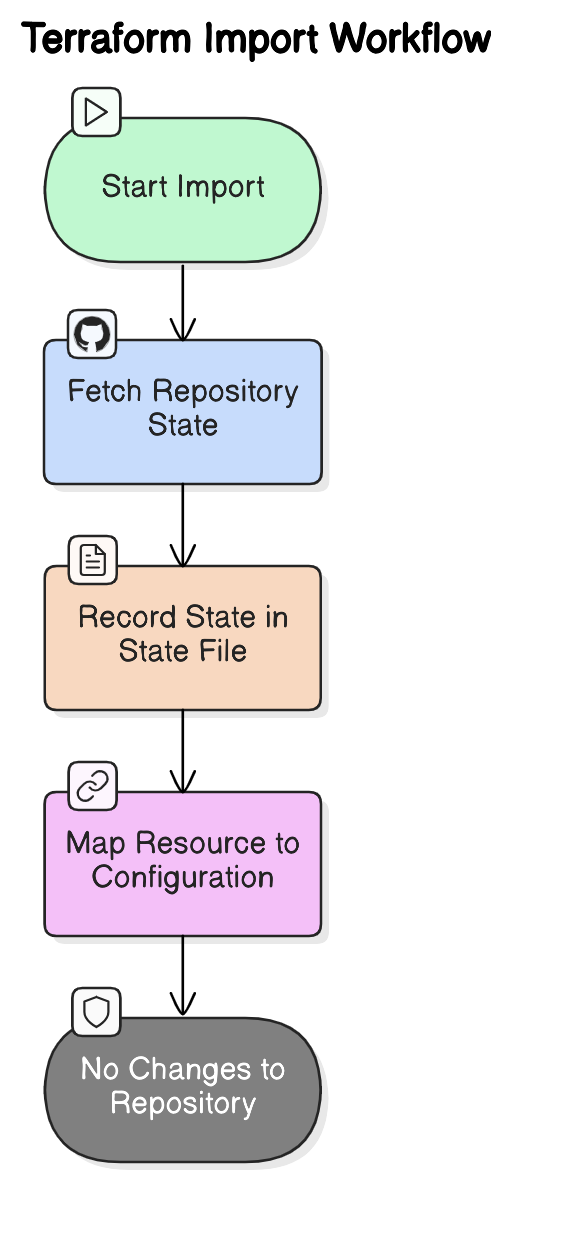
Terraform adds the resource to its state file (
terraform.tfstate).The
.tffiles are NOT updated automatically.You still need to manually write the Terraform configuration (
main.tf) to match the imported resource.Running
terraform planwill show any differences.
The command’s syntax is:
$ terraform import <resource_address> <resource_id>resource_address: How the resource is defined in your Terraform config. Example:
resource "aws_s3_bucket" "example"resource_id: The actual identifier used by the provider (e.g., an S3 bucket name, GitHub repo name, or database ID).
Each provider has its own rules for what counts as a valid resource ID. Always check the official Terraform provider documentation before importing.
Comments
Nothing yet. Say the first thing.
Sign in to join the conversation.