
Hello Everyone,
I’ve figured out something pretty amazing lately: the most valuable professional skill I’ve developed is knowing how to prompt AI. Think of it as being the creative director behind a very literal-minded machine, you’ve got to set the vision, the boundaries and the success criteria, all in one go. People often say AI makes thinking lazy. I found it’s quite the opposite. It makes you pause. It makes you clarify. No more hiding behind jargon or fuzzy ideas. It’s precision … or nothing.
Week 9 of the AI in Education course, Prompting Like a Pro, is all about giving students that power. They’re mastering how to ask the right question, choose the right format and stay in control of their learning journey. Because when kids get to lead AI, they become learners, creators and thinkers … not just users.
Next Week will be the Final in this 10 week series, the one you’ve all been waiting for, “Fakery, Hallucinations and Ethics”, it’s quite amazing, don’t miss it.
Ready to dive in? Let’s go!
Enough of the chat, check out the Amazing Tools & Absolutely Splendid ideas I have to share with you today, in the spirit of
EASIER, MORE PRODUCTIVE
& A WHOLE LOT MORE FUN!
Hope this helped you feel a bit more caught up (and less overwhelmed).
PS
Virtual Teacher is.......... FREE FOREVER
Mind Candy - mental treats, light, fun or entertaining things for the brain.
Reader Comments - Thanks Mark
#AIinEducation - Week 9 - Prompting Like a PRO
HALLOWEEN SHADOW PUPPETS 🎃🦇👻🧛♀️: Whooooooo!
TO DO LIST : Make sure you do!
VT YouTube: The Hare and the Tortoise
Let's create a ripple effect of learning, sharing, and growing together.
Pass any good ideas on to colleagues and encourage them to subscribe to VirtualTeacher for more.
Some of my favourite jokes this week. Try them out on your kids this week.
How heavy is a rainbow?
It’s pretty light.
Where do bad rainbows go?
Prism! It’s a light sentence and it gives them time to reflect!
Why did the robot cross the road?
Because the chicken programmed it.
Why can’t you have a party on the moon?
No atmosphere.


This week we’re unlocking the real power behind AI, yes, it’s not just about pressing the button, it’s about how you prompt it. With our reliable tool, EduChat, students will learn to ask smarter, think deeper and steer the results in ways that reflect their ideas.
TIP: Every lesson works as a demo with EduChat or ChatGpt(Years 5–6 can try EduChat independently).

Monday – Day 1: Use AI to Learn AI
We begin by exploring EduChat’s interface. Students watch a video demo, ask their first questions and explore the interface.
Tuesday – Day 2: Understanding Prompts
The focus is on prompt design: who the AI should be, what you’re asking and how you want it answered. Students try writing prompts, then tweak them to see how the responses change.
Wednesday – Day 3: Researching & Verifying with AI
Students switch into researcher mode, using precise prompts and trusted links to find, check and refine information. The aim: build accuracy and verify answers.
Thursday – Day 4: AI as a Creative Partner
We dive into creative partnering with AI. In groups, students craft and refine a story with EduChat, adding their own flair, voice and edits. It’s creativity + control in action.
Friday – Day 5: Using AI to Learn How to Learn
On our final day we turn the tool into a personalised tutor. Students use a ready-made template to ask EduChat to guide them step-by-step through a topic (like their 6× table), reflect on how they learn best and then build their own prompt to reflect how they want to learn.
Why This Matters
This week isn’t just about using AI—it’s about directing it. Students discover that:
clear, structured prompts yield stronger responses,
choosing the right format (table, quiz, story) can reshape understanding,
verifying AI-generated content is part of smart learning.
Ultimately, they realise their voice and decisions drive the outcome and that’s the real power.
👉 Download Week 9 now Here’s to a week of curiosity, creativity and confident AI-prompting. Creating great questions and prompts to produce SPLENDID results.
CREATE a Halloween Shadow Puppet play. Video your play. Use sound effects, onomatopoeia, (these can be audio effects in your editing program, or sound effects, you make yourself) music and video clip filters, to create your video.
Things you will need:-
- Torch, lamp light source.
- Download the Shadow Halloween outlines (or you may
like to make your own)
- Straws, sticks for shadow puppets.
- Story – A Really Really Scary Story
Shadow puppet theatre
This time we will use a light source(single LED torch), a white wall or light colour wall, and project the images onto the wall.
Or you can use the puppet theatre if you have one.
1. WATCH the Video A Really Really Scary Story
2. READ A Really Really Scary Story, have some fun with this. Choose the script layout and option that you would like. Or you can write your own really scary story if you would like.
Narration Script
Here is a timed Narration Script
and this one is a Studio Voice-Over Script
3. CUT OUT the characters and sticky tape them to straws, (or something similar)from the template. Or draw your own characters and cut them out.
4. SETUP your theatre. Follow the directions in the video. Or use a puppet theatre if you have one.
5. SET up your camera position, so you see the shadows but not the shadow puppets.
6. PRACTICE your show. Write your dialogue, or you may wish to read the script and perform the actions. Practice with your puppets.
7. GATHER an audience and …..ACTION! Make sure that it’s comfortable and fun.TURN off all of the lights turn on the spotlight/torch, and be prepared for lots of laughs along the way. The hearty applause that follows will show that you’ve done a super job with your shadow puppet show.
8. FILM your story. Make sure you use landscape, make sure you use a loud clear voice.
9. UPLOAD your video to your google classroom. Just drag and drop from your desktop.
HOT HINTS
Don’t strike the set till you have checked the rushes.
Hold your shadow puppets flat against the screen, they are 2D( 2 dimensional).
QC (quality control) your video to make sure your effects are not too loud, and your voice can be heard.
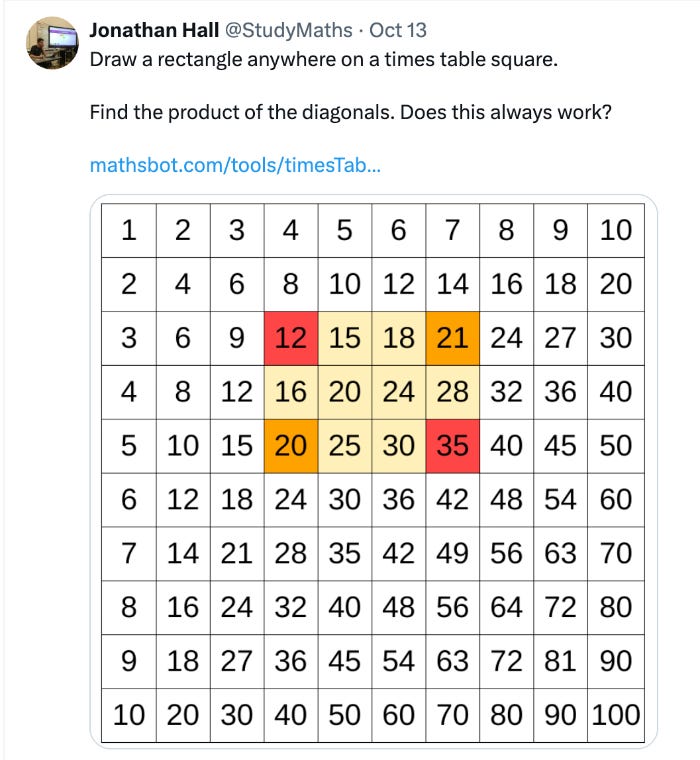
MathsBot Some great interactives. Try the Multiplication Square Free Access to digital manipulatives, question generators and 200+ free resources
The Legend of Niels Bohr It’s a brilliant reminder that tests rarely capture what a student really knows & that imagination is often the key to unlocking deeper, more original answers.
The TRIPLE Filter Test This page retells Socrates’ Triple Filter Test, showing how truth, goodness and usefulness guide wise communication, an ideal resource for ethics, philosophy or classroom discussion on online behaviour, gossip or critical thinking.
Strine Strine is the quirky, colourful world of Australian slang . The words Aussies toss around every day. On this page you’ll find idioms kids love, real examples to bring Strine alive in your lessons.

If you are adventurous you might also like to Make Shadow Puppets with Aesop’s Fable - The Hare and the Tortoise. Step into a world of light and shadow with this timeless fable brought to life through shadow puppetry. Watch as the classic story of The Hare & the Tortoise unfolds, full of charm, lessons and creative visuals.
FREE DOWNLOADS
Hare & Tortoise Shadow Puppets
What do you find in a Fable?
Be a Fabulist and Write Your Own Fable Template

This Newsletter is not free, despite the misleading advertising above.
The Fee is now due. Each week you must help one colleague AI & technology who has less knowledge than you. HELP THAT PERSON even if you have to visit their classroom or do a little research and get back to them. Trust me, this will help a lot of people get their computer classrooms running better. OK I'm trusting you!!!
Editor: Cathy Brown cathy@virtualteacher.com.au
Before you go I have a question for you:
Would you be interested in learning more about AI and how to integrate into your teaching? Would you like more information about inservice and training?
No need to decide just yet, just email me if you'd like to start the ball rolling. cathy@virtualteacher.com.au or check out the VT AI Consultancy Page.
Comments
Nothing yet. Say the first thing.
Sign in to join the conversation.