

I have spent the last two months building an agent.
Not writing about agents. Not teaching agent development. Building one, for one reason: I needed to move faster with clients.
Here is the problem it solves. The Finding Hidden Customers playbook works. The four-prompt chain finds pain segments your competitors cannot see. But running it by hand takes time. Research in one tool. EDP analysis in another thread. Segment scoring. Data mapping. Then the loop between scoring and data until the rankings settle.
I do this four to five times a week. So I built a thing that does it for me.
You give it a brand. It does the rest.
It researches the company. It maps the regulatory environment and the public databases that reveal buyer pain. It finds the Existential Data Point. It builds pain segments and ranks them gold, silver, and bronze. It scores each one on urgency, observability, value prop fit, buyer resonance, and market density. Then it hands you a verdict and an execution roadmap your go-to-market engineer can run.
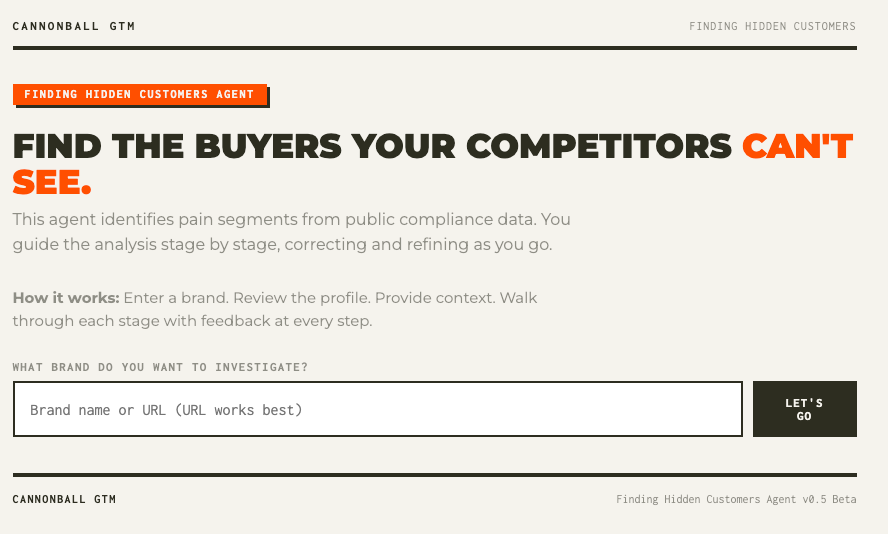
It does all of this stage by stage. At every stage it stops and lets you push back. Correct the buyer. Adjust the deal size. Tell it the website is wrong about who actually buys. It revises and keeps going.
That last part matters. The agent is not a black box that spits out an answer. It is a working session. You stay in the loop because your judgment is the thing that makes the output real. I learned that the hard way watching growth leaders use early versions. The ones who handed over context up front got segments they could defend. The ones who skipped it got segments they rejected.
The agent is built to keep you in the chair.
I am not going into the software business. I spent thirty years in and around software. I know exactly what it costs to host an application, support it, fix it, and keep it running. That is not the business I am building.
The business I am building is this. I learn the methodology by doing the work. I build tools that make the work faster. And I hand those tools to the people who pay to learn alongside me.
Think of it like a meal kit. There are people who will teach you knife skills. That is a real and valuable thing. I am handing you the kit, tested and portioned, with the recipe that works. You still cook. But you are not starting from an empty kitchen.
Agent development is going to be part of every growth leader’s job. I am doing that work first so you understand what good looks like. As I build each agent for my practice, I will hand it to you. This is the first. There will be more, one for each playbook.
The agent runs on your own infrastructure. Your API key. Your password. Your data. Nothing shared with me or anyone else.
There are two ways to get it running. Pick the one that fits you.
Railway hosts the agent for you at your own private URL. You need three things:
A GitHub account, connected to Railway. This is the step people miss, and it is the number one reason deploys fail. Railway pulls the agent’s code from GitHub when it deploys. If your Railway account is not connected to a GitHub account, the deploy hangs or fails with “GitHub Repo not found.” A free GitHub account works fine. Connect it in Railway under Account Settings, then Integrations, then GitHub. One time, about a minute.
A Railway account. Free to start, about five dollars a month for hosting.
An Anthropic API key. About three dollars per brand analysis, billed to your own account.
Click the button (above) or here. Paste your API key. Choose a password. Deploy. Two minutes, no terminal, no code. The README walks you through every step, including how to get your Anthropic key.
If your deploy hangs or fails: nine times out of ten it is the GitHub connection. Go to Railway, then Account Settings, then Integrations, and confirm GitHub is connected. Then delete the failed deploy and click the deploy button again fresh. If it still will not go, use Path 2. It is the same agent.
If you are comfortable spending ten minutes in a terminal, you can skip Railway entirely and run the agent on your own computer. No hosting account, no monthly fee. Your only cost is the API usage, about three dollars per brand.
Download the agent files here: https://github.com/marketadvocate-sudo/Finding-Hidden-Customers-Public-Agent/archive/refs/heads/main.zip
Unzip it. Open the SETUP file inside. It walks you through every step for Mac and Windows: installing Python, setting your API key, and starting the agent. First time takes about ten minutes. After that it is one command to launch.
Open your browser to the address the agent gives you, enter your password, and run a brand.
This is exactly how I run my own copy. Local is not the consolation prize. It is the version with the fewest moving parts.
This agent is lab-tested. I have run it across more than seventy brands and refined it with feedback from working growth leaders who used it on their own clients. It produces consistently strong results. I trust it enough to use it in live engagements.
It is still beta. That means it is good and getting better, and your feedback is the fuel. When something does not fit your industry or your situation, tell me. That is how the next version gets sharper.
If you have not run the four prompts by hand yet, start there. The prompt library is the methodology. It teaches you how the work thinks, and you will get far more out of the agent once you understand what it is doing under the hood.
If you already know the chain, deploy the agent and run a brand you know well. Compare what it finds to what you already believe. That is the fastest way to trust it.
The prompts teach you to find hidden customers. The agent finds them for you.
Now go find buyers your competitors cannot see.
Comments
Nothing yet. Say the first thing.
Sign in to join the conversation.