
I have talked about the ways to protect yourself from having your accounts taken over before but this month I want to take it further and tell you how to ensure you don’t lose any account access when you get a new phone.
Recently I ran into a customer of mine that just got a new phone and he was not able to get into his business email account with Microsoft. He knew what the password was but since he had a different phone his Microsoft Authenticator app didn’t work for this account. This also happened to me about six months ago when I got a new phone except I was locked out of a few accounts for some companies that I manage email.
The problem is that you can’t automatically move your authenticator entries to a new phone. Microsoft says all you need to do is back up your authenticator into your Microsoft account and then restore it onto your new phone. This is technically true but only works for entries that are connected to your personal Microsoft account. Not for other accounts like your work or business email.
Since this was my customer’s business account the entry was not backed up by his personal account and he was locked out. Luckily, he knew his password, and he was able to contact Microsoft since he is a paying customer, and they helped him reset his authenticator for his business email. He works for himself and is the admin on his account so reaching out to his company admin was not an option. When this happened to me, I was also able to get my authenticator entries back because I set up every option available when I initially set up each account in my authenticator. So, I was able to receive text messages or codes to alternate email addresses.
Why am I telling you this? The simple fact that I didn’t stop with just the authenticator app and decided to also set up texting or alternate email options for the accounts I manage made it easier for me to get back into those accounts after getting a new phone.
This is an option when initially setting up a new account, but it is also available in your Microsoft account so you can add other options at any time. This is also good if you initially set up your account with an old phone number or email that you no longer have access to because you can login to your account and update with the new phone number or email account. Do these things now instead of waiting until you have a new device and it is too late.
If you are not sure how to update this information or even how to set up an authenticator I can help with this also.
I have helped many people replace computers in the past year due to Windows 10 not being supported any longer. For many of those I had recommended these minicomputers. My go-to brand is GMK Tek. I have also used the brand Minisforum.
As I said in the title, they are very small but very powerful and also fairly inexpensive. When I compare these to the big computer names like Dell, HP or Lenovo they are usually a few hundred dollars less for similar specifications.
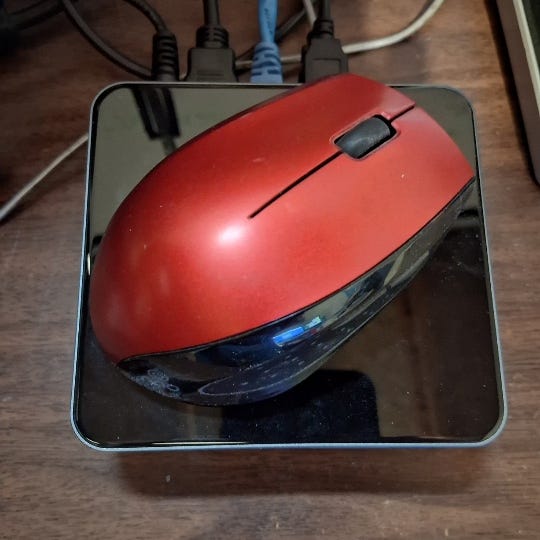
These computers come in two different forms; one is about 4.5 inches X 4.5 inches and about 2.5 inches tall. The other is 7 inches X 7 inches and about 1.5 inches tall. Here is a picture of the first size. I placed a standard wireless mouse on top of it for scale.
If you happen to go into a bank, you might notice one of these mounted on the back of the tellers’ monitors. Many banks have been using these for years.
So, the next time you need a new desktop, you might consider one of these mini powerhouses. But, just like any other computer it is best to really check them out because both of the companies I listed above sell good powerful computers, but they also have some that are really inexpensive and those come with a processor that I am sure most people would be unhappy with. As always, I am available to help you shop or even do the shopping for you when it comes to new computers.



The talk about how to avoid becoming a victim of scams. Email Scam Busters is your monthly resource to let you and your parents in on the latest scams they should look out fo
No posts
Comments
Nothing yet. Say the first thing.
Sign in to join the conversation.