
I want to show you what the Bitcoin node that I run at home looks like:

OK, don’t leave yet - I’m just kidding around!
But honestly - and don’t laugh - this is what I imagined when I first heard about people running these mysterious nodes.
I imagined they were large and complex, and required very specialized hardware and knowledge. Even the word ‘node’ makes it sound quite technical.
I’m going to make a confession. I didn’t realize until much later that a bitcoin node was none of these things.
Because, well, it’s just a piece of software running on a computer.
That’s it. Furthermore, once it is set up and the entire blockchain has been downloaded, there is almost nothing else you need to do other than let it run. Honestly, it could not be simpler.
Now I’m going to show you what my Bitcoin node REALLY looks like:
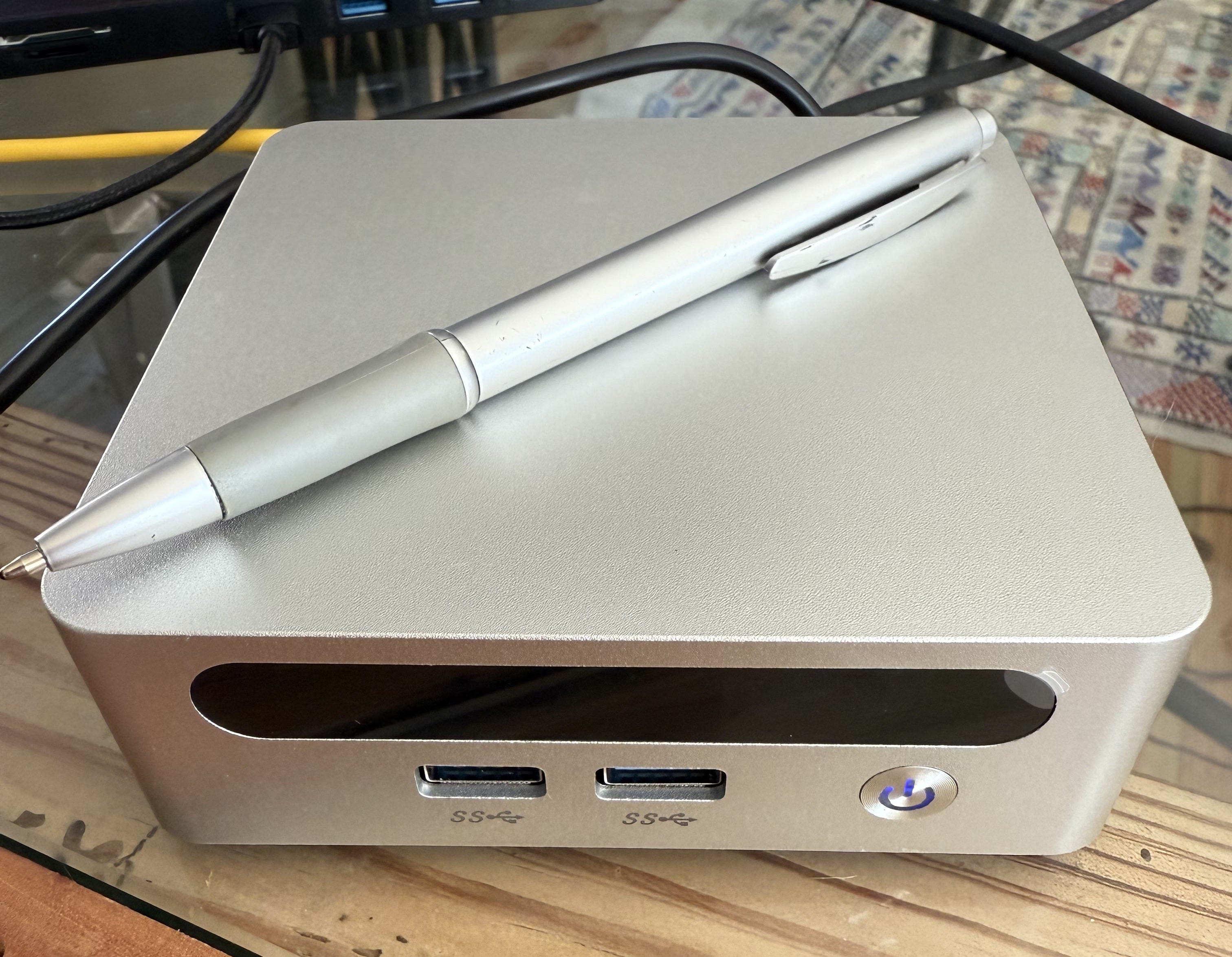
You see that? It’s the size of a pen. The more astute among you will recognize that it is, in essence, a mini-PC.
This one specifically is a Start9 Server One. This little machine is what’s known as a ‘plug-and-play’ Bitcoin node. The simplest way to describe it is a computer that comes pre-configured with StartOS, which is an open-source, Linux-based operating system.
(And if you don’t know what that means, don’t worry because it doesn’t really matter.)
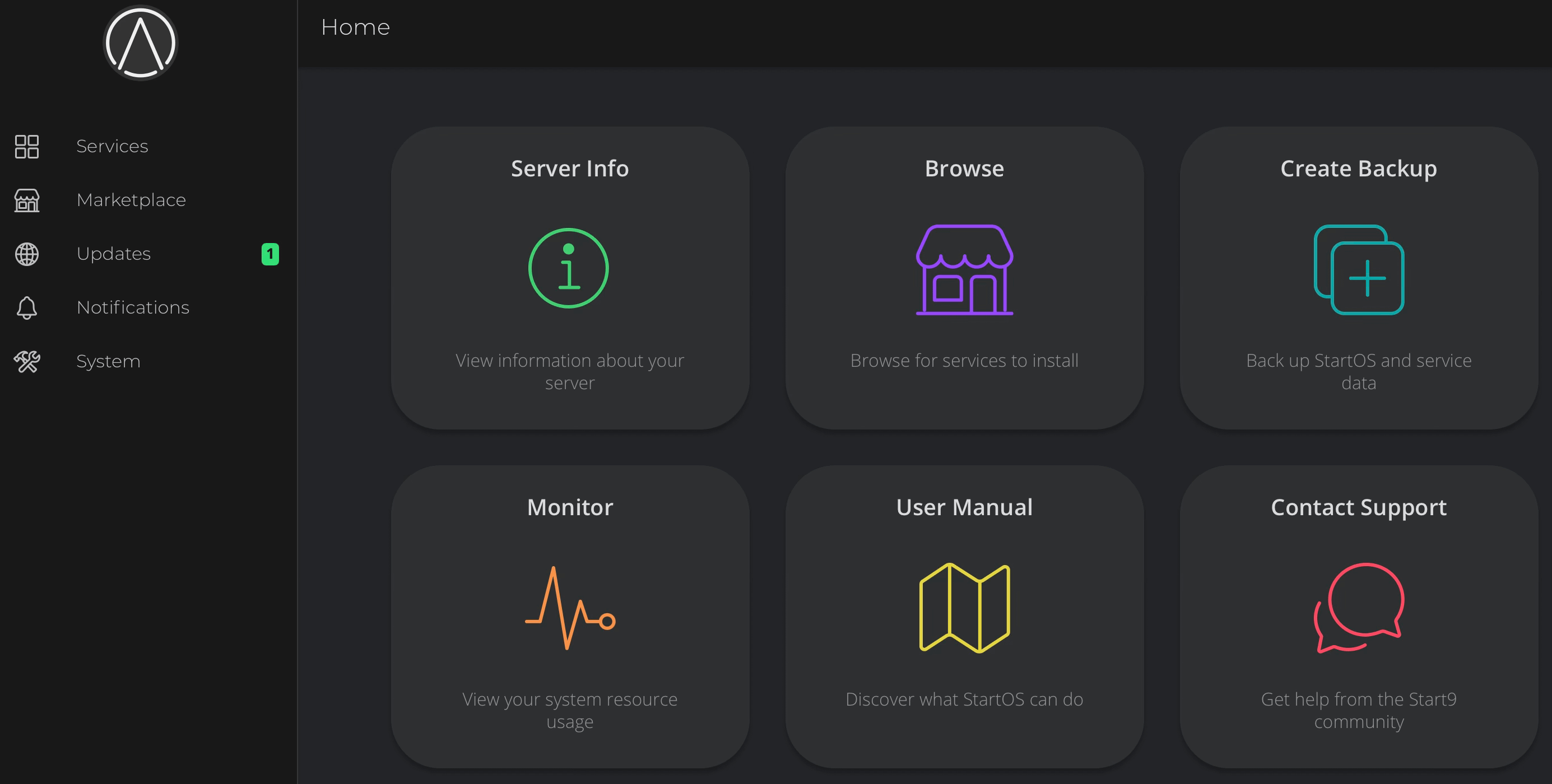
When you set it up, you can access everything in a browser on your regular laptop, and you'll see a simple, clean dashboard that operates almost like an app store.
The home dashboard looks like this:
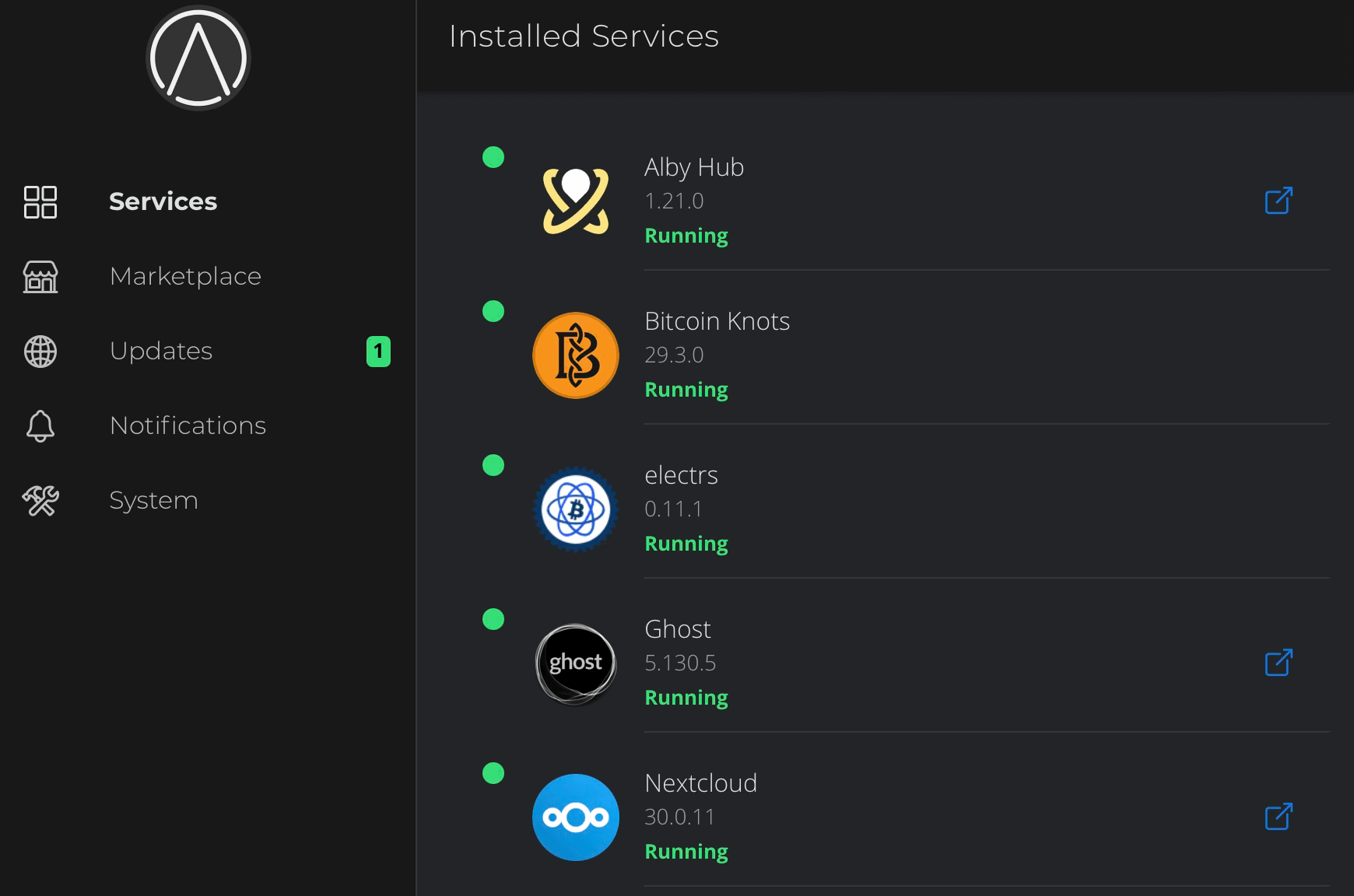
If you go to ‘Services’ on the left hand menu, you will see everything currently installed:
And if you click on ‘Marketplace’ on the left hand side, you can see everything that is available for you to install:
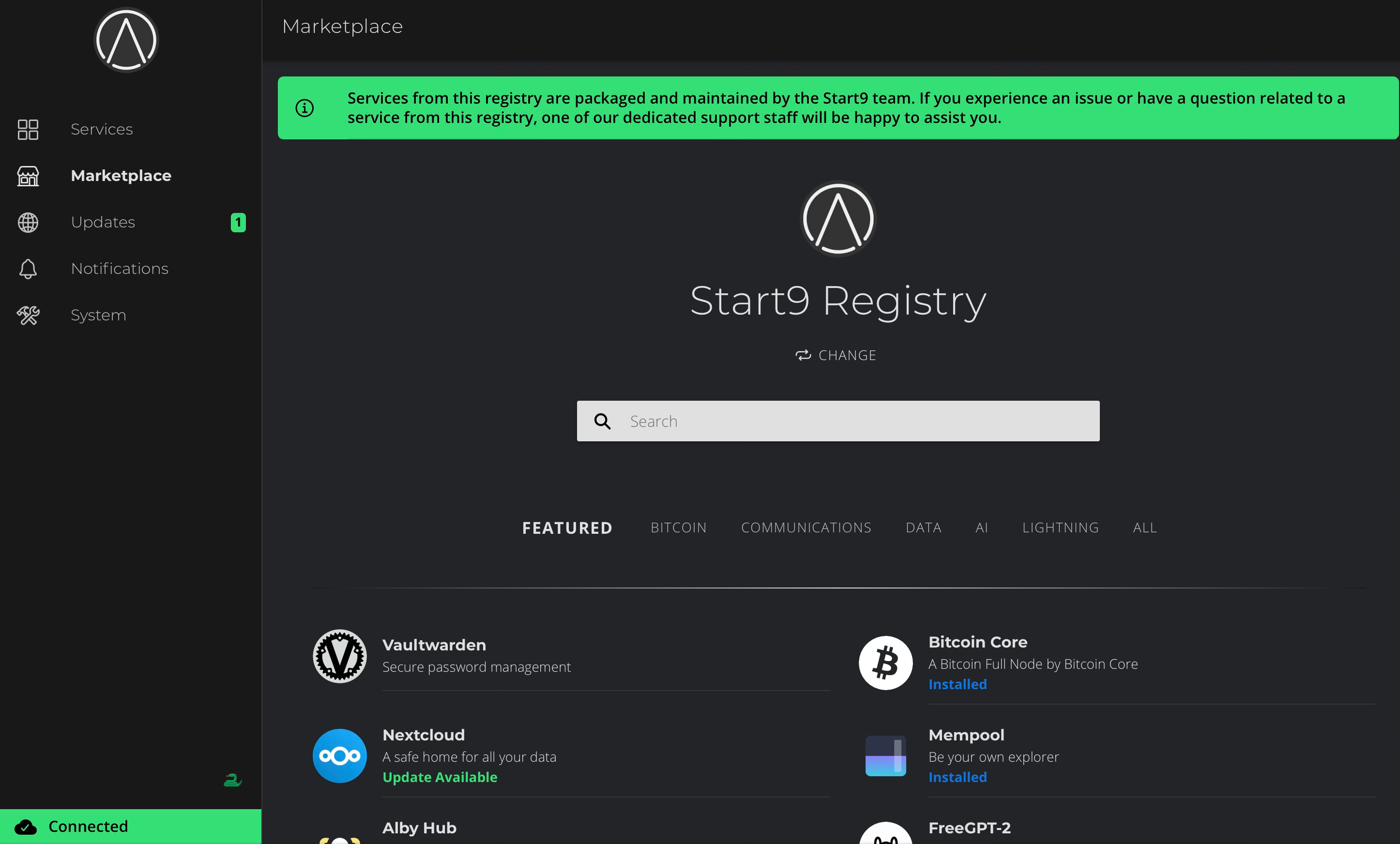
And that’s it. It’s easier to use than a regular Macbook.
You’re probably wondering WHY you’d want to own one of these things in the first place. First of all, in this article I cover the reasons for running your own Bitcoin node.
But there are many other reasons to invest into one of these cool little gadgets. A Start9 (or its alternative, Umbrel) is much more than just a ‘node’. It’s a complete hub for your sovereign computing setup.
If this kind of digital sovereignty thinking is your thing, subscribe for free to get every new article straight to your inbox. Paid subscribers also get access to the Bitcoin Tool Vault, my growing library of tools for taking back control of your money and your data.
What is sovereign computing?
Sovereign computing is the practice of running your digital life on hardware you own, with software you control, holding data only you can access.
It is the opposite of the rental model that dominates the modern internet, where your files, communications, money, and identity sit on machines belonging to corporations who set the terms, log the activity, and charge you for the privilege.
Nowadays, when you open your laptop, there is a good chance that most of the programs that you are using, and the files that you are creating, belong to one of the tech giants like Google or Microsoft.
Consider a free Google product like Docs or Sheets. Many people started using it because it means you don’t have to pay for a licence for Microsoft Office. However, as with anything, if it’s free then you are probably the product.
Google just uses a different model to make money from Docs:
Direct subscriptions: Google Workspace charges businesses, schools, and governments a monthly per-seat fee for the bundle that includes Docs, generating tens of billions in annual revenue.
Storage upsells: Free accounts get 15GB shared across Drive, Gmail, and Photos, then funnel users into paid Google One subscriptions once that quota fills up.
Data and metadata: Your content, your editing patterns, and your sharing behavior feed Google’s AI training, product development, and the broader behavioral profile the company holds on you.
Ad ecosystem lock-in: Free Docs keeps you logged into a Google account, which sharpens the targeting engine behind Alphabet’s advertising business, the source of roughly three-quarters of its revenue.
All this is to say, that Google locks you into their system, and they own everything. You are always using Google. You are giving Google your data. You end up paying them a subscription for extra storage.
In the sovereign computing model, you avoid all this by running free, open-source software and storing files directly on your own server instead of Google’s.
In the case of Google Docs, your sovereign computing replacement might be running NextCloud for storage on your Start9, paired with NextOffice for document creation and editing.
This is just one example. You can find open-source alternatives for many of the major tech giant products.
You may also like…
So what am I running on my Start9?
When I first set up my Start9 Server One, I didn’t really understand that it was not just a ‘Bitcoin node’.
Not until I had a look around in the StartOS marketplace did it dawn on me that there were many, many things that I could do with my new hardware.
I’ve owned my Start9 for around 8 months, and it’s opened up a whole new world. The great thing is that I can experiment with it and I don’t need to worry about messing up my node, which is my main priority.
It’s so easy to use that it’s nearly impossible to break anything.
Over the months I’ve slowly added and experimented with a number of different services on my Start9.
So here is what I’m running right now, and why:
Bitcoin Knots: This is the Bitcoin node software. My preference is to run Bitcoin Knots instead of Core because it doesn’t allow large OP_RETURN data.
Knots just sits on my Start9, running in the background. I don’t have to do anything except occassionally check it and update it if there is a new release.
Electrs: This is the implementation required for connecting your Bitcoin node to your wallet. In my case, I use Sparrow wallet. So Electrs connects Knots to Sparrow.
Alby Hub: Alby is probably my favourite thing about my Start9, after Knots. I host my own lightning hub for sending and receiving lightning payments.
This allows me to have a self-custody lightning wallet that I have full control over. I even integrated it into my website so I could receive lightning payments.
Alby is super easy to install and set up. I have a paid subscription so that I can have my own customised lightning address, but this is absolutely not a neccesity.
Mempool: A personal block explorer running directly on my Start9, fed by my own Bitcoin node. It shows every pending and confirmed transaction on the Bitcoin network, current fee rates, and full block history, and I can track my own transactions.
Because the queries stay on my own hardware, no third party can see which addresses or transactions I am looking at.
I enjoy opening it and watching the network in action! OK, that’s a bit nerdy, I know.
RoboSats: This is a peer-to-peer Bitcoin exchange, with most transactions done with lightning. It is self-hosted and anonymous. More about RoboSats here.
NextCloud: NextCloud allows you to use your Start9 as a personal ‘cloud’ server to store all your files, without relying on a subscription-based cloud service.
As already mention, it can be paired with an open-source document editing program like NextOffice to replace Google Docs or Microsoft Word.
Bisq: This is also a well-known P2P exchange for Bitcoin. I have set it up and had a look around, but I have not used it yet.
BTCPay Server: This allows businesses to receive on-chain BTC payments directly. I originally set this up so I could receive payments for my website. However this proved to be more difficult than I inititally anticipated, because achieving an inbound clearnet connection was tricky.
In the end I decided it was better suited for larger enterprises and chose to stick with lightning only for now. Some technical expertise is definitely required.
Free-GPT2: This allows you to run an LLM directly on your Start9. This is technically a local replacement for ChatGPT or Claude. You can choose which LLM(s) you wish to download from Ollama library.
In truth, I set it up and experimented with it, but it couldn’t hold a torch to Claude. However, it is worth knowing how to do this because if Anthropic wants to KYC me, I’m finished.
Canary: This is a self-hosted Bitcoin wallet monitoring service that helps you keep track of your Bitcoin wallets without exposing your private keys. This pairs with an app on your phone which will notify you if there is a wallet transaction, or your balance goes above or below certain limits.
Who should buy a Start9?
To be clear, I run the above software without very much technical expertise at all. Start9 makes it so easy it would be crazy NOT to make full use of its capabilities.
I couldn’t recommed one of these little pieces of hardware more for Bitcoiners. True - they are not cheap, especially with the recent price increases we’ve seen for all RAM and SSD.
However, you can generally pay for your Start9 with Bitcoin (depending on the retailer) so if you already have a stash, it does make sense to use a little of it for one of these fantastic machines.
Who should consider investing in a Start9?
Bitcoiners who already self-custody. If you hold your own keys, the next logical step is verifying your own balance against your own copy of the blockchain. A Start9 closes that loop.
Anyone tired of subscription creep. If your monthly outgoings include Dropbox, iCloud, Google One, a password manager, a VPN, a notes app, and a media subscription, a one-time hardware purchase replaces most of them.
People who run a business and accept payments. BTCPay Server alone justifies the device for anyone selling goods or services, especially if you want to accept Bitcoin without a payment processor sitting between you and your customers.
Writers, creators, and publishers. Self-hosted Ghost, NextCloud for files, your own collaborative document editor, your own publishing pipeline. Useful for anyone who would rather not have their work sitting on Substack, Medium, or Google forever.
Privacy-conscious households. Anyone who has read enough about data brokers, ad tracking, and breach notifications to feel uneasy about how much of their life sits on other people’s servers.
Families wanting their own photo and file storage. A single device can replace iCloud and Google Photos for an entire household, with no monthly fee per person and no third party scanning the contents.
People in jurisdictions where deplatforming is a real risk. If your work, your politics, or your community make you vulnerable to having an account suspended, owning your own infrastructure removes the threat. Nobody can deplatform a server in your house.
Tinkerers and hobbyists. If you enjoy poking around with new tools, the marketplace gives you a low-friction way to spin up dozens of self-hosted services without learning Linux administration first.
Need help setting up your Bitcoin node? Check out my personal experience working with The Bitcoin Way here:
⛔️ DISCLAIMER: This content is for informational and entertainment purposes only and should not be considered financial, investment, or legal advice. I am not a licensed financial advisor, accountant, or investment professional. The information shared in this post reflects my personal opinions and is based on publicly available data at the time of writing. All investment decisions - especially those involving Bitcoin or other digital assets - carry risk and should be made only after conducting your own due diligence and consulting with a qualified financial advisor. Never invest more than you can afford to lose. This post may contain affiliate links that pay me a small commission - at no extra expense to you - if you click the link and purchase the product/service. My views are my own and do not reflect those of any of my affiliate partners or sponsors.
Comments
Nothing yet. Say the first thing.
Sign in to join the conversation.