
While making progress on my current app project, I wanted to make it harder to inspect strings in my app.
For instance, in my case, I make use of advanced prompts for LLMs. These aren’t super secret, nothing disastrous would happen if somebody could read them, but still, like a secret sauce, I like to keep some things under wraps.
I immediately thought about the relatively recently introduced Swift macros.
So what are macros again?
Preprocessing Macros, in C were much simpler: you would define a keyword and an expression.
Then, at compile time, the preprocessor would substitute the keyword with the expression.
It was useful to save a lot of keystrokes, avoid mistakes in repetitive code, and define patterns to reuse in the codebase. Even though it sounds primitive, it was with a set of macros that the first version of Objective-C was born!
Fast forward to Swift, and we have a tool that is really powerful.
The principle stays the same: write some code to use with the macro, so that when using your macro, the referenced code will be substituted at compile time.
Xcode comes with a template to create a macro (File > New > Package > Swift Macro).
You end up with the boilerplate files and code needed to make a macro, and a sample macro (stringify).
You have three files (naming will depend on the name of your project, in my case, it's ObfuscatorMacroExample):
ObfuscatorMacroExampleMacro.swift: This is the meat of the package, you declare the actual code.ObfuscatorMacroExample.swift: The is the file and module where you declare your macro to be used and imported. It makes use of the external macro that is declared in the previous file.main.swift: This is the client, to essentially test the usage macro.
As an example, my test macro looks like this in the first file
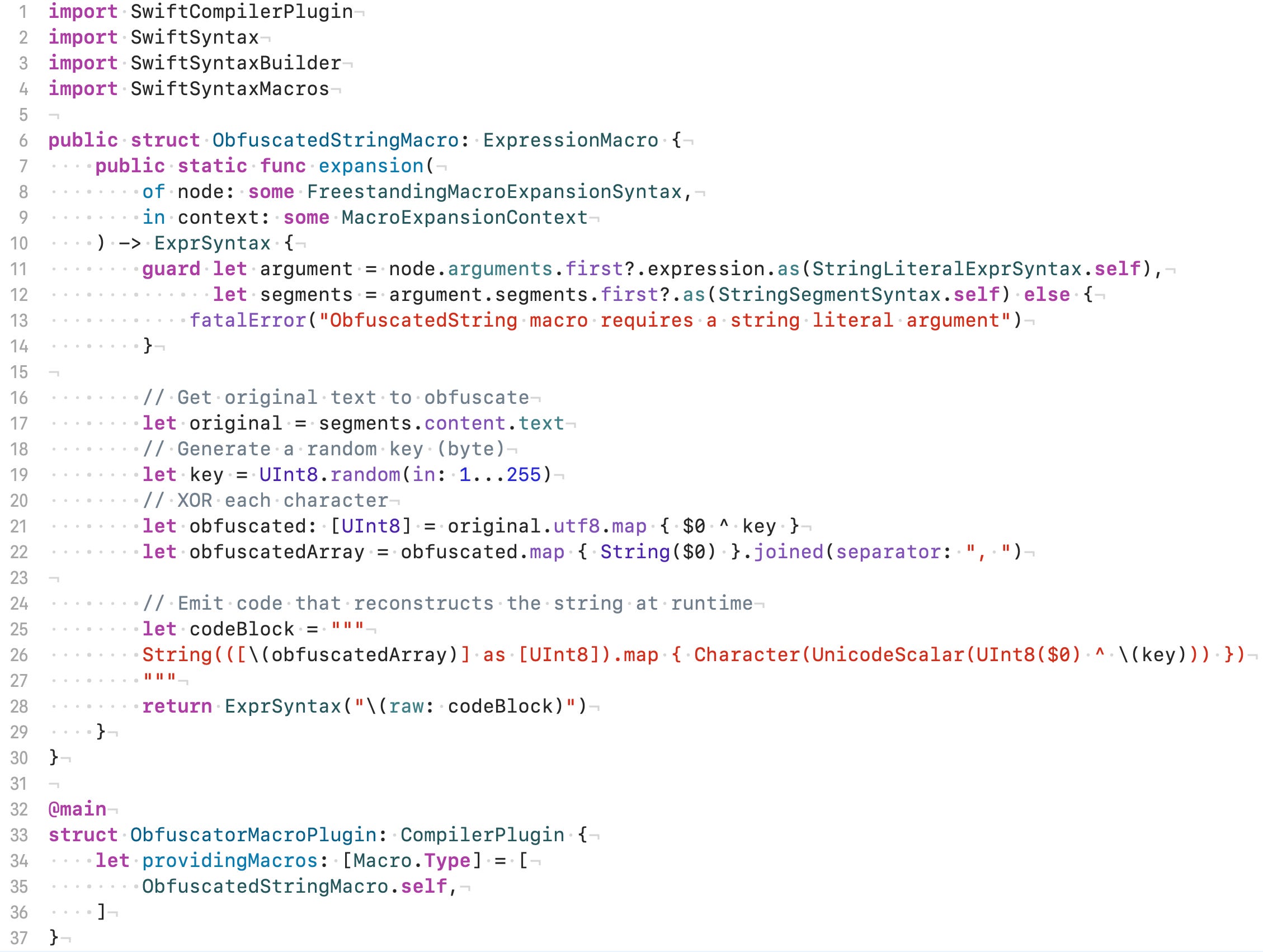
As you can see, I did a really simple obfuscation:
I generate a random 1-byte key
I XOR each UTF-8 character of the string to obfuscate with the key
Then I make an array of those bytes → This is the array that will be in the binary, not the obfuscated string. That's exactly what we want.
Then there is the code that reverses this at runtime, it does the same steps in reverse: XORing first each byte, building a character, and joining them.
In the second file, we will find the declaration of our macro:

Finally, we can use it in main.swift:
See? We can even expand the macro to see what the actual code of our binary looks like.
The full code is available on this repo, for education purposes only, since it's far from being polished and production ready.
However, be careful, obfuscating is exactly what its name suggests: a layer of obscurity! It is far from enough to hide your API keys or any real secret. Any knowledgeable forensics analyst will be able to reverse the process and find the original string. Of course, as you make it more difficult, it’ll be more difficult and possibly deter the less determined, but it's definitely not bulletproof!
It was a nice exercise, however in the end, I went with a well-made package that had already all the bells and whistles I was thinking of adding: randomized multiple methods of obfuscation across several layers.
But I still got to play with Swift macros!
No posts
Comments
Nothing yet. Say the first thing.
Sign in to join the conversation.