
Hey, you came back! Previously, we explored how car remote key fobs worked when it comes to security and encryption. We saw how it relies on seeding a PRNG with a common value, and then keeping them somehow in sync, so that they both produce a synchronized sequence of number, that can hardly be guessed by a nefarious actor.
Today, let's dive into Time-based One-Time Password (TOTP), a key component of modern two-factor authentication systems. And of course we'll look at the implementation in Swift.
As we have already established, TOTP stands for Time-based One-Time Password.
In part one, one key aspect was that the seed had to be kept in sync so that the generated number was the same between the client and the server.
What if you can't sync them manually like the car remote? Isn't there a way to keep them in sync? It turns out there is, TOTP used something we all share: time.
The basic algorithm works like this:
Both sides share a secret key (established during setup)
Time is divided into 30-second intervals (to account for minor differences between actors)
The current time interval number is combined with the secret key
This combination is run through a cryptographic hash function
The resulting hash is truncated to get a 6 or 8 digit code
Smart isn't it? Let's take a look at how it can be implemented in Swift.
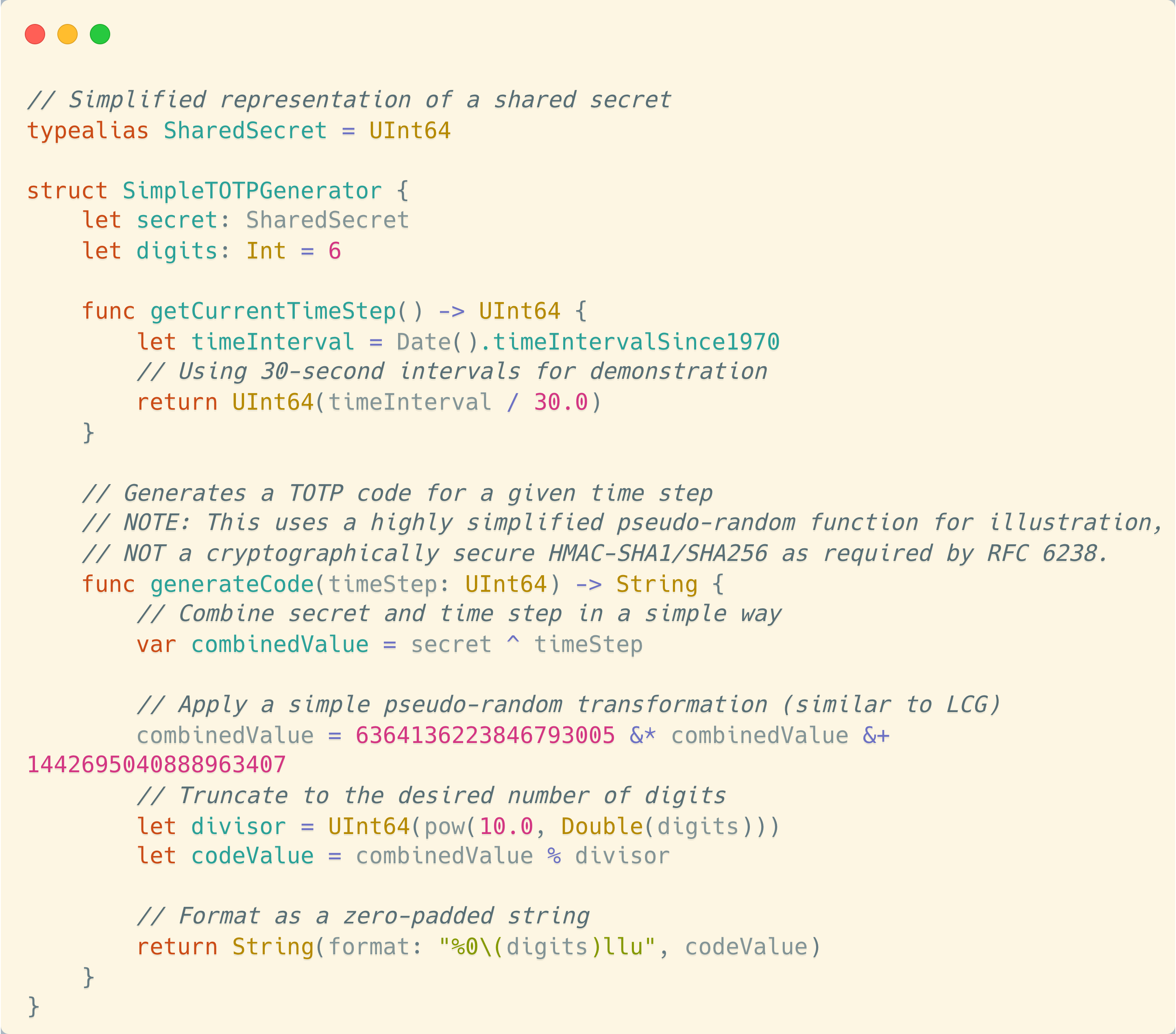
First, the current time is split between 30-second intervals. This will enable actor to have the same code, even if they have minor differences in their time synchronization. It will also allow the user to read the code and enter it, without having it expire before their very eyes.
Then, as you can see, the implementation of the code generation looks a lot like what we did last time.
The main difference is that we now rely on an external piece of data (time) that is combined with our secret, and that we truncate the result into 6 digits, much more readable for an end user.
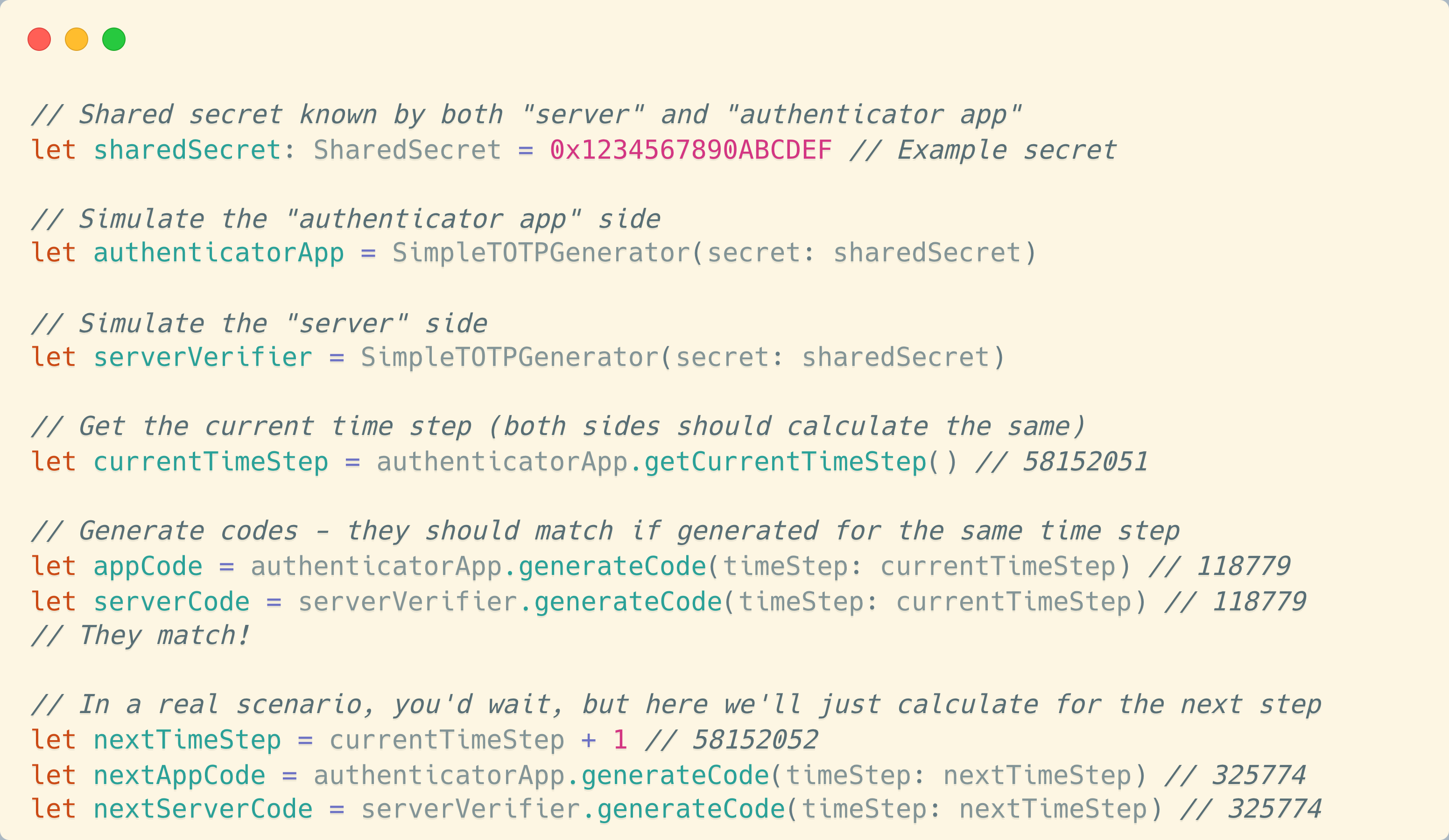
I don't expect you to roll out your own TOTP implementation following this post (because you definitely should not), but here are some notes worth thinking about:
The secret key must remain well, secret. If someone gets access to it, they can generate valid codes, since the only other part of the seed is time, which is obviously known.
TOTP is secure because the code changes frequently, but it’s not invulnerable, for instance, against an attacker with access to your device.
Time synchronization is crucial. If one of the involved device’s clock is off by more than the allowed time step, authentication will fail.
Additionally to the 30-second interval, most implementations allow a window of valid codes (similar to our car remote example) to account for minor time differences or network delays.
Time-based One-Time Passwords provide a robust second factor for authentication. By combining something you know (your password) with something you have (your TOTP device or app), you significantly enhance your security.
Often, your TOTP app will rely on something you are, for instance with biometrics authentication, in order to achieve essentially three-factor authentication.
The beauty of TOTP lies in its simplicity. Both sides independently generate the same code using a shared secret and the current time, without needing to communicate. And they will stay in sync forever. It’s a brilliant application of cryptographic principles to solve a real-world problem.
In our journey from car remote controls to TOTP, we’ve seen how pseudo-random number generators and cryptographic algorithms can be used to create secure, synchronized systems.
Whether you’re unlocking your car or your online banking account, the principles remain surprisingly similar. And you'd be impressed how much those principles are pervasive in our daily lives!
No posts
Comments
Nothing yet. Say the first thing.
Sign in to join the conversation.