
If you’re still writing a full PRD before you build, you’re doing more work than the current generation of AI needs from you.
Somewhere around Opus 4.6 and GPT-5.5, AI stopped needing instructions and started bringing judgment. Not just code, dare I say, a lot of Intuition. That changes what your job as a builder actually looks like. Below is the workflow I’ve replaced PRDs with, broken down so you can copy it directly.

What this framework does is remove a specific kind of friction for simple features: the friction of specifying the obvious. It does not replace the judgment of knowing what's worth building in the first place. That part is still entirely yours.
The biggest unlock, however, is realising how much you can now leave unsaid. Here’s a working list of examples of what AI reliably fills in on its own, without a spec:
Dark mode. Not just a toggle. System-preference detection, a persisted setting, contrast-aware color tokens, transitions that don’t feel jarring.
Infra and security basics. Ask for a new feature and the plan comes back with rate limiting, logging, and data retention flagged, before you’ve thought to ask.
Empty, loading, and error states. The thing every team used to forget until QA found it. Now it shows up in the first draft itself.
Form validation. Sensible inline errors, not just a red border and a prayer.
Onboarding flows. A first-run experience that explains the product, instead of a blank screen.
The test I use: if a competent mid-level engineer would build it a certain way without being told, by default now, so will the AI. That’s your new baseline. Anything below that baseline no longer needs a spec. Anything above it, the genuinely novel or opinionated parts of your product, still does.
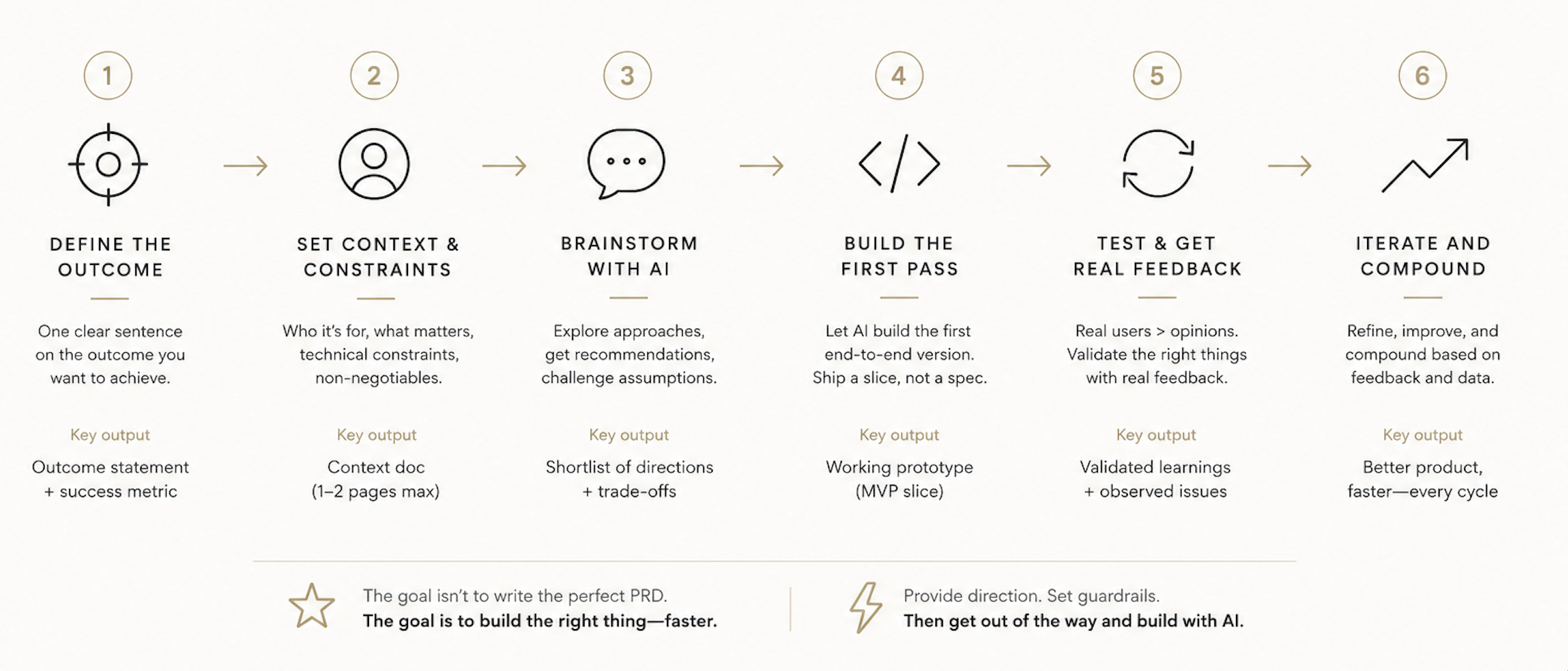
Here’s the actual workflow, step by step.
1. Start with the idea, not the document. Take your high-level idea straight to your harness (I use Claude Code) as a conversation. Don’t pre-write requirements. Describe the outcome you want.
2. Ask for a plan, not code. Have it lay out a full feature plan before writing anything. This is the step that used to be your PRD. Now it’s a five-minute back-and-forth instead of a two-day document.
3. Sort everything into four buckets. This is the part that actually replaces the thinking a PRD used to force you to do:
Critical - the core, must-haves for the product to function at all
High Priority - meaningfully improves the product, not required for v1
Infra - the plumbing: performance, scalability, monitoring
Security - anything touching auth, data, access control
4. Build, then decide, in that order. Watch each piece get built before you commit to it. Decide whether it’s worth keeping once you’ve actually seen it, not before. This inverts the traditional order, and it’s the single biggest change in how I work now. Sure, this does cost you token. But it does add a lot more value in terms of look and feel in the long-run.
5. Keep these two tracking documents. Ask your harness to maintain a PENDING.md and a FEATURES.md as you go. This is the only paperwork I’ve kept ( I assume you have CLAUDE.md and certain SKILLS in place already). Everything else that used to live in a PRD now lives in the conversation history.
If your harness has worked across more than one of your projects, it can transfer solutions between them, if you ask it to. Sound simple, yet I didn’t realise how much of a leverage it can be before.
I was stuck on Google OAuth in one project for longer than I’d like to admit. I’d already solved it cleanly in a different project months earlier. I asked Claude Code to look at how it was implemented there and apply the same pattern here. It did, in minutes.
The takeaway: before you troubleshoot a hard problem from scratch, ask your harness whether you’ve already solved something similar elsewhere. It might have the answer sitting in a project you forgot about.
If you’re building into a space with established competitors, don’t start your feature list from memory. This mostly works when you are building it for personal use only:
Point an exploration agent at an existing, well-established product in your category
Ask it to report back everything the product does, feature by feature
Run that list through the same four-bucket framework above
Pay close attention to what it flags unprompted on infra and security, this is usually the most valuable part of the output
I used this exact approach building my own scheduling tool, after getting frustrated with the gaps in the tools already on the market. The feature list was thorough. The non-functional requirements it suggested unprompted, the security and infrastructure details, were the part that actually impressed me. This is the layer most builders skip, and it’s the layer that can separate a toy from a real product.
This is also the spark that felt missing from the earlier wave of vibe-coding tools. Lovable and Bolt.new were great at getting you to a demo. They weren’t bringing this kind of structural thinking to the table. This does and I have experienced it first hand.
None of this guarantees a great product, and it’s worth being honest about the limit. Feature-level taste is not the same as product-level taste. I’ve written before about why the real work of a great product happens below the surface, in the parts nobody sees on a demo call. If you haven’t read my piece on the Iceberg Theory of Great Products, it’s the companion read to this one, and it argues the flip side of what’s above.
As I mentioned above, what this framework does is remove a specific kind of friction: the friction of specifying the obvious. It does not replace the judgment of knowing what’s worth building in the first place. That part still separates a great product that many people love from a hobby project that only you use.
If you’re still writing full PRDs, try this instead on your next feature: skip the document, describe the outcome, ask for a plan, and sort what comes back into Critical, High Priority, Infra, and Security. See how much of the document your harness fills in without being asked.
If you try this workflow, I’d genuinely like to know what your harness got right without being told, and where it needed you to step in. Drop it in the comments, I’m collecting examples for a follow-up piece.
No posts
Comments
Nothing yet. Say the first thing.
Sign in to join the conversation.