
In a previous post, I shared my initial Dev Container setup.
Since then, I’ve refined my configuration significantly. In this article, I’ll walk you through three major improvements I’ve implemented:
Separating project configuration from IDE/terminal customization
Externalizing my configuration into a centralized Git repository
Installing the Gemini CLI directly into the container
In my original setup, project-specific settings (system dependencies, configuration files, …) and personal IDE/terminal customizations (Powerlevel10k, global gitignore, Zsh config, …) were all mixed together in a single devcontainer.json file.
In my new setup, I’ve separated these concerns:
devcontainer.json: Now only contains configurations essential to the project itself.settings.json: Personal VS Code customizations are now centralized and loaded directly by the IDE.
Dotfiles: All my personal terminal and shell configurations are now stored in a public GitHub repository and pulled in automatically by VS Code.

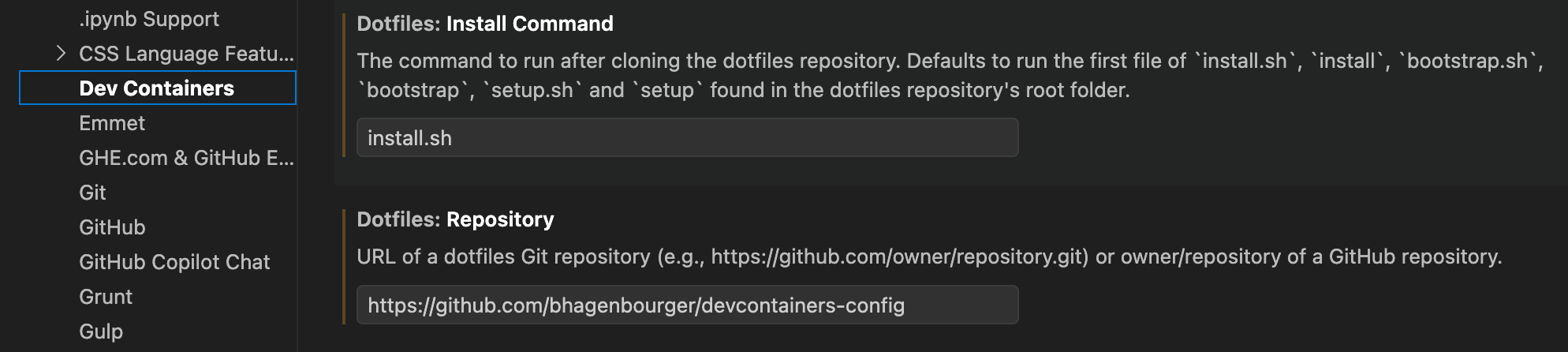
With this approach, devcontainer.json stays focused on project requirements, while VS Code handles my personal environment.
As mentioned above, I now store my entire setup in a public GitHub repository. This offers several key advantages:
Version Control: My configuration is backed up and versioned.
Portability: My setup is easily shareable across different machines.
Isolation: My personal configuration lives outside the main project repository, ensuring I don’t impact other developers on the team.
However, this transition introduced a few technical constraints:
Custom Installation: I now use a custom script to handle the Dev Container configuration installation.
Docker & Symlinks: I originally used a symlink for the
.devcontainerfolder, but since Docker doesn’t follow symlinks when mounting files, I had to adapt. I created a.devcontainer_configfolder and now copy the necessary configuration files into the container.Git Hygiene: To avoid tracking these local configuration files in the project’s Git history, I added exclusions to the
.git/info/excludefile.
In my first setup, I kept the Gemini CLI outside the container. This caused several issues. Gemini couldn’t access my .venv due to permission errors, and it couldn’t execute uv run pytest because the necessary system packages were only installed inside the container, not on my local machine.
To fix this, I added the Gemini CLI installation to the install.sh script called by VS Code. Now that Gemini is installed directly inside the container, it can execute uv run pytest successfully with full access to the containerized environment.
This new “composable” setup makes my configuration much more flexible. I can now use Dev Containers exactly how I like without impacting my teammates. By using a centralized public repository, others can even cherry-pick specific parts of my configuration for their own use.
I’m really happy with how this modular approach turned out. I hope this inspired you to give Dev Containers a try or to refine your own setup!
No posts
Comments
Nothing yet. Say the first thing.
Sign in to join the conversation.