
I once spent 45 minutes reading a function before I understood what it did.
It was 80 lines long. No comments. Variable names like d, s, x, and temp. Three levels of nesting. A boolean flag as the second argument named flag.
The engineer who wrote it was smart.
I know because I wrote it. Six months earlier.
Robert C. Martin has a line that hit me when I read it:
“The ratio of time spent reading code versus writing code is well over 10 to 1. We are constantly reading old code as part of the effort to write new code.”
I believe him now. I did not believe him when I was the one writing 80-line functions.
This post is about three things — naming, functions, and formatting — that you can fix in your codebase today. Not a refactoring sprint. Not a rewrite. One hour. The improvements last for years.
Why readability matters more than you think
There is a specific kind of pain that only engineers feel.
You open a file you have not touched in three months. You need to change one thing. One small thing. But first you have to re-learn what the file does. Then you have to figure out which part to change. Then you have to make sure your change does not break the parts you still do not fully understand.
Thirty minutes later you make a two-line change.
Martin calls the accumulation of this pain “the total cost of owning a mess.” He is right that it compounds. Each shortcut makes the next one more likely. Each hour lost to reading bad code is an hour not spent building.
The solution is not to “write clean code from now on.” That is too vague.
The solution is three specific habits. Here they are.
Fix 1: Names that reveal intent
Of the three fixes in this post, naming pays off the fastest. You can rename 20 variables in 20 minutes with your IDE’s rename refactoring. The improvements are immediate and permanent.
This is also the fix most engineers underestimate. Names feel cosmetic. They are not.
Here is a real example from the book. Read this function and time how long it takes you to understand what it does:
public List<int[]> getThem() {
    List<int[]> list1 = new ArrayList<>();
    for (int[] x : theList) {
        if (x[0] == 4) {
            list1.add(x);
        }
    }
    return list1;
}
What is the List? What is x[0]? Why does 4 matter?
The logic is simple. But the names force you to hold a mental translation table while you read. That cognitive overhead is the tax you pay every time you open this file.
Now the same code with names that reveal intent:
public List<Cell> getFlaggedCells() {
    List<Cell> flaggedCells = new ArrayList<>();
    for (Cell cell : gameBoard) {
        if (cell.isFlagged()) {
            flaggedCells.add(cell);
        }
    }
    return flaggedCells;
}
Nothing changed except the names. Same logic. Same structure.
But now you know you are looking at a game board. You know you are finding flagged cells. You know what a cell knows about itself. You understood it in five seconds instead of two minutes.
The five naming mistakes I see in every codebase
Single-letter variables outside loops
// What is this? You have to read the whole function to find out.
int d;
String s;
boolean f;
// Now you know immediately.
int elapsedTimeInDays;
String userFullName;
boolean isUserActive;
i,j,kin loops — fine. Everywhere else — no.
Class names that mean nothing
// Manager, Processor, Data, Info — these tell you nothing.
class Manager { }
class DataProcessor { }
class UserInfo { }
// These tell you exactly what you are dealing with.
class SubscriptionBillingManager { }
class ArticleContentParser { }
class UserPreferences { }
I have a personal rule: if I cannot explain what a class does in one sentence without using the word “handles,” the name is wrong.
Methods that hide what they do
// What does process() process?
// What does get() get?
public void process() { }
public List<User> get() { }
public boolean check(User user) { }
// Now the method name IS the documentation.
public void processMonthlySubscriptions() { }
public List<User> findActiveUsersInTokyo() { }
public boolean isEligibleForDiscount(User user) { }
Inconsistent vocabulary
This one drives me crazy. The same operation ends up being called fetch, retrieve, get, or load, depending on who wrote the code. Individually they're all fine, but together they make the codebase feel messy and unpredictable.
// Pick ONE word and use it everywhere.
userService.fetchUser(id);       // fetch
accountRepo.retrieveAccount(id); // retrieve — same concept, different word
profileDao.getProfile(id);       // get — third word for same concept
// One word. Every time.
userService.findUser(id);
accountRepo.findAccount(id);
profileRepo.findProfile(id);
When I do code reviews in Tokyo I flag this immediately. Inconsistent naming means every new engineer has to build a mental map of which word means what. That map belongs in the code, not in someone’s head.
Names you cannot pronounce
Martin has an example from a company he worked with. Their variable was named genymdhms — generation date, year, month, day, hour, minute, second. Engineers walked around saying “gen-yah-mudda-hims” in meetings.
// What does this class represent? You need a key to decode it.
class DtaRcrd102 {
    private Date genymdhms;
    private Date modymdhms;
    private final String pszqint = "102";
}
// Now you can have an actual conversation about it.
class Customer {
    private Date generationTimestamp;
    private Date modificationTimestamp;
    private final String recordId = "102";
}
If you cannot say it out loud in a meeting, it is wrong.
The naming exercise
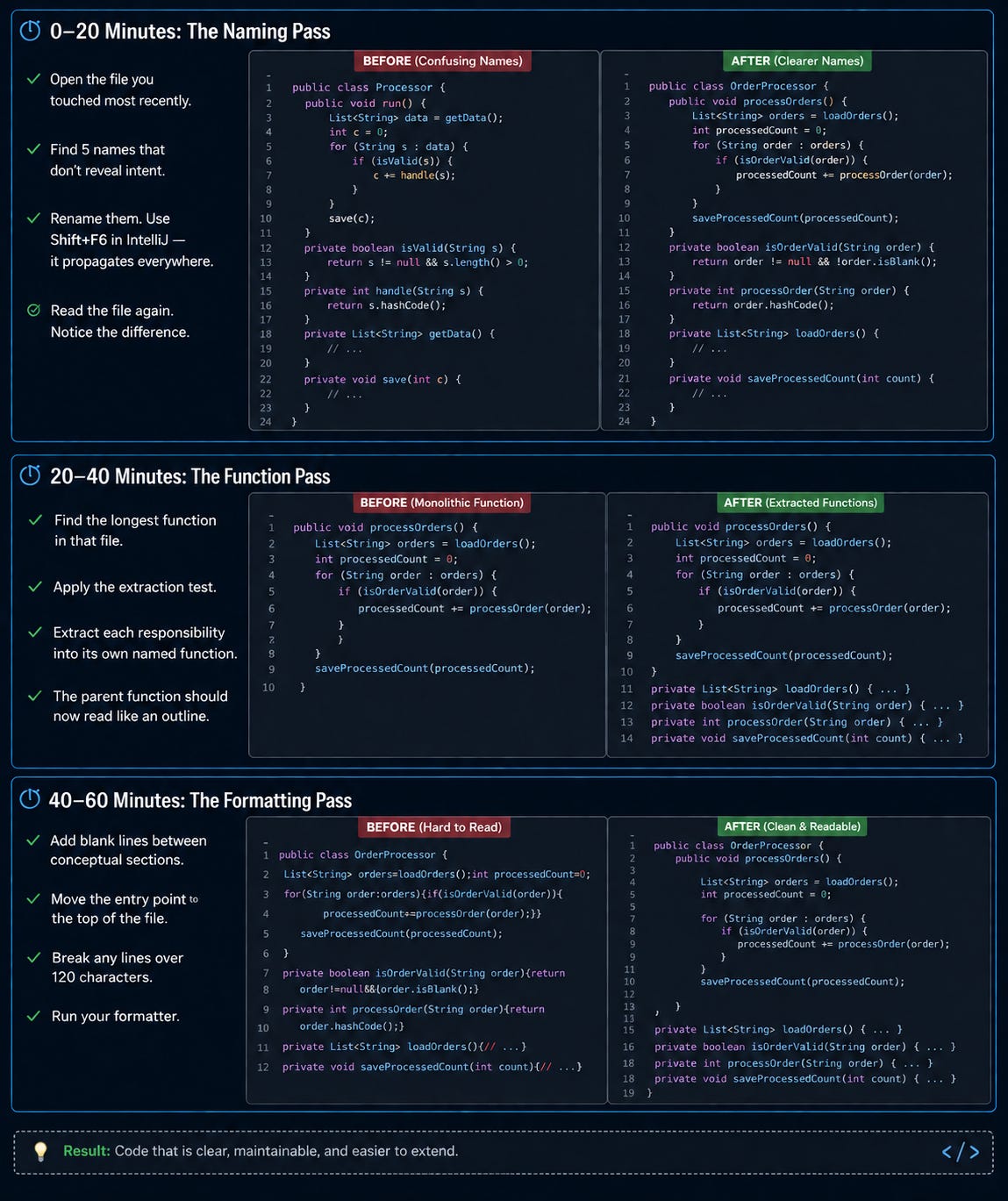
Open the file you touched most recently. Find five names that do not immediately reveal intent. Rename them. Read the file again.
Notice how much faster your eyes move.
Fix 2: Functions that do one thing
This is the rule that causes the most arguments.
Martin says functions should be 5-10 lines. I think that is too strict for Spring Boot services where you sometimes need the full request/response context visible in one place. My real limit is around 20 lines. At 30 you are almost certainly doing too many things.
The rule itself is not about line count. It is about responsibility.
Here is a processOrder function. I have seen variations of this in nearly every codebase I have worked in. Read it.
public void processOrder(Order order) {
    // validate
    if (order.getItems() == null || order.getItems().isEmpty()) {
        throw new IllegalArgumentException("Order has no items");
    }
    if (order.getUserId() == null) {
        throw new IllegalArgumentException("Order has no user");
    }
    // calculate total
    double total = 0;
    for (OrderItem item : order.getItems()) {
        total += item.getPrice() * item.getQuantity();
    }
    if (order.getCouponCode() != null) {
        Coupon coupon = couponRepository.findByCode(order.getCouponCode());
        if (coupon != null && coupon.isValid()) {
            total = total * (1 - coupon.getDiscountRate());
        }
    }
    order.setTotalAmount(total);
    // charge payment
    PaymentResult result = paymentGateway.charge(
        order.getUserId(),
        order.getTotalAmount(),
        order.getPaymentToken()
    );
    if (!result.isSuccessful()) {
        throw new PaymentException("Payment failed: " + result.getErrorCode());
    }
    order.setPaymentId(result.getTransactionId());
    // update inventory
    for (OrderItem item : order.getItems()) {
        inventoryService.decreaseStock(item.getProductId(), item.getQuantity());
    }
    // send notifications
    emailService.sendOrderConfirmation(order);
    smsService.sendOrderNotification(order);
    // save
    orderRepository.save(order);
}
This validates, calculates, charges, updates inventory, notifies, and saves.
Six things. One function.
If you have ever debugged a payment bug and accidentally broken the notification logic, you know why this matters. If you have ever needed to test just the coupon calculation and had to mock five dependencies to do it, you know why this matters.
Here is the same logic, refactored:
// This reads like a summary of what happens when you place an order.
// You understand the complete process in 6 seconds.
public void processOrder(Order order) {
    validateOrder(order);
    calculateOrderTotal(order);
    chargePayment(order);
    updateInventory(order);
    notifyCustomer(order);
    orderRepository.save(order);
}
private void validateOrder(Order order) {
    if (order.getItems() == null || order.getItems().isEmpty()) {
        throw new IllegalArgumentException("Order has no items");
    }
    if (order.getUserId() == null) {
        throw new IllegalArgumentException("Order has no user");
    }
}
private void calculateOrderTotal(Order order) {
    double subtotal = order.getItems().stream()
        .mapToDouble(item -> item.getPrice() * item.getQuantity())
        .sum();
    double total = applyCouponIfValid(subtotal, order.getCouponCode());
    order.setTotalAmount(total);
}
private double applyCouponIfValid(double total, String couponCode) {
    if (couponCode == null) return total;
    Coupon coupon = couponRepository.findByCode(couponCode);
    if (coupon == null || !coupon.isValid()) return total;
    return total * (1 - coupon.getDiscountRate());
}
private void chargePayment(Order order) {
    PaymentResult result = paymentGateway.charge(
        order.getUserId(),
        order.getTotalAmount(),
        order.getPaymentToken()
    );
    if (!result.isSuccessful()) {
        throw new PaymentException("Payment failed: " + result.getErrorCode());
    }
    order.setPaymentId(result.getTransactionId());
}
private void updateInventory(Order order) {
    order.getItems().forEach(item ->
        inventoryService.decreaseStock(item.getProductId(), item.getQuantity())
    );
}
private void notifyCustomer(Order order) {
    emailService.sendOrderConfirmation(order);
    smsService.sendOrderNotification(order);
}
The top-level function now reads like plain English. A new engineer can understand the full process in seconds. Each step is testable in isolation. A bug in notifyCustomer cannot touch updateInventory.
If you recognized your own code in the before version — no judgment. I have written that function. Multiple times. In multiple languages.
How to know if a function does too many things
Apply what I call the extraction test.
Can you extract a section into a sub-function with a name that is not simply a restatement of the parent? If yes — that section wants to be its own function.
processOrder() contains:
  "validate order items and user" → validateOrder()
  "calculate subtotal and apply coupon" → calculateOrderTotal()
  "charge via payment gateway" → chargePayment()
  "decrease stock for each item" → updateInventory()
  "send email and SMS" → notifyCustomer()
Five extractable pieces. Five responsibilities.
One function was doing five things.
Stop extracting when the sub-function name restates the parent. That is the signal you have gone deep enough.
The argument problem
The ideal number of function arguments is zero. One is fine. Two is acceptable. Three needs a good reason. Four or more — almost always a sign that something is wrong.
// What is 'true'? You have to check the method signature every time.
createUser("Dev", "Dhar", "dev@example.com", true);
// The call site now documents itself.
createUser(CreateUserRequest.builder()
    .firstName("Dev")
    .lastName("Dhar")
    .email("dev@example.com")
    .isAdmin(true)
    .build());
Boolean flag arguments are almost always wrong. They announce that the function does two things — one when true, one when false. Split it into two functions.
// This function does two things.
public void render(boolean isSuite) { }
// Now each function does one thing.
public void renderSuite() { }
public void renderSingleTest() { }
Fix 3: Formatting that communicates structure
Some engineers treat formatting as cosmetic. It is not.
Formatting tells the reader which code belongs together. It tells them which functions call which other functions. It tells them where one concept ends and another begins.
Martin puts it directly: “Code formatting is about communication, and communication is the professional developer’s first order of business.”
The newspaper metaphor
Think of how a newspaper is structured. The headline tells you the story. The opening paragraph gives you the key facts. The details come later, for readers who want more.
Your code should work the same way.
The entry point — the function a caller actually uses — should be at the top. The implementation details below. The reader sees the high-level picture first, then reads the details in the order they need them.
// Bad: you have to scroll to the bottom to find the entry point.
// You are reading the details before you know what they are details OF.
private void validateEmail(String email) { ... }
private User createUserEntity(RegistrationRequest request) { ... }
private void saveUser(User user) { ... }
private void sendWelcomeEmail(User user) { ... }
public void registerUser(RegistrationRequest request) {
    validateEmail(request.getEmail());
    User user = createUserEntity(request);
    saveUser(user);
    sendWelcomeEmail(user);
}
// Good: entry point at the top.
// You understand the high-level flow in 4 seconds.
// Then you read the details below in the order you need them.
public void registerUser(RegistrationRequest request) {
    validateEmail(request.getEmail());
    User user = createUserEntity(request);
    saveUser(user);
    sendWelcomeEmail(user);
}
private User createUserEntity(RegistrationRequest request) {
    return User.builder()
        .email(request.getEmail())
        .passwordHash(hashPassword(request.getPassword()))
        .createdAt(Instant.now())
        .build();
}
private void validateEmail(String email) {
    if (!email.contains("@")) {
        throw new InvalidEmailException(email);
    }
}
private void saveUser(User user) {
    userRepository.save(user);
}
private void sendWelcomeEmail(User user) {
    emailService.sendWelcome(user.getEmail());
}
Blank lines are not optional
Blank lines separate concepts. Their absence is not “compact” — it is exhausting.
// Bad. No breathing room. Everything runs together.
public class OrderService {
    private OrderRepository orderRepository;
    private PaymentService paymentService;
    public OrderService(OrderRepository orderRepository,
                        PaymentService paymentService) {
        this.orderRepository = orderRepository;
        this.paymentService = paymentService;
    }
    public Order createOrder(CreateOrderRequest request) {
        Order order = new Order(request);
        orderRepository.save(order);
        return order;
    }
    public void cancelOrder(String orderId) {
        Order order = orderRepository.findById(orderId)
            .orElseThrow(() -> new OrderNotFoundException(orderId));
        order.cancel();
        orderRepository.save(order);
    }
}
// Good. Fields, constructor, and methods are visually distinct.
// Your eye knows where each section begins.
public class OrderService {
    private final OrderRepository orderRepository;
    private final PaymentService paymentService;
    public OrderService(
        OrderRepository orderRepository,
        PaymentService paymentService
    ) {
        this.orderRepository = orderRepository;
        this.paymentService = paymentService;
    }
    public Order createOrder(CreateOrderRequest request) {
        Order order = new Order(request);
        orderRepository.save(order);
        return order;
    }
    public void cancelOrder(String orderId) {
        Order order = orderRepository.findById(orderId)
            .orElseThrow(() -> new OrderNotFoundException(orderId));
        order.cancel();
        orderRepository.save(order);
    }
}
Keep lines short
120 characters. That is my limit. Martin suggests 80 but I find that too aggressive for modern Java with long class names and method chains.
When you find a line over 120 characters, it is almost always a sign that you are doing too much in one statement:
// Bad. Forces horizontal scrolling. Breaks reading flow.
Map<String, List<OrderItem>> itemsByCategory = orders.stream().flatMap(order -> order.getItems().stream()).collect(Collectors.groupingBy(OrderItem::getCategory));
// Good. Reads top to bottom, not left to right.
Map<String, List<OrderItem>> itemsByCategory = orders.stream()
    .flatMap(order -> order.getItems().stream())
    .collect(Collectors.groupingBy(OrderItem::getCategory));
One rule on team formatting
Your preferences do not matter as much as consistency.
Pick a formatter — Checkstyle, Google Java Format, IntelliJ’s built-in — configure it once, run it on save, enforce it in the CI pipeline. Inconsistent formatting is not a style debate. It is a readability tax paid by every engineer on every file switch.
In teams I have managed, we configure the formatter in week one. It saves hours of PR comments about indentation that should never happen.
The one-hour plan
You do not need to clean your whole codebase. You need to build the habit.
Better Engineers is a reader-supported publication. To receive new posts and support my work, consider becoming a free or paid subscriber.
After one hour you will not have a clean codebase. You will have one clean file.
Martin calls the underlying habit the Boy Scout Rule:
“Leave the campground cleaner than you found it.”
Not a rewrite. Not a project. One file at a time. Every time you touch code. Over a year, a codebase maintained this way looks completely different from one that was not.
I re-read Clean Code last month. Third time. I still found three habits I thought I had but did not.
That is either a great book or a damning indictment of how slowly I learn things.
Probably both.
Next post in this series: “Stop Writing Comments — Write Better Code Instead.”
Share this with one engineer who just onboarded and is still deciphering your codebase.
Comments
Nothing yet. Say the first thing.
Sign in to join the conversation.