
Introduction
A Laravel pivot table is the table that connects two models in a many-to-many relationship.
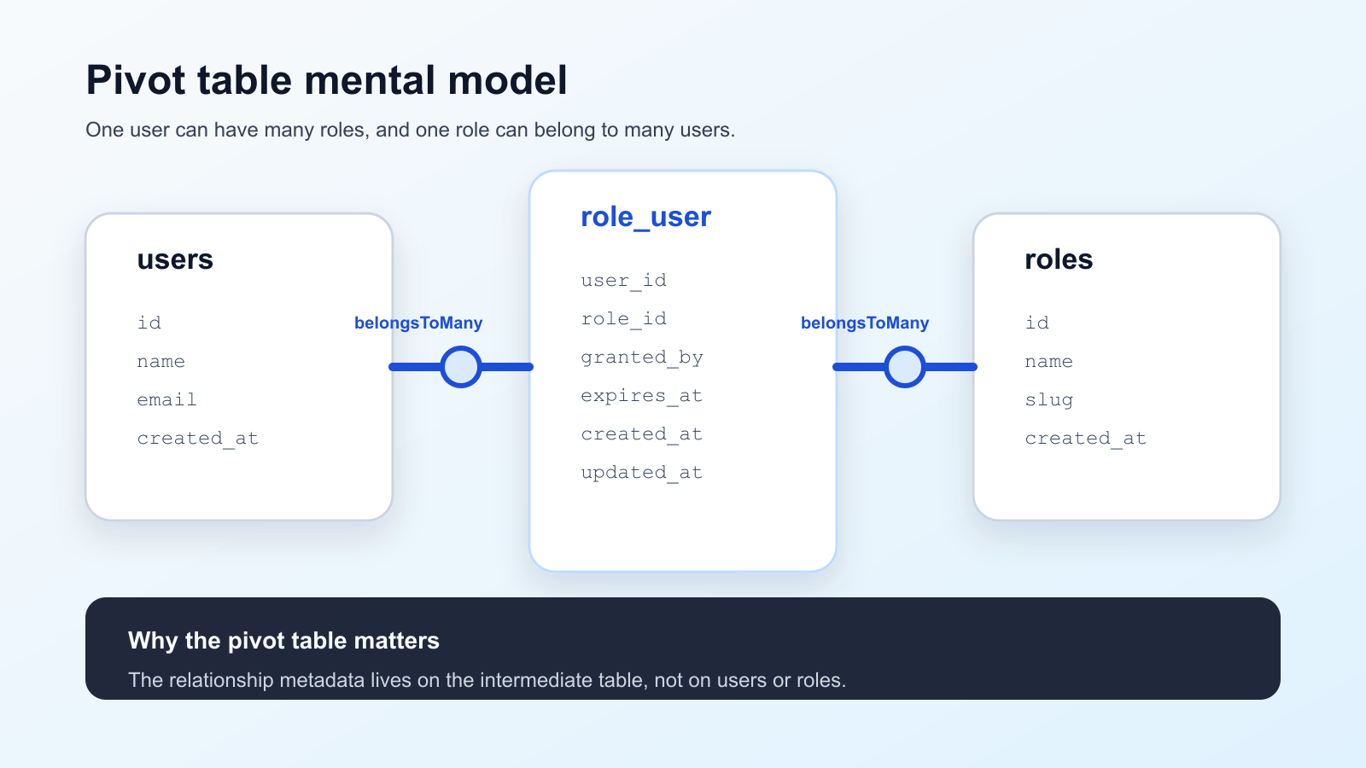
If you have users and roles, the pivot table stores which user has which role:
users ───< role_user >─── roles
role_user
- user_id
- role_id
- granted_by
- expires_at
- created_at
- updated_at
That is the mental model. The rest is just wiring it into Eloquent correctly.
Here is the same relationship as a quick diagram, including the extra fields that belong on the pivot table itself:
This guide walks through one real example from start to finish:
- the migration
- the
belongsToMany()relationships - extra pivot fields
attach(),sync(),syncWithoutDetaching(), andupdateExistingPivot()
When you need a pivot table in Laravel
Use a pivot table when one record can belong to many others on both sides.
Typical examples:
- users and roles
- posts and tags
- products and categories
- students and courses
If each side only belongs to one record on the other side, this is not a pivot-table problem. That is usually a belongsTo() / hasMany() relationship instead.
The example we will build
We will use this relationship:
- one user can have many roles
- one role can belong to many users
- the pivot table also stores who granted the role and when it expires
That means we need three tables:
usersrolesrole_user
Create the pivot table migration
Laravel expects the default pivot table name to be the two related model names in alphabetical order, singular, joined with an underscore.
So for User and Role, the conventional table name is:
role_user
Here is a migration that works well:
use Illuminate\Database\Migrations\Migration;
use Illuminate\Database\Schema\Blueprint;
use Illuminate\Support\Facades\Schema;
return new class extends Migration
{
    public function up(): void
    {
        Schema::create('role_user', function (Blueprint $table) {
            $table->foreignId('user_id')->constrained()->cascadeOnDelete();
            $table->foreignId('role_id')->constrained()->cascadeOnDelete();
            $table->foreignId('granted_by')->nullable()->constrained('users')->nullOnDelete();
            $table->timestamp('expires_at')->nullable();
            $table->timestamps();
            $table->primary(['user_id', 'role_id']);
        });
    }
    public function down(): void
    {
        Schema::dropIfExists('role_user');
    }
};
Why this version is solid:
foreignId()->constrained()gives you proper foreign keys- the composite primary key prevents duplicate
user_id+role_idpairs timestamps()lets you see when the relationship was created or updated- extra pivot fields stay on the pivot table, not the
usersorrolestables
If you want a refresher on migrations before doing this, this Laravel migrations guide is the right companion.
Define the many-to-many relationship in your models
In User.php
use Illuminate\Database\Eloquent\Model;
use Illuminate\Database\Eloquent\Relations\BelongsToMany;
class User extends Model
{
    public function roles(): BelongsToMany
    {
        return $this->belongsToMany(Role::class)
            ->withPivot(['granted_by', 'expires_at'])
            ->withTimestamps();
    }
}
In Role.php
use Illuminate\Database\Eloquent\Model;
use Illuminate\Database\Eloquent\Relations\BelongsToMany;
class Role extends Model
{
    public function users(): BelongsToMany
    {
        return $this->belongsToMany(User::class)
            ->withPivot(['granted_by', 'expires_at'])
            ->withTimestamps();
    }
}
The important pieces are:
belongsToMany()tells Laravel this is many-to-manywithPivot()tells Laravel which extra pivot columns to exposewithTimestamps()tells Laravel to manage the pivot table timestamps
Read pivot data
Once the relationship is loaded, Laravel exposes the intermediate record through the pivot property:
$user = User::with('roles')->findOrFail(1);
foreach ($user->roles as $role) {
    echo $role->name;
    echo $role->pivot->granted_by;
    echo $role->pivot->expires_at;
}
That is the cleanest way to read extra metadata that belongs to the relationship itself.
Attach related models
Use attach() when you want to add a relationship without replacing existing ones.
$user->roles()->attach($roleId);
If the pivot table has extra fields, pass them in the second argument:
$user->roles()->attach($roleId, [
    'granted_by' => auth()->id(),
    'expires_at' => now()->addMonth(),
]);
This is a good fit when you are adding one or a few new relationships and you know they are not already attached.
Sync related models
Use sync() when you want the pivot table to match one exact set of IDs.
$user->roles()->sync([1, 2, 3]);
After that call:
- roles
1,2, and3stay attached - anything else gets detached
You can also sync with extra pivot data:
$user->roles()->sync([
    1 => ['granted_by' => auth()->id()],
    2 => ['granted_by' => auth()->id(), 'expires_at' => now()->addWeek()],
]);
This is the right method when the submitted form or settings screen represents the full desired state.
Avoid accidental detaches with syncWithoutDetaching()
Sometimes you want sync-like behavior without removing existing records.
$user->roles()->syncWithoutDetaching([
    3 => ['granted_by' => auth()->id()],
]);
This attaches the missing role but leaves the existing ones alone.
It is a better fit than sync() when “add this role too” is the requirement.
Update existing pivot rows
If the relationship already exists and you just want to change the pivot data, use updateExistingPivot().
$user->roles()->updateExistingPivot($roleId, [
    'expires_at' => now()->addMonths(3),
    'granted_by' => auth()->id(),
]);
This is cleaner than detaching and reattaching just to change metadata.
Common pitfalls
Duplicate rows in the pivot table
If you do not enforce uniqueness, it is easy to attach the same pair twice. The composite primary key in the migration prevents that.
Wrong pivot table name
Laravel expects the alphabetical singular naming convention by default. If your table name does not follow that convention, pass it explicitly:
return $this->belongsToMany(Role::class, 'user_roles');
Forgetting withPivot()
If you do not add the extra columns to withPivot(), they will exist in the database but not be available on $role->pivot.
Using sync() when you really meant “attach one more”
This is a classic production bug. sync() removes anything not in the provided list.
If you only mean to add one relationship, use attach() or syncWithoutDetaching() instead.
Practical controller example
Here is a simple example of granting roles from a request:
public function updateRoles(Request $request, User $user): RedirectResponse
{
    $validated = $request->validate([
        'roles' => ['array'],
        'roles.*.id' => ['required', 'integer', 'exists:roles,id'],
        'roles.*.expires_at' => ['nullable', 'date'],
    ]);
    $syncData = collect($validated['roles'] ?? [])
        ->mapWithKeys(fn (array $role) => [
            $role['id'] => [
                'granted_by' => auth()->id(),
                'expires_at' => $role['expires_at'] ?? null,
            ],
        ])
        ->all();
    $user->roles()->sync($syncData);
    return back();
}
This is a good real-world pattern because it makes the request payload the source of truth.
If you are validating nested request arrays like this often, this Laravel array validation guide is worth keeping nearby.
Conclusion
Laravel pivot tables are just many-to-many relationships with an intermediate table. Once the mental model is clear, the main decisions are straightforward:
- use
belongsToMany()on both models - use
withPivot()for extra fields - use
attach()to add - use
sync()to replace the full set - use
syncWithoutDetaching()to add without removing - use
updateExistingPivot()to change existing pivot metadata
If you are still wiring relationships and database structure in Laravel, these are the next reads I would keep open:
Comments
Nothing yet. Say the first thing.
Sign in to join the conversation.