
Introduction
If you want to generate PDFs from Blade views in Laravel, barryvdh/laravel-dompdf is the package most people reach for first.
It is a good fit when you want to turn an HTML invoice, receipt, or report into a downloadable PDF without introducing a full browser-rendering stack.
The practical pattern looks like this:
- install the package
- build a dedicated Blade view for the PDF
- pass data into that view
- return a stream or download response
This guide walks through that workflow with a simple invoice example.
Install Laravel DomPDF
Install the package with Composer:
composer require barryvdh/laravel-dompdf
In current Laravel versions, package discovery handles the service provider automatically.
If you want to publish the config file, run:
php artisan vendor:publish --provider="Barryvdh\DomPDF\ServiceProvider"
That creates config/dompdf.php, which is where you can tune paper size, font, remote assets, and other package-level defaults.
Generate a PDF from a Blade view
The simplest workflow is:
- create a normal Blade file
- pass data into it
- load that view into
Pdf::loadView()
Example controller:
use Barryvdh\DomPDF\Facade\Pdf;
use App\Models\Invoice;
class InvoiceController extends Controller
{
    public function showPdf(Invoice $invoice)
    {
        $pdf = Pdf::loadView('pdf.invoice', [
            'invoice' => $invoice->load('items', 'customer'),
        ]);
        return $pdf->download("invoice-{$invoice->id}.pdf");
    }
}
That is the core of the package. Everything else is mostly about shaping the view and tuning the output.
A practical invoice example
Here is a minimal Blade view that works well as a starting point:
<!DOCTYPE html>
<html lang="en">
<head>
    <meta charset="UTF-8">
    <title>Invoice #{{ $invoice->id }}</title>
    <style>
        body {
            font-family: DejaVu Sans, sans-serif;
            font-size: 14px;
            color: #111827;
        }
        .header, .totals {
            margin-bottom: 24px;
        }
        table {
            width: 100%;
            border-collapse: collapse;
        }
        th, td {
            padding: 10px;
            border-bottom: 1px solid #e5e7eb;
            text-align: left;
        }
        .text-right {
            text-align: right;
        }
    </style>
</head>
<body>
    <div class="header">
        <h1>Invoice #{{ $invoice->id }}</h1>
        <p>{{ $invoice->customer->name }}</p>
        <p>{{ $invoice->created_at->toDateString() }}</p>
    </div>
    <table>
        <thead>
            <tr>
                <th>Description</th>
                <th class="text-right">Qty</th>
                <th class="text-right">Price</th>
                <th class="text-right">Total</th>
            </tr>
        </thead>
        <tbody>
            @foreach ($invoice->items as $item)
                <tr>
                    <td>{{ $item->description }}</td>
                    <td class="text-right">{{ $item->quantity }}</td>
                    <td class="text-right">${{ number_format($item->price, 2) }}</td>
                    <td class="text-right">
                        ${{ number_format($item->quantity * $item->price, 2) }}
                    </td>
                </tr>
            @endforeach
        </tbody>
    </table>
    <div class="totals">
        <p><strong>Total:</strong> ${{ number_format($invoice->total, 2) }}</p>
    </div>
</body>
</html>
This is intentionally plain. DomPDF handles simple HTML and CSS much better than elaborate app-layout markup.
Download vs stream
You will usually choose one of these two responses:
Download the file
return $pdf->download("invoice-{$invoice->id}.pdf");
This is the right choice when the user expects a file immediately.
Stream the PDF in the browser
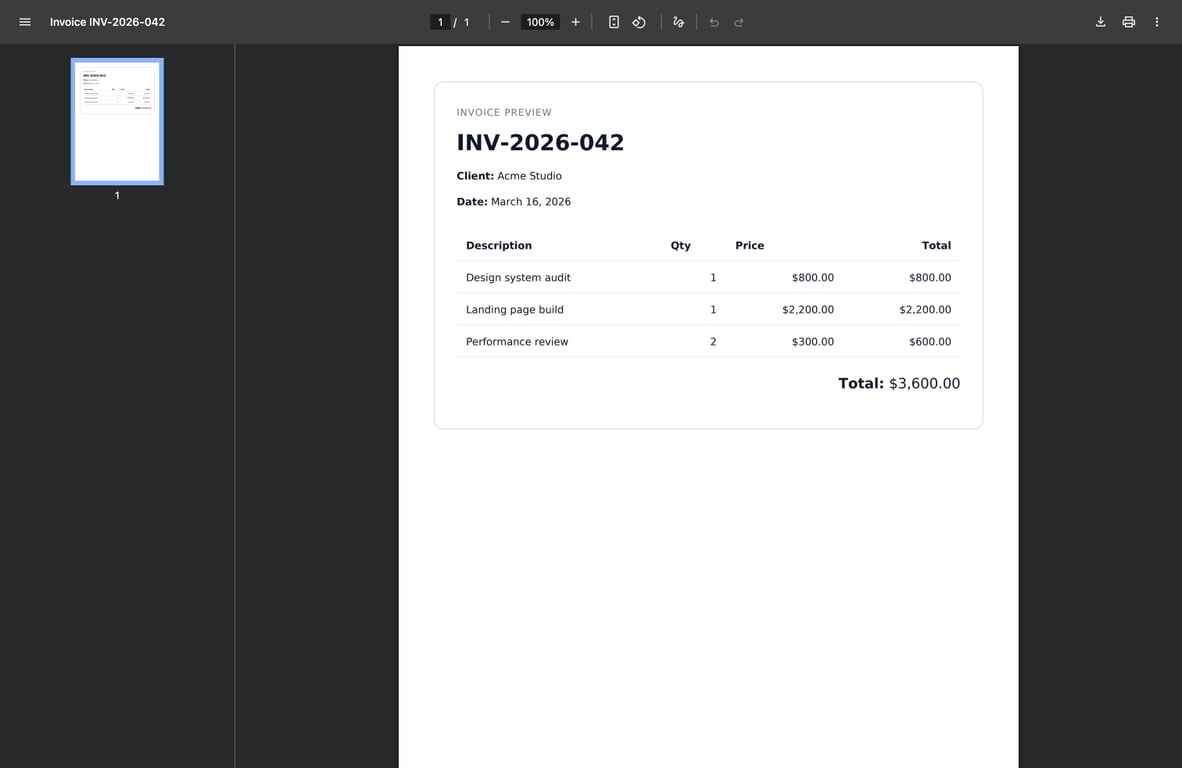
return $pdf->stream("invoice-{$invoice->id}.pdf");
This is useful for previews or browser-based review flows.
Here is the kind of result you get from a simple streamed invoice:
Set paper size and orientation
You can set these per document:
$pdf = Pdf::loadView('pdf.invoice', ['invoice' => $invoice])
    ->setPaper('a4', 'portrait');
Common options:
a4letterportraitlandscape
This is worth setting explicitly when the output is user-facing, because “default paper” assumptions vary across teams and environments.
Images in DomPDF
Images can work, but this is an area where people usually run into trouble.
Good defaults:
- use absolute paths or public URLs when needed
- keep image sizes reasonable
- prefer simple logos or invoice graphics over large decorative assets
Example:
<img src="{{ public_path('images/logo.png') }}" alt="Company logo" width="160">
If you rely on remote assets, check the DomPDF config because remote loading may need to be enabled depending on your setup.
Common rendering limits
This is the part most tutorials underplay.
DomPDF is convenient, but it is not a real browser engine. That means:
- advanced CSS can fail or render differently
- flexbox and grid support are not something to trust blindly
- complex layouts, sticky headers, and JavaScript-driven UIs are a bad fit
If the PDF needs pixel-perfect browser rendering, screenshots, charts, or highly modern CSS, a headless-browser approach is often the better tool.
For invoices, receipts, and straightforward reports, DomPDF is usually good enough.
Keep PDF Blade views separate from normal web views
This is one of the best practical habits for this package.
Do not reuse your full app layout unless it is already extremely simple. A dedicated PDF Blade view is usually easier to control and debug.
Good:
resources/views/pdf/invoice.blade.php
Less good:
- reusing the full frontend layout
- depending on heavy external CSS
- expecting interactive UI markup to render nicely in a PDF
A complete controller example
Here is a realistic controller method:
use App\Models\Invoice;
use Barryvdh\DomPDF\Facade\Pdf;
use Illuminate\Http\Response;
class InvoicePdfController
{
    public function __invoke(Invoice $invoice): Response
    {
        $invoice->load(['customer', 'items']);
        return Pdf::loadView('pdf.invoice', [
                'invoice' => $invoice,
            ])
            ->setPaper('a4', 'portrait')
            ->download("invoice-{$invoice->id}.pdf");
    }
}
This is about as much complexity as most DomPDF use cases need.
When DomPDF is the right choice
Use it when:
- the document is mostly text and tables
- the layout is predictable
- you want a Blade-first workflow
- you do not need modern browser rendering fidelity
Do not force it into jobs better suited to a browser-based renderer.
Conclusion
Laravel DomPDF is a practical solution for invoice-style PDFs, receipts, and basic reports because it lets you stay in Laravel and Blade the whole way through.
The main rule is simple: keep the PDF view intentionally simple. That is usually the difference between a package that feels easy and one that turns into hours of CSS debugging.
If you are still tightening the data and output side of a Laravel app after this, these are the next reads I would keep open:
Comments
Nothing yet. Say the first thing.
Sign in to join the conversation.