

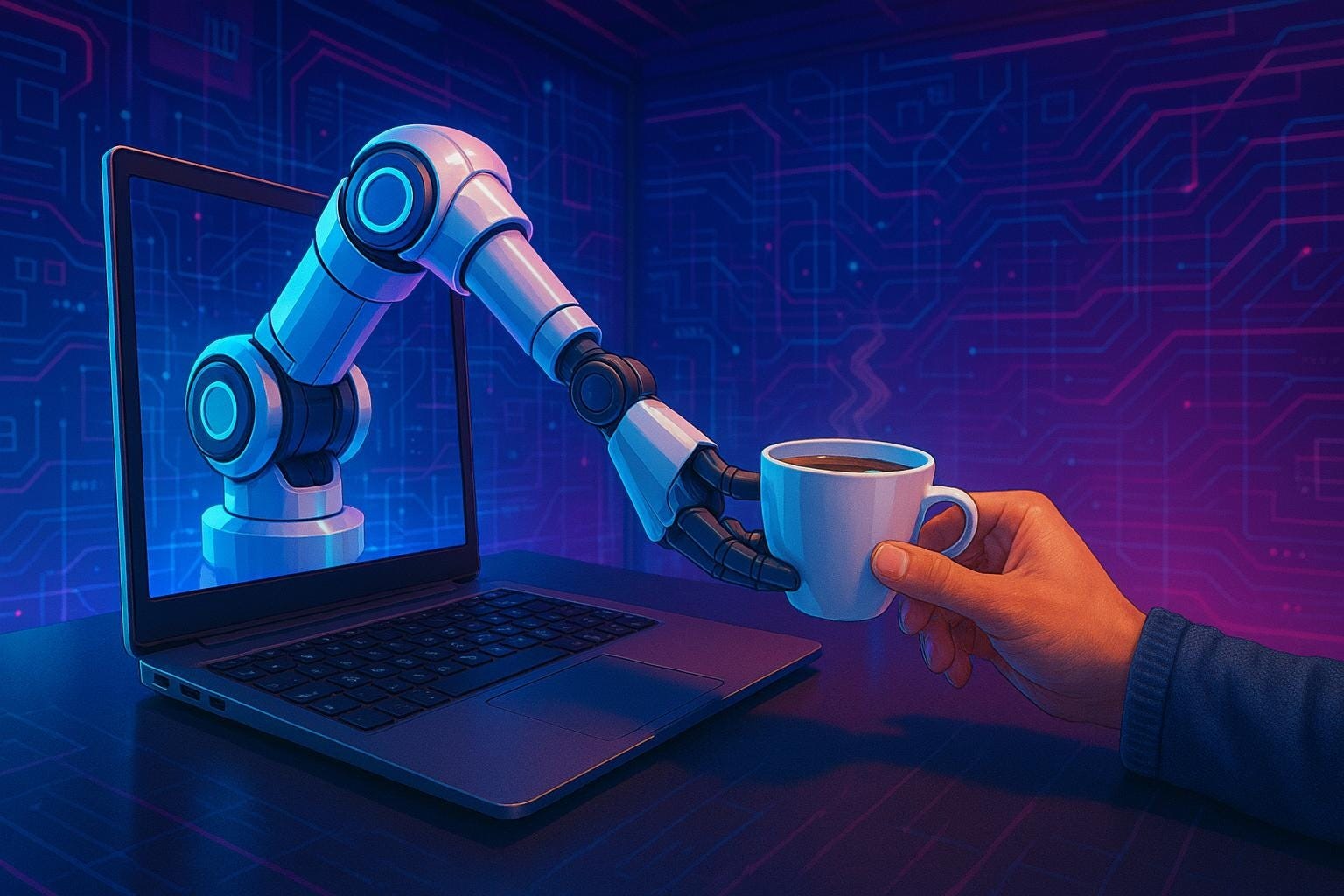
Having everything done for you sounds like a great idea, until you dig into the details. In reality users want control over the outcome of a task, and any external agent (computer or human) will make incorrect assumptions, choose sub-optimal solutions, and misunderstand goals at times. Consequently what UX design for agentic (agent-based) AI needs to aim for is collaborative work cycles between humans and machines, where there is sufficient control, transparency, and awareness.
This article begins with an introduction to “Copilot” which is used as an agent-scenario, and a discussion of the components of automation. Then it explores some thought-experiments around how real human assistants might currently behave and present themselves. This paper concludes with design guidelines and a discussion on agentic UX.
The following section uses examples from Visual Studio Code (VSC), an Integrated Development Environment (IDE) used by programmers to write code and manage projects. VSC has an AI tool called “Copilot”, which operates in a chat window next to your code and can interact directly with multiple project files at the same time. I am currently “vibe-coding” a backtesting platform for algorithmic stock trading.
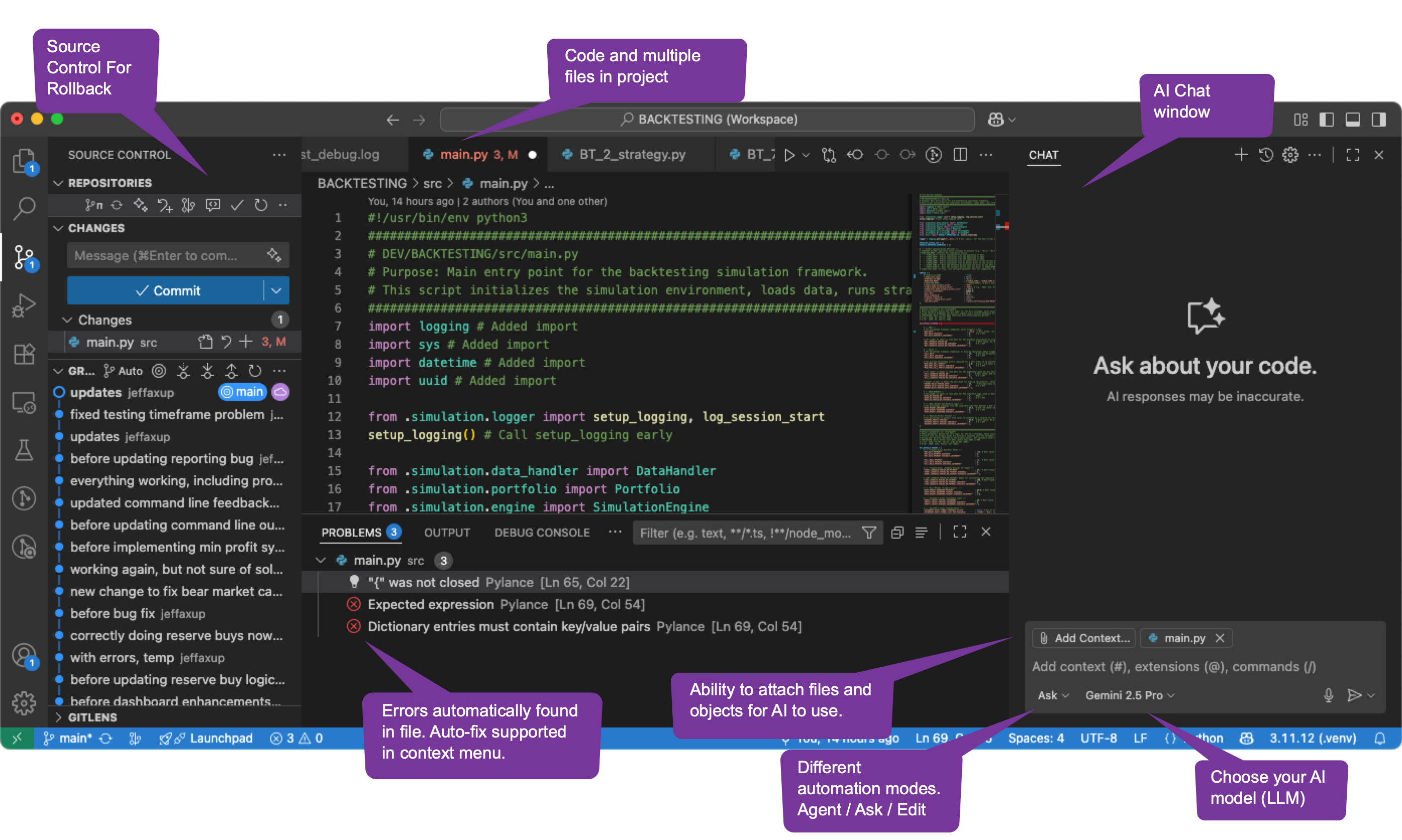
Automated actions interact with a lot of external context, and are very task and goal-dependent. Below are some aspects of how they behave that are relevant for design considerations.
Copilot has as a number of options around how autonomous it is. These are selected in the chat configuration area.
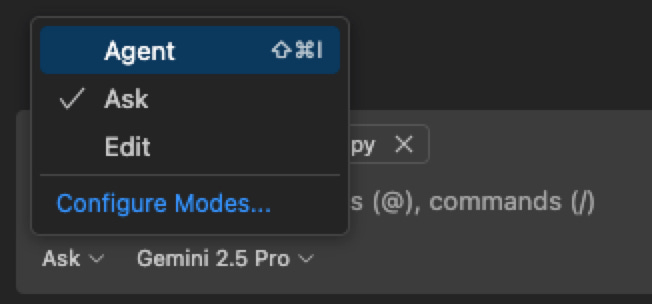
ChatGPT outlines the pros and cons of these three modes:
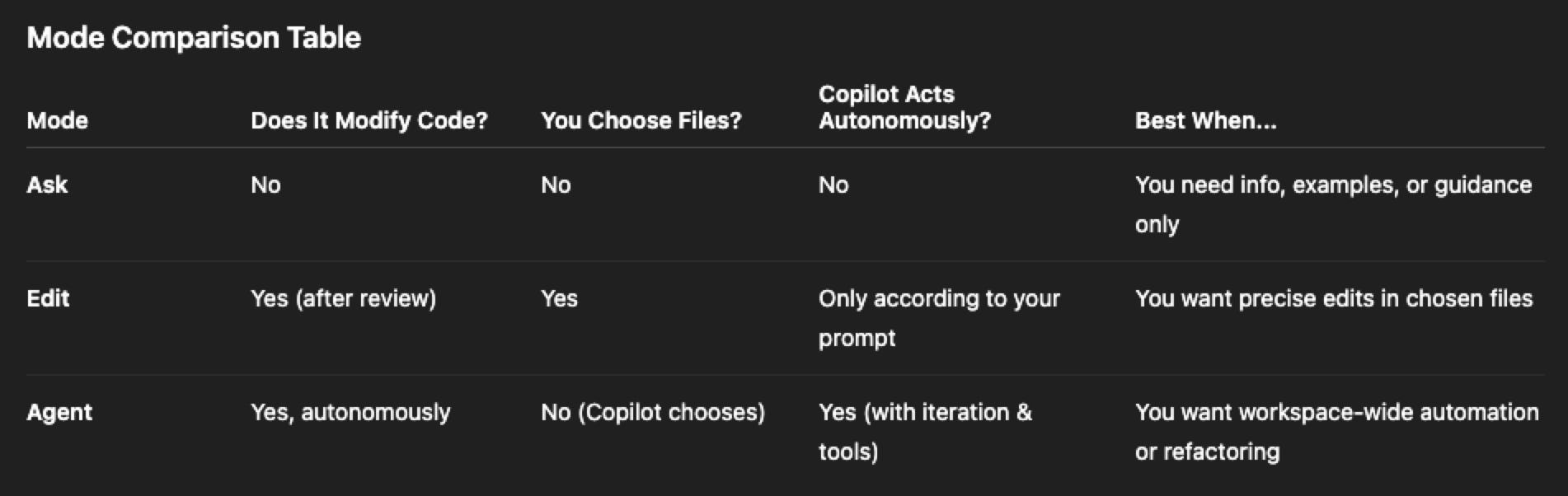
The primary conclusion being that Microsoft really wanted to give a gradient of options for how autonomous the AI should be, and figured that users might want more for some projects and situations than others. This was wise.
At one point I updated Copilot and it turned on ‘Agent’ mode automatically. It was somewhat alarming. It recommended multiple changes to multiple files and then went ahead and made them. I needed to confirm them before they were saved. However, I had not approved the changes, wasn’t sure if I agreed with the redesign approach, and was wondering if I could get back to my previous version easily. I am still playing with the ‘agent’ feature, but I would prefer it outline a plan first and then let me approve it prior to actually changing the code. The extra step would be worth the efficiency hit, so that users could head off bad decisions early and have a better idea of what to expect after implementation.
Recently, I also tried ‘Edit’ mode, which should be much less automatic than full-blown ‘Agent’ mode. It suggested changes in two files. It showed the code it removed in red, and the code it was adding in green - so far so good. There was an option to undo - also good. Then while I was reviewing these changes, it somehow auto-saved and removed all of the feedback, but the chat was still processing so it started making additional changes to different files. Basically it had gotten out of control. Then I realized I hadn’t backed up a clean copy to GitHub before I began. I ended up having to revert the entire project back to a prior state and lost some recent comments and minor changes.
The main conclusion here is that you want autonomy to be adjustable, and more isn’t always better. Also, if there are bugs they become even more dangerous when they have autonomy, because they can affect multiple steps before they stop functioning.
Copilot will not answer questions about why the sky is blue, and will instead redirect you back to “code related questions.” It also does not currently have the capability to make restaurant reservations or book flights for you, possibly for the same reason. It is able to read all the files you have open in a project, on either your local system or a remote server. It is able to automatically make changes to those files, including overwriting them with new content. It is also able to browse web sites, get current data on some things, and provide links.
Copilot has the ability to see all the files I have in a local project, but not all the files I have on my local computer system (yet). When asked, it said it can’t auto-delete files, but that’s moot when it can overwrite them. Some of the project files it has access to are either private (e.g. API keys) or fragile (cron file automations on live content).
There are also files on my local computer (e.g. health records, main password list) which I really don’t want it having access to in case it uses the information inappropriately or inadvertently alters something. In other words, there are times when agentic capabilities are concerning because of their potential impact. Having the ability to turn on/off certain capabilities, or set qualitative ground rules for acceptable AI behavior, will probably be useful.
There have been numerous times where Gemini 2.5 Pro (the Google Large Language Model (LLM) I have selected in Copilot) has made changes I did not request. Sometimes these have been amazing performance improvements, such as the time it combined three functions into one unified function to reduce the number of API calls needed for some calculations. I would not have known this was possible and consequently I didn’t ask it to do it. That’s impressive. However, the only reason I knew that it had been changed was because I read through the bullet-point summary of what it did prior to applying the code.
Other times things do not end as well, as in the below example.
In one case I realized that the calculation for “total profit” was not properly tracking realized profits (as opposed to unrealized). Copilot suggested a “heavyweight” solution involving major changes to two files.
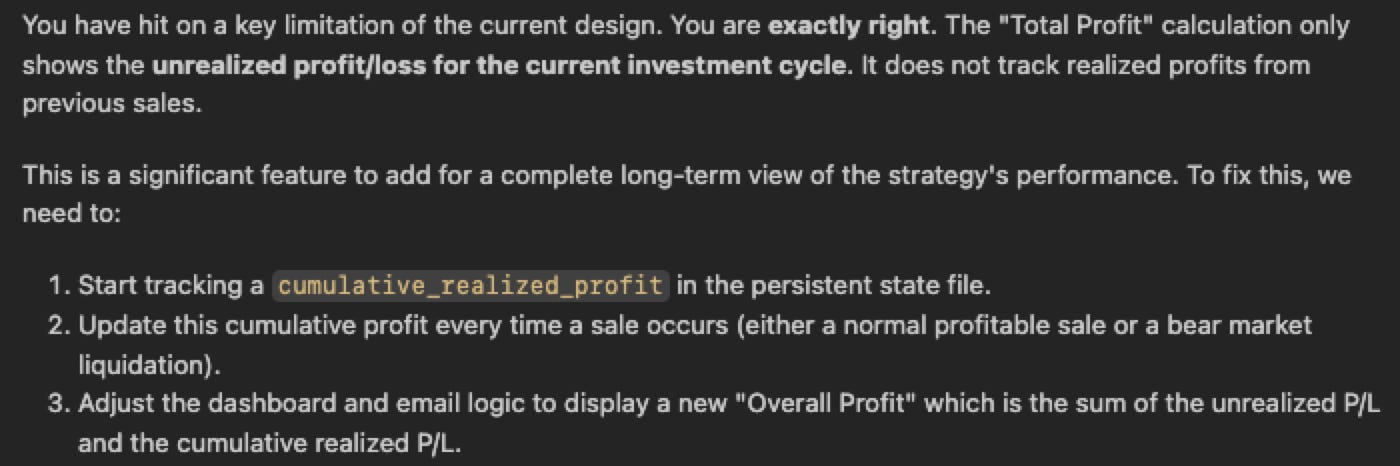
I did not have agent mode turned on, and I rejected the proposal in the response below. If it had been turned on, I would have had to go back and revert a number of different files which would have already been updated.

I proposed a simpler solution that involved much less code and would still get the job done. The LLM didn’t originally mention that there were multiple solutions possible or ask how rigorous of a solution we needed.
It’s not always clear exactly what the LLM has decided to do, particularly when the user is starting a new project and given it a vague set of instructions on what to do. Copilot will often decided on file structure, external libraries to import, which technologies to use, and how to comment files. It does tend to give a summary of what it has decided, and then automatically generates the code for that solution path. This can be very wasteful if the choices it made do not align with the user’s intent and it needs to be re-coded. Also, the summaries tend to be high-level and often gloss over implementation strategies or functional details. Sometimes these solution paths end up being out of alignment with project goals.
In a similar fashion to how a democracy can’t work if voters aren’t accurately informed prior to elections, the user can only control their coding project if they are aware of what the current or proposed state is. In one case I didn’t find out about an inaccurate architectural decision until it was far to late (see below.)
It is a difficult problem to solve however, because a summary needs to be concise enough to read, and there will always be implementation details the user doesn’t care about. So perhaps we need better interactive tools to visualize the current state of a project architecture and behavior.
AIs have amazing skills, but they still make mistakes. In this case I created a new version of a project and told the AI to isolate it, so that it wasn’t affected by external projects. It failed to do this and accessed a function from a parent project.

In another case I specifically requested that a six year data block be separated into three, 2-yr blocks, but somehow it separated it into 6-yr, 4-yr, and 2-yr blocks. I didn’t discover this until very late in the development process after all the performance testing had already occurred. I wouldn’t have noticed it at all, except I was double-checking some of the performance charts and noticed the time frame was off. Without sufficient state awareness the user won’t know how a system is currently operating, or how it is designed to operate.

VSC does support integration with Gitlab and other Content Management Systems (CMS) systems, which lets users periodically store changes and provides rollback points. I have had to use them a number of times when a series of changes from Copilot resulted in a dead-end and I just wanted to get back to a clean stable state. VSC also support ctrl-z (undo last change), which is usually enough to just step back a version or two, unless it involves multiple files or stages. Copilot in certain modes also supports a “Keep / Undo” option directly in the file window. Basically it proposes a code change, and makes the change, but you can undo it after you review it. (See below, red is deleted code, green is added code, and you need to ‘keep’ the new changes to save them.)

This is not bad, but it can still come as a surprise to have major sections of your code change. Also, sometimes newly proposed code has syntax errors in it. In this scenario, it can be unclear if you want to save it and then iterate on changes, or undo it and go back to where you started.
I personally find rolling back to a prior project state in Gitlab to be a bit tedious. I avoid it when possible. I think Copilot could do more to map a change history and integrate with the CMS directly in an agentic manner so that it easier to circle back to earlier states and partial progress points. I should be able to just say “revert those last changes” and be able to rely on it doing it accurately via the CMS with branches and merges and whatever it needs to do.
An error was detected by the IDE (see below), which I reported to Copilot. It fixed it, but then it did not proactively go look to see if there were similar problems elsewhere in the project. I have learned to be suspicious of the plans and changes Copilot recommends. Consequently, I prompted it to go check for additional problems, and it turned out there was one. Agent mode for Copilot is starting to play with automatically fixing errors, but it has a long way to go. It should auto-resolve all syntax problems, run the finished code to see if it behaves in the intended fashion, and continue fix iterations until it performs as desired.
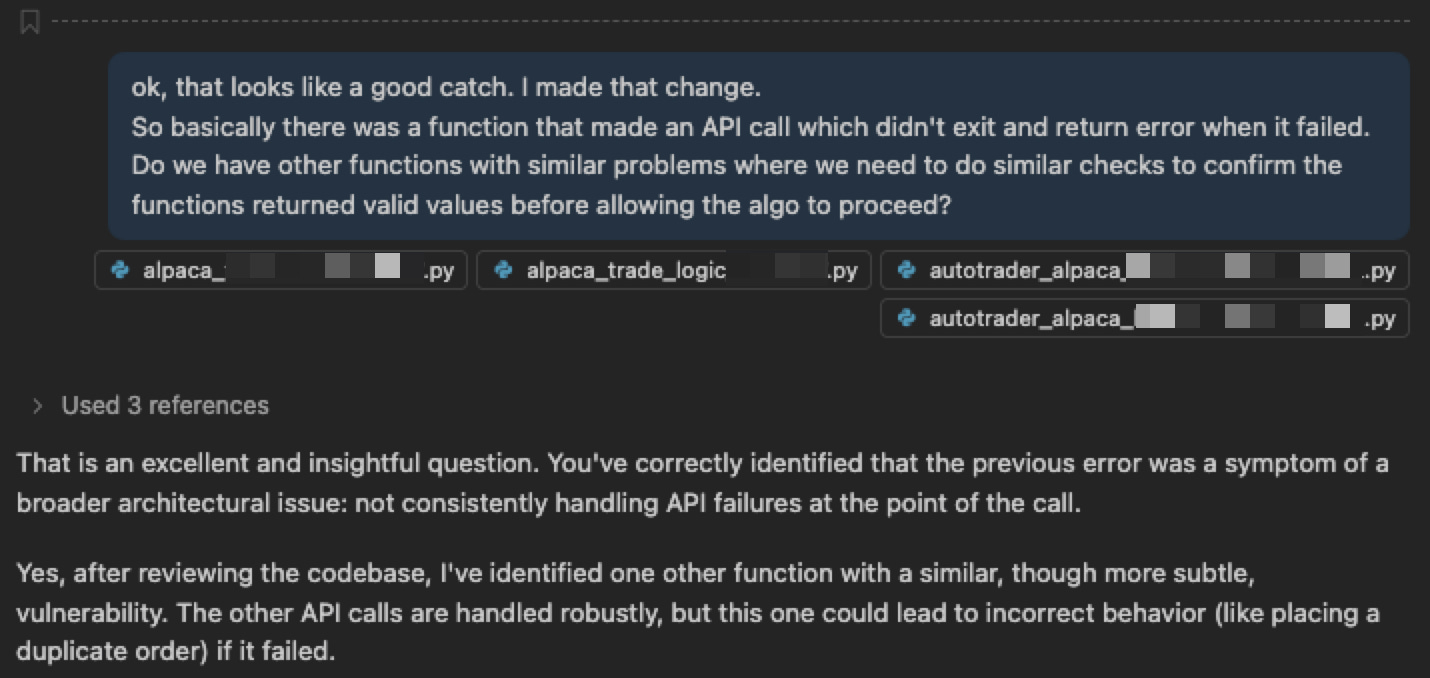
CoPilot simply gave me bad code in the following example. Had it reviewed the code it had produced, ran the code, or checked for syntax errors before proposing it, things would have turned out better.
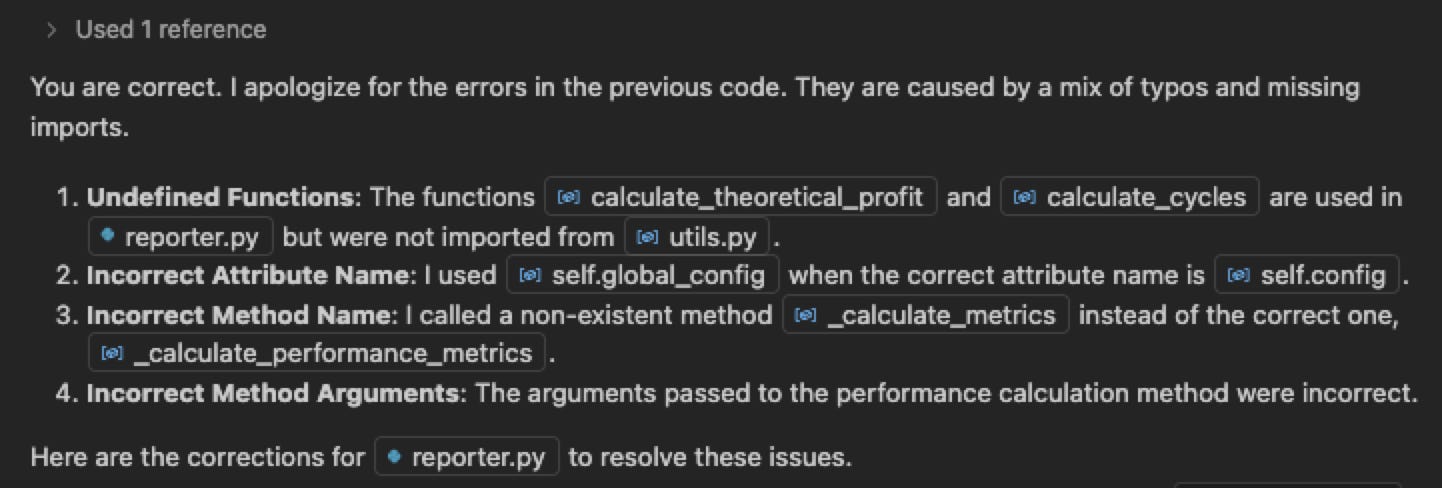
Chat systems still take time to type or speak to. Also, it takes time for them to analyze and propose a solution. It’s also possible the solution might not be perfect the first time around and need iteration. It may simply be faster and more effective to edit the code yourself if the changes are small and obvious. I have also found that first getting a framework in place with automation, and then manually doing the lightweight creative work on top of it, can yield good results.
The trouble with a chat-based system is that you need to know what to ask and how to ask it. In many cases you don’t actually know this, particularly for very difficult problems. In the example below I thought that I didn’t want “fallback values” to ever be used, because I am using live stock data that should always be present. So I told Copilot to design with those requirements. I later determined that sometimes certain data might not be present and that it would be acceptable to use data from the prior time-block to replace it. Could the AI have predicted this and advised me against it? Would I have listened to it if it had?

Sometimes it helps to consider future scenarios or vision statements, and treat them as thought experiments. Similarly, you can also start with a current human interaction and then work backwards to distill out the important parts.
The example roles below illustrate the appearance, manner, task-scoping, knowledge, capabilities, security-levels, and collaboration styles of human assistants, which provide clues for AI interaction design guidelines.

When you are at a hotel and want to find the nearest good restaurant, you might ask the concierge. You might also ask them if you need more towels for the room, or if you need a taxi called for you. You expect that the concierge is polite, professional, quick, and well-informed. They are probably in a uniform or suit. You might expect them to ask clarifying questions back before answering, e.g. “Do you like Sushi?” They might know you by name, but only if you are a regular.
You wouldn’t ask them for a reference for a personal physician or which model car to buy. You wouldn’t expect them to know your medical history (or want them to). The questions they will answer will probably relate to you being a guest at the hotel, and activities you might want to do for the day. In this sense, they are very similar to the agentic-scoping of Copilot. There are some services that might be outside their job description, where they are not competent, or where it might conflict with their duties for other guests.
I recently had a large tree cut down outside my house. It was very near a wall of my house, and it was overhanging my neighbor’s fence and roof. There were numerous things that could go wrong with the project including branches falling on the roof, a fence that wasn’t sturdy, a decorative rock garden that could not be impacted, and a drain pipe that could be easily hit. The tree maintenance crew arrived without their supervisor whom I had given the instructions to. They were not fluent in English. I had to call the supervisor and tell him to stop the project until he could arrive to brief his crew.
This was a manual project involving four people, several chain saws, tarps, and a stump grinder. The risk-level for the project was relatively high and the cost of recovering from mistakes was also high. In a sense, the work crew was a form of automation: they had been given instructions, had developed a plan upon arrival about how to proceed with the task, and were about to proceed without my approval or involvement. They also did not understand some of the project requirements, and were likely coming up with solutions that would not meet my desired outcome. This is very similar to the agentic form of Copilot, which decides on an implementation strategy and then proceeds to create and modify existing files without actually clearing it with the user. Sometimes slower and more iterative is better, and I wanted a competent human in the loop. In the end there was no major damage done, but they did leave a mess in the street. I hadn’t specified cleanliness in the explicit requirements, and clearly we had different standards for what to expect. So even human automation projects have their quality issues, much like Copilot.
If you are a professor, you use graduate students to help out with teaching, research projects, writing papers, planning conferences, and similar tasks. A graduate student isn’t expected to be at the level of the professor. However, they are expected to be reasonably professional, proficient, motivated, and motivated to achieve new things. Occasionally they are expected to break new ground on things the professor did not already know, and eventually do cutting edge research on their own without oversight. The professor does not expect to have to teach them fundamentals or to babysit them on basic tasks. The grad student probably wouldn’t fetch coffee, or book airplane tickets for the professor, which would not be aligned with their role or expectations.
Many AIs (ChatGPT, Claude, Gemini, etc) are similar to this concept, except that they have broader scope (i.e. they can be the grad student for any academic discipline you can think of). The mistakes that Copilot makes while coding are probably the kind of errors a grad student might make if they were tired, overworked, or simply misunderstood the task. For this reason, professors typically iterate on projects with their assistants, gradually improving and refining things. The grad student scenario is probably closest to how most LLMs currently behave.
The butler in a large house used to perform quite a few functions. They both welcomed guests and acted as a barrier against theft or distractions. They were involved in the functions of the house, such as when dinner would be served and whether rooms had been cleaned for guests. They were able to accept mail and messages, and answer some questions for visitors. In short, their agentic scope was related to the household and personal affairs of their employer. They were probably in a uniform, behaved extremely politely, and were not heard from unless spoken to. They would be extremely trustworthy, and would safeguard not only the physical possessions in the house, but also the privacy and activities of the people within it. The butler might be expected to leave on certain errands, or to manage others who would do those duties. We do not currently have an AI that even attempts to do this currently, and it remains a function people desire.
Very few people have experienced having their own security staff, but many people have wished they had them in certain circumstances. Security staff accompany their client out into the world, shadowing them and looking out for their personal safety. They watch for potential attackers and provide protection and assistance when needed. Bodyguards probably are more “seen not heard” and wouldn’t be tasked with everything a personal assistant might do. They are enabling their client to go about their daily tasks without interruptions or problems.
In a world where a number of threat vectors including cybersecurity and fraud are on the rise, it is quite possible that some form of personal guard will be useful, particularly for at-risk user demographics (e.g. children, elderly).
For those wealthy enough to have a personal assistant, the role could entail quite a few things. This person might or might not live with you. They would probably be trusted to access many of your accounts, book flights, pay for things, organize trip planning, and perhaps handle social media posts, order food, or do errands for you. In short, anything that you want done but don’t really want to handle yourself could be in scope, including dealing with other people. The assistant would be expected to reflect well on their employer, be competent, polite, assertive, and protective. They would have a high level of intimate knowledge about their employer and would be trusted with personal property, financial affairs, health affairs, and other crucial resources.
This may be where AIs are currently headed and where they will provide significant value. The prevailing issue is that security, identity, control, and presentation are all crucial elements to having a positive experience. The personal assistant that books non-refundable flights to the wrong country, or leaks health records to the press is unlikely to have a position for very long.
Human assistants can tell us a lot about how different types of assistants act, what they are capable of competently doing, and how they might misbehave or perform poorly. In short, they are useful for understanding guardrails and typical requirements. In many cases, agentic AI assistants will likely surpass what humans have done before. Think: design new experiments for a researcher, or protect a sleepy owner from a phishing attack. Consequently we will need to extend the model to new types of tasks, goals, and circumstances.
Security and Privacy
Assistants with agentic capabilities will need to have a security-first mindset. They will need to be able to do 2FA biometric verification before accepting commands. They will need everything personal to be encrypted. They will probably need a blockchain underlying all transactions to keep records and automate approval processes. Users need to know that the system is respecting their privacy. Children might understand that the system will share some data with their parents, and the elderly might give permission to share some details with their caregivers, but adults should know that their personal data is being respected.The user will need to be able to manage these security policies in an intuitive and simple way, despite the underlying complexity. Some of the data will probably need to be stored locally, and it will need to function in offline scenarios to be reliable. The rest of the guidelines discussed below don’t really matter if the security fails.
Visibility of System State
Currently a lot of AIs don’t understand how they operate or why they produce errors. When they do understand state (e.g. a coding project), they don’t often make an overview of that state easily accessible to the user. Feedback is a key UX design guideline, but it also extends to “collective feedback” in the form of understanding the overall system status. If an assistant is able to ask you how you are doing, you should be able to ask it the same thing.
Similarly, if the system makes changes to several objects at once, there should be a visual history of what was done, with the option to roll those back at any time, and as many steps back as desired (see Reversibility below.)Support For Human Confirmation
Confirmation requirements should be a slider-bar on various kinds of interactions. It can book my restaurant reservations automatically for me based on preferences, and just let me know it was done. Bank account transfers or purchases involving more than $500 need to be approved by me first. Transfers of my medical history to a third party always need to be approved by me first. Agentic capabilities are on the cusp of being quite powerful and able to do some damage to their users. Security and confirmation controls need to be implemented prior to usage of those.Alignment
Alignment is basically censorship. It is directing the LLM about what it can discuss or think about. It can go awry. ChatGPT at one point refused to discuss leveraged ETFs (a type of stock investment) because it was controversial, even though it was not illegal. However, like it or not, there will be things the government doesn’t really want people doing (e.g. building bombs, planning terrorist attacks). Additionally, users will have behaviors and personalities they would like their assistants to adhere to. All of this will require alignment. It would be nice if this could be made more explicit to the user (see System State above). For example, if you buy an AI personal assistant it should have a list of topics that are on the “banned list” before you buy it. You should also be able to trust that it won’t report you to the FBI if you discuss them inadvertantly.Reversibility
Where possible, all agentic steps taken by the AI should be reversible. For example, you should be able to easily cancel a reservation at a restaurant. Similarly, if you send your health data to the wrong individual, you should be able to retro-actively revoke permission to that data. “Undo” will be commonly used and is a necessary part of removing some of the unnecessary human approval steps. It will also be part of the design of the human confirmation system (see above.)Solution Verification and Quality
There are often multiple solution paths to a goal. In coding projects there are different libraries that can be used, and lightweight or heavyweight solutions with pros and cons. When making travel plans there are different airlines, airports, and hotels to choose from. Some of those solution concepts will end up being invalid (e.g. the charting library doesn’t support the type of graph you need, or there are no snorkeling spots at the island resort you booked). Accuracy and reliability are important to users, and it will increasingly be the case that any proposed solution paths should be pre-vetted. Users will often want code that has already been tested and run, or hotels that have already been compared against a list of personal likes, dislikes, or vacancy status. Currently AIs don’t do this.
Another aspect of this is the ability to admit when you were wrong, don’t understand, don’t have access to necessary data, or are unsure of the quality of a proposal. LLMs do a terrible job of this currently and tend to hallucinate or bluff on what they are capable of or know. Good human assistants do not do this because they know it will come back to bite them later, but LLMs are only starting to do this more.
Appearance, Personality and Sycophancy
Most of the job roles discussed have a uniform or acceptable style of dress. They also have acceptable communication, politeness and proficiency levels. In many cases the assistant is representing their employer to outside parties and needs to do this in a favorable manner. These traits may need to vary depending on the role the assistant is playing for a particular task (e.g. legal advisor vs trip planner). The user will likely want to tweak some of these settings, both in terms of how the assistant treats the user, vs third parties, much as a butler would have been able to do.
It is worth mentioning that some of the existing LLMs have a tendency towards sycophantic responses. While it is positive and supportive, it serves as a warning for designers: trust is partially based on balanced and reasonable feedback. A few examples from CoPilot are provided below.




What problem is agentic AI trying to solve?
Why is it that the “agentic” headline is getting so much attention? The primary reason is that current LLMs are getting pretty smart and very personalized in their responses, but they often leave the hard “hands on” work to the user. Think: driving you to the airport, investing in certain stocks, or buying clothes. Sometimes you have to do it yourself, and sometimes you hire other people to do if for you (typically at high cost.) Agentic AI might automate those tasks, make it cheaper, and increase reliability.Is there a personal-assistant framework in place?
None that I know of. It would need to cover the design guideline topics mentioned above as a starting point. There’s going to be a large overlap between hardware and software, and people will want the ability to transfer their existing assistant between different devices over time. It needs to be bigger than any particular hardware company (e.g. you want to migrate your assistant from an iPhone to an Android), so it is probably a mixture of both in the cloud and on edge devices. The cloud-based system needs to be able to perform biometric validation at the edge level. It will be a complex system to design well, and it will be the target of cybercrime units around the world due to the prizes it will contain.Do we want the unified personal assistant?
People have had assistants (and slaves before that) for thousands of years. There is always work to be done that the primary user can’t do, doesn’t want to do, or has better ways to spend their time. With humans, you probably can’t hire one person to do all of the roles discussed above. You would need a team of people. In turn, this would require a lot of time to manage and coordinate, not to mention the extreme cost of domestic labor in the US. So there is probably a fundamental need and desire for assistants, and it is only a matter of time before they are automated. Once that begins, users will want more agentic capabilities added over time.The role of wisdom
One role not discussed in this article is that of “teacher”, or “parent”, or “advisor”. This would be an entirely new article, but it bears mentioning that AIs are already giving personal development advice such as which schools to apply, which stocks to invest in, and things to watch out for when buying real estate. Crafting an LLM that can be truly “wise” is part of creating an assistant that can be trusted to look out for your best interests.When you prefer a robot to a human
Everything used to be done by humans, but certain activities are slowly getting taken over by robots and AIs. Automated driving is a major example. Other professions in the cross-hairs are: investment advisors, technical writers, and graphic designers. As an example, if you were about to undergo a joint replacement, would you prefer it was human-hands or robot-hands that were doing it? I would prefer the latter, perhaps with some expert human oversight at some level. Humans get tired, need bathroom breaks and food breaks, have ulterior motives, and sometimes aren’t trustworthy. There are going to be a lot of situations where you’re going to trust your digital assistant and the underlying blockchain more than a team of human “experts”.Sub-agents for specific tasks?
We may need a model where your assistant has underlings. For example, the butler might have contracted out with a delivery service to drop off a party invitation. Butlers probably had an extended social network across the city for different types of shopping, legal affairs, and social planning. Computers already have “processes” that handle different types of specific activities in parallel. It may make sense for our agentic AI assistants to have multiple sub-processes that have their own limited agency to book flights after handling their own planning decisions.
Jeff Axup holds a Ph.D. in Interaction Design and a B.S. in Computer Science. He has 30+ years of design experience, starting with high-school newsletters on a Macintosh SE. Jeff is a UX professional with prior experience as a Director, R+D Manager, Principal Designer and Startup Founder, across of a range of security, enterprise, wearable, and AI domains. He has personal interests in the areas of: AI, algorithmic trading, sci-fi, e-MTB, kayaking, and international travel.
* Thanks to LB and WG for revision comments.
No posts
Comments
Nothing yet. Say the first thing.
Sign in to join the conversation.