The SQL Server UPPER Function is used to Convert the given Text or expression into Uppercase, and the LOWER Function converts the word or text into Lowercase. The syntax of the Upper Function to convert string to uppercase is
SELECT UPPER (Expression | [Column_Name])
FROM SOurce
The basic syntax of the Lower Function to convert to lowercase is:
SELECT LOWER (Expression | [Column_Name])
FROM SOurce
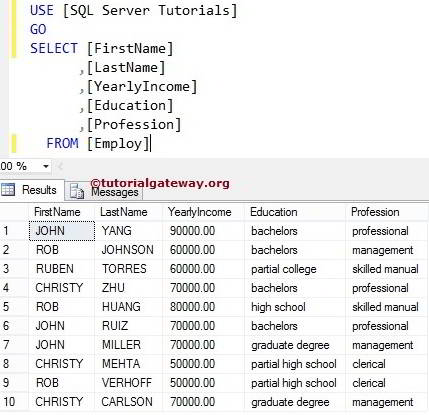
Let us see how to write LOWER Function and UPPER in SQL Server with an example. For this demo, we are going to use the below-shown data
SQL Upper Function for uppercase Example
If you observe the above screenshot, the [FirstName] and [LastName] column text was in the Upper case, but the [Education] and [Profession] Column values were in the Lower case.
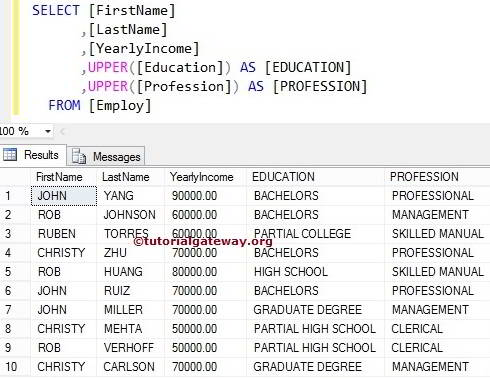
It looks tedious when we show the same output to the end user. So, using this UPPER Function, let us convert the remaining columns to the upper case. Please refer to the list of SQL String Functions from our SQL Server Programming.
SELECT [FirstName]
      ,[LastName]
      ,[YearlyIncome]
      ,UPPER([Education]) AS [EDUCATION]
      ,UPPER([Profession]) AS [PROFESSION]
  FROM [Employ]
SQL Lower Function for lowercase Example
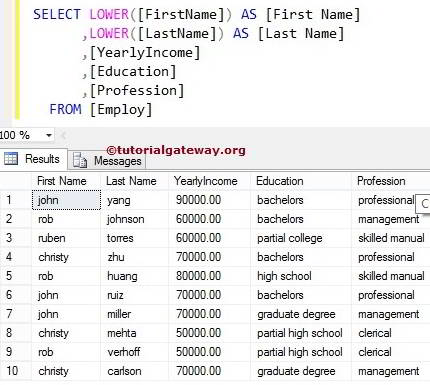
If you observe the Source Data, [FirstName] and [LastName] column values are in Uppercase. But the [Education] and [Profession] Column data is in Lower case. It looks unprofessional when we show the same output to the end user. So, using this LOWER Function, let us convert the remaining columns to Lowercase.
SELECT LOWER([FirstName]) AS [First Name]
      ,LOWER([LastName]) AS [Last Name]
      ,[YearlyIncome]
      ,[Education]
      ,[Profession]
  FROM [Employ]
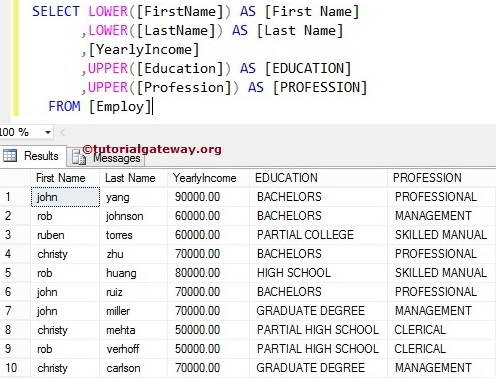
Combining two Functions
In this example, we will show you how to combine the Lower Function and Upper Function in one SELECT Statement. Learn more about the SELECT Statement in SQL.
SELECT LOWER([FirstName]) AS [First Name]
      ,LOWER([LastName]) AS [Last Name]
      ,[YearlyIncome]
      ,UPPER([Education]) AS [EDUCATION]
      ,UPPER([Profession]) AS [PROFESSION]
  FROM [Employ]
The above Server Query will convert the [FirstName] and [LastName] column values to Lower case and the [Education] and [Profession] Column values to uppercase. Please refer to the SQL TRIM and SQL LEFT functions.
Upper and Lower Functions on Variable
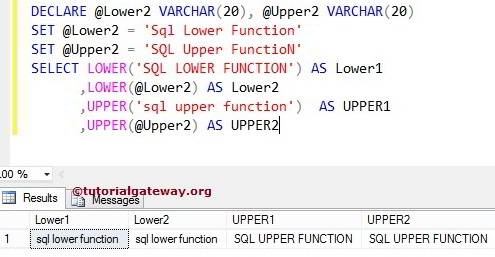
We can also apply the Upper and Lower functions to constant values and Variables.
DECLARE @Lower2 VARCHAR(20), @Upper2 VARCHAR(20)
SET @Lower2 = 'SqlLower Function'
SET @Upper2 = 'SQLUpper FunctioN'
SELECT LOWER('SQLLOWER FUNCTION') AS Lower1
      ,LOWER(@Lower2) AS Lower2
      ,UPPER('sqlupper function')  AS UPPER1
      ,UPPER(@Upper2) AS UPPER2