The SQL Server SPACE function is one of the String functions that is used to return the string of repeated spaces, and its syntax is
SPACE(Integer)
SQL SPACE Function Example
The String SPACE Function returns the string of repeated spaces. The following query will show you multiple ways to use this function.
DECLARE @Str1 VARCHAR(50),
        @Str2 VARCHAR(50)
SET @Str1 = 'Learn '
SET @Str2 = 'SQL Server'

SELECT @Str1 + SPACE(1) + @Str2 AS Result1
SELECT @Str1 + SPACE(3) + @Str2 AS Result2

SELECT 'Learn' + SPACE(5) +'SQL Server'+ SPACE(8) + '2014' AS Result3
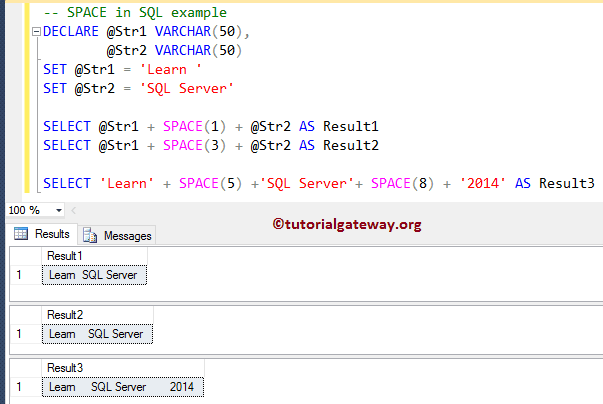
Within this example query, it will combine the two variables along with SPACE(1) and produce the string result. It means we are assigning a single space between the two string variables and assigning a new name using the ALIAS Column. Please refer to the list of SQL String Functions from our SQL Server Programming.
SELECT @Str1 + SPACE(1) + @Str2 AS Result1
In the next line, We are adding five whitespaces in between the first two, and 8 spaces between Server, 2014.
SELECT 'Learn' + SPACE(5) +'SQL Server'+ SPACE(8) + '2014' AS Result3
SQL SPACE Function Example 2
The SPACE function is also helpful when combining multiple columns (concatenating). In this example, we will combine the First name and Last Name columns present in the Employee column to get the Full name and the space. We will use this function.
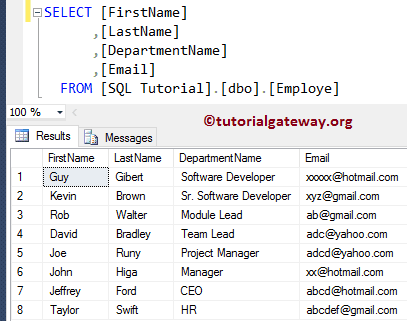
For this SPACE method demonstration, We are going to use the below-shown data
CODE
SELECT [FirstName]
      ,[LastName]
      ,[FirstName] + SPACE(5) + [LastName] AS [Full Name]
      ,[DepartmentName]
      ,[Email]
  FROM [Employe]
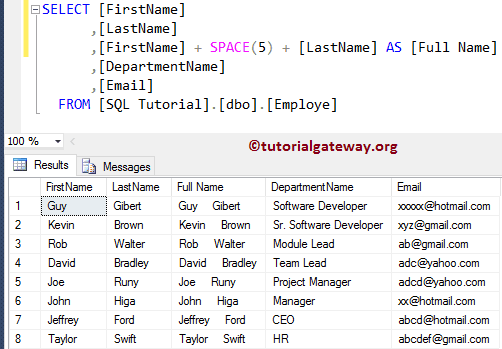
TIP: We used this SPACE(5) String Function to get FIVE empty whitespaces. Please refer to the SQL REPLICATE and SQL CONCAT functions.
Example 3
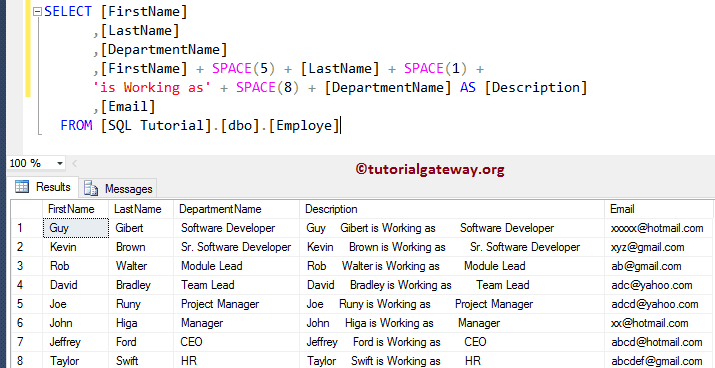
In this string SPACE function example, we will combine the First name, five spaces, Last Name, one space, string text = ‘is working as’, eight whitespaces, and the Department name columns available in the Employee table.
SELECT [FirstName]
      ,[LastName]
      ,[DepartmentName]
  	  ,[FirstName] + SPACE(5) + [LastName] + SPACE(1) +
	  'is Working as' + SPACE(8) + [DepartmentName] AS [Description]
      ,[Email]
  FROM [Employe]