The SQL Server RANK function will assign the rank number to each record present in a partition. If the RANK function encounters two equal values in the same partition, then it will assign the same number to both values. And it skips the next number.
The syntax of the SQL Server rank function is as shown below.
SELECT RANK() OVER (PARTITION_BY_Clause ORDER_BY_Clause)
FROM [Source]
Partition_By_Clause: This will divide the records selected by the SELECT Statement into partitions. If you specify the Partition By Clause, then the RANK Function will assign the numbers to each partition. It will consider all the records as a single portion if you haven’t. So, it will assign the numbers from top to bottom.
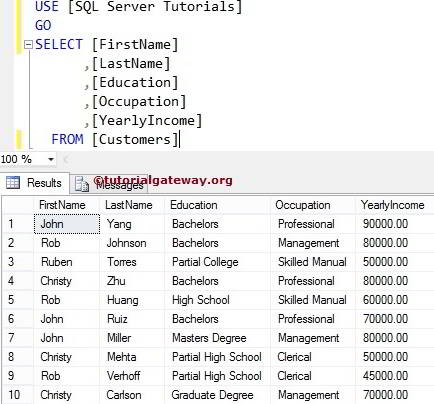
For this RANK Function example, we will use the table data below.
SQL Server RANK Function Example
It allows you to assign a number to each record present in a partition. In this example, we will show you how to rank rows within the partitioned rows present in a table. The following SQL SELECT statement will categorize the data by Occupation and assign the number based on yearly income.
SELECT [FirstName]
      ,[LastName]
      ,[Education]
      ,[Occupation]
      ,[YearlyIncome]
      ,RANK() OVER (
                     PARTITION BY [Occupation]
                     ORDER BY [YearlyIncome] DESC
             ) AS RANK
  FROM [Customers]
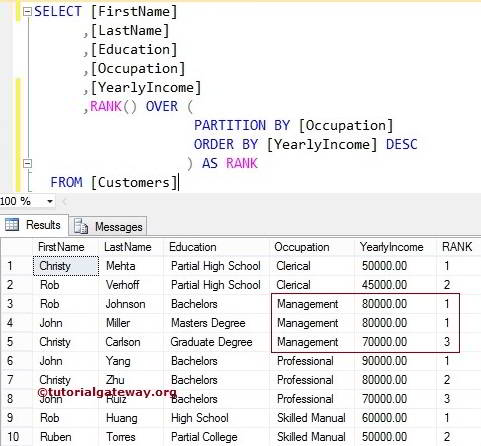
It divides the selected data into partitions using their Occupation. You can observe from the above SQL Server example output that we have four sections.
PARTITION BY [Occupation]
The SQL ORDER BY statement below will sort the partitioned data in descending order using their [yearly income]
ORDER BY [YearlyIncome] DESC
We used the RANK Function with Partition by clause. So, it will assign the numbers for each occupation.
RANK() OVER (
              PARTITION BY [Occupation]
              ORDER BY [YearlyIncome] DESC
             ) AS RANK
It has given the same number to the 3rd and 4th records because their yearly income is the same. Next, it skipped one number and assigned the 3rd to the next record. Please refer to the list of SQL ranking functions on our SQL Server tutorial page.
SQL Server RANK Function without Partition By Clause
In this example, we will show you, What will happen if we miss or without the Partition By Clause. For instance, it uses the above example query without Partition by clause.
SELECT [FirstName]
      ,[LastName]
      ,[Education]
      ,[Occupation]
      ,[YearlyIncome]
      ,RANK() OVER (
                     ORDER BY [YearlyIncome] DESC
              ) AS RANK
  FROM [Customers]
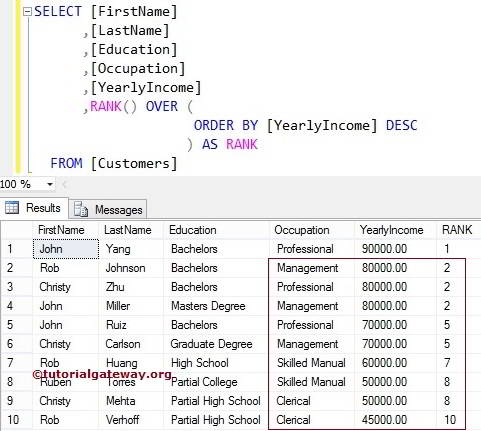
We used the RANK Function without Partition by clause. So, this function considers them as a single category and assigns the numbers from beginning to end.
RANK() OVER (
              ORDER BY [YearlyIncome] DESC
            ) AS RANK
It has given the same number to 2, 3, and 4 records because their yearly income is the same. Next, it skipped two numbers for those two records (3, 4) and assigned the 5 to the next record.
TIP: Please refer to the SQL DENSE_RANK, SQL ROW_NUMBER, and SQL NTILE methods available in the list of ranking functions to see the other possible options.
Ranking the String Columns
It also allows you to rank string columns. In this example query, we use this SQL Server function to assign the rank numbers for the string column First name.
SELECT [LastName]
      ,[Education]
      ,[YearlyIncome]
      ,[Occupation]
      ,[FirstName]
      ,RANK() OVER (
                    PARTITION BY [Occupation]
                    ORDER BY [FirstName] DESC
                   ) AS RANK
  FROM [Customers]
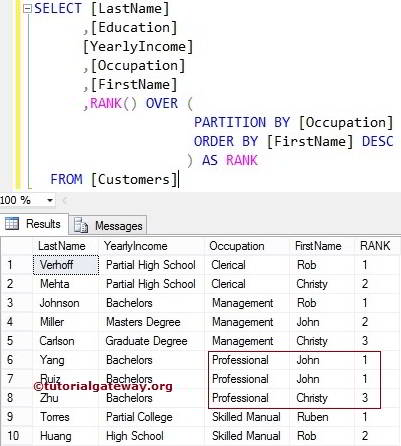
It has given the same number to 6 and 7 records because their First name is the same. Next, it skipped one number and assigned the 3rd to the next record.