
SQL Server MONTH Function will return an integer that represents the month part of a specified date and its syntax is
MONTH(date)
For this Month Function example, we use the below-shown employee data.
SQL MONTH Function Example
In this example, we will show the possible ways to use the MONTH function, including testing on a random date and time and today’s date.
SELECT MONTH('07-19-2004') AS [Example1]

-- Testing with Random DateTime
SELECT MONTH('2015-11-24 12:29:44.513') AS [Example2]

-- Testing with Today
SELECT MONTH(GETDATE()) AS [Example2]
OUTPUT
Example1
--------
7

Example1
--------
11

Example1
--------
9
MONTH Function Example 2
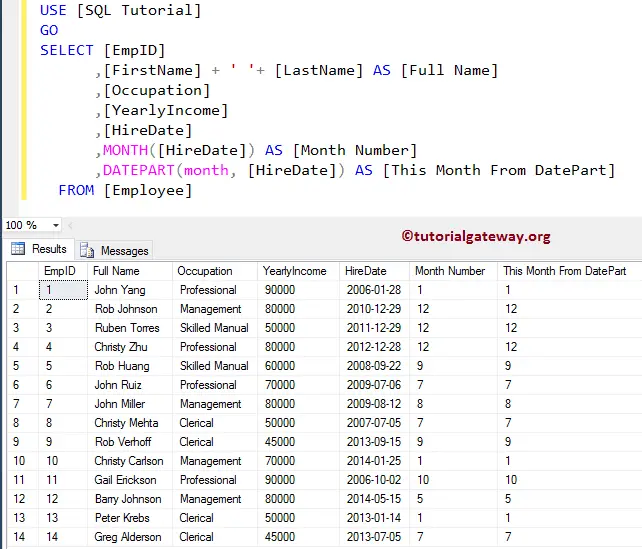
In this case, we will return the Month numbers from the Hire Date in the Employee table. To achieve this, we are using both the DATEPART and Month functions. It demonstrates that you can get the monthly number using both of these methods.
As you can see, the DATEPART and Month methods return the same month result. Remember, before 2012, people used the SQL DATEPART to extract the Number. Please refer to the SQL Date and Time methods from the SQL Server tutorial for the Remaining methods.
SELECT [EmpID]
      ,[FirstName] + ' '+ [LastName] AS [Full Name]
      ,[Occupation]
      ,[YearlyIncome]
      ,[HireDate]
      ,MONTH([HireDate]) AS [Month Number]
      ,DATEPART(month, [HireDate]) AS [This Month From DatePart]
  FROM [Employee]
TIP: Please refer to the SQL DATEDIFF, SQL DAY, and SQL YEAR functions.