
The Python string join method is used to join or concatenate a string with an iterable. This function accepts an iterable as an argument. It joins a given separator while concatenating the strings in an iterable.
This section discusses how to use this function to join strings in a List, Dictionary, Set, etc., with an example of each and its syntax is
separator.join(iterable)
Python join strings with spaces and delimiter
It is a simple example to show you the string join function. Here, we declared a tuple of characters a, b, and c. Next, we used the space as the separator and the tuple as an argument of the function.
It combines or concat the tuple items separated by space. In the last statement, we used the comma as the separator between the Python tuple.
text = ('a', 'b', 'c')

x = ' '.join(text)
print(x)

seq = ','
print(seq.join(text))
a b c
a,b,c
This time we are using the tuple of string words to join in Python. Next, we used # as the separator for this method.
text = ('Hi', 'Hello', 'World')

seq = '#'
print(seq.join(text))
print()
Hi#Hello#WorldHow to join List items in Python?
We are using this join function to combine the List items. Here, we used the \n (newline) as the separator between the list items. I suggest you refer to the Python List article from our Python basics page.
listText = ['Hi', 'Hello', 'World', 'From', 'Me']

seq = '\n'
print(seq.join(listText))
Hi
Hello
World
From
Me
It is another example to apply to List items. Here, we used different separators ‘’, $$$, -> to concat the list items.
liVal = ['t', 'u', 't', 'o', 'r', 'i','a', 'l']
print(liVal)
print()

seq = ''
print(seq.join(liVal))
print()

seq = '$$$'
print(seq.join(liVal))
print()
['t', 'u', 't', 'o', 'r', 'i', 'a', 'l']

tutorial

t$$$u$$$t$$$o$$$r$$$i$$$a$$$l

t->u->t->o->r->i->a->l
How to join Set elements?
Here, we are using the Python join function on the set items. I suggest you refer to Python Set.
setValues = {'Hi', 'Guys', 'How', 'are', 'you'}
print(setValues)
print()

seq = ''
print(seq.join(setValues))
print()

seq = '###'
str1 = seq.join(setValues)
print(str1)
{'you', 'Guys', 'How', 'Hi', 'are'}

youGuysHowHiare

you###Guys###How###Hi###are
How to join Dictionary items?
In this string method example, we use the join function on the dictionary items. Refer to the Python Dictionary.
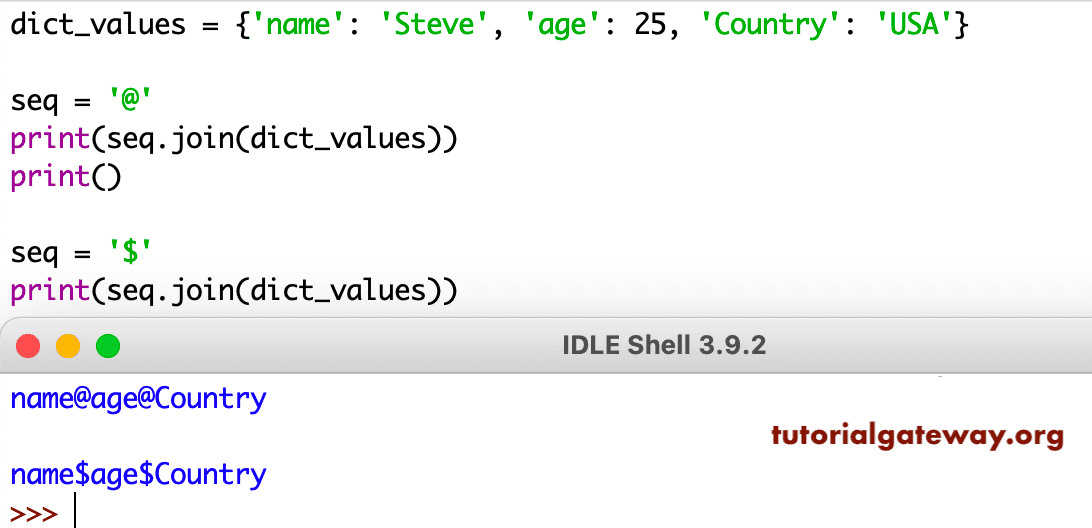
As you can see from the above screenshot, it merged the dictionary keys. It is the default option available. However, you can use the dictionary function Python dict.values to merge the dictionary values.
dictItems = {'name': 'Steve', 'Job': 'Developer', 'Country': 'USA'}

seq = '$$$'
print(seq.join(dictItems.keys()))
print()

seq = '$$$'
print(seq.join(dictItems.values()))
print()
name$$$Job$$$Country

Steve$$$Developer$$$USA
Python string join example
Until now, we only used the iterable inside this method (tuple, list, set, and dictionary). Here, we are using the Python string as an argument.
seq = 'United'
print(seq.join('HELLO'))
print()

print(seq.join(['H','E', 'L', 'L', 'O']))
HUnitedEUnitedLUnitedLUnitedO

HUnitedEUnitedLUnitedLUnitedO
As you can see from the above string join screenshot, both the print(‘HELLO’) and ([‘H’,’E’, ‘L’, ‘L’, ‘O’]) are returning the same result. This is because, internally, (‘HELLO’) will be converted to a list of characters. If you use ‘TUTORIAL’ as the argument, it prints TUnitedUUnitedTUnitedO
Another example of a string join is to understand the implicit conversion. Here, we used different separators to separate tutorialgateway. Please refer to the Python split and Python rsplit functions from the list of available Python string methods.
name = 'tutorialgateway'
print(name)
print()

seq = ','
print(seq.join(name))
print()

lang = 'Computers'
print(lang)
print()

seq = ','
print(seq.join(lang))
tutorialgateway

t,u,t,o,r,i,a,l,g,a,t,e,w,a,y

Computers

C,o,m,p,u,t,e,r,s
Python join string and int
So far, we are working with the place text or sentence. In this example, we declared a mixed list of strings and integers. Next, we used this function with $$$ as a separator to combine the list items. As you can see, it is throwing an error: TypeError: sequence item 3: expected str instance, int found
listvalues = ['UK', 'INDIA', 'USA', 1, 'FRANCE']
print(listvalues)
print()

seq = '$$$'
print(seq.join(listvalues))
['UK', 'INDIA', 'USA', 1, 'FRANCE']

Traceback (most recent call last):
  File "/Users/suresh/Desktop/simple.py", line 6, in <module>
    print.........
TypeError: sequence item 3: expected str instance, int found
This time, within the function, we used the Python For Loop to iterate each item in a List. Next, we used the str function to convert the List item to a string.
listVal = ['Hi', 20, 'Hello', 40, 'World', 140, 'From', 3.0, 'Now']
print(listVal)
print()

seq = ' '
strAftJn = seq.join(str(item) for item in listVal)
print(strAftJn)
print()

seq = '@'
strAftJn = seq.join(str(item) for item in listVal)
print(strAftJn)
print()

seq = ' *+* '
strAftJn = seq.join(str(item) for item in listVal)
print(strAftJn)
['Hi', 20, 'Hello', 40, 'World', 140, 'From', 3.0, 'Now']

Hi 20 Hello 40 World 140 From 3.0 Now

Hi@20@Hello@40@World@140@From@3.0@Now

Hi *+* 20 *+* Hello *+* 40 *+* World *+* 140 *+* From *+* 3.0 *+* Now
There is an alternative approach to working with mixed lists. Here, we used the map function along with string join to achieve the same result. Refer to the Python map function.
listTxt = ['Hi', 20, 'Hello', 40, 'World', 140, 'From', 3.0, 'Now']
print(listTxt)
print()

sequence = ' '
strAfterJn = sequence.join(map(str, listTxt))
print(strAfterJn)
print()

sequence = ', '
strAfterJn = sequence.join(map(str, listTxt))
print(strAfterJn)
print()

sequence = ' *#* '
strAfterJn = sequence.join(map(str, listTxt))
print(strAfterJn)
['Hi', 20, 'Hello', 40, 'World', 140, 'From', 3.0, 'Now']

Hi 20 Hello 40 World 140 From 3.0 Now

Hi, 20, Hello, 40, World, 140, From, 3.0, Now

Hi *#* 20 *#* Hello *#* 40 *#* World *#* 140 *#* From *#* 3.0 *#* Now
It is another approach to concatenating a string and an int using the join method. Here, we are using the Python string format function inside the Python for loop to format list items.
listVal = [ 20, 40, 140, 'Learn', 3.0]
print(listVal)
print()

seq = ' $ '
afterJn  = seq.join('{0}'.format(item) for item in listVal)
print(afterJn )
print()

seq = ' *+* '
afterJn  = seq.join('{0}'.format(item) for item in listVal)
print(afterJn )
[20, 40, 140, 'Learn', 3.0]

20 $ 40 $ 140 $ Learn $ 3.0

20 *+* 40 *+* 140 *+* Learn *+* 3.0