
Python dictionary items() function returns a view object of available dictionary items (total keys and value pairs) as individual tuples. When we modify the dictionary, the view object updates the modifications and returns the new view object. In this section, we discuss the use of this dictionary’s item function.
Python Dictionary items() Syntax
The syntax of the built-in dictionary items() function is
dictionary_name.items()
Parameters: It does not take any parameters.
Return Value: The items() function returns a view object containing a list of dictionary (key, value) pairs as a tuple. Basically, it returns a list of tuples, and each tuple contains a dictionary key-value pair.
Python Dictionary items() function Example
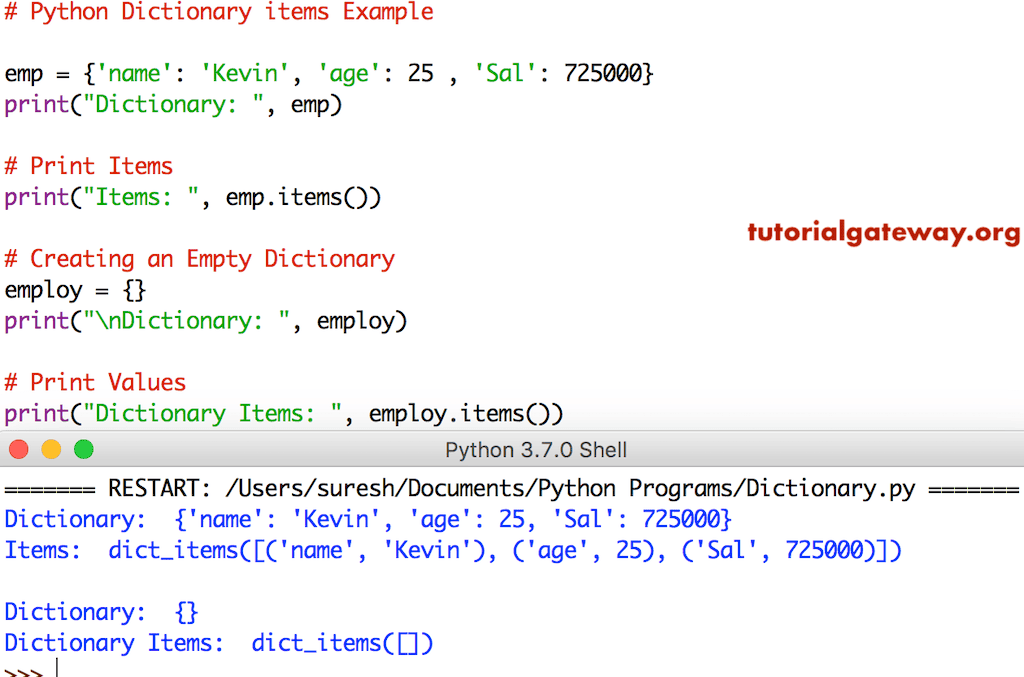
The items function returns the list of total key-value pairs available in a given dictionary. The code below prints the key-value pairs in emp and employ.
TIP: Please refer to the Creating a Python Dictionary article from our Python tutorial page.
emp = {'name': 'Kevin', 'age': 25 , 'Sal': 725000}
print("Dictionary: ", emp)

# Print Items
print("Items: ", emp.items())

# Creating an Empty
employ = {}
print("\nDictionary: ", employ)

# Print Values
print("Dictionary Items: ", employ.items())
How dict.items() work when the dictionary is modified?
The dictionary items() function automatically updates the view object accordingly.
n = {'a': 10, 'b': 20, 'c': 30}

items = n.items()
print('Original:', items)

del[n['b']]
print('Updated:', items)
Original: dict_items([('a', 10), ('b', 20), ('c', 30)])
Updated: dict_items([('a', 10), ('c', 30)])
Python dictionary items for loop
In the following example, the items() method is used inside a for loop to iterate over the dictionary items and access keys and values. On each iteration, unpack the tuple items to access and print the dictionary key-value pair returned by the items() method.
n = {'a': 10, 'b': 20, 'c': 30}
for k, v in n.items():
    print(k, v)
a 10
b 20
c 30
If we use the code below, the for loop accesses the individual tuples without unpacking. Refer to the Python tuple
n = {'a': 10, 'b': 20, 'c': 30}
for i in n.items():
    print(i)
('a', 10)
('b', 20)
('c', 30)
Using Python dictionary items() with conditional statements
Once the items() function extracts the key-value pair, we can use any conditional statement to filter those tuple pairs. Here, the Python if else statement checks the GDP position and if it is greater than 2, print a message.
n = {'INDIA': 4, 'USA': 1, 'CHINA': 2, 'JAPAN': 3}

for countries, position in n.items():
    if position > 2:
        print(f"{countries} should improve its GDP.")
INDIA should improve its GDP.
JAPAN should improve its GDP.
Using dict.items() with dictionary comprehension
The following example creates a new dictionary based on an existing one by filtering items based on a condition. For this, we use dictionary comprehension with the items() method to apply a condition.
To get only dictionary keys, use the Python dictionary keys function, and for only values, use the Python dict.values method. However, to access a particular value of a given key, use the Python dict.get() function.
n = {'Bikes': 10, 'Cars': 20, 'Cycle': 50}

n = {k: v for k, v in n.items() if v > 15}
print(n)
{'Cars': 20, 'Cycle': 50}How to filter Python dictionary items based on a condition?
We can use the dict comprehension along with the built-in items () method to filter the dictionary.
Using value to filter dictionary items
In the example below, the items() method returns the key-value pair from the fruits dictionary. Next, the dictionary comprehension iterates over those key-value pairs.
On each iteration, the if statement checks whether the fruits count is greater than 50 (dictionary value of each item is greater than 50). If true, add that key-value pair to the new dictionary.
fruits = {"Apple": 100, "Banana": 50, "Kiwi": 75, "Mango": 120}

new = {k: v for k, v in fruits.items() if v > 50}
print(new)
{‘Apple’: 100, ‘Kiwi’: 75, ‘Mango’: 120}
Using a key to filter Python dictionary items
If the task is to filter dictionary items based on key, we can use the same approach and replace the if condition for evaluating dict keys. Since the dictionary keys are strings (fruits), we use the built-in string Python endswith() function. It checks whether the string key (fruit) ends with the letter e; if true, add that key-value pair to the new dictionary.
- Continue reading Python strings.
fruits = {"Apple": 100, "Banana": 50, "Kiwi": 75, "Orange": 120}

new = {k: v for k, v in fruits.items() if k.endswith('e')}
print(new)
{'Apple': 100, 'Orange': 120}Python dictionary items list comprehension
As we all know, the built-in items() function returns the key-value pair from the dictionary. We can use the list comprehension along with the items() method to create a list from them.
In the example below, we declared a dictionary and used the items() function to extract the key-value pairs. The Python list comprehension will iterate over the key-value pairs and store them in a new Python list.
The following example iterates over key-value pairs and stores them in a list of tuples, where each tuple is a dictionary item.
fruits = {"Apple": 100, "Banana": 50, "Orange": 120}

items = [item for item in fruits.items()]
print(items)
[('Apple', 100), ('Banana', 50), ('Orange', 120)]Instead of getting a list of tuples with dictionary items, if the task is to get only keys or values, we use the same list comprehension with a simple modification. In the following example, we create two lists: the first list contains the dictionary keys, and the second list contains the dict values.
fruits = {"Apple": 100, "Banana": 50, "Orange": 120}

keys = [k for k, v in fruits.items()]
print(keys)

values = [v for k, v in fruits.items()]
print(values)
['Apple', 'Banana', 'Orange']
[100, 50, 120]How to sort Python dictionary items by value?
We can use the built-in dict.items() function to get the tuple of key-value pairs and then apply the sorted() function on them. In the following example, we declared a fruits dictionary with three items. Refer to the Python dictionary sorted function.
Next, we used the sorted() function with the key value as the dictionary value. To do this, we use the Python lambda expression.
fruits = {"Apple": 100, "Banana": 50, "Orange": 120}

sorted_fruits = dict(sorted(fruits.items(), key=lambda item: item[1]))
print(sorted_fruits)
{'Banana': 50, 'Apple': 100, 'Orange': 120}Use the reverse = True as the last argument of the sorted() function to sort the dictionary items in descending order.
desc_fruits = dict(sorted(fruits.items(), key=lambda item: item[1], reverse = True))
print(desc_fruits)
{'Orange': 120, 'Apple': 100, 'Banana': 50}