
The Python Assignment Operators are handy for assigning the values to the declared variables. Equals (=) is the most commonly used assignment operator in any programming language. For example:
i = 10
The list of available assignment operators in Python language. You can continue learning the other operators with our Python tutorial.
| Assignment Operators | Example | Explanation |
|---|---|---|
| = | x= 25 | Value 25 is assigned to x |
| += | x += 25 | This is same as x = x + 25 |
| -= | x -= 25 | Same as x = x – 25 |
| *= | x *= 25 | This is same as x = x * 25 |
| /= | x /= 25 | Same as x = x / 25 |
| %= | x %= 25 | This is identical to x = x % 25 |
| //= | x //= 25 | Same as x = x // 25 |
| **= | x **= 25 | This is same as x = x ** 25 |
| &= | x &= 25 | This is same as x = x & 25 |
| |= | x |= 25 | This is same as x = x | 25 |
| ^= | x ^= 25 | Same as x = x ^ 25 |
| <<= | x <<= 25 | This is same as x = x << 25 |
| >>= | x >>= 25 | Same as x = x >> 25 |
Python Assignment Operators Example
For this example, we are using four variables: a, Total, x, and y; their values are 7, 21, 9, and 65. Next, we use them to show the working functionality of all the Assignment Operators.
From the list of assignment operators, equal to is the most commonly used one. Most often, people mistakenly use it instead of the Python comparison operator (==) inside the Python if-else statement to evaluate an expression. Remember, = is to assign a value to a variable, whereas the == is to evaluate the expression (checking the left expression is equal to the right).
a = 7
Total = 21

Total += a # Using +=
print("The Value of the Total after using += is: ", Total)
Total -= a # Using -=
print("The Value of the Total after using -= is: ", Total)
Total *= a # Using *=
print("The Value of the Total after using *= is: ", Total)
Total //= a # Using //=
print("The Value of the Total after using //= is: ", Total)
Total **= a # Using **=
print("The Value of the Total after using **= is: ", Total)
Total /= a # Using /=
print("The Value of the Total after using /= is: ", Total)
Total %= a # Using %=
print("The Value of the Total after using %= is: ", Total)

x = 9
y = 65
x &= y # Using &=
print("The Value of the x after using &= is: ", x)
x |= 9 # Using |=
print("The Value of the x after using |= is: ", x)
x ^= y # Using ^=
print("The Value of the x after using ^= is: ", x)
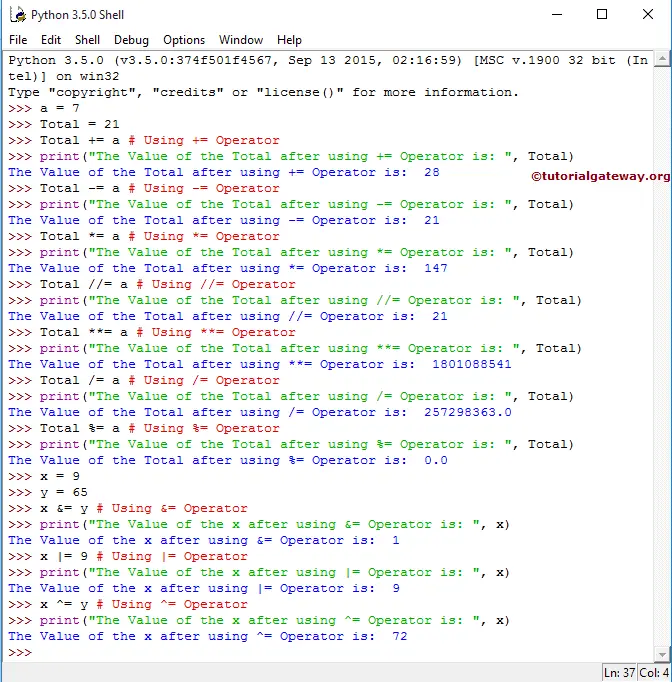
TIP: We can also say the assignment operators are a shorter version of the arithmetic operators, where the result is stored in a separate variable. You can learn more about Python arithmetic operators.
In this example program, We declared 2 integer values, a Total, and we assigned values 7 and 21, respectively.
The print statements will display the output of the Total after using the Python Assignment Operators on a and Total. Let us see the functionalities of all of them.
First functionality,
 Total += a # Using +=
 print("The Value of the Total after using += is: ", Total)
Total += a means
Total = Total + a ⇒ 21 + 7 = 28
So, the output of the above-mentioned Python print statement will be 28
The functionality of the Second assignment operator is,
 Total -= a # Using -=
 print("The Value of the Total after using -= is: ", Total)
Total -= a means
Total = Total – a ⇒ 28 – 7 = 21
So, the output will be 21
Third functionality,
 Total *= a # Using *=
 print("The Value of the Total after using *= is: ", Total)
Total *= a means
Total = Total * a ⇒ 21 * 7 = 147
So, the output will be 147
Fourth assignment operator in Python functionality,
 Total //= a # Using //=
 print("The Value of the Total after using //= is: ", Total)
Total //= a means
Total = Total // a ⇒ 147 // 7 = 21
So, the output of the above-mentioned print statement will be 21
Fifth functionality,
 Total **= a # Using **=
 print("The Value of the Total after using **= is: ", Total)
Total **= a means
Total = Total ** a ⇒ 21*21*21 *21*21*21*21 = 1,801,088,541
So, the output of the above-mentioned print statement will be 1,801,088,541
The Sixth assignment operator functionality,
Total /= a # Using /=
>>> print("The Value of the Total after using /= is: ", Total)
Total /= a means
Total= Total/ a ⇒ 1,801,088,541 / 7 = 257,298,363
So, the output of Total /= a will be 257,298,363
The functionality of a Seventh assignment operator in Python is
 Total %= a # Using %=
 print("The Value of the Total after using %= is: ", Total)
Total %= a means
Total = Total % a ⇒257,298,363 % 7 = 0 (because Remainder of 257,298,363 /7 is = 0)
In the next line, We declared 2 integer values, x and y, and assigned 9 and 65, respectively.
 x = 9
 y = 65
Eighth functionality,
 x &= y # Using &=
 print("The Value of the x after using &=  is: ", x)
x &= y means
x = x&y ⇒ 9 & 65
⇒ 00001001 & 01000001 = 00000001 ⇒ 1
So, the output of x &= y is 1. Please refer to the Python Bitwise operators for bit operations.
Ninth one’s functionality,
 x |= 9 # Using |=
 print("The Value of the x after using |=  is: ", x)
x |= 9 means x | 9 ⇒ 1 | 9
⇒ 00000001 | 00001001 = 00001001 ⇒ 9
So, the output will be 9
The functionality of a Tenth assignment operator,
x ^= y # Using ^=
>>> print("The Value of the x after using ^= is: ", x)
x ^= y means
x = x ^ y ⇒ 9 ^65
⇒ 00001001 ^ 01000001 = 01001000 ⇒ 72
So, the output will be 72.