
AutomatedLab - A Quickstart for Deploying SQL Server Labs on Windows
Learn how you can use AutomatedLab to quickly create new environments.
2023-08-04
2,887 reads
Learn how you can use AutomatedLab to quickly create new environments.
2023-08-04
2,887 reads
This article delves into five new dbatools command that work with sequence objects.
2023-05-31
1,540 reads
Learn how you can interact with ChatGPT from PowerShell.
2023-09-06 (first published: 2023-04-24)
7,197 reads

Flyway's output is often overwhelmed with verbose messages, most of which we can ignore but some of which provide vital warnings about failed compilations, or useful details about what a migration or callback did. I'll show how to use some pipeline-aware PowerShell functions to filter out and save the bits we want and pass the results along in a form that is useful to the next process in the pipeline.
2023-03-29
See how well ChatGPT works with questions on generating PowerShell code.
2023-03-20
14,328 reads
Learn how you can use PowerShell to update the Power BI data model.
2022-12-12
5,842 reads

2022-02-14
4,600 reads

In this article we look at how to install SQL Server and Oracle using PowerShell to create development environments using Windows Containers.
2022-01-28

Knowing how to manipulate strings is critical in any language. In this article, Greg Moore explains working with PowerShell strings.
2021-12-20
During the development cycle, the mechanics of reliable delivery must not be allowed to dominate the design work. With script callbacks in Flyway Teams, many of the development tasks required during a database migration can happen automatically, producing reports, build scripts, code reviews, or documentation.
2021-11-05
By Steve Jones
I recently started playing with the MCP Server for SQL Server, which is a...
If you spend your days tuning queries, managing pipelines, or keeping a production database...
I’ve been rebuilding my three-site SQL Server demo lab, and I ran into something...
Has anyone written a wrapper function (or similar) around STRING_AGG() to allow the retrieval...
Putting this here as we're currently on SQL Server 2019 installed on Windows Server...
Comments posted to this topic are about the item Never is Not the Policy
I have added a few indexes to one of my tables in SQL Server 2025:
ALTER TABLE dbo.CustomerContact
ADD CONSTRAINT PK_CustomerContact
    PRIMARY KEY (CustomerID);

-- Create index on CustomerEmail
CREATE INDEX IX_CustomerContact_CustomerEmail
ON dbo.CustomerContact (CustomerEmail);
CREATE INDEX IX_CustomerContact_CustomerPhone
ON dbo.CustomerContact (phone);
I then do this to disable one index:
alter index IX_CustomerContact_CustomerPhone on dbo.CustomerContact disableI see this when I check the index status:
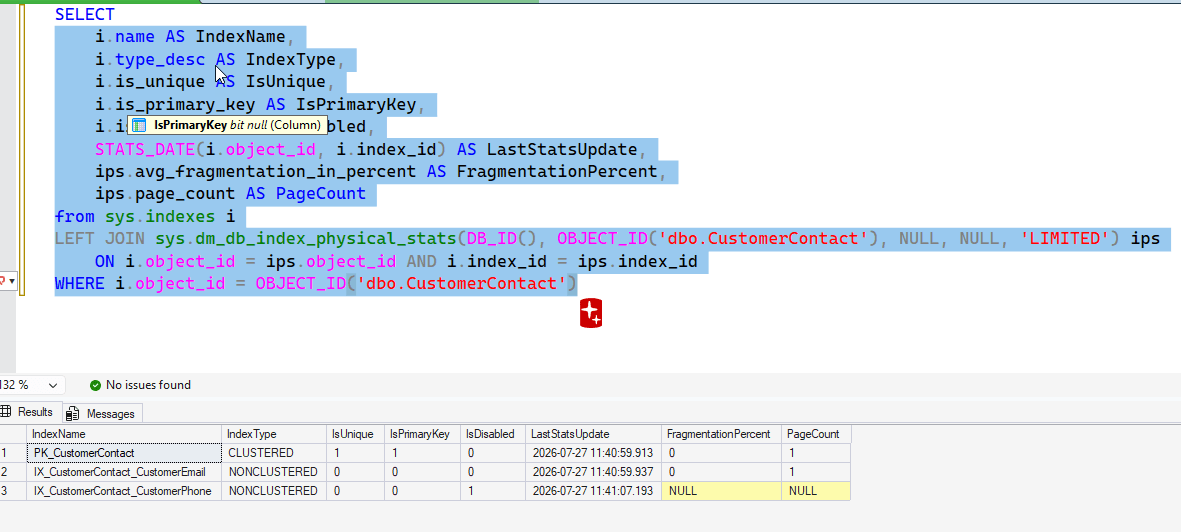 I decide to rebuild all indexes with this command:
ALTER INDEX ALL ON dbo.CustomerContact rebuildAfter I do this, what will I see for the index status? See possible answers