
Automating SSAS Multidimensional Security Audits with PowerShell
This article presents a way to audit your SSAS cubes using PowerShell to prepare for any audit questions about who has access to the data.
2026-08-19
1,093 reads
This article presents a way to audit your SSAS cubes using PowerShell to prepare for any audit questions about who has access to the data.
2026-08-19
1,093 reads

Imagine a candle that is lit and takes 1 hour to burn out. Now imagine one hundred candles. How many hours will it last? That depends. If they are lit simultaneously, it will take 1 hour. That is the basic idea of running in the background or asynchronously. Of course, the 100 candles can execute independently of one another, unlike if you try to run 100 processes on a computer with 2 cores. PowerShell has some ways to manage that, as PowerShell job – which we will see in this article – runspaces – needs to add programmable using .net.
2025-02-14

I was talking with a good friend that has an environment with terabytes of information and to create a homolog or dev environment to him is a pain. He comes to me with a solution : A PowerShell script that gets only the first 1000 lines of each table, creates the inserts and schema files
2024-03-15
Have you ever been in a situation that you want to call a cmdlet or a function with a parameter that depends on a conditional criteria that is available as a list? In this article I will show a technique where you can use PowerShell Dynamic Parameters to assist the user with parameter values.
2024-02-09

Learn how you can install SMSS automatically using PowerShell DSC as this series continues.
2024-01-31
3,522 reads
Have you ever been in a situation that you want to call a cmdlet or a function with a parameter that depends on a conditional criteria that is available as a list? In this article I will show a technique where you can use PowerShell Dynamic Parameters to assist the user with parameter values.
2024-01-29
Imagine this: you have several directories full of SQL script files, and you need to know where a certain table is used. You’d rather like the context too, so you can check the whole SQL Expression and work out why it is running so slowly.
2024-01-08
2023-12-22
396 reads

Learn about various PowerShell commands that can be used to administer virtual machines on Amazon AWS.
2023-12-04
2023-08-21
503 reads
If you spend your days tuning queries, managing pipelines, or keeping a production database...
I’ve been rebuilding my three-site SQL Server demo lab, and I ran into something...
By SQLPals
SQL Server gMSA: Why DBAs Still Aren't Using It in 2026 ...
Comments posted to this topic are about the item Never is Not the Policy
Comments posted to this topic are about the item Automating SSAS Multidimensional Security Audits...
Comments posted to this topic are about the item Rebuilding All Indexes
I have added a few indexes to one of my tables in SQL Server 2025:
ALTER TABLE dbo.CustomerContact
ADD CONSTRAINT PK_CustomerContact
    PRIMARY KEY (CustomerID);

-- Create index on CustomerEmail
CREATE INDEX IX_CustomerContact_CustomerEmail
ON dbo.CustomerContact (CustomerEmail);
CREATE INDEX IX_CustomerContact_CustomerEmail
ON dbo.CustomerContact (phone);
I then do this to disable one index:
alter index IX_CustomerContact_CustomerPhone on dbo.CustomerContact disableI see this when I check the index status:
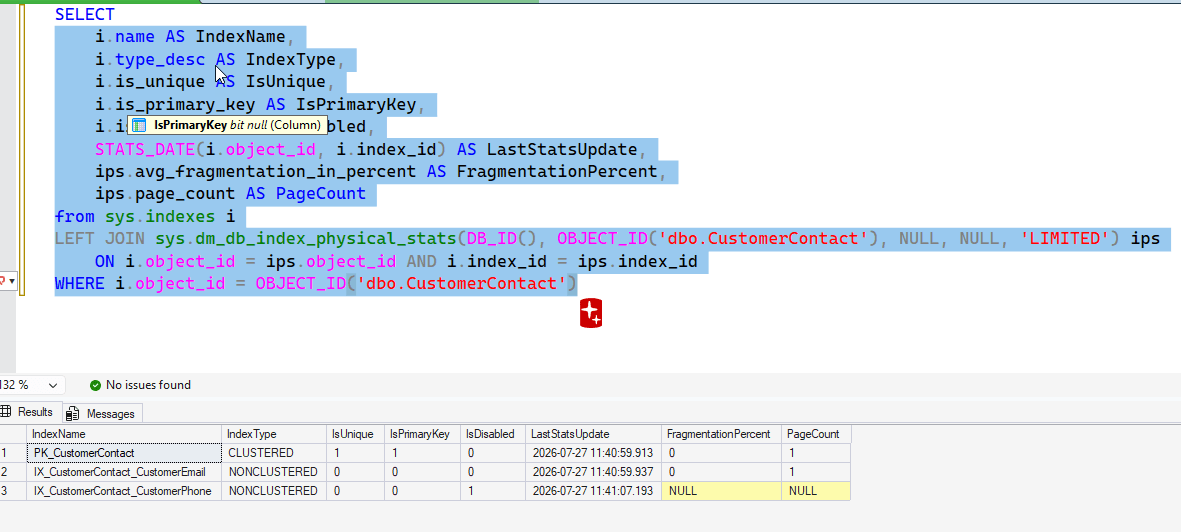 I decide to rebuild all indexes with this command:
ALTER INDEX ALL ON dbo.CustomerContactAfter I do this, what will I see for the index status? See possible answers