Apple Updates iWork Apps for Mac With iCloud Folder Sharing and Other New Features - MacRumors
Skip to Content

Apple Updates iWork Apps for Mac With iCloud Folder Sharing and Other New Features

Apple today updated Pages, Numbers, and Keynote, its iWork apps designed for the Mac, to version 10.0 with a new set of features. The updates add support for iCloud Folder Sharing for collaborative files with macOS 10.15.4 installed, plus there are options to edit shared documents offline.

iwork for mac
There are also new templates and editable shapes to work with, a redesigned template chooser, and an option to add color, gradients, and images to the background of any document. Each app's release notes are below.

Pages Release Notes

  • Select from a variety of gorgeous new templates to help you get started.
  • Add a Pages document to a shared iCloud Drive folder to automatically start collaborating. Requires macOS 10.15.4.
  • Add a drop cap to make a paragraph stand out with a large, decorative first letter.
  • Apply a color, gradient, or image to the background of any document.
  • Easily access your recently used templates in a redesigned template chooser.
  • Print or export a PDF of your document with comments included.
  • Edit shared documents while offline and your changes will upload when you're back online.
  • Enhance your documents with a variety of new, editable shapes.

Numbers Release Notes

  • Create spreadsheets with more rows and columns than ever before.
  • Apply a color to a background of a sheet.
  • Add a Numbers spreadsheet to a shared ‌iCloud Drive‌ to automatically start collaborating. Requires macOS 10.15.4.
  • Edit shared spreadsheets while offline and your changes will upload when you're back online.
  • Easily access your recently used templates in a redesigned template chooser.
  • Print or export a PDF of your spreadsheet with comments included.
  • Add a drop cap to text in a shape.
  • Enhance your spreadsheets with a variety of new, editable shapes.

Keynote Release Notes

  • Add a Keynote presentation to a shared ‌iCloud Drive‌ to automatically start collaborating. Requires macOS 10.15.4.
  • Edit shared presentations while offline and your changes will upload when you're back online.
  • Select from a variety of gorgeous new themes to help you get started.
  • Easily access your recently used themes in a redesigned template chooser.
  • Print or export a PDF of your presentation with comments included.
  • Add a drop cap to make text stand out with a large, decorative first letter.
  • Enhance your presentations with a variety of new, editable shapes.
  • New "Keyboard" text build in and build out animation

Apple does not appear to have released updates to its iWork for iOS apps, so the new features are limited to the Mac versions at this time. All of the new updates can be downloaded from the Mac App Store.

Apple's iWork for Mac apps are all free downloads.

Popular Stories

Apple Event Logo

Apple Unveiled Four New Products Today

Tuesday August 25, 2026 8:39 am PDT by
Apple today unveiled a new Mac mini with M6 and M5 Pro chip options, a new Mac Studio with M5 Max and M5 Ultra chip options, a new version of the Polishing Cloth with a lower price, and updated Magic Keyboards for Macs. To learn more about these products, read our coverage below: Apple Announces New Mac Mini With M6 and M5 Pro Chips and More Apple Unveils New Mac Studio With M5 Max and M5...
apple magic keyboard with glyphs 2026 refresh

Apple Quietly Refreshes Magic Keyboards

Tuesday August 25, 2026 7:22 am PDT by
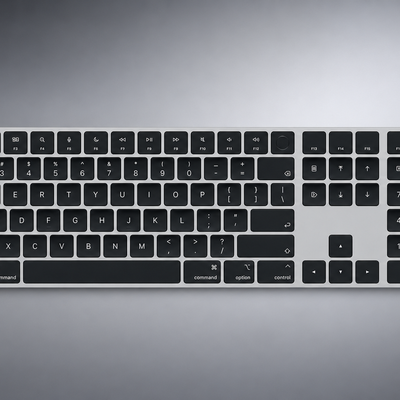
Apple today quietly introduced updated Magic Keyboard models with revised U.S. English key labeling. On the new keyboards, the tab, caps lock, shift, return, and delete keycaps are labeled with glyphs rather than edge text. On the full-size models with a numeric keypad, the change goes further, with the home, page up, page down, end, clear, and enter keys also swapping their text labels for...
Apple Logo Gradient 16x9 1

Apple Just Made an Extremely Rare Product Announcement

Thursday August 27, 2026 7:58 am PDT by
The new Mac mini and Mac Studio models unveiled by Apple this week are the company's first new Macs announced in August since 2020. It is extremely rare for Apple to announce new products of any kind in August, excluding smaller things like new color options and accessories. As mentioned, Apple's last notable August product announcement was in 2020, when it updated the 27-inch iMac and a...

Top Rated Comments

ruka.snow Avatar
84 months ago

Does this add the cursor support that they mentioned was on its way?
Macs already have a cursor
Score: 22 Votes (Like | Disagree)
BWhaler Avatar
84 months ago
This looks like a great update.

I love iWork. Sure, far from perfect, but it is the best office suite IMHO. I use it in the enterprise, and even with the ecosystem limitations, it's powerful.

I am so pleased Apple continues to invest in this tool.
Score: 11 Votes (Like | Disagree)
jonblatho Avatar
84 months ago

Why do most of the new templates come with missing fonts??
They’re downloaded and installed when you first attempt to use the templates. They may first appear as a fallback font, but they’ll come in.

New typefaces (there may be more than listed but these are the ones I’ve spotted):

* Graphik
* Graphik Compact
* Canela
* Canela Deck
* Canela Text
* Druk
* Druk Wide
* Proxima Nova

Good, versatile choices.
Score: 6 Votes (Like | Disagree)
84 months ago

Nope. Pages says 'open,' not update. I guess the impatient among us must wait....
You have to click on the app once you search for it in order to see the Update button. Personally, I've never seen this method of updating before. Perhaps, this is how Apple is trying to mitigate congestion resulting from everyone starting to download at once.
Score: 3 Votes (Like | Disagree)
nattK Avatar
84 months ago
Why do most of the new templates come with missing fonts??


Does this add the cursor support that they mentioned was on its way?
This is the Mac apps. iOS and iPadOS updates coming soon
Score: 3 Votes (Like | Disagree)
dancingbrook Avatar
84 months ago

Is there a setting in System Preferences that will automatically update Pages/Numbers/Keynote?
If I did not read this website I would have had no idea there was an update available
Yes, see...Software Updates and click the advanced tab. I assume Apple just rolls these things out over time to prevent server overload. Often it takes a day or so for everyone to be informed and updated.


Your suggestion worked perfectly for me! Went into the App Store on my MacBook Pro > searched for each individual app > clicked on each one > saw the update button. Seems circuitous but oh well...thanks!
Yes, if you wait a bit longer, tomorrow maybe, all of us will see the update notice. It's just us informed one who always get the first crack.
Score: 2 Votes (Like | Disagree)