The ODROID-H-series is going 10 GbE

Imagine you have a Single-Board Computer with onboard 10 GbE networking, being low cost and low power consumption, allowing 24×7 usage without ballooning the energy monthly bills to unsustainable amounts.

Imagine this very same SBC provides you with 4, yes 4 M.2 slots, 3 being PCIe Gen 3 x2 lanes, 1 being PCIe Gen 3 x1 lane, allowing user customization with NVMe SSDs or PCIe to 6Gbs SATA or additional NICs or WiFi 6e or 7 or AI accelerators or custom cards (e.g. sensors.)

The team at Hardkernel imagined it and decided to make it a reality!

Introducing the ODROID-H5

Hardkernel is introducing the ODROID-H5, which includes a complete reconfiguration of the 9 High-Speed IO (HSIO) lanes, plus a dedicated USB 3.1 Gen 2 10 Gbps lane provided by the processor.

The points discussed below highlight the key evolutions of the new ODROID-H5 series compared to its predecessor, the ODROID-H4:

  1. Efficiency-focused CPU: The N300 operates as a high-efficiency variant of the N305, specifically engineered for reduced power consumption and thermal output. This optimization results in a multi-threaded performance profile approximately 10–15% lower than the N305, making it an ideal choice for 24×7 low-power operation (TDP at 7W instead of 15W for the N305).
  2. Onboard 10 GbE Networking: Experience a massive leap in bandwidth with out-of-the-box 10 GbE connectivity, offering a significant upgrade over standard 2.5 GbE solutions.
  3. Unprecedented M.2 Expandability: While the H4 provided a single M.2 slot (x4 lanes), the H5 delivers 3 x M.2 slots (x2 lanes) plus 1 x M.2 slot (x1 lane) natively. This design nearly doubles the total available lanes (7 vs. 4) and eliminates the need for external splitter cards, allowing for rich customization with NVMe, NICs, and AI accelerators.

As the team at Hardkernel introduces the H5 series, we remain committed to the H4 series for as long as critical upstream components, such as Intel CPU models, remain available for production. Unfortunately, the global CPU supply chain has been extremely volatile lately, which has caused regrettable disruptions in our ability to maintain H4 stock. We are doing our best to navigate these supply issues to resume production as soon as possible.

Comparison Table


ODROID H4
(‘2024 Apr)

ODROID H4 Ultra
(‘2024 Apr)

ODROID H5
(‘2026 May)

Processor      
CPU (Intel)(see note 1) Processor N97 Core™ i3 Processor N305     Core™ i3 Processor N300
Code name Alder Lake-N
Microarchitecture Gracemont
Cores / Threads 4C4T 8C8T 8C8T
Cache 6 MB
AVX2 (Advanced Vector Extensions) Yes
TDP 12W 15W 7W
Single Thread Burst Frequency (GHz) 3.6 3.8 3.8
Full multi Thread Sustained Frequency(GHz) 2.9 2.6 2.3
Memory  
Max. Memory address space (GB) 64 (see note 2)
Max. Memory Speed (MT/s) DDR5-4800
In Band Error Correction Code (IBECC) Support Yes
iGPU (Intel Graphics)  
Burst Frequency (MHz) 1200 1250 1250
Execution Units 24 32 32
Video outputs  
HDMI 1
DisplayPort 2
PCIe (via NVMe slot)  
Generation Gen 3
Configuration 1 x M.2 slot x4 lanes 1 x M.2 slot x4 lanes 3 x M.2 slots x2 lanes
1 x M.2 slot x1 lane
Compatibility with optional
ODROID 4-ports 2.5GbE Net Card
Yes Yes No
Compatibility with optional
ODROID M.2 2×2 Card
Yes Yes No
Compatibility with optional
ODROID M.2 4×1 Card
Yes Yes No
Compatibility with optional
ODROID M.2 10GbE Card (see note 3)
Yes Yes Yes
Compatibility with optional
ODROID M.2 6-port SATA Card (see note 4)
Yes Yes Yes
Compatibility with optional
3rd Party M.2 WiFi 6e, 7 x1 Card (see note 5)
Yes Yes Yes
IO ports  
USB 2.0 2 ports 2 ports 3 ports
USB 3.0 2 ports 2 ports 1 port
2.5GbE 1 port 2 ports No
10GbE No No 1 port
SATA III No 4 ports No
24pin IO Expansion ports I2C x 2
  USB 2.0 x 3
  UART x 1
  HDMI-CEC x 1
  Ext. Power Button x 1
Others  
Dual-BIOS No Yes Yes
Optional Cooling Fan

Slim 92×15 or thick 92×25 mm 12 Volt

standard PC 4-pin

Slim fan fits inside the new cases.

Dimensions 120x120mm (4.7×4.7 in)
Recommended Power Supply 1 60W

Recommended Power Supply 2

for supporting booting with 3.5″ hard disks

No 133W No
Unlimited Performance Mode Yes
Security (TPM 2.0) fTPM enabled (Will run Windows 11 out of the box)
Hardkernel H-series cases

DIY assembly

The cases are made of solid and sturdy PCBs.

Plus GameCube-style case.

DIY assembly

The cases are made of solid and sturdy PCBs.

Certifications FCC/CE/KC/RoHS

Note 1: See INTEL Ark comparison table at https://www.intel.com/content/www/us/en/products/compare.html?productIds=231806,231805,233090

Note 2: The INTEL Ark pages state the Max Memory Size to be 16GB. However it has been well documented by many users that 32GB, 48GB and 64GB SO-DIMMs work okay with the INTEL processors N CPU. Of course, we have also confirmed the normal operation of the 32GB, 48GB, and 64GB RAM modules.

Note 3: The ODROID M.2 10GbE Card product page is at https://www.hardkernel.com/shop/10gbe-m-2-card-type-1See also Wiki page at https://wiki.odroid.com/accessory/connectivity/m.2_to_10gbe_adapter

Note 4: The ODROID M.2 6-port SATA Card product page is at https://www.hardkernel.com/shop/6-port-sata-m-2-card-type-1/ . See also Wiki page at: https://wiki.odroid.com/accessory/connectivity/m.2_to_sata6_adapter

Note 5: See 3rd party solution as discussed for the ODROID M2. It applies easily to the H5.  https://wiki.odroid.com/odroid-m1s/application_note/m.2_wifi_bt

Leveraging the onboard (a.k.a. out of the box) 10GbE vs. 2.5GbE

The technologies listed below significantly profit from the four times increased speed:

– File transfer using SMB.
– Distributed file systems.
– Distributed databases.
– VM server over 10GbE (e.g. Proxmox).
– Data Lab clusters over 10 GbE.
– Distributed AI/HPC processing over 10 GbE.
– Distributed sensors & commands requiring more than 1 or 2.5 GbE bandwidth.

Benefits of 3 x M.2 slots x2 lanes + 1 x M.2 slot x1 lane vs. 1 x M.2 slot x4 lanes out of the box

The H5 offers 7 x HSIO lanes on 4 x M.2 slots instead of 4 x HSIO lanes on 1 M.2 slot, almost double. The CPU offers 9 HSIO lanes, after taking 2 lanes for the 10 GbE onboard NIC, we decided to federate the 7 remaining lanes into M.2 slots, leaving the user, meaning you, to decide how these lanes will be used. In doing so, the ODROID H5 is now the most versatile model of the H-series.

Example:

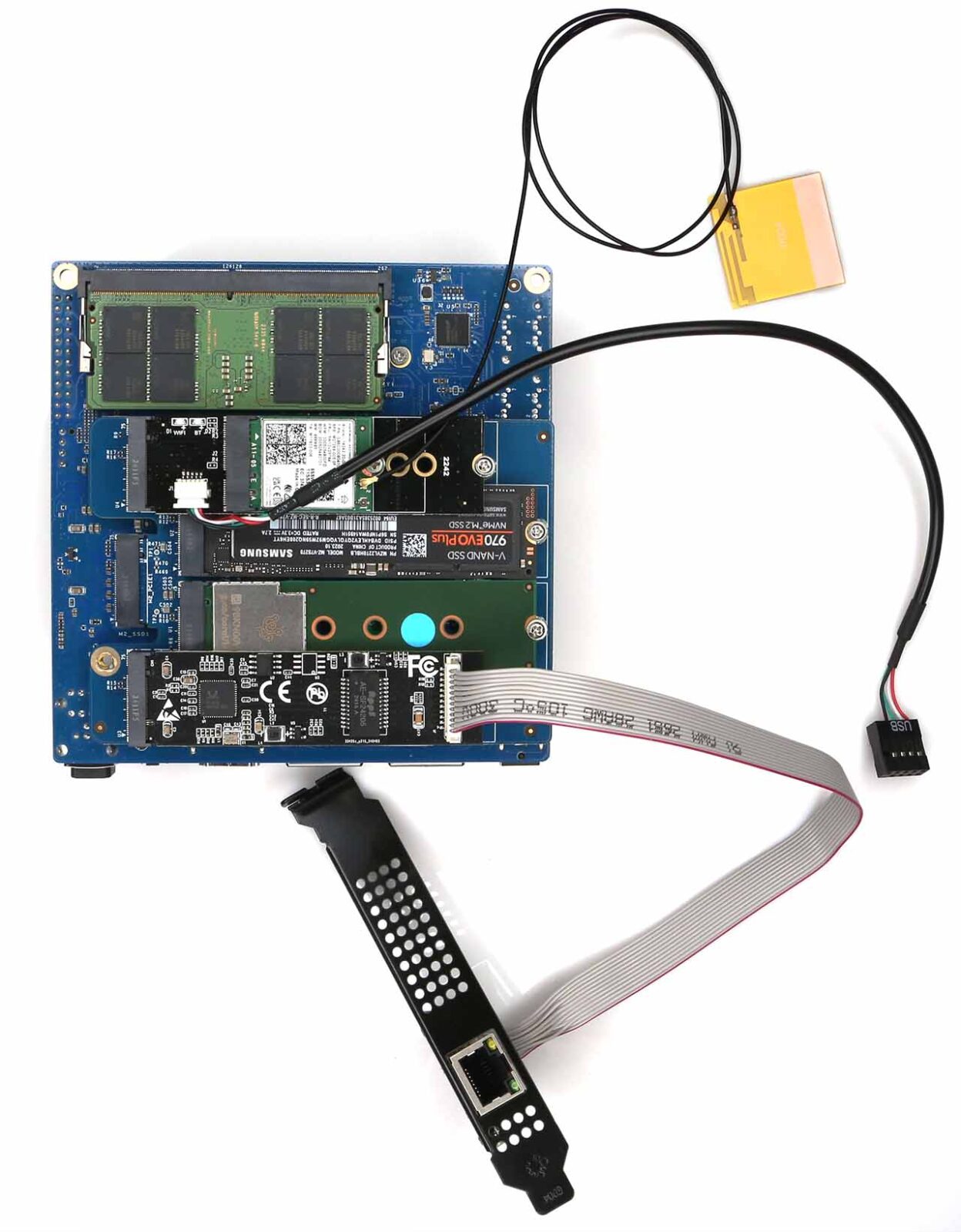
Here is a possible configuration with optional PCIe peripherals:

– One x2 3rd Party NVMe drive
– One x2 ODROID M.2 10 GbE card (you then have 2 x 10 GbE NIC!)
– One x1 3rd Party NPU AI accelerator
– One x2 ODROID 6-Port SATA M.2 Card

This configuration would enable distributed AI/HPC processing over 10GbE.

The photos shown below reflect this example configuration.

Iperf3 Network Benchmarking

During our 60-second throughput evaluation, the board maintained a consistent bitrate of close to 9.5 Gbits/sec. Furthermore, the H5 demonstrated exceptional thermal and link stability, showing zero performance degradation or connectivity issues during a rigorous 18-hour Iperf stress test.

The team has finally realized a vision for a truly cost-effective and eco-friendly 10 Gbps network storage solution, engineered to deliver high-speed data handling with remarkably low power overhead.
Even when actively connected to a 10 GbE network, the H5 maintains an impressive idle power profile of approximately 3W, while remaining fully capable of saturating the link with real-world transmission speeds of 1+ GB/s.

N97 vs N305 vs N300

Check out the table below detailing the PassMark benchmark results, providing a clear performance comparison across the N97, N305, and N300 processors. While these are synthetic benchmarks, we ensured a level playing field by running them on three distinct boards within an identical Ubuntu 26.04 + Linux kernel 7.0 environment, making this data perfectly suited for evaluating relative performance gaps.

  N97 N305 N300
Single Thread Rating 2187.1 2302.5 2313.5
CPU Mark 6281.8 11939.2 10578.8

In terms of raw computational throughput, while single-thread ratings remain comparable, the N300 yields a CPU Mark score approximately 10% lower than the N305, reflecting its performance profile in multi-threaded environments. This delta is a logical consequence of the hardware specifications, as the N300’s sustained multi-core frequency is engineered to be roughly 10% lower than that of its N305 counterpart.

Regarding power management, the Power-Limit-4 (PL4) is set to Disabled by default. It is important to note that our latest BIOS releases come with Unlimited Performance Mode (UP) enabled out of the box. For more information about the UP mode, see the annex Unlimited Performance Mode at the bottom of this document.

To quantify the performance delta between the N300 and N305 within a more pragmatic framework, our team executed a series of rigorous evaluations utilizing various modules from the Phoronix Test Suite, including:

  • Data compression algorithms
  • Cryptographic processing
  • Imaging and rendering tasks
  • Python scripting performance
  • Video encoding throughput
  • Vulkan-based compute workloads

The results indicate a performance variance of less than 5%. Consequently, we believe this marginal difference would be virtually imperceptible to users during real-world computing operations.

While the generous onboard heatsink makes fanless operation technically feasible, we strongly advocate for the installation of an active cooling solution to preserve the peak performance of the H5 board’s 8-core architecture during sustained loads.

For optimal thermal management, the official slim 92x92x15mm 12V PWM cooling fan—or an equivalent third-party alternative—should be mounted beneath the venting apertures of our official chassis. We have validated the third-party cooling solutions for compatibility listed below:

  • Noctua NF-A9x14 PWM (14mm thickness)
  • Thermalright TL-9015 (15mm thickness)

The ODROID-H5 retains the industry-standard 12V PWM 4-pin connector utilized in the H4 series, ensuring that users can easily integrate a wide variety of readily available third-party slim cooling fans into their builds.

Triple-Head 4K Monitor Support

Experience the versatility of connecting up to three 4K/60Hz monitors to the H5 board, perfect for both immersive entertainment and high-productivity workflows. Leveraging advanced hardware virtualization, users can seamlessly run Linux and Windows environments simultaneously with flawless performance.

The images shown below demonstrate the multi-display capabilities of the new ODROID-H5:

Picture 1: Simultaneous 4K playback of three different YouTube videos using Chrome on the Ubuntu desktop, showcasing smooth multi-threaded media handling.

Picture 2: An ultra-wide WebGL Aquarium demo running on Ubuntu Chromium across all displays, achieving a massive combined resolution of approximately 11520 x 2160.

Picture 3: A demonstration of hardware virtualization (VT-x) in action: the left monitor displays the Ubuntu Desktop host, the center runs Windows 11 as a guest, and the right runs  .

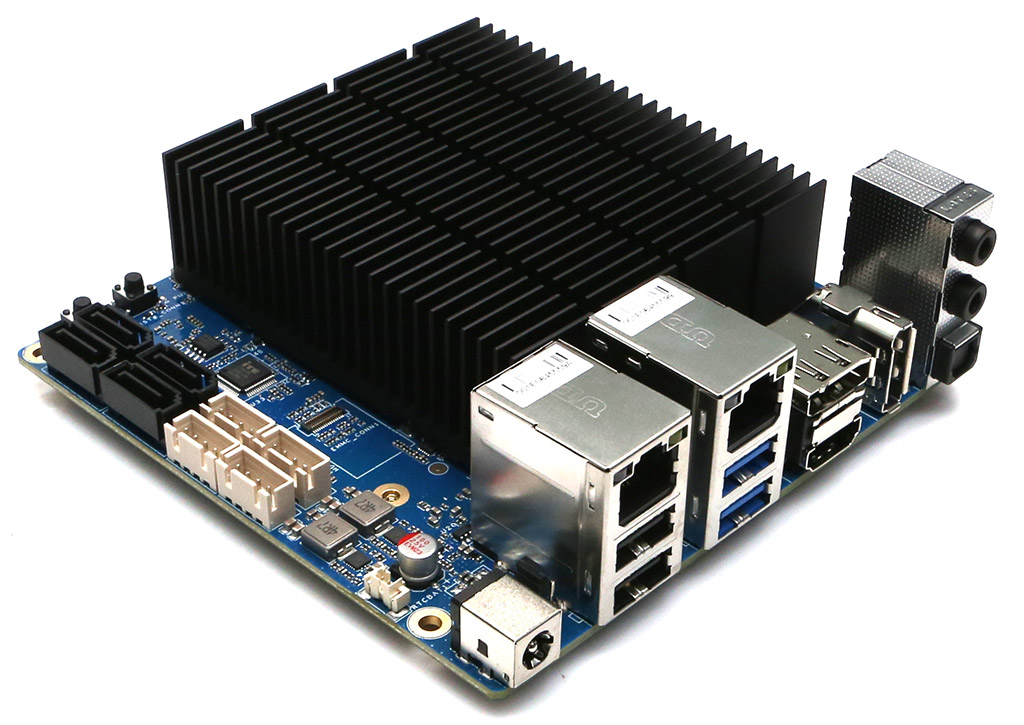
Board Detail

  • A. CPU (Intel N300 )
  • B. 1 x DDR5 SO-DIMM slots (Single channel memory support)
  • C. 1 x M.2 Slot PCIe 3.0 x 2 (Label M2_SSD1)
  • D. 1 x M.2 Slot PCIe 3.0 x 1 (Label M2_SSD4)
  • E. 1 x M.2 Slot PCIe 3.0 x 2 (Label M2_SSD3)
  • F.  1 x M.2 Slot PCIe 3.0 x 2 (Label M2_SSD2)
  • G. 1 x eMMC (Embedded Multimedia-Card) Socket
  • H. 1 x DC Power Jack
  • I.  3 x USB 2.0
  • J. 1 x RJ45 Ethernet Ports (10/100/1000/2500/10000)
  • K. 1x USB 2.0 and 1 x USB 3.0
  • L. 1 x DisplayPort 1.2
  • M. 1 x HDMI 2.0
  • N. 1 x DisplayPort 1.2
  • O. 1 x Peripheral Expansion Header (24-pin)
  • P.  1 x Active Cooling Fan Connector (4-pin)
  • Q. 1 x RTC/CMOS Backup Battery Connector (2-pin)
  • R. 1 x Power Switch
  • S. 1 x Reset Switch
  • T. 4 x System LED Indicators

Specifications

Processor Intel i3 N300 Octa-Core : Max Turbo Frequency 3.80 GHz
Memory 1 x DDR5 SO-DIMM slot
Single Channel, up to 4800 MT/s (5600MT/s or higher speed DRAM modules are still compatible)
Max memory capacity 64GB
In Band Error Correction Code (IBECC) Support
DDR3/DDR4 are not supported
Storage 1 x eMMC connector (bootable and selectable on BIOS)
Various eMMC modules can be purchased at Hardkernel store separately
3 x M.2 slot (PCIe 3.0 x 2, supports NGFF-2280 cards)
1 x M.2 slot (PCIe 3.0 x 1, supports NGFF-2280 cards)
Networking 1 x 10 GbE LAN ports (RJ45, supports 10/100/1000/2500/5000/10000 Mbps)
Realtek RTL8127
Supports Wake-On-Lan
LED indicators (Green: Link, Amber: Traffic)
Video 1 x HDMI 2.0 (up to 4K@60Hz)
2 x DisplayPort 1.2 (up to 4K@60Hz)
Audio No Analog output, only Digital output from HDMI and DisplayPort
External I/O 1 x USB 3.0 ports
3 x USB 2.0 ports
1 x Peripheral Expansion Header (24-pin, 2.54mm pitch)
– 1 x DC 5V, 1 x DC 3.3V, 5 x GND
– 1 x UART (TXD/RXD/RTS/CTS : 3.3Volt IO level)
– 2 x I2C (SCL/SDA : 3.3Volt IO level)
– 1 x External Power Button
– HDMI CEC, 5VA+
– 3 x USB 2.0
– All 3.3V I/O signal level
Other features Passive Heatsink
BIOS Backup Battery
– Maintains system time and BIOS settings
Power Button
Reset Button
System LEDS Indicators:
– Red (PWR) – Solid light when DC power is supplied
– Blue (left, SLEEP) – turns off only when the system enters into suspend mode
– Blue (right, PMIC) – turns on only when the major power rails are working
– Green (NVMe) – Flashes when NVMe data transfers
Active Cooling Fan Connector (12V 4-pin, PWM input + TACHO output)
– Active Cooling Fan is optional
– Connector (4-pin, 2.54mm pitch)
Power DC jack : outer (ground) diameter 5.5mm, inner(positive) diameter 2.1mm
DC input voltage range : 11V ~ 20V
– DC 15V/4A power adapter is recommended
Power consumption:
– Headless Idle : ≃ 3.3W
– Desktop GUI Idle : ≃ 4.5W
– CPU + GPU stress test : ≃25W
– Power-off : ≃0.4W
– Suspend : ≃0.9~1.3W
Form Factor 120mm x 120mm x 44mm Approx.
Weight : 320g including heatsink


Power Consumption Characteristics

Power Consumption Characteristics with Desktop GUI

Using our specialized ODROID-PowerMate, the team conducted a series of precise evaluations to quantify the ODROID-H5 energy profile during active use cases. To simulate a real-world workstation environment, our test bench included a high-speed M.2 NVMe SSD, a 4K HDMI display, a stable 1GbE Ethernet link (a 1GbE network switch connected to the H5 onboard 10GbE), and a standard USB input device.

When applying heavy computing loads to all 8 CPU cores and 32 GPU execution units, the maximum system peak power is expected to rise to approximately 25W in UP mode. The data table and analytical chart shown below provide a comprehensive breakdown of the power consumption metrics observed during our rigorous testing.

Activity   Power Consumption (W), Avr 50sec
Booting Zone1 12.2
IDLE (with GUI on an HDMI monitor) Zone2 7.5
4K YouTube Play on Chrome Browser Zone3 16.4
WebGL aquarium demo on Chrome Browser Zone4 10.4
WebGL + CPU Stress Zone5 25.3
CPU Stress Zone6 23.8
Sleep (Suspend to RAM) Zone7 0.9
Wakeup + IDLE Zone8 7.9
Power OFF   0.4

Idle Power Characteristics for Headless Server

For servers with prolonged periods of inactivity, minimizing idle power consumption is essential to reduce operational energy costs and support a sustainable global environment.

The team at Hardkernel remains dedicated to refining the low-power efficiency of the H-series. Efficiency is our guiding principle during the hardware design phase, especially when selecting critical power conversion components.

Consequently, the new H5 model maintains an impressive idle profile of approximately 2W. Recognizing the high level of community interest in these metrics, we have performed comprehensive, in-depth evaluations across the model range.

Our methodology began by resetting all BIOS parameters to factory defaults and booting into an Ubuntu 26.04 + Linux kernel 7.0 environment. Upon verifying a CPU C10 (pc10) state occupancy exceeding 96%, we logged power consumption at one-second intervals for 60 seconds using the ODROID-PowerMate. The average values are detailed in the comparison table below.

Subsequent tests involved disconnecting the HDMI cable to observe the power delta. We also evaluated the system with Unlimited Performance Mode enabled; our data confirmed that this setting has a negligible impact on idle energy draw.

Significant efficiency gains were achieved by adjusting the PCIe ASPM (Active State Power Management) from “Disabled” to “Auto,” dropping idle consumption below 3W. While “Disabled” remains the default to ensure compatibility with certain unstable NVMe/PCIe devices, users are encouraged to activate this feature based on their specific hardware configuration.

Furthermore, with the Ethernet cable removed, the H5 board demonstrates a remarkable idle floor of just 2.2W. While this scenario is unique to standalone applications like robotics or drones, it highlights the architectural efficiency of the board.

The H5 provides a powerful, eco-friendly solution for anyone looking to deploy a 24/7 low-power server that is both cost-effective and environmentally responsible.

Activity Power Consumption (W) Actions Timer
Booting + Login 10.7 Login 0:10 ~ 1:10
IDLE + ETH + HDMI 4.7 USB Dongle remove 1:30 ~ 2:30
IDLE + ETH 2.9 HDMI cable disconnect 2:50 ~ 3:50
IDLE 2.2 Ethernet cable disconnect 4:10 ~ 5:10

Notes

  • The PL4 setting was measured in the default Unlimited Performance Mode.
  • Measurements were taken with all PCIe ASPM settings changed to Auto.
  • A 1GbE switch connected to the onboard 10GbE NIC.
  • In this test, Ubuntu Desktop OS was used, and we think that power consumption could have been slightly reduced if Ubuntu Server OS had been used.

Comprehensive Idle Power Metrics

The data table shown below provides an analytical breakdown of the ODROID-H5 energy profile relative to varying Ethernet link speeds.

  • Our evaluation spanned five distinct bandwidth tiers—100Mbps, 1Gbps, 2.5Gbps, 5Gbps, and 10Gbps—revealing a logical and measurable correlation between negotiated link speed and the system’s idle power floor.
  • Notably, by disconnecting peripheral input devices such as the USB keyboard, we observed an even further reduction in energy draw compared to the baseline metrics documented in our previous tests.
Link Speed (Mbps) IDLE Power (W)
100 1.99
1000 2.53
2500 2.84
5000 3.12
10000 3.26


The Genesis of the ODROID-H5

Network Evolution: 2.5GbE vs. 10GbE

For years, the adoption of 10GbE networking remained a luxury for home labs and SOHO environments, often sidelined by prohibitive deployment and maintenance costs. However, the landscape has shifted; the infrastructure for high-speed connectivity is now more accessible than ever, with affordable switches and adapters becoming the new standard.

While legacy 10GbE NIC were notorious for high power draw and excessive thermal output, the ODROID-H5 leverages the cutting-edge RTL8127 controller. This results in an eco-friendly SBC that delivers massive bandwidth without the burden of unsustainable energy bills.

It was time to embrace a new tier of performance: experience networking speeds 10x faster than 1GbE and 4x faster than 2.5GbE solutions.

A Paradigm Shift in M.2 Expandability

The ODROID-H4 series offered a single M.2 slot utilizing four PCIe 3.0 lanes; the H5 series redefined this architecture with 3 x M.2 slots (x2 lanes) plus 1 x M.2 slot (x1 lane). This allows for the simultaneous installation of up to four NGFF PCIe devices natively, eliminating the need for external M.2 splitter cards.

This expanded slot array offers unprecedented flexibility. Users can now architect high-density configurations featuring multiple NVMe storage pools, AI NPU accelerators, additional NICs, WiFi modules, LTE/5G connectivity, or even external GPUs.

Architectural Nuances & Refinements

We have maintained the core features that define the H-series DNA, including in-band ECC support, dual flash BIOS, the versatile 24-pin IO header, and the standard PWM cooling fan connector, all within the familiar board form factor.

The previous dual 2.5GbE configuration has evolved into a single, high-performance 10GbE network port. For those requiring dual connectivity, our 10GbE M.2 Card provides an elegant expansion path.

As the industry moves away from SATA storage, we have removed the traditional SATA ports found on the H4 Plus/Ultra models to prioritize M.2 density. For power users with legacy HDD or SATA SSD,, we recommend our optional 6-Port SATA M.2 Card.

In addition, infrequently used analog and optical audio ports were removed to simplify I/O and reduce the board height, as well as the BOM. Note that you can get the audio from the HDMI port.

Status Report: ODROID-H4 Series

The Hardkernel team apologizes for the recent H4 series stock shortage. We sincerely apologize for the inconvenience caused. The global semiconductor market remains highly unstable, and as major manufacturers focus on producing enterprise AI components, it is having a severe impact on the supply and pricing of general-purpose CPUs and memory chips.

We are prepared to immediately resume H4 series production as soon as CPU supplies are secured, but we have not yet received a definitive supply schedule from our suppliers. Additionally, we must inform you that securing the parts required for future H5 production is also facing significant difficulties.

Despite these supply chain issues, we remain committed to the H series. We will make every direct and indirect effort to resolve these issues.

Annex

Unlimited Performance Mode

Starting with the Core 10th generation Intel introduced Power Limit 4 (PL4) and made it user configurable via the BIOS. What is it? PL4 is the SoC’s maximum power limit at the package level. No matter what the CPU is actually doing, it will not pass this limit. The interesting side of the story is that as a user you can set it to 0, which means no limit.

Fortunately, Intel carried it with the Alder Lake-N processors.

The ODROID-H5 BIOS allows you to set this limit to 0. This is what we call Unlimited Performance mode. The default value is 30,000 corresponding to the Balanced mode, meaning around a SoC’s maximum power limit of 17W for the N300 of the H5.

Using the Unlimited Performance mode (annotated UP) with the ODROID-H5 enables the CPU to turbo boost indefinitely: 2.3 GHz all cores and 3.8 GHz for one core.

As you may expect the CPU will get hot quickly (in a matter of minutes) and get close to his T Junction (Tj) temperature which will trigger its emergency shutdown as thermal protection. But the CPU will not reach Tj because it will automatically throttle down when it is about 5 degrees Celsius away from Tj (we tested this multiple times). As soon as the CPU thermally throttles down you start losing the increased performance you were aiming at while still consuming more power compared to the Balanced mode. Not ideal.

In order to prevent thermal throttling when using the Unlimited Performance mode, the solution is simple: active cooling with a fan.

We designed the H5 heat sink to make it very efficient: (a) you do not need a fan in Balanced mode (b) it has a high rate of thermal exchange when coupled with a fan.

Using a fan will decrease the maximal CPU temperature by about 25 to 30 degrees Celsius depending on factors such as the ambient temperature. It it difficult for us to give you precise temperature values because what one witnesses depends on many factors: as already mentioned the ambient temperature, the CPU BGA soldering thickness error, the heat sink assembly tolerance, the type of thermal paste and quantity applied, the cooling fan speed RPM error margin (which can be as high as 5 to 10%). All of these factors can result in a 10+ degrees Celsius difference between one setting and another.

The important point is that with active cooling you get the increased performance you aim at while the CPU stays just comfortably warm while turbo boosting indefinitely, way below temperatures close to Tj. In other words the fan active cooling brings you the best of both worlds. This is what we witnessed and validated while performing many tests in different locations.

Last point: in Unlimited Performance mode, the CPU (and the fan) use more power than they do in Balanced mode, easily reaching 25 watt with the ODROID-H5. However this happens only when the CPU is indeed turbo boosting. When idle, the system will use the same power as in Balanced mode. If your goal is to minimize energy consumption, use Balanced mode. If your goal is to maximize performance use Unlimited Performance mode and again use active cooling with a fan to avoid the CPU to be constantly throttling down.

For learning how to change PL4 in the BIOS, as well as change the fan settings, please refer to the related Wiki page.

WIKI: https://wiki.odroid.com/odroid-h5/start

GTIN:8809543644236


  • The terms HDMI, HDMI High-Definition Multimedia Interface, HDMI Trade dress and the HDMI Logos are trademarks or registered trademarks of HDMI Licensing Administrator, Inc.
  • HDMI, HDMI High-Definition Multimedia Interface(고화질 멀티미디어 인터페이스), HDMI 트레이드 드레스 및 HDMI 로고라는 용어는 HDMI Licensing Administrator, Inc.의 상표 또는 등록 상표입니다.


Continue reading

ODROID-C5

ODROID-C5 is an affordable, power-efficient, high-performance Single Board Computer that supports Android and Linux platforms. ODROID-C5 is powered by the Amlogic S905X5M application processor, manufactured in an advanced low-power semiconductor fab, featuring a quad-core Cortex-A55 CPU running at 2.5GHz and a modern Mali G310 GPU running at 0.85GHz. Compare with the ODROID-C4 which had the previous generation processor S905X3, the computing performance of the ODROID-C5 is about 20-25% faster, the 4GB DRAM interface is significantly improved, the memory bandwidth increases by about 30%, and the new GPU 3D rendering performance is more than doubled. The eMMC host interface specification also has been changed from HS200 to HS400, resulting in file system access speeds that are more than 50% faster. Let’s take a look at the power and performance differences between ODROID-C4 and ODROID-C5 at a glance. Although these are somewhat synthetic benchmarks, it should help you estimate the performance differences.
  • Power consumption in milliwatt (while running “stress-ng –cpu 4 –cpu-method matrixprod”)
  • Drystone-2 (Integer performance)
  • Double-Precision Whetstone (Floating-point performance)
  • mbw (memory bandwidth)
  • 7-Zip (Integer performance + memory bandwidth)
  • iozone (eMMC storage performance)
  • glmark2 (3D GPU performance) 
Despite the noticeable performance increase, power consumption was reduced by over 25%, making it possible to build a very energy-friendly single board computer that consumes less than 2.5 watts even when the computing tasks are fully loaded.
A CPU (Amlogic S905X5M) H 2 x System LED indicators
B DDR4 memory (4GiB) I 1 x UART for system console
C 4 x USB 2.0 host ports J 1 x IR receiver
D 1 x RJ45 Ethernet port (10/100/1000) K 40 x GPIO pins
E 1 x HDMI 2.0 L, O Stereo audio output 2 pins, Alternative power input 2 pins
F 1 x Micro USB 2.0 port (OTG) M 1 x eMMC module socket
G 1 x DC power jack (Outer diameter : 5.5mm, inner diameter : 2.1mm) N 1 x Micro SD slot
  These outstanding low-power and low-heat characteristics make it the first SBC in our product line to be heatsink-free. This reduces not only BOM costs but also operating electricity costs and carbon emissions. As shown in the graph below, we performed a stress test for over two hours with the ODROID-C5 board mounted inside the case, and no thermal throttling issues occurred The ODROID-C5 board dimensions and the locations of the connectors are identical to the ODROID-C4. Therefore, cases and most add-on boards for the C4 can be used as is. The reason why the area around the CPU looks messy is because of the BGA underfill process. BGA (Ball Grid Array) underfill is a post-assembly process where a low-viscosity, thermoset epoxy resin is dispensed under the BGA component to fill the gap between the BGA and the PCB. This process enhances the reliability and performance of the BGA solder joints by protecting them from stress and improving heat transfer. Block diagram Hardware specifications
Form Factor Board Dimensions: 85mm x 56mm x 22mm Weight: 42g
Processor Amlogic S905X5M Quad-Core Cortex-A55 (2.5GHz) ARM G310 V2 GPU (0.85GHz)
Memory DDR4 4GB with 32-bit bus width Data rate: 3200 MT/s
Storage 1x Micro SD slot (DS/HS mode up to UHS-I SDR104) 1x eMMC socket (HS400)
Networking 1 x GbE port (RJ45, supports 10/100/1000 Mbps) – LED indicators * Green LED: Flashing by data traffics at 100Mbps connection * Amber LED: Flashing by data traffics at 1000Mbps connection
Video output 1 x HDMI 2.0 (up to 4K@60Hz with HDR, CEC, EDID)
Audio 1 x HDMI digital output 1 x Analog stereo line out
External I/O 4 x USB 2.0 host port 1 x Micro USB port (OTG) 1 x Debug serial console (UART : 921600bps) 1 x 40 pin GPIO header GPIO input/output nominal voltage is 3.1V. The maximum input tolerance is 3.4V.
Other features * System LED Indicators: – Red (POWER)  Solid light when DC power is connected – Blue (ALIVE) Flashing like a heartbeat while Kernel runs. Solid on the u-boot stage.
Power 1 x DC jack: outer (negative) diameter 5.5mm inner (positive) diameter 2.1mm 1 x Alternative(aux) power input from a 2-pin header   DC input voltage range: 7.5V ~ 15.5V (12V/2A power adapter is recommended) – IDLE : ≃ 1W without any kind of peripherals – CPU Stress : ≃ 2.5W (Performance governor) without any kind of peripherals – Power Off : ≃ 0.22W
Due to SoC design constraints, there’s no USB 3.0 Super-Speed ​​or PCIe bus built into the chip. As a result, all USB ports on the ODROID-C5 only support up to USB 2.0 High-speed devices.  

Software demo videos

Ubuntu OS

  • Chromium 138.0.7204.157 Showcase
  • AV1 4K HDR10 video playback using GStreamer on Ubuntu OS with a native SPI connected RGB-LED string for Ambilight on a UHD TV.
  • Vulkan 3D GPU rendering on Wayland Gnome desktop

Yocto OS

  • GPU accelerated Chromium browser operation with lightning-fast boot speed.
The complex process of powering on, bootloader, kernel booting, internet connection, web browser launch, WebGL demo download, and 3D rendering is completed in less than 10 seconds.

Android OS

  • Thanks to GPU driver that supports the Vulkan API, GoW can run in HD quality at 2x the resolution of the original PSP on Android 14
    The C5 model is nearly 30% cheaper than the C4, making it ideal for building a wide range of high-performance, low-power, and affordable embedded systems. Wiki:https://wiki.odroid.com/odroid-c5/odroid-c5 GTIN: 8809543644199
  • The terms HDMI, HDMI High-Definition Multimedia Interface, HDMI Trade dress and the HDMI Logos are trademarks or registered trademarks of HDMI Licensing Administrator, Inc.
  • HDMI, HDMI High-Definition Multimedia Interface(고화질 멀티미디어 인터페이스), HDMI 트레이드 드레스 및 HDMI 로고라는 용어는 HDMI Licensing Administrator, Inc.의 상표 또는 등록 상표입니다.

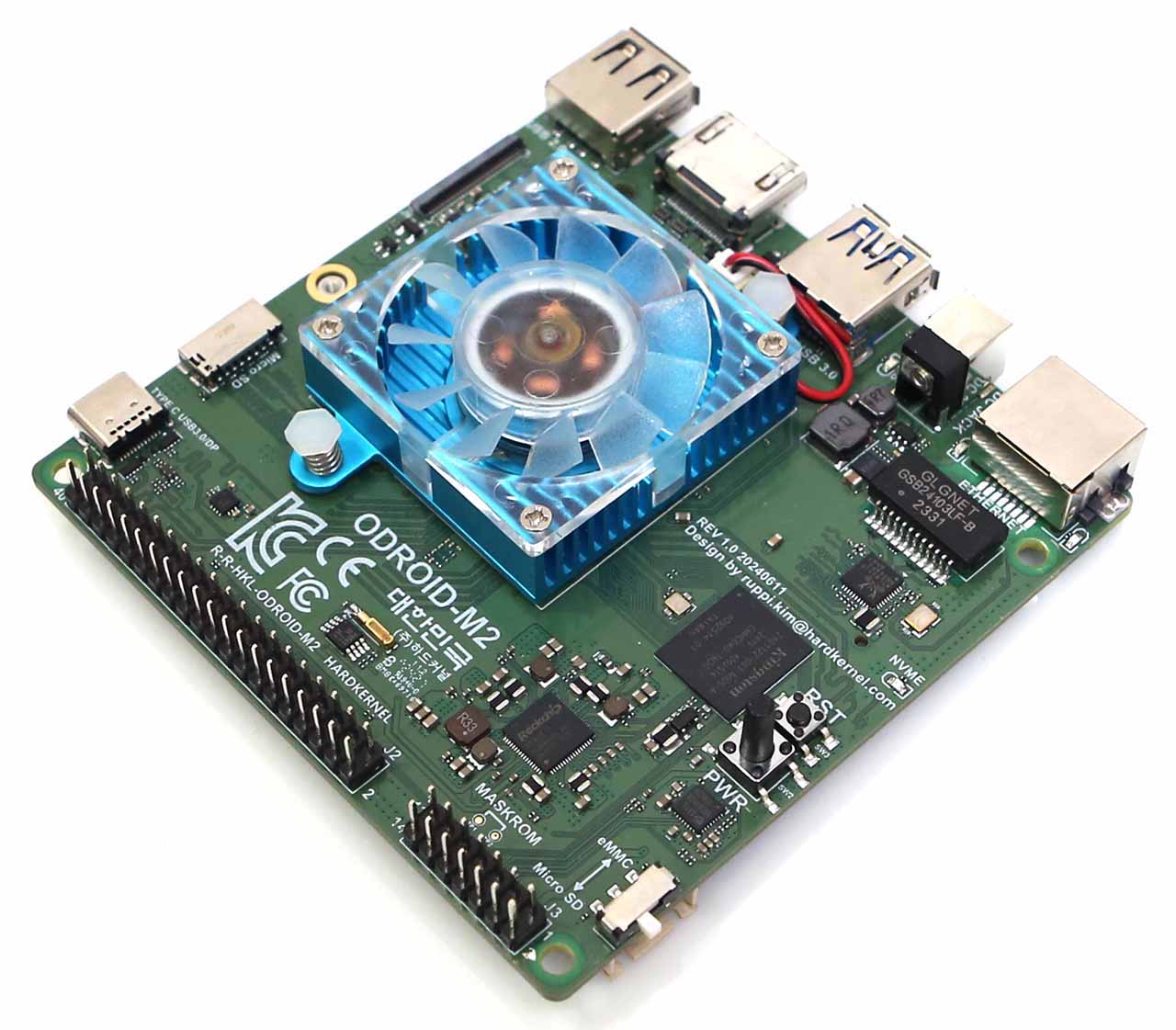
ODROID-M2

The M2 is a striking high performance SBC compared to the M1 series
We launched the ODROID-M1 about 2 years ago, and the ODROID-M1S about 1 year ago. Both models have been successfully supplied and continue to be adopted as core components in embedded systems by our B2B customers.
We received feedback that the performance and input/output port configuration of the ODROID-M1/M1S were sufficient for most embedded systems. However some customers still wanted higher-end models equipped with high-performance processors. To meet the demand for higher performance computing power required by important industrial embedded system builders, we are launching the new ODROID-M2 SBC today.
Compared to the original ODROID-M1 (based on the RK3568B2 SoC), the ODROID-M2 uses the RK3588S2 SoC whose comparative characteristics are listed below:
Multiprocessing performance is about 3 times faster.
LPDDR5 64-bit RAM with a memory bandwidth that is more than twice higher.
A GPU that is more than 5 times faster.
A NPU that is more than 3 times faster.
An on-board 64GB eMMC storage device which is twice faster thanks to a HS400 interface.
More information : https://www.hardkernel.com/shop/odroid-m2-with-16gbyte-ram/

H4 Cube Case

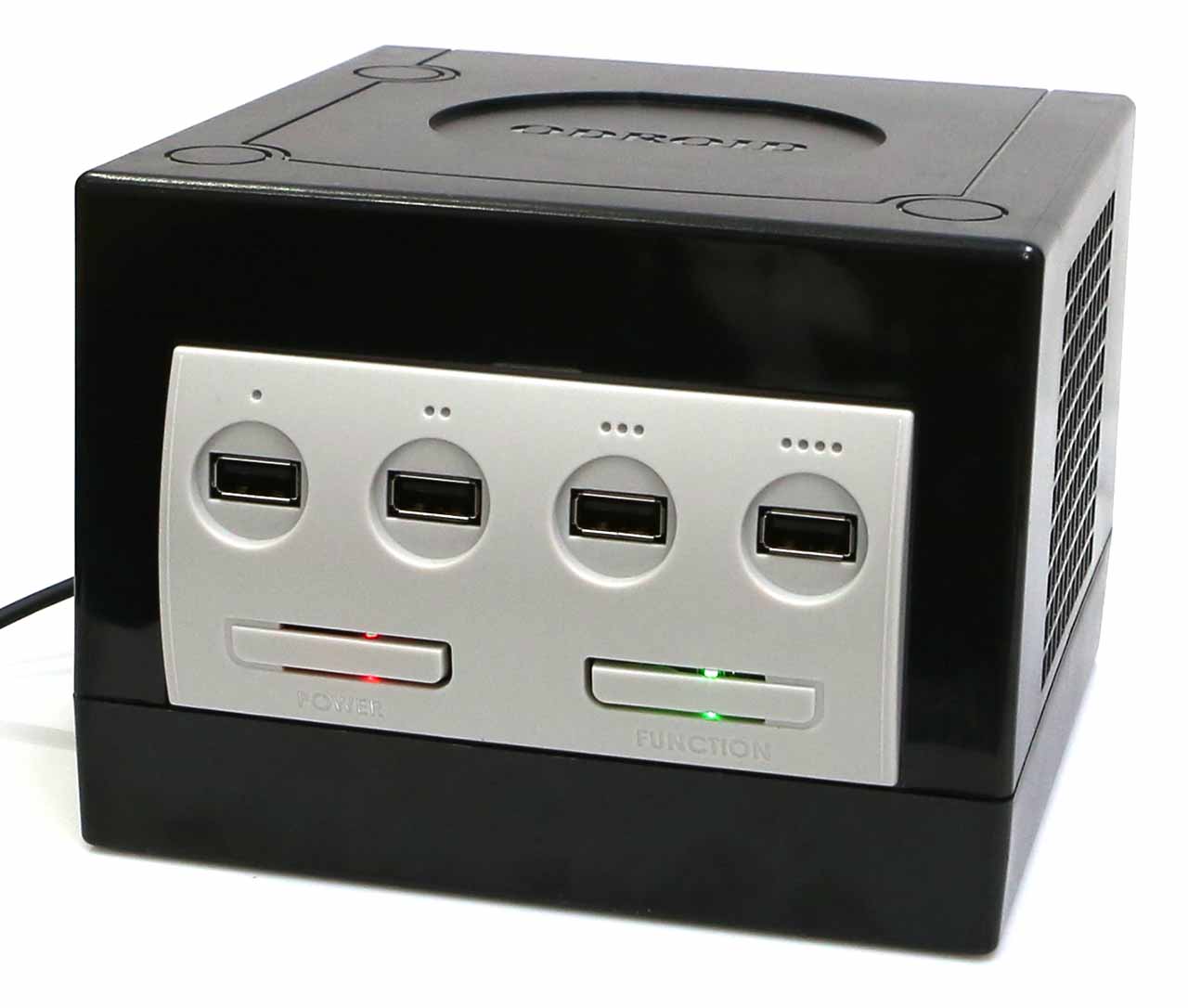
The H4 Cube Case can embed an ODROID-H4, H4+ or H4 Ultra board with optional two 2.5″ SATA SSDs, as well as a Net Card and a 92x92x15mm cooling fan. There are four USB ports on the front panel allowing you to easily connect game controllers or input/output devices.

2.5” SATA SSDs (or HDDs) can only be used with the ODROID-H4+ or H4 Ultra. The ODROID-H4 does not include SATA ports. Alternatively, you can use an M.2 2×2 Card (in place of the Net Card) + 2 NVMe SSDs with any of the three H4 board models.

Passionate “old-school” game players from the early 2000’s will be smiling with nostalgia at our homage to a legendary game console released in 2001.

There is a power button with a red LED and a function button with a green LED which is configurable.

The green LED can be controlled by the RTS signal, and the user configurable Function button status can be read by the CTS signal through the 24-pin IO header, so they can be accessed with a simple Python script on Linux. Please refer to this link for the details: How to access the user button and LED

Its shape is close to a cube with size of 150x157x110mm. A big handle on the rear side helps you carry the H4 Cube Case around.


Components in the box


  • Case Top
  • Case Bottom
  • Front panel
  • USB hub board
  • Rear panel
  • SATA SSD bracket x 2
  • Cushion for SATA SSD x 2
  • M3 screw x 4
  • Screw for plastic parts x 13
  • Rubber feet x 4
  • Screwdriver x 1
  • 20mm PCB support plastic M3 x 2 (to be used when a Net Card or M.2 2×2 Card is not installed)
  • 16mm PCB support metal M3 x 2 (to be used when a Net Card or M.2 2×2 Card is installed)
  • 24-pin wire cable (see WARNING below)

More information : https://www.hardkernel.com/shop/h4-cube-case/

WARNING: Be careful matching pin 1 of the Cube Case USB hub board and pin 1 of the H4 board header.


New M.2 card for the ODROID-H4 Series

After the commercial success of the NetCard 2.5 GbE for the ODROID-H series, we looked into how we could provide new add-on cards to extend further the versatility of your ODROID-H4.

Note: This product is not compatible with the ODROID-H2, H3 series.

The M.2 screws are pre-installed. (4 pcs)

The M.2 4×1 card, provides four M.2 PCIe Gen 3 x1 lanes connectors instead. It allows you to use four M.2 devices: any combination of NVMe drives, Network adapters, WiFi adapters, 5G adapters, etc that leverage the bandwidth of PCIe Gen 3 x1 lane.

Because the PCIe Gen 3 configuration (bifurcation) is embedded in Intel microcode that is merged into the BIOS bin file at build time, you need to flash a different version of the BIOS to use one of these two new cards.

The M.2 4×1 card requires the same BIOS version as the NetCard 2.5 GbE. You find this BIOS on the Wiki pages for the H3 and H4.

Important Note: Make sure to select the right BIOS, for the H4 or for the H3.

Like the NetCard 2.5 GbE, these two new cards are installed under the mainboard, they slide into the mainboard M.2 connector and then are screwed to fix them solidly.

Thanks to this integration, these two new cards are compatible with all the ODROID-H3 and ODROID-H4 series. Note however that if you use tall M.2 devices, you may have to select a case that provides enough bottom vertical space.

M.2 4×1 card (Compatible with ODROID-H4 series only)

You can install four 2280-sized M.2 PCIe devices, and each slot has one PCIe 3.0 lane (1 x 8GT/s)

Multiple SSDs can be installed using the JBOD (Just Bunch of Disks) concept. Since it only uses one PCIe lane per slot, the original PCIe speed is reduced to a quarter, but you can still access files up to 800~900MB/s.

Or you can install PCIe devices such as WiFi, 5GbE Ethernet, 4G/5G modem, AI accelerator TPU/NPU, etc. in M.2 form factor.


As stated earlier, you have to flash another ESF BIOS for 4 bifurcated x1 lanes, since the default BIOS provides non-bifurcated x4 lanes.

Typical Use Cases

These two new M.2 cards are intended for any ODROID-H4 or ODROIR-H3 who want to split off the PCIe Gen 3 x4 lanes for use with two x2 lanes or four x1 lane devices, at the expense of the max theoretical speed provided to each device.

Use Cases

  • You want as much SSD space as possible:
    • The M.2 2×2 card with 2 x 4TB NVMe SSD provides 8TB of SSD space.
    • The M.2 4×1 card with 4 x 4TB NVMe SSD provides 16TB of SSD space.
  • While keeping an SSD at PCIe Gen 3 x2 or x1 speed, you want to use one of several extra network adapters, a PCI WiFi adapter, a 5G adapter, a PCIe AI adapter, etc.

If your goal is to use an M.2 NVMe SSD at maximum speed (4 x 8GT/sec), keep using the PCIe Gen 3 x4 lanes fully dedicated to the NVMe SSD.

Informational Benchmark

Using a generic NVMe SSD we measured and compared the throughput you gain in each configuration, we also measured the throughput of a 128GB eMMC and a SATA SSD, all using ioZone 3.

We obtained the following results:

The obvious first remark is that reducing the PCIe throughput by a factor of 2 or 4 does not mean the speed of your SSD will also be divided by the factors. The reason is that your NVMe SSD also has its own limits no matter how fast is the PCIe channel(s). The second remark is that in both cases, M.2 2×2 or M.2 4×1 card, the NVMe SSD still provides faster speeds than the SATA SSD and eMMC.

Product Compatibility

  H2 Series H3 Series H4 Series
NetCard v1 (2.5GbE) Yes Yes Yes
NetCard v2 (2.5GbE) Yes Yes Yes
M.2 2×2 Card No (1) Yes Yes
M.2 4×1 card No / Maybe (2) No / Maybe (2) Yes

(1) The H2 CPU (Celeron J4115) does not support the 2×2 PCIe bifurcation.
(2) The M.2 4×1 card has a larger footprint and does not physically fit under the H2 or H3 boards. Therefore, the card cannot be fixed directly to the board like with a H4. HOWEVER, if you can find an M.2 male/female extension cable plus perform some additional DIY for mounting the card in your box or case, you can use the M.2 4×1 card with the H2 or H3.

WIKI : https://wiki.odroid.com/accessory/add-on_boards/m.2_cards

More information : 

M.2 2×2 Card : https://www.hardkernel.com/shop/m-2-2×2-card/

M.2 4×1 Card : https://www.hardkernel.com/shop/m-2-4×1-card/


The ODROID H-series is growing with three brand new models

Again, the new generation is more powerful and offers higher performance. 
It also delivers key new IO that will please many users.

Introducing the ODROID-H4, H4+ and H4 Ultra

Hardkernel is introducing the ODROID-H4, H4+ and H4 Ultra, which is equipped with higher performance and richer interfaces.


The major characteristics of the ODROID-H4 series compared to the ODROID-H3 series are:

  1. Faster CPU architecture Alder Lake N vs. Jasper Lake. Plus AVX2 extensions.
  2. Faster DRAM interface DDR5 4800 MT/s vs. DDR4 2933 MT/s.
  3. Higher base and boost CPU frequencies and more powerful iGPU.
  4. The increase from 2 to 4 SATA ports allows connection to a greater number of storage devices, ODROID-H4+ and ODROID H4 Ultra only.
  5. An additional DisplayPort added allows the simultaneous use of up to 3 monitors.
  6. Low cost ODROID H4 for compute and graphics applications (e.g signage, robot, factory automation,..)
  7. Flagship H4 Ultra doubling the number of CPU cores, from 4 to 8 cores.

We also implemented little details following the ODROID-H3 feedback we receive from all of our users, this means you. Examples: 

  1. Dual BIOS: If the BIOS is corrupted due to a power outage during update, etc., you can boot into the backup BIOS and recover by moving the jumper next to the DC jack. This feature is only available on ODROID-H4+ and ODROID H4-Ultra.
  2. The new H4 cases format has been improved so that a cooling fan can be mounted inside the case.
  3. A Mini-ITX kit for seamless integration with generic ITX PC cases.

Let’s look at the detailed table shown below.

  ODROID

H2+  

(‘2020 Jun)

ODROID

H3  

(‘2022 Oct)

ODROID

H3+  

(‘2022 Oct)

ODROID

H4  

(‘2024 Apr)

ODROID

H4+ 

(‘2024 Apr)

ODROID

H4 Ultra  

(‘2024 Apr)

Processor            
CPU (Intel) Celeron J4115 Celeron N5105 Pentium N6005 Processor N97 Processor N97 Core™ i3 Processor N305
Code name Gemini Lake Jasper Lake Jasper Lake Alder Lake-N Alder Lake-N Alder Lake-N
Launch date Q4’17 Q1’21 Q1’21 Q1’23 Q1’23 Q1’23
Microarchitecture Goldmont Plus Tremont Tremont Gracemont Gracemont Gracemont
Cores / Threads 4C4T 4C4T 4C4T 4C4T 4C4T 8C8T
Cache 4 MB 4 MB 4 MB 6 MB 6 MB 6 MB
AVX2 (Advanced Vector Extensions) No No No Yes Yes Yes
TDP 10W 10W 10W 12W 12W 15W
Single Thread Burst Frequency (GHz) 2.5 2.9  3.3 3.6 3.6 3.8
Memory            
Max. Memory address space (GB) 32 64 64  48 48 48
Max. Memory Speed (MT/s) DDR4-2400 DDR4-2933 DDR4-2933 DDR5-4800 DDR5-4800 DDR5-4800
iGPU (Intel UHD Graphics)            
Burst Frequency (MHz) 750 800 900 1200 1200 1250
Execution Units 12 24 32 24 24 32
Video outputs            
HDMI 1 1 1 1 1 1
DisplayPort 1 1 1 2 2 2
PCIe (via NVMe slot)            
Generation Gen 2 Gen 3 Gen 3 Gen 3 Gen 3 Gen 3
Lanes 4 4 4 4 4 4
Compatibility with optional 4-ports 2.5GbE  Net Card Yes Yes Yes Yes Yes Yes
IO ports            
USB 2.0 2 ports 2 ports 2 ports 2 ports 2 ports 2 ports
USB 3.0 2 ports 2 ports 2 ports 2 ports 2 ports 2 ports
2.5GbE 2 ports 2 ports 2 ports 1 port 2 ports 2 ports
SATA III 2 ports 2 ports 2 ports No 4 ports 4 ports
24pin IO Expansion ports I2C x 2 I2C x 2 I2C x 2 I2C x 2 I2C x 2 I2C x 2
  USB 2.0 x 1 USB 2.0 x 3 USB 2.0 x 3 USB 2.0 x 3 USB 2.0 x 3 USB 2.0 x 3
  UART x 2 UART x 1 UART x 1 UART x 1 UART x 1 UART x 1
  HDMI-CEC x 1 HDMI-CEC x 1 HDMI-CEC x 1 HDMI-CEC x 1 HDMI-CEC x 1 HDMI-CEC x 1
  Ext. Power Button x 1 Ext. Power Button x 1 Ext. Power Button x 1 Ext. Power Button x 1 Ext. Power Button x 1 Ext. Power Button x 1
Others            
Optional Cooling Fan 92 mm 5 Volt

mini 4pin connector

92-25 mm 12 Volt

standard PC 4-pin

92-25 mm 12 Volt

standard PC 4-pin

Slim 92-15 or thick 92-25 mm 12 Volt

standard PC 4-pin

Slim fan fits inside the new cases.

Slim 92-15 or thick 92-25 mm 12 Volt

standard PC 4-pin

Slim fan fits inside the new cases.

Slim 92-15 or thick 92-25 mm 12 Volt

standard PC 4-pin

Slim fan fits inside the new cases.

Dimensions 110x110mm (4.3×4.3 in) 110x110mm (4.3×4.3 in) 110x110mm (4.3×4.3 in) 120x120mm (4.7×4.7 in) 120x120mm (4.7×4.7 in) 120x120mm (4.7×4.7 in)
Recommended Power Supply 1 60W 60W 60W 60W 60W 60W
Recommended Power Supply 2 for supporting booting with 3.5″ hard disks 133W 133W 133W 133W 133W 133W
Unlimited Performance Mode No Yes Yes Yes Yes Yes
Security (TPM 2.0) Couldn’t be supported fTPM enabled

(Will run Windows 11 out of the box)

Hardkernel H-series cases DIY assembly

Translucent Blue Acrylic

DIY assembly

The cases are made of solid and sturdy PCBs.

DIY assembly

The cases are made of solid and sturdy PCBs.

A classic GameCube-style case will be released in May or June separately.

Certifications FCC/CE/KC/RoHS FCC/CE/KC/RoHS FCC/CE/KC/RoHS FCC/CE/KC/RoHS FCC/CE/KC/RoHS FCC/CE/KC/RoHS
Pricing $119 $129 $165 $99 $139 $220

Noteworthy Features

Why the N97 instead of the N100?

Bigger numbers aren’t always better. INTEL naming may be deceiving.

We chose the N97 because its Maximum Turbo Frequency is 200MHz higher than the N100, respectively 3.60GHz vs. 3.40GHz. In addition, the GPU Max Dynamic Frequency is a whopping 450MHz higher, respectively 1.2GHz vs. 750MHz.

The TDP value of the N97, which is therefore faster than the N100, is higher, but there is almost no difference in power consumption at idle state. Although the N97 is more expensive, we chose it for its higher performance.

Single-Channel Memory

This is a decision made by Intel. The Alder Lake N processors only offer one single-channel of memory. However, the DDR5 speed of 4800 MT/s as well as the Dual Rank (r2x8) option largely compensate for the double-channel of DDR4 with the H2 and H3 series. The DDR5 4800 MT/s of the H4 series leaves the DDR4 2933 MT/s and DDR4 2400 MT/s of the H3 and H2 series in its rear mirror.

Note: While the Intel ARK pages specify the Alder Lake N max. memory to be 16GB, we validated that 32 and 48 GB DDR5 SO-DIMMs 4800 or 5600 MT/s work as well. The 5600 MT/s will run at 4800 MT/s. The Intel specifications for the H2 and H3 processors were limited as well, but many users were able to (respectfully) pump up the max. memory to 32 and 64 GB.

How many SATA ports and video outputs?

Compared to the previous generation Gemini Lake or Jasper Lake, the design flexibility of the new Alder Lake-N’s high-speed signal interface has been significantly reduced. To enable SATA ports inside the SoC, a choice arose: reducing the number of PCIe lanes for NVMe from 4 to 2 or find another way. In order to avoid compromising the speed of NVMe, it was inevitable to add an external, expensive SATA controller.

Thanks to a controller that supports four SATA ports, the requirement to connect many storage devices has been resolved. As the performance of CPU, GPU, and DRAM increases, it has become possible to drive a large number of displays. Therefore, in addition to the one output each for HDMI and DisplayPort in the existing H series, the new H4 series is equipped with an additional DisplayPort, allowing a total of three 4K monitors to be connected simultaneously.

Because there are more connectors with relatively large footprints, the form factor has changed from 110x110mm to 120x120mm, and the area has increased by about 20%. As a result, form factor compatibility with the existing H2/H3 series has unfortunately disappeared. However, this affects only the case compatibility. Accessories such as the Net Card work on H2, H3 and H4 series.

Which H4 model is the best for you?

To allow you to use a high-performance platform at a relatively low cost, we removed all SATA functions, the second Ethernet port, and the Dual-BIOS feature to create a basic H4 model that focuses on cost-effectiveness. Therefore, it is suitable for application to embedded systems such as digital signage or factory automation or robot control.

On the other hand, the H4+ is equipped with four SATA ports, a second Ethernet port, and Dual-BIOS feature, making it the best choice for users who need mass storage for high-performance NAS and/or use it for routing capabilities.

Finally, although it is more expensive, we have also designed the H4 Ultra model, which can take advantage of powerful performance with twice the number of CPU cores (from 4 to 8) and more GPU execution units. Thanks to its many cores and fast clocks, the H4 Ultra model shows computing performance that can be twice as high as the H4 and H4+ models, based on multithreaded computing benchmarking results.

If you are very sensitive to power consumption, the H4 model would be the most desirable option. This is because the power in idle state is about 1 Watt lower than the H4+ model.

Performance

Thanks to the Intel Alder Lake-N Gracemont architecture, the higher frequencies of the N97, for the H4 and H4+, and N305, for the H4 Ultra, coupled with DDR5 4800 MT/s, the H4 and H4+ in UP mode are on average around 36% more performant than the H3+ in UP mode. The increased performance jumps to around 83% for the H4 Ultra, again compared to the H3+ in UP mode. This is what we witnessed while running 206 mostly non-synthetic benchmarks. We review these benchmarks further down. We will also see that the increased performance climbs to even higher numbers for multi-threaded applications.

Versatility

For the last 4 years, We acquired a lot of experience and feedback from users, meaning you, first with the H2 series, then with the H3 series. We have seen and still see an incredible broad range of applications.

Some users pushed their ODROID to the max with as much memory as possible, disks, discrete graphics cards, additional SATA ports cards or high-bandwidth network cards.

Conversely, other users made their ODROID as frugal as possible, chasing the last tenths of Watt that could be saved. In this matter, see section Power Consumption Characteristics, we worked on many aspects to make significantly low idle power consumption possible, as well as documenting and enabling users to know how to reach idle power that is not at all high compared to ARM series
boards. We believe this is essential, especially for European users where the cost of electrical energy has been rising for years, to which you add the goal of reducing net greenhouse gas emissions, as targeted by the EU, while running 24×7 systems.

These two extremes, and everything in the middle, are possible because the H series boards can be widely customized. We believe the success of the ODROID H-series is in part due to its original DIY design goal with boards that do not restrict you to one kind of application, e.g. TV box.

The ODROID H4 series doubles down on versatility by adding the low cost H4, with stripped down hardware, on one side of the H4+, and the 8-core H4 Ultra flagship on the other side of the H4+.

The table shown below details the H4 series user-level customizations:

Design An SBC design that makes sense: all the connectivity is on the rear side, simplifying case design and reducing footprint on a desk.
H-series Net Card Using the NVMe port, provides 4 additional 2.5 GbE ports, thus tripling the number of 2.5 GbE ports to 6 ports.
Do It Yourself The ODROID H-series offers you a lot of freedom. You are free to chose:

1. The amount and brand of memory. No soldered memory.

2. The size of the eMMC (including not using one). No soldered eMMC.

3. The size of the NVMe PCIe Gen 3 x4 SSD, including not using one(*).

4. To transform the NVMe slot into a PCIe Gen 3 x4 slot for using PCIe cards via optional adapter cable(*).

5. The size of the 1 to 4 SATA III hard disks or SSDs, including not using them (H4+ and H4 Ultra only).

6. A case among 4 (soon to be 5) types of Hard Kernel cases or use a custom one you design or another user designed or use a mainstream Mini-ITX case thanks to the ODROID H4 Mini-ITX kit.

7. Hard Kernel cases allow the usage of an optional silent fan for optimal thermal performance.

8. Any x86-64 flavor of Windows, Linux or BSD operating systems, etc.

9. To upgrade the hardware later with larger memory, more NVMe or SSD or hard disk space.

10. To maximize performance or to minimize power consumption thanks to well documented BIOS and OS options.

(*) PCIe Gen 2 on the H2/H2+.

Summary

Note: This summary compares the UP versions of the H3+, H4, H4+ and H4 Ultra because we did not run all the benchmarks on the H3+ non-UP. We ran a total number of 206 benchmarks/cases using the UP configurations.

The major facts about these benchmarks are:

  • The H4 and H4+ UP are on average around 36% more performant than the H3+ UP.
  • With the H4 Ultra UP, the average climbs to around 83%!
  • The H4 and H4+ UP can be up to twice faster than the H3+ UP for particular tests.
  • The H4 Ultra UP can be up to three and a half faster than the H3+ UP for particular tests.
  • The H4 Ultra UP is on average around 36% more performant than the H4 and H4+ UP.
  • The H4 Ultra UP can be more than twice faster than the H4 and H4+ UP for particular tests.
  • Not too surprising, with 8 cores vs. 4 cores, the H4 Ultra UP top performance occurs with multi-threaded applications
    (e.g. Compilation, Java, Imaging, Stargate, MemCached, OpenSSL, Video Encoding,…) without being kneecapped by thermal throttling, thanks to Unlimited Performance and active cooling.


Demo video

This demo video shows the PS2 and GameCube emulation games on Linux Vulkan GPU driver with Fractional-Scaling technology. We used Batocera.linux x86_64 version 39 for the emulation.

Thanks to the H4’s significantly improved CPU, GPU, and DRAM performance, we can enjoy SD-quality classic masterpiece games in HD quality graphics now.  To play games with this level of graphics on the H3 board, we had to connect an external video card.

Board Description

  • A. CPU (Intel N97 or N305 )
  • B. 1 x DDR5 SO-DIMM slots (Single channel memory support)
  • C. 1 x M.2 PCI Express Module Socket (NGFF-2280)
  • D. 1 x eMMC (Embedded Multimedia-Card) Socket
  • E. 4 x SATA Power Connectors (2.5mm pitch, JST-XH compatible connector)
  • F. 4 x SATA3 6.0 Gb/s Data Connectors
  • G. 1 x DC Power Jack
  • H. 2 x USB 3.0
  • I. 2 x USB 2.0
  • J. 1 x HDMI 2.0
  • K. 2 x DisplayPort 1.2
  • L. 2 x RJ45 Ethernet Ports (10/100/1000/2500)
  • M. 5 x System LED Indicators
  • N. 1 x Peripheral Expansion Header (24-pin)
  • O. 1 x Power Switch
  • P. 1 x Reset Switch
  • Q. 1 x Backup Battery Connector (2-pin)
  • R. 1 x Active Cooling Fan Connector (4-pin)
  • S. 1 x Audio out, 1 x Audio in, 1 x SPDIF out
Processor Intel 4-Core N97 for ODROID-H4 and H4+

Intel 8-Core i3 N305 for ODROID-H4 Ultra

Memory 1 x DDR5 SO-DIMM slots

Single Channel, up to 4800 MT/s. Note: Dual rank r2x8 are better.

Max memory capacity 48GB

DDR3/DDR4 are not supported

Storage 1 x eMMC connector (bootable and selectable on BIOS)

Various eMMC modules can be purchased at Hardkernel store

4 x SATA3 6Gbps 

1 x M.2 slot (PCIe 3.0 x 4, supports NGFF-2280 cards)

Networking 2 x 2.5 GbE LAN ports (RJ45, supports 10/100/1000/2500 Mbps)

Intel I226-V

Supports Wake-On-Lan

LED indicators (Green: Link, Amber: Traffic)

Video 2 x DisplayPort 1.2 (up to 4K@60Hz)

1 x HDMI 2.0 (up to 4K@60Hz)

Triple simultaneous display support

Audio 1 x Audio out (3.5mm jack)

1 x Audio in (3.5mm jack)

1 x SPDIF out (ALC662, HDA codec)

* HDMI & DP have audio output too.

External I/O 2 x USB 3.0 Host ports

2 x USB 2.0 Host ports

1 x Peripheral Expansion Header (24-pin, 2.54mm pitch)

– 1 x DC 5V, 1 x DC 3.3V, 5 x GND

– 1 x UART (TXD/RXD/RTS/CTS 3.3Volt IO)

– 2 x I2C (SCL/SDA 3.3Volt IO)

– 1 x External Power Button

– HDMI CEC, 5VA+, D+,D- ( To use the HDMI-CEC function, an additional external adapter board must be installed )

– 3 x USB 2.0

Other features Passive Heatsink

Dual BIOS on H4+ and H4 Ultra

BIOS Backup Battery ( All H series models include a backup battery by default )

– Maintains system time and BIOS settings

Power Button

Reset Button

System LEDS Indicators:

– Red (PWR) – Solid light when DC power is supplied

– Blue (left, SLEEP) – turns off only when the system enters into suspend mode

– Blue (right, PMIC) – turns on only when the major power rails are working

– Amber (SATA) – Flashes when SATA data transfers

– Green (NVMe) – Flashes when NVMe data transfers

Active Cooling Fan Connector (12V 4-pin, PWM input + TACHO output)

– Active Cooling Fan is optional

– Connector (4-pin, 2.54mm pitch)

Power DC jack : outer (ground) diameter 5.5mm, inner(positive) diameter 2.1mm

DC 14V ~ 20V 

— DC 15V/4A power adapter is recommended if you don’t use 3.5″ HDDs

— DC 19V/7A power adapter is recommended if you use more than one 3.5″ SATA HDDs together

Power consumption:

— Headless Idle : 2.0 ~ 2.9 Watt

— Desktop GUI Idle : 4.6 ~ 6.2 Watt 

— CPU + GPU stress test : 19 ~ 22 Watt 

— Power-off :  0.2 Watt

— Suspend to RAM :  0.9 ~ 1.2 Watt

Form Factor 120mm x 120mm x 47mm Approx.

For the distinction between ODROID-H4, H4+, and H4-Ultra refer to the figure below

Have written H4, H4PLUS, and H4-ULTRA like in the red circle below pictures where on the bottom PCB inside SODIMM DDR5 Socket.

H4 H4+ H4-Ultra

WIKI : https://wiki.odroid.com/odroid-h4/start

More Information : https://www.hardkernel.com/product-category/odroid-board/x86/


  • The terms HDMI, HDMI High-Definition Multimedia Interface, HDMI Trade dress and the HDMI Logos are trademarks or registered trademarks of HDMI Licensing Administrator, Inc.
  • HDMI, HDMI High-Definition Multimedia Interface(고화질 멀티미디어 인터페이스), HDMI 트레이드 드레스 및 HDMI 로고라는 용어는 HDMI Licensing Administrator, Inc.의 상표 또는 등록 상표입니다.

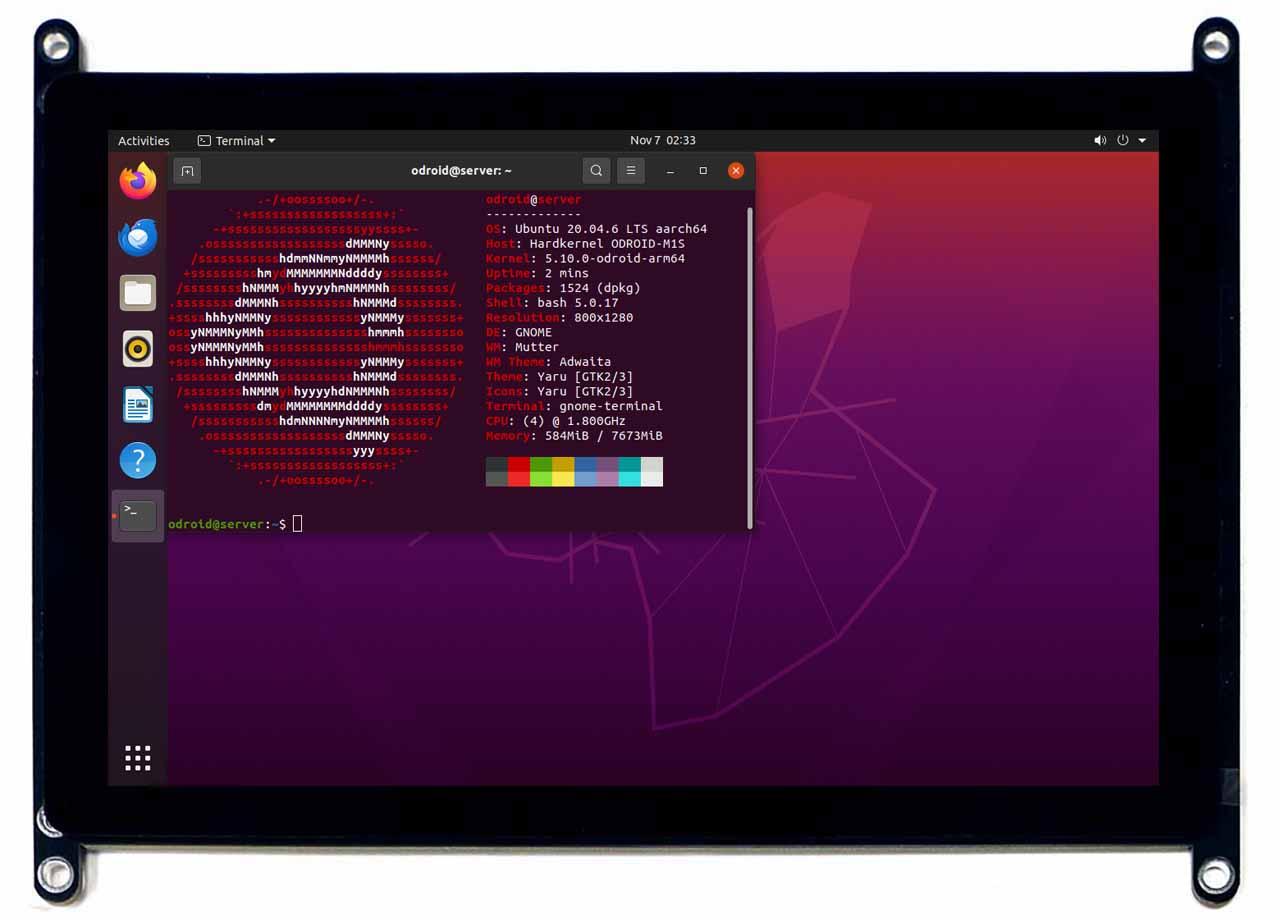
Vu8S 8inch MIPI LCD for M1S

The four-lane MIPI-DSI port can be directly connected to a LCD panel.
A 8inch 800×1280 wide viewing angle LCD and capacitive multi-touch screen is pre-assembled.
The ODROID-Vu8S is dedicated to ODROID-M1S. It can only be used via a MIPI DSI Connector(J7) on M1S.
The I type Bracket boards are required to dock Vu8S to assembled ODROID-M1S with case.

 If you activate the MIPI-DSI interface, the HDMI output function will be disabled automatically.
This is because HDMI and MIPI-DSI can NOT be used simultaneously due to system memory bandwidth limitations.

Package includes

A. Assembled 8inch TFT LCD + multi touch screen * 1EA
B. M3 x 40(BLACK) Support * 3EA including a spare part
C. M3 x 7(BLACK) Bolt * 7EA including a spare part
D. M3 x 5(SILVER) Bolt* 5EA including a spare part
E. Vu8S LCD Frame Board for M1S * 1EA
F. Vu8S I form Bracket Board for M1S * 2EA

  • 8-inch TFT-LCD
  • Portrait 800(H) x 1280(V) pixels hardware native resolution
  • Mechanical Dimensions : 202(W) x 153.0(H)
  • Viewable screen size : 172.224 x 107.64 mm (active area)
  • 5 finger capacitive touch input
  • Power consumption : 2.4W ± 10% (100% duty cycle)

WIKI : https://wiki.odroid.com/accessory/display/vu_series/vu8s

More information : https://www.hardkernel.com/shop/vu8s-8inch-mipi-lcd-for-m1s/


UPS Kit for M1S


The UPS(Uninterrupted Power Supply) Kit is designed specifically for the ODROID-M1S.

It is equipped with a 18650 rechargeable Li-Ion battery holder, charger control IC and a 5Volt Boost DCDC. There is a small MCU on the board which measures the battery level and communicate with the ODROID-M1S board via USB interface. When the AC power source is removed, the UPS keeps supplying the power to the ODROID-M1S boards with the battery.

The M1S-UPS has a USB serial port(ttyACM) to communicate with so that it can trigger the shutdown process by sending a low battery warning. It will significantly reduce the risk of data loss by sudden power loss.When the AC power source becomes available again, the UPS will supply power to the ODROID-M1S again and trigger a power-on event automatically.

Specification

Power Input
Dc Input Voltage DC 4.8V ~ 5.4V
DC Input Current 3A Min.
Charger
Charging Time 5 ~ 9 hours
Battery Charging Current 500mA Max.
Power Ouput
DC Output Current 3A Max.
DC Output Voltage 5.2 V
Recommended Battery
Type Protected Li-Ion 18650 cylindrical cell
Capacity 2400~3600 mAh
Nominal Voltage 3.7 V
Estimated ODROID-M1S running time (500mA @ 5V) About 3~4 hours with a fully charged battery

✔ The battery is not included in the package, so you have to buy a PROTECTED 18650 Li-Ion rechargeable battery in your local market and install it. The length of the 18650 Li-Ion battery with a built-in protection circuit is close to 68mm, which is about 3~4mm longer than the unprotected bare cell battery length of 65mm.

  • Since the retail market in many countries, including South Korea, does not allow the sale of unprotected lithium-ion rechargeable batteries, we designed it to use batteries that include a protection circuit.
  • For safety reasons, when purchasing batteries, please choose a reputable battery cell manufacturer if possible. As far as we know that Panasonic, LG, Samsung, and CATL are famous.

✔ Due to the Li-Ion chemical characteristics, the battery voltage level might go higher slightly when the load is very light.

WIKI : https://wiki.odroid.com/accessory/power_supply_battery/m1s_ups

More Information : https://www.hardkernel.com/shop/ups-kit-for-m1s/


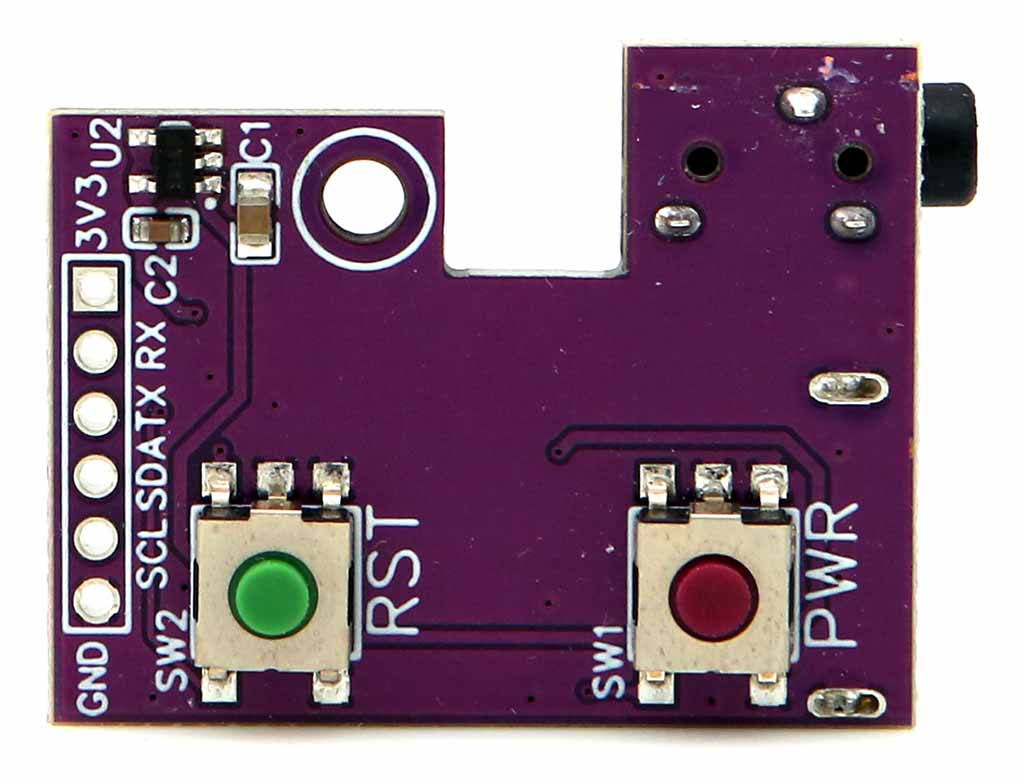
Mini IO Board for M1S

  • Compatible with ODROID-M1S
  • This is a convenient input/output port board that can be used by plugging directly into the 14-pin header connector of ODROID-M1S.
  • USB 2.0 host, Power button, Reset button, Audio line-out 3.5mm phone jack and I2C & UART buses are available on a small board.
  1. System power noise may affect the audio circuitry, resulting in background noise in the audio output. Therefore, we recommend that our customers do not use the phone jack output in applications requiring high sound quality.
  2. You have to remove the upper case to mount this IO board on the ODROID-M1S.

WIKI : https://wiki.odroid.com/accessory/add-on_board/miniioboard

More information : https://www.hardkernel.com/shop/mini-io-board-for-m1s/

4 Channel Relay board for M1S

4 channel relay board will provide the ability to control high voltage and high current external devices through GPIO pins easily.

  • Add-on board for ODROID-M1S only.
  • 4-channel relay control via GPIO pins.
  • GPIO isolation using PC817 photocoupler to prevent interference from high voltage circuit.
  • Single RS232 serial port.
  • Board reset and power button pins (Optional)


Form Factor Board dimension : 90 (L) x 65 (W) x 28 (H) mm
I/O 4x RELAY (SRD-05VDC-SL-C)
1x RS232

WIKI : https://wiki.odroid.com/accessory/add-on_boards/relayboard

More Information : https://www.hardkernel.com/shop/4-channel-relay-board-for-m1s/


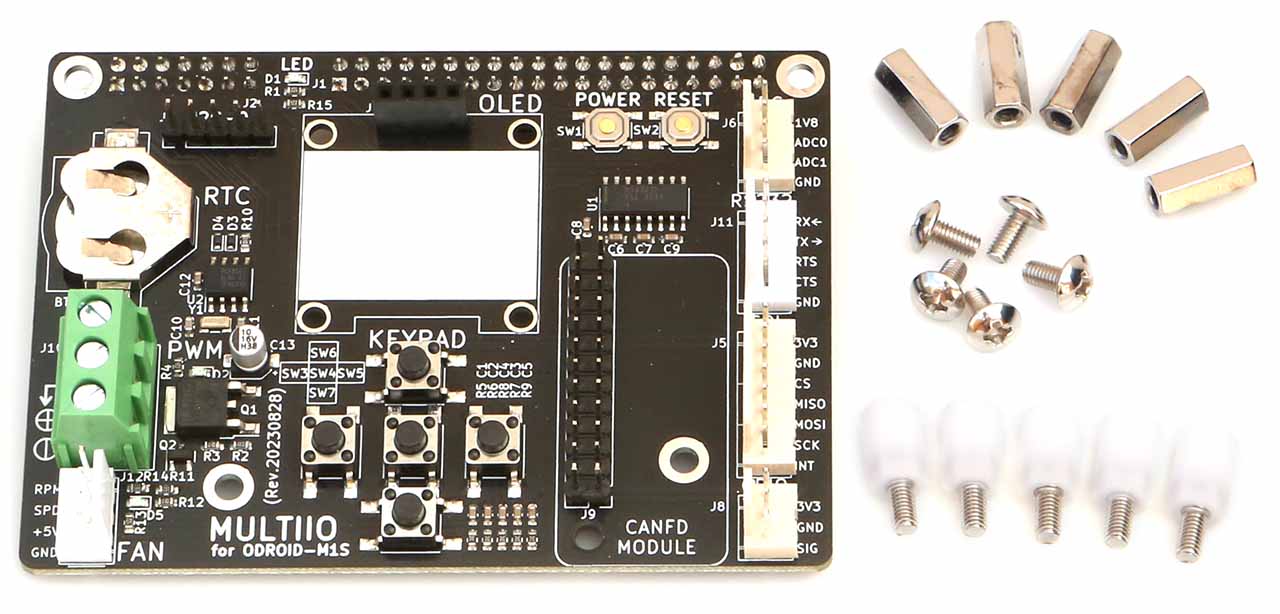
Multi I/O Training Board for M1S

Multi I/O Training Board is designed to help one to add or extend various peripheral connections to GPIO pin header that used be done using jumper wires. Separating signals on GPIO header to multiple connections per different type of signals, this will help to easy wiring to peripheral devices and evaluate them. Also this board include several simple components that helps to test or use hardware functions.

 ! NOTE !

This product is only compatible with ODROID-M1S with 4/8GByte RAM + IO Header

Form Factor Board dimension : 90 (L) x 65 (W) x 16 (H) mm
I/O 2x I2C bus (J4 & J7, J7 is dedicated for 128×64 OLED display
1x LED
1x RTC (PCF8563) with backup battery socket (CR1620)
5x tack switches
2x buttons (SW1 is for power & SW2 is for board reset)
1x 2CH ADC input
1x RS232 port
2x SPI connection (J5 & J9)
1x GPIO input/output
1x MOSFET (IRLR2905TRPBF) output (PWM)
1x 5V FAN control output (PWM)

WIKI : https://wiki.odroid.com/accessory/add-on_boards/multiioboard

More Information : https://www.hardkernel.com/shop/multi-i-o-training-board-for-m1s/