Best WordPress Hosting 2026: 10 Providers Tested & Ranked


A great WordPress website deserves hosting to match. Yet, not every hosting provider delivers on its promises. So, which managed WordPress host actually takes the crown?
To find out, we put 10 leading WordPress hosting providers through rigorous testing. Here is our breakdown of which platforms offer the ultimate environment for your projects—and which ones you are better off avoiding.


WordPress is by far the most popular content management system in the world. It is easy to see why: the platform is user-friendly, flexible, open-source, and virtually infinitely customizable thanks to a vast library of plugins. From blogs and corporate sites to full-fledged online stores, WordPress can handle it all.
Setting up a WordPress site is relatively simple. From a technical standpoint, you really only need one thing: reliable web hosting. Fortunately, many providers offer managed hosting solutions tailored specifically to WordPress. We tested 10 of the top options for you.


Best WordPress Hosting: Our TOP 7
To find out how they really perform, we built a standalone WordPress website with each of the 10 providers in our test. Beyond rigorous performance benchmarks, we evaluated each host on ease of use, feature set, security measures, customer support, and overall value for money.
Before diving into our full evaluation criteria and what to consider when choosing a host, here is a quick look at our top seven providers:
Hostinger: EXPERTE.com's Top Pick
Hostinger is an international web host based in Lithuania that offers managed WordPress hosting alongside standard web hosting. Its WordPress plans work well for both beginners and more demanding users as well as businesses. Hostinger handles website management, domains, email, and technical settings all in its own hPanel.
What we like about Hostinger
Hostinger earned the top spot in our comparison by delivering strong performance across every category we tested, with virtually no weak points. You get a comprehensive WordPress package at a price few competitors can match.
What stands out most is how Hostinger balances an intuitive interface with plenty of advanced technical options on a modern platform. Even beginners will find their way around easily: the custom hPanel features a clean, simple layout that makes managing a website remarkably effortless.
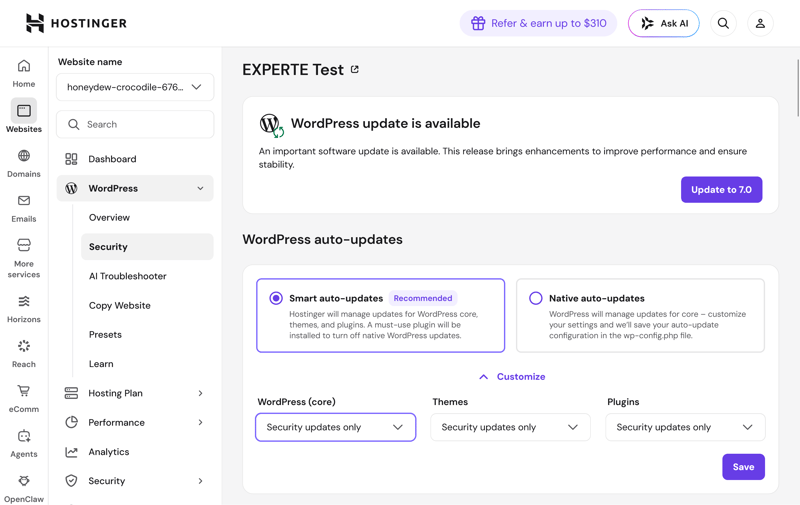
Our top pick, Hostinger, offers the best overall WordPress package.
Experienced users still get access to useful developer tools and extensive caching features. As a result, Hostinger scales far better for demanding projects than most other budget hosts.
Who is Hostinger a good fit for?
Hostinger is worth a look if you want powerful WordPress hosting without paying premium prices. It's a solid pick for freelancers, small businesses, agencies, and anyone running multiple websites, since even the cheaper plans offer strong performance and generous project limits.
What are Hostinger's possible drawbacks?
We didn't find any major flaws with Hostinger, just a few minor inconsistencies. Backups, for example, could be more generous: the cheapest plan only includes weekly automatic backups.
Uptime wasn't top-tier in our performance test either. With 99.932% uptime over our six-week test, Hostinger lands in the middle of the pack. That said, it's still a solid number for most websites.
Pros and cons of Hostinger
Excellent value for money
Hostinger delivers strong performance at low prices. If you're running multiple websites, you get more for your money here than with many competitors.Easy to use with plenty of room to grow
The hPanel makes setting up and managing WordPress projects simple. At the same time, it offers enough technical features and tools for more demanding projects.Modern tech for fast websites
LiteSpeed, NVMe storage, HTTP/3, caching, and a CDN form a strong foundation for fast WordPress websites.
Only weekly backups on the entry-level plan
On the cheapest plan, Hostinger creates automatic backups just once a week. That is a bit sparse for websites that update frequently.Uptime leaves room for improvement
While the other performance metrics are strong, Hostinger does not rank among the absolute top performers when it comes to uptime.
SiteGround: Outstanding Performance
SiteGround is a Bulgarian hosting provider that offers managed WordPress hosting, traditional shared hosting, and cloud solutions. You manage your WordPress websites through the company’s own Site Tools, with several server locations available worldwide.
What we like about SiteGround
Almost everything. SiteGround barely missed the top spot in our comparison. It ranks among the best in technology, security, ease of use, and performance, without a single major weakness. You get a strong managed WordPress package that takes plenty of work off your hands while still leaving room for more demanding projects.
Performance is where SiteGround really shines. It delivered fast server response times, short load times, and perfect uptime of 100% during our six-week test. A powerful caching system and a built-in CDN help make that happen.
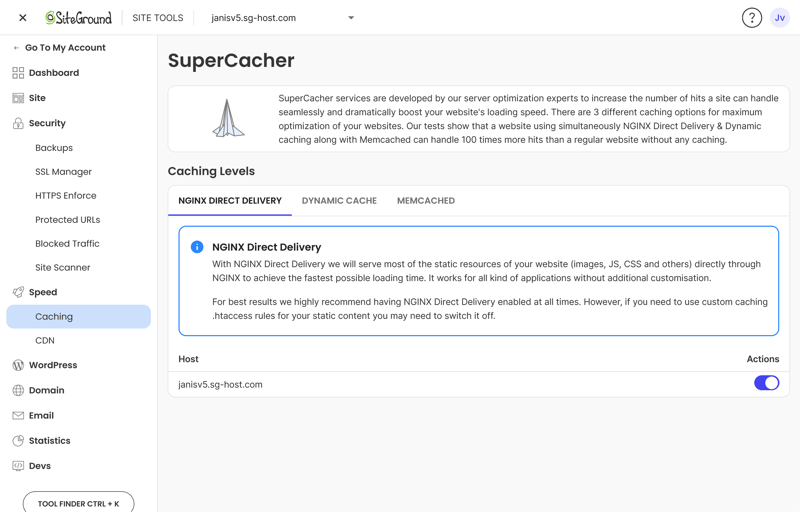
SiteGround’s server performance is impressive.
SiteGround also gets a lot right when it comes to ease of use and security. New WordPress websites are quickly set up, you migrate existing projects for free, and the Site Tools stay easy to navigate despite offering a huge range of features.
Who is SiteGround a good fit for?
SiteGround is a strong all-rounder that works well for nearly any type of WordPress website. Thanks to its excellent performance, it’s an especially reliable choice for business websites run by small and medium-sized companies.
SiteGround also offers a few plans that let you create an unlimited number of websites, making it a practical option if you’re managing several projects at once.
What are SiteGround’s possible drawbacks?
SiteGround's few weaknesses have less to do with the hosting itself than with pricing and support. Costs rise significantly after the first contract term, which makes the provider less appealing eventually. Reaching an actual support agent can also be needlessly complicated at times.
Pros and cons of SiteGround
Outstanding performance
SiteGround scores highly for fast loading times, quick server response, and excellent uptime. In our performance test, it lands right at the top.Broad set of features
Caching, staging, a CDN, a firewall, and malware protection: SiteGround covers many features we expect from a managed WordPress host. It also throws in handy extras like built-in collaboration tools.Strong security included
Daily backups, automatic updates, SSL, and other protective features take care of most of the typical WordPress maintenance work for you.
Steep renewal prices
Costs rise noticeably after the first contract term. So don't just look at the low introductory price, check the regular renewal costs too.Support access could be smoother
Reaching a real support agent can sometimes be harder than it should be for a managed WordPress host. Once you get help, it's solid.
Cloudways: As Much Control as You Can Get
Cloudways is a managed cloud host without its own server infrastructure. Instead, you pick a cloud provider like DigitalOcean, Amazon (AWS), or Google Cloud to run your website on. Cloudways then manages that environment for you.
What do we like about Cloudways?
With Cloudways, you get far more control than a typical managed WordPress host offers, yet you don't have to manage your cloud server entirely on your own. That middle ground is precisely what makes the provider so appealing: Cloudways handles much of the technical work without locking your hosting into rigid, one-size-fits-all packages.
Cloudways also delivers top-tier performance, with fast server response times, excellent Pagespeed scores, and 100% uptime in our test.
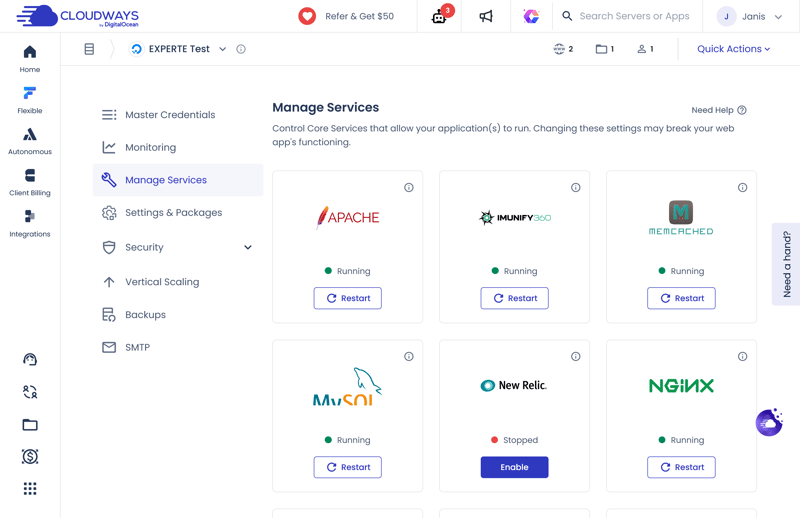
With Cloudways, you enable individual services as needed.
The hoster also stands out with advanced caching options and flexible PHP settings. A single server can host as many WordPress websites as you need.
Who is Cloudways a good fit for?
Cloudways is a great fit if you run multiple WordPress websites, expect growing needs, or want more control over your hosting setup.
Developers, agencies, and owners of larger websites benefit the most from its flexible resources. For a single, small website, Cloudways may not be worth it, since you likely won’t use many of its features.
What are Cloudways’ possible drawbacks?
The biggest hurdle is the technical know-how required. Cloudways demands more expertise than Hostinger or SiteGround, since you’ll need to choose your server size, cloud provider, and hosting settings yourself. It’s also not the cheapest option.
Pros and cons of Cloudways
Full technical control
You choose your cloud provider, server size, location, and resources. This gives you far more freedom than traditional managed WordPress hosts.Top performance
Fast load times, quick server responses, and 100% uptime make Cloudways one of the best-performing providers in our test.Flexible and fair pricing
No bait-and-switch pricing, no long-term contracts, and no steep renewal fees. You pay for the resources you actually use, and you can adjust them anytime.
Not beginner-friendly
The many technical choices require more hosting know-how. For a simple WordPress site, there are much easier options.Some features cost extra
CDN, automatic WordPress updates, and some support services aren’t included by default with Cloudways.
Kinsta: Premium WordPress Hosting
Kinsta is a California-based provider that specializes in managed WordPress hosting for businesses. Rather than traditional web hosting, Kinsta focuses entirely on fully managed WordPress environments, with its own tools for management, development, and analytics.
What we like about Kinsta
Kinsta stands out with its ease of use, strong support, and well-designed WordPress management. It ranked 4th in our test—not quite podium material, but still among the top providers.
The dashboard is one of the best we’ve seen. It’s fast, clean, and puts all key features in one place. New WordPress sites are quickly set up. Migrating existing projects to Kinsta is straightforward.
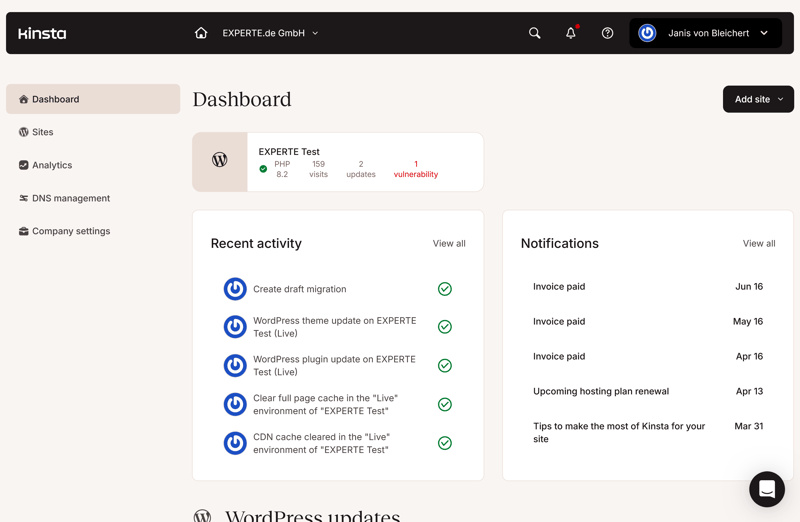
The Kinsta dashboard is clean and modern.
Technically, Kinsta delivers everything you’d expect from a premium host: modern server tech, powerful caching, a built-in CDN, and robust security features. Performance is strong, though it didn’t top every benchmark in our tests.
Who is Kinsta a good fit for?
Kinsta is a great fit for businesses and anyone whose WordPress site is critical to their operations. If you value ease of use, strong support, and a professional dashboard, and you're willing to pay more for it, Kinsta is a solid choice.
What are Kinsta’s possible drawbacks?
The biggest drawback is cost. Kinsta ranks among the most expensive providers in our test, and it doesn't even include a domain or email hosting. If you genuinely need top-tier hosting, the price may be worth it. But for simple websites, the extra cost rarely pays off.
Pros and cons of Kinsta:
Clean, polished dashboard
Kinsta's interface is nearly flawless. It's intuitive and easy to navigate, yet still packed with features for advanced users.Excellent WordPress support
Kinsta offers 24/7 live chat support. In our test, we never waited more than a few minutes for knowledgeable help.Modern tech and strong performance
Kinsta combines cutting-edge server technology, powerful caching, and a built-in CDN for fast, consistent performance.
Very high cost
Kinsta is one of the most expensive providers in our comparison. For small or simple websites, the premium price is difficult to justify.Extra costs add up
Although Kinsta isn't cheap to begin with, Object Cache, more frequent backups, and extended WordPress update services all cost extra.
Bluehost: A Lot of WordPress for Your Money
Bluehost is a US-based hosting provider with more than 20 years in the business. Its lineup includes managed WordPress hosting, traditional web hosting, cloud hosting, and domain services. In our test, this host, which WordPress recommends, ranked 5th overall.
What we like about Bluehost
A lot. Bluehost stands out in several key areas: it offers top-tier hardware, solid security features, and generous project limits.
Technically, Bluehost ranks among the best in the field. You get fast NVMe storage, advanced caching with a built-in CDN, and a suite of developer tools. PHP limits are unusually high, too.
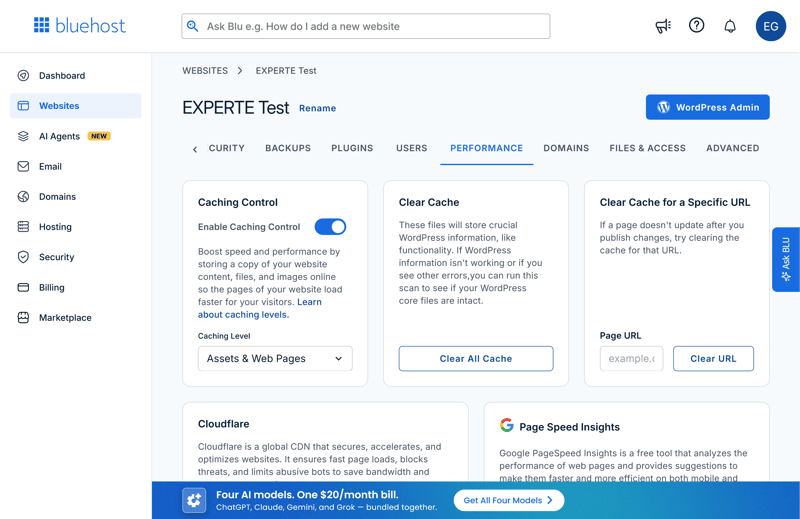
Bluehost offers modern WordPress technology with powerful performance features.
Security is another strong point. Firewall, DDoS protection, malware scanning, and automatic updates are all included.
Who is Bluehost a good fit for?
Bluehost is a great choice if you run multiple WordPress sites and want a feature-rich plan at a reasonable price. Even the lower-tier plans allow for several WordPress installations. But if you only need hosting for one high-priority site, there are stronger alternatives.
What are Bluehost’s possible drawbacks?
Bluehost has no single major flaw that undermines its overall value. Instead, a few smaller issues keep it from the top spots. Performance is good but not as consistent as the best hosts. The backup solution is weak, with only weekly backups and a single restore point.
Pros and cons of Bluehost:
Extensive feature set
Bluehost offers flexible PHP settings, NVMe storage, advanced caching, a CDN, and a full suite of developer tools. This makes it a great choice for more demanding WordPress projects.Multiple websites included
Even the lower-tier plans let you run multiple WordPress sites. This makes Bluehost especially appealing if you want to manage several projects under one hosting plan.Robust security
Firewall, DDoS protection, malware scanning, and automatic updates cover the biggest WordPress security risks. Bluehost also delivered 100% uptime in our test.
Limited backup capabilities
Bluehost only creates weekly automatic backups, keeping just the most recent restore point.Mixed performance results
While servers are generally fast, performance isn’t quite as consistent as top-tier competitors.
WordPress.com: Hosting Built by the Creators of WordPress
Looking for WordPress hosting straight from the source? You’re getting pretty close. WordPress.com is powered by Automattic, the company founded by WordPress co-founder Matt Mullenweg. That deep integration makes for an exceptionally strong managed hosting experience.
What we like about WordPress.com
WordPress.com stands out for its reliability and high level of automation. It handles many routine maintenance tasks for you, which makes it a great choice for websites that need to run smoothly with minimal technical upkeep.
Its security features are especially strong: firewall, DDoS protection, login security, malware detection, and automatic updates cover the biggest WordPress risks. If the host detects malware, it removes it for free. During our entire test period, the service had zero downtime.
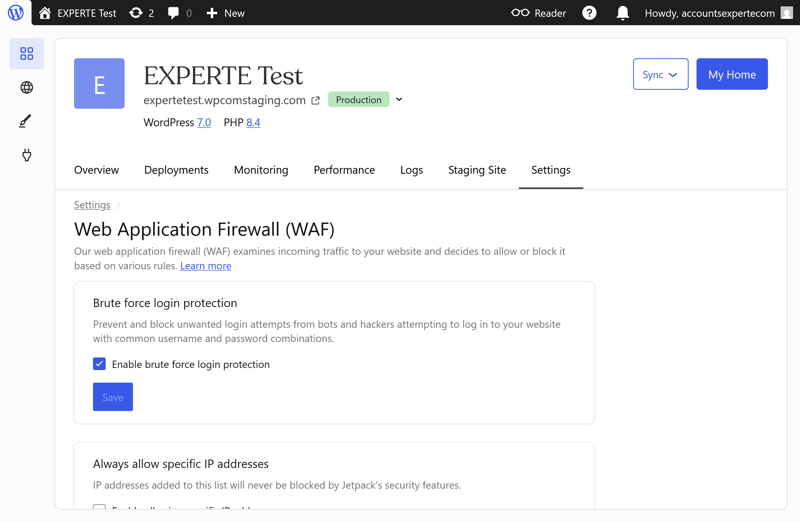
WordPress.com takes your website’s security very seriously.
The platform is technically solid, too. Powered by HTTP/3, multi-layer caching, a built-in CDN, and high PHP limits, it delivers a thoroughly modern foundation. And the numbers back it up: WordPress.com delivered some of the fastest page load speeds in our testing.
Who is WordPress.com a good fit for?
WordPress.com is a great choice if you run a single website and want to spend as little time as possible on hosting, updates, security, or performance tuning. It becomes less appealing if you manage multiple websites, as even the most expensive plan limits you to one WordPress installation.
What are WordPress.com’s possible drawbacks?
On the flip side, WordPress.com offers less control. The platform limits configuration options, blocks numerous plugins, and does not support multisite setups. Key managed features, such as automatic backups, staging environments, and developer access, are locked behind higher-tier plans.
The user experience could also use some polish. Having two distinct management areas—the hosting panel and the WordPress dashboard—creates overlap and makes it confusing to locate specific settings.
Pros and cons of WordPress.com
Robust security
WordPress.com offers comprehensive protection for your website. If malware is detected, the support team removes it completely free of charge.Reliable performance
During our testing, WordPress.com achieved 100% uptime alongside exceptional load speeds, placing its performance among the top results in our comparison.Hands-off automation
Caching, CDN delivery, security protocols, and system updates are largely handled in the background without requiring manual setup.
Only one website per plan
Each plan is limited to a single WordPress installation. This makes WordPress.com a poor fit if you manage multiple projects.Key features locked behind higher tiers
Features that ought to be standard with managed WordPress hosting, such as automated backups, are restricted to higher-tier plans on WordPress.com.No multisite support
WordPress.com does not support WordPress Multisite on any plan, meaning you cannot manage multiple sites from a single installation.
GoDaddy: Convenient WordPress Hosting

GoDaddy is one of the largest web hosting and domain providers in the world, and it now offers managed WordPress plans too. The service handles many tasks involved in setting up, managing, and maintaining your WordPress website, and it configures numerous features automatically.
What we like about GoDaddy
GoDaddy doesn't rank at the very top, but it still gets a lot right. Setting up WordPress is simple, and the free website migration worked quickly and smoothly in our test.
GoDaddy also does well on security, as it detects malware automatically and removes any threats it finds at no extra cost. Its servers responded quickly and stayed online almost the entire time during our test.
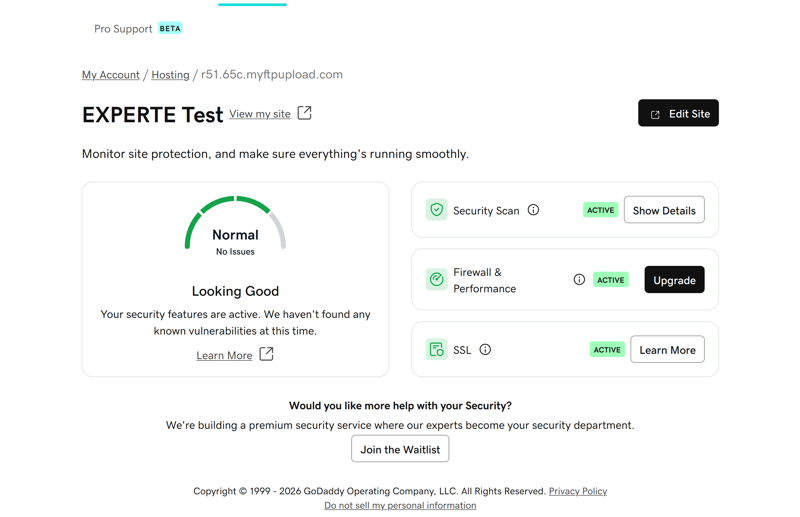
GoDaddy offers plenty of security features.
Another plus—one that is unfortunately not a given in the hosting industry—is how easily you can reach GoDaddy's support team. Response times are fast, though the quality of the assistance can be hit-or-miss.
Who is GoDaddy a good fit for?
If you want to run a single WordPress website without much technical hassle, GoDaddy is worth a look. Small business sites and other simple projects are quick to set up and need very little day-to-day maintenance.
What are GoDaddy's possible drawbacks?
GoDaddy limits key features depending on your plan and allows little room to adjust technical settings. Prices also jump significantly once your first contract term ends. Overall, you get a solid managed WordPress package, but not the premium experience the best providers in our test deliver.
Pros and cons of GoDaddy:
Easy setup and migration
Setting up a new WordPress website is quick and straightforward. Automatic migration of an existing website also tends to go smoothly and without errors.Strong security features
Malware scanning, free malware removal, a firewall, and automatic updates protect your website with almost no effort on your part.Fast servers and strong uptime
GoDaddy's servers respond quickly. Over our six-week test, we recorded almost no measurable downtime.
Much higher renewal prices
Prices increase significantly after your initial term ends, which dulls the appeal of the low starting rates.Restricted control options
Key settings are managed for you with no caching controls, while developer tools require the top-tier tier.Fragmented interface with heavy upselling
The dashboard design could use improvement: features are split across different areas, and ads for add-ons take up far too much space.
Alternatives
Our top seven only tell part of the story. In total, we tested 10 WordPress hosts, and the ideal option for your specific project might be among the remaining providers. Here is our breakdown of the rest:
WP Engine WordPress hosting
WP Engine delivers blazing-fast servers, a full suite of performance tools, and top-tier security. Professional WordPress projects benefit from built-in caching, a CDN, staging environments, developer tools, and daily backups.
That said, it’s one of the priciest hosts in our comparison, and despite the promise of 24/7 live chat support, we couldn’t reach an agent once during testing.

DreamHost WordPress Hosting
DreamHost delivers an easy-to-use platform with strong security and a solid set of features at a fair price. Daily backups, automatic updates, a CDN, and full plugin freedom make it a well-rounded managed WordPress hosting option.
The provider falls short on performance, though. Its servers respond slowly, and support left a mixed impression in our test. Live chat and callback services weren't always reliable.

IONOS WordPress Hosting
The biggest selling point for IONOS is its low price. You can run a single WordPress site affordably and without hassle on European servers.
As a managed hosting provider, though, IONOS lags behind almost all its competitors. Performance disappoints, with slow servers, poor uptime, and no built-in caching. Support also struggled to help us reliably in our test.

Key Takeaways
See our full ranking of WordPress hosts here:


How We Tested: Our Evaluation Criteria
While managed WordPress hosts differ greatly in technology, features, usability, and pricing, their core objective remains the same: simplifying site management, handling technical tasks behind the scenes, and delivering a fast, secure, and dependable platform.
To maintain a level playing field, we measure every host against a uniform set of criteria. Our test system bridges objective performance metrics with practical, everyday testing.
We test every WordPress hosting provider in six categories and award up to 100 points. Each category is weighted differently:
- 1.
Setup & Ease of Use (15%)
- 2.
Technology & Features (20%)
- 3.
Security (10%)
- 4.
Performance (30%)
- 5.
Support (10%)
- 6.
Costs (15%)
The points from each category add up to a score for that section. We then combine these scores to calculate the provider’s overall rating.
We’ll explain the criteria for each category in more detail below. First, here’s the full scoring breakdown:
 |  |  |  |  |  |  |  |  |  | |
|---|---|---|---|---|---|---|---|---|---|---|
| Setup & Ease of Use (15%) | ||||||||||
| Installation & setup | 3/3
| 3/3
| 3/3
| 2.5/3
| 2/3
| 3/3
| 2/3
| 3/3
| 3/3
| 3/3
|
| Migration | 2/2
| 2/2
| 1.5/2
| 1.5/2
| 0.5/2
| 1.5/2
| 2/2
| 2/2
| 2/2
| 0/2
|
| Control Panel | 9/10
| 8/10
| 8/10
| 10/10
| 7/10
| 4/10
| 4/10
| 6/10
| 8/10
| 4/10
|
| Technology & Features (20%) | ||||||||||
| Server stack & protocols | 2/2
| 1/2
| 1/2
| 1.5/2
| 1.5/2
| 1.5/2
| 1.5/2
| 1.5/2
| 1.5/2
| 1.5/2
|
| PHP | 8/8
| 6.5/8
| 8/8
| 5.5/8
| 8/8
| 6/8
| 4.5/8
| 5/8
| 7.5/8
| 5.5/8
|
| Caching & CDN | 5/5
| 5/5
| 4/5
| 4/5
| 5/5
| 4.5/5
| 4.5/5
| 5/5
| 4.5/5
| 2.5/5
|
| Features | 5/5
| 5/5
| 5/5
| 5/5
| 5/5
| 4/5
| 3/5
| 4/5
| 4/5
| 2/5
|
| Security (10%) | ||||||||||
| Free SSL | 2/2 Yes | 2/2 Yes | 2/2 Yes | 2/2 Yes | 2/2 Yes | 2/2 Yes | 0/2 No | 2/2 Yes | 2/2 Yes | 0/2 No |
| Server protection | 3/4
| 3/4
| 4/4
| 4/4
| 4/4
| 4/4
| 4/4
| 3/4
| 3/4
| 3/4
|
| WordPress updates | 2/2
| 2/2
| 0/2 No automatic updates | 0/2 No automatic updates | 2/2
| 2/2
| 2/2
| 1/2
| 2/2
| 2/2
|
| Backups | 1/2
| 2/2
| 2/2
| 2/2
| 0/2 Daily backups aren't included in every plan | 0/2 Daily backups aren't included in every plan | 0/2 Daily backups aren't included in every plan | 2/2
| 2/2
| 0/2 Daily backups aren't included in every plan |
| Performance (30%) | ||||||||||
| Response speed (TTFB) | 8/10 0.31 s | 10/10 0.26 s | 10/10 0.27 s | 10/10 0.23 s | 10/10 0.23 s | 4/10 0.63 s | 10/10 0.27 s | 10/10 0.19 s | 2/10 0.82 s | 8/10 0.39 s |
| TTFB outliers | 3/5 0.51 % | 4/5 0.28 % | 3/5 0.54 % | 5/5 0.09 % | 1/5 1.07 % | 4/5 0.41 % | 5/5 0.10 % | 5/5 0.20 % | 0/5 2.22 % | 1/5 1.02 % |
| Pagespeed (LCP) | 10/10 0.46 s | 6/10 0.61 s | 8/10 0.57 s | 6/10 0.68 s | 2/10 0.95 s | 8/10 0.52 s | 4/10 0.79 s | 6/10 0.68 s | 4/10 0.78 s | 0/10 1.28 s |
| Uptime | 0/5 99.93 % | 5/5 100.00 % | 5/5 100.00 % | 2/5 99.98 % | 5/5 100.00 % | 5/5 100.00 % | 4/5 99.99 % | 2/5 99.98 % | 5/5 100.00 % | 0/5 98.92 % |
| Support (10%) | ||||||||||
| Documentation | 1.5/2
| 1/2
| 1/2
| 2/2
| 1.5/2
| 2/2
| 2/2
| 1/2
| 1.5/2
| 1/2
|
| Support channels | 1.5/2
| 0.5/2
| 1.5/2
| 1/2
| 2/2
| 1.5/2
| 1.5/2
| 1/2
| 1/2
| 1/2
|
| Speed and quality | 3/3
| 3/3
| 2.5/3
| 3/3
| 1/3
| 3/3
| 1.5/3
| 0/3
| 2/3
| 1/3
|
| Ratings on review platforms | 3/3
| 2/3
| 2/3
| 3/3
| 2/3
| 2/3
| 2/3
| 2/3
| 2/3
| 2/3
|
| Costs (15%) | ||||||||||
| 1 project, 10 GB storage | 3/3 $3.49 | 2/3 $7.49 | 0/3 $24.00 | 0/3 $41.67 | 2/3 $8.49 | 2/3 $6.50 | 1/3 $11.98 | 0/3 $32.08 | 0/3 $17.99 | 1/3 $11.98 |
| 10 projects | 3/3 $4.49 | 2/3 $12.49 | 2/3 $24.00 | 0/3 $187.50 | 3/3 $8.49 | 0/3 $65.00 | 2/3 $46.00 | 0/3 $119.17 | 0/3 $179.90 | 2/3 $46.00 |
| 50 GB of storage | 3/3 $4.49 | 2/3 $12.49 | 1/3 $24.00 | 0/3 $283.33 | 2/3 $8.49 | 1/3 $20.00 | 2/3 $11.98 | 0/3 $302.50 | 0/3 $24.99 | 2/3 $11.98 |
| Fair pricing | 5/6
| 3.5/6
| 4/6
| 5/6
| 4/6
| 5/6
| 4/6
| 2/6
| 4/6
| 4/6
|
Setup & Ease of Use (15%)
Hosting providers vary significantly when it comes to setup speed, site migration, and panel navigation. While some get your WordPress dashboard live in minutes, others drag out the process with confusing steps or unexpected delays.
This category assesses how fast you can deploy a new site, how effortlessly you can transfer an existing one, and how intuitive the dashboard feels for daily management.
How easy is it to install WordPress?
A solid host should provide flexible installation options, including quick one-click installs, guided setup wizards, and custom setups for advanced users.
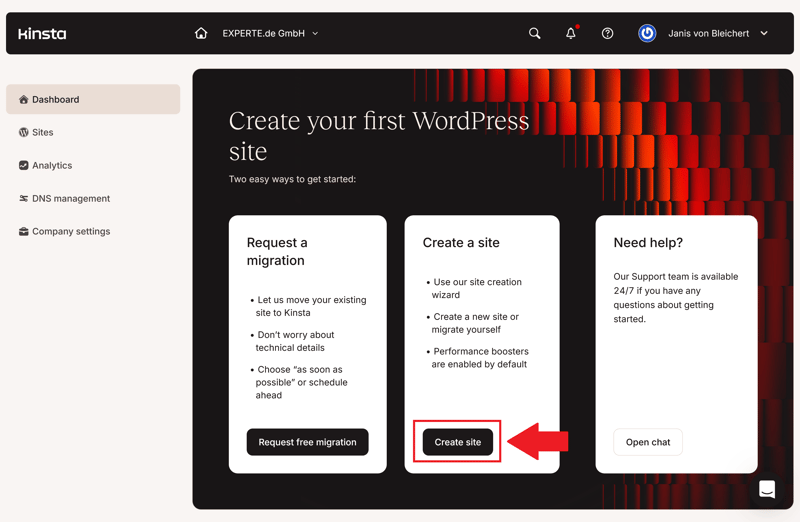
Kinsta provides multiple flexible ways to install WordPress.
It comes down to execution. The process should feel straightforward even if you lack technical experience. Ideally, you pick your basic configurations and jump straight into WordPress.
Points are docked for slow setup times, unnecessary hoops to jump through, or installations that demand manual fixes out of the box.
How easy is it to migrate an existing WordPress website?
Switching providers should not mean rebuilding your site from the ground up. We test whether hosts provide free migration options and how reliable those transfers prove to be.
The best hosts handle migrations automatically through custom tools, moving your site quickly and error-free.
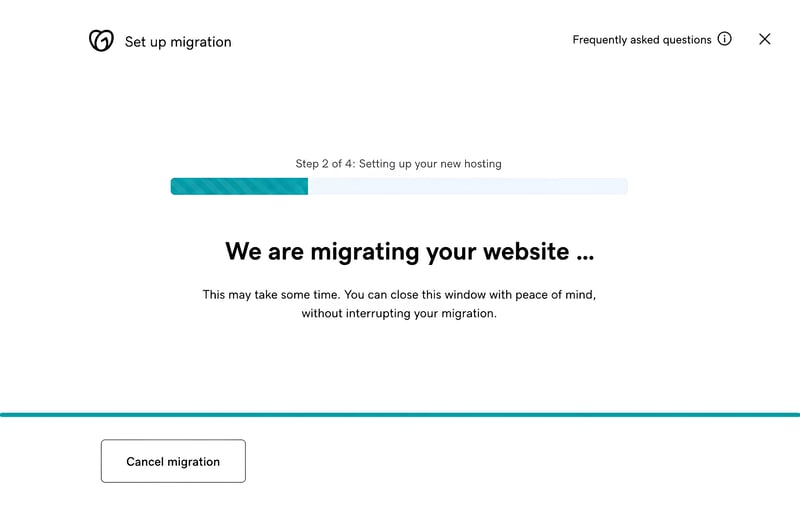
GoDaddy makes migrating your site straightforward.
Hosts score lower if they lack automated tools, lock migrations behind paid upgrades, or complicate the transfer process.
How easy is the Control Panel to use?
In your host’s Control Panel, you manage your WordPress websites, domains, backups, security settings, and more. A well-designed interface should keep essential tools easily accessible.
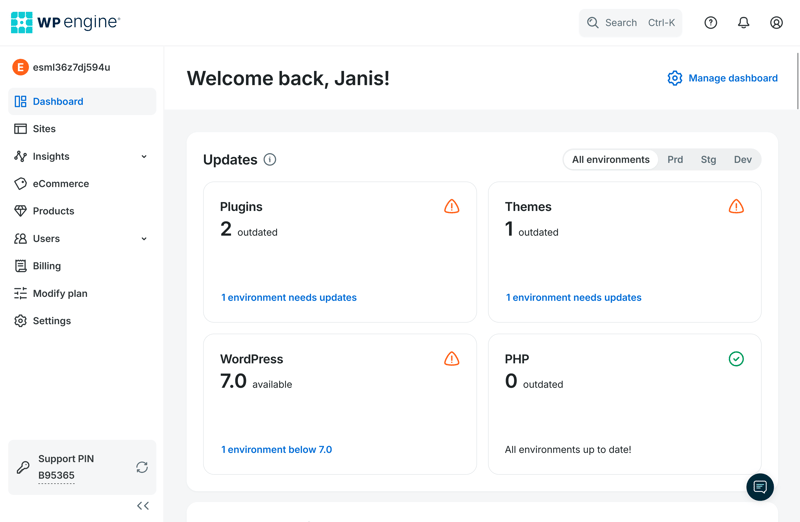
WP Engine features a clean, highly intuitive dashboard.
We favor centralized control panels that keep all settings in one location. Having to jump between separate dashboards creates friction and leads to unnecessary confusion.
Speed and usability matter. Cluttered layouts filled with aggressive upsells or slow-loading menus hinder everyday workflow and result in point deductions.
Technology & Features (20%)
A WordPress host's technical setup determines how powerful and flexible the hosting really is in practice. Many differences are not obvious right away and tend to show up later, with larger file uploads, more complex websites, or growing visitor numbers.
That is why we take a close look at the technical foundation of each hosting plan. This includes server infrastructure, PHP configuration, caching and CDN integration, and developer-oriented features.
How modern is the technical foundation?
First, we look at the server stack, starting with storage technology. Traditional HDDs are vastly slower than SSDs and have largely become obsolete in modern WordPress hosting, so we rate SSD storage higher. NVMe SSDs represent the gold standard, transferring data even faster than standard SSDs.
Bluehost | Cloudways | DreamHost | GoDaddy | Hostinger | IONOS | Kinsta | SiteGround | WordPress.com | WP Engine | |
|---|---|---|---|---|---|---|---|---|---|---|
Server locations | 9 countries | 8 countries | 3 countries | 3 countries | 11 countries | 2 countries | 21 countries | 7 countries | 19 countries | 12 countries |
Web server | Apache | NGINX | NGINX | NGINX | LiteSpeed | Apache | NGINX | NGINX | NGINX | NGINX |
Control Panel | cPanel | Custom | Custom | Custom | Custom | Custom | Custom | Custom | Custom | Custom |
Database | MySQL | MariaDB | MySQL | MySQL | MariaDB | MariaDB | MariaDB | MySQL | MariaDB | MySQL |
Storage type | NVMe | SSD | NVMe | NVMe | NVMe | NVMe | SSD | SSD | SSD | SSD |
| Protocols | ||||||||||
HTTP/2 | ✓ | ✓ | ✓ | ✓ | ✓ | ✓ | ✓ | ✓ | ✓ | ✓ |
HTTP/3 | ✗ | ✗ | ✗ | ✗ | ✓ | ✗ | ✓ | ✗ | ✓ | ✓ |
We also factor in supported web protocols. HTTP/2 is now standard and allows browsers to load multiple files efficiently over a single connection. HTTP/3 takes performance further, making connections faster and more resilient.
To earn full marks, a provider must combine NVMe SSD storage with support for both HTTP/2 and HTTP/3.
PHP versions and resources
WordPress relies heavily on PHP. We check which PHP versions a host currently supports (newer is better) and how much control you get over configuration settings.
We award points if you can switch PHP versions independently without friction. Providers earn bonus points if you can adjust individual PHP variables directly in the dashboard without opening a support ticket or editing configuration files manually.
Bluehost | Cloudways | DreamHost | GoDaddy | Hostinger | IONOS | Kinsta | SiteGround | WordPress.com | WP Engine | |
|---|---|---|---|---|---|---|---|---|---|---|
PHP version configurable | ✓ | ✓ | ✓ | ✓ | ✓ | ✓ | ✓ | ✓ | ✓ | ✓ |
PHP settings configurable | ✓ | ✓ | ✓ | ✗ | ✓ | ✗ | ✗ | ✓ | ✗ | ✗ |
Max PHP version | 8.5 | 8.4 | 8.5 | 8.3 | 8.5 | 8.4 | 8.5 | 8.5 | 8.4 | 8.4 |
Max memory limit | unlimited | unlimited | 768 MB | 512 MB | 3072 MB | 512 MB | 512 MB | 768 MB | 512 MB | 512 MB |
Max execution time | unlimited | unlimited | unlimited | 180s | unlimited | 360s | 300s | 120s | 850s | 43300s |
Max upload size | unlimited | unlimited | 1028 MB | 1024 MB | 3072 MB | 128 MB | 128 MB | 256 MB | 2048 MB | 50 MB |
We also evaluate the resource limits of our test plan, specifically the memory limit, which dictates the maximum RAM a single PHP process can consume. We begin awarding points at 256 MB, with maximum scores given for 1,024 MB or more.
The maximum execution time is another critical factor. It defines how long a PHP script can run before the server terminates it. We award points starting at 60 seconds, with full credit at 300 seconds. Maximum upload limits are graded using a similar scale.
Caching & CDN
Caching is essential for high-performing WordPress sites. Instead of dynamically generating every page request from scratch, the server stores pre-built content and serves it instantly to subsequent visitors.
We check whether a host provides built-in server-side caching and whether object caching is available. Object caching stores frequent database queries in RAM, reducing backend load during peak traffic.
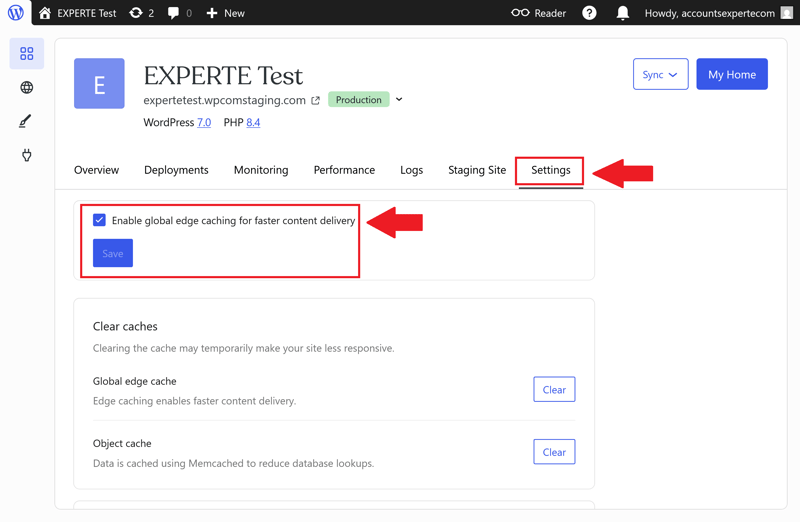
WordPress.com relies on aggressive caching strategies.
A built-in content delivery network (CDN) is another key requirement. It distributes static assets—such as images, CSS, and JavaScript—across a global network of servers, serving content from the node closest to the user.
Certain pages, such as shopping carts or account dashboards, should never be cached. We verify whether hosts allow custom cache exclusion rules and whether the cache clears automatically when content is updated.
Bluehost | Cloudways | DreamHost | GoDaddy | Hostinger | IONOS | Kinsta | SiteGround | WordPress.com | WP Engine | |
|---|---|---|---|---|---|---|---|---|---|---|
Server side caching | ✓ | ✓ | ✓ | ✓ | ✓ | ✓ | ✓ | ✓ | ✓ | ✓ |
Object Caching | ✓ | ✓ | ✓ | ✓ | ✓ | ✗ | ✗ | ✓ | ✓ | ✓ |
CDN | ✓ | ✗ | ✓ | ✓ | ✓ | ✗ | ✓ | ✓ | ✓ | ✓ |
Cache exclusions | ✓ | ✓ | ✗ | ✗ | ✓ | ✗ | ✓ | ✓ | ✗ | ✓ |
Automatic cache purge | ✓ | ✓ | ✓ | ✓ | ✓ | ✓ | ✓ | ✓ | ✓ | ✓ |
Hosts that offer comprehensive caching technology paired with flexible user controls earn the highest scores.
Additional WordPress features
Beyond core infrastructure, PHP configs, and caching systems, we also evaluate the host's broader feature toolkit. These capabilities save significant time on complex projects, client work, and day-to-day administrative tasks.
Cron jobs allow you to automate recurring tasks, such as running scheduled scripts or executing background maintenance processes.
SSH access is another critical tool for technical users, providing direct, encrypted command-line access to the underlying server environment.
We also check for WP-CLI support. This command-line interface for WordPress allows developers to manage core updates, plugin installations, user accounts, and database tasks without relying on the graphical admin panel.
WordPress Multisite support is essential for managing larger network structures. It enables you to run and control multiple distinct sites from within a single WordPress installation, though not all hosting providers support this configuration.
Staging environments play a major role in our evaluation as well. They allow you to safely test updates, code changes, or new features on a duplicate clone of your site before deploying those modifications to your live production environment.
The more of these features a host offers without complicated workarounds or paid add-ons, the higher its score.
Security (10%)
A managed hosting provider should keep your website running smoothly while protecting it against online threats. That means defending against server-level DDoS attacks, malware infections, automated bot logins, outdated WordPress software, and data loss caused by technical errors or failed updates.
That is why we take a close look at the security features included with each plan and how much maintenance work the host takes off your hands.
SSL and threat protection
Every WordPress website should be accessible over HTTPS without incurring extra costs. We verify whether all plans include free, unlimited SSL certificates that also cover additional domains and subdomains.
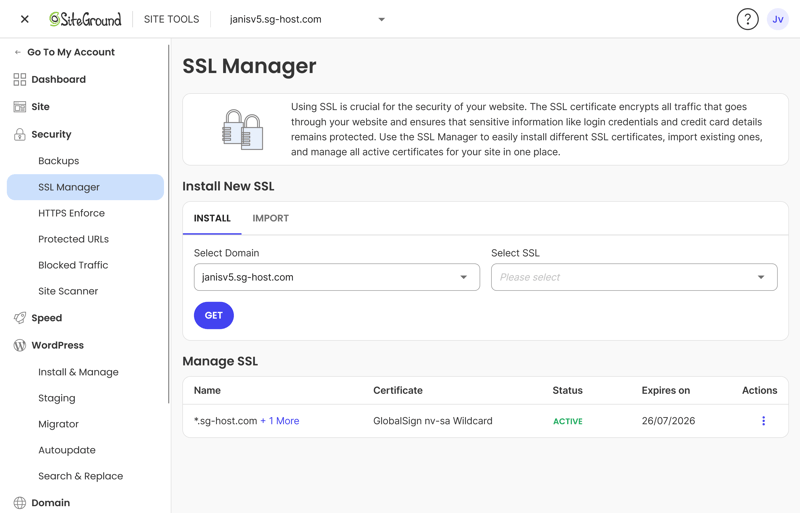
SSL certificates come standard with SiteGround as well.
To evaluate server-level defense, we look for core protective measures: a web application firewall, DDoS mitigation, rate-limiting on suspicious login attempts, and routine malware scanning.
The more of these security tools a host provides out of the box, the less you need to depend on third-party plugins or paid add-on services.
Bluehost | Cloudways | DreamHost | GoDaddy | Hostinger | IONOS | Kinsta | SiteGround | WordPress.com | WP Engine | |
|---|---|---|---|---|---|---|---|---|---|---|
Unlimited free SSL certificates (on all plans) | ✓ | ✓ | ✓ | ✗ | ✓ | ✗ | ✓ | ✓ | ✓ | ✓ |
Firewall | ✓ | ✓ | ✓ | ✓ | ✓ | ✓ | ✓ | ✓ | ✓ | ✓ |
DDoS protection | ✓ | ✓ | ✓ | ✓ | ✓ | ✓ | ✓ | ✓ | ✓ | ✓ |
Login protection | ✓ | ✓ | ✗ | ✓ | ✗ | ✗ | ✓ | ✓ | ✓ | ✗ |
Malware scanning | ✓ | ✓ | ✓ | ✓ | ✓ | ✓ | ✓ | ✗ | ✓ | ✓ |
Auto updates WordPress core | ✓ | ✗ | ✓ | ✓ | ✓ | ✓ | ✗ | ✓ | ✓ | ✓ |
Auto updates WordPress plugins/themes | ✓ | ✗ | ✓ | ✓ | ✓ | ✓ | ✗ | ✓ | ✓ | ✗ |
Daily automated backups (on all plans) | ✗ | ✓ | ✓ | ✗ | ✗ | ✗ | ✓ | ✓ | ✗ | ✓ |
Min. 14 day backup retention (on all plans) | ✗ | ✓ | ✓ | ✗ | ✓ | ✗ | ✓ | ✓ | ✗ | ✓ |
Automated WordPress updates
Outdated core files, plugins, and themes represent the single largest security vulnerability for WordPress sites. That is why we check whether hosts allow you to enable automated updates for WordPress core, plugins, and themes.
Granular control is a major benefit here. Top hosts allow you to select which specific components update automatically or let you manage individual plugins and themes on a case-by-case basis.
Automated backups
Reliable backups are essential when an update breaks your site or malware compromises your files. We expect every managed WordPress host to perform automated daily backups across all plans and retain those restore points for at least 10 days.
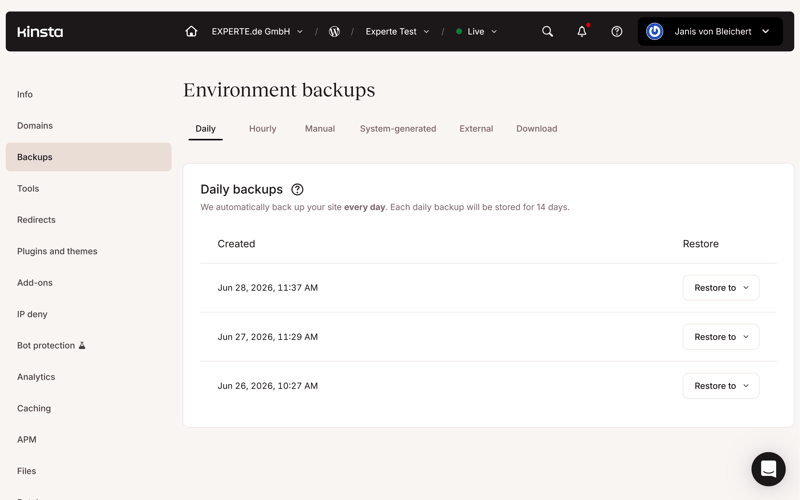
Kinsta automatically backs up your site every day.
Higher backup frequencies and longer retention periods earn better scores. Above all, restoring a clean, operational version of your site should be fast and simple.
Performance (30%)
When it comes to performance, we do not simply rely on marketing claims. We put every provider to the test ourselves under identical conditions.
We subscribed to a comparable hosting plan with each provider, deployed an identical WordPress demo site, and continuously monitored its performance over a six-week testing period.
Specifically, we evaluated four key metrics:
- 1.
Response speed (TTFB)
- 2.
Outliers and slow requests
- 3.
Pagespeed (LCP)
- 4.
Uptime (availability)
Server response time
Time to First Byte (TTFB) measures how quickly a server responds to a user request and transmits the initial byte of data. Lower numbers mean your website begins rendering faster.
| Response time (TTFB) | |
|---|---|
| 0.186 s |
| 0.23 s |
| 0.232 s |
| 0.264 s |
| 0.266 s |
| 0.271 s |
| 0.305 s |
| 0.387 s |
| 0.631 s |
| 0.819 s |
We track TTFB continuously over six weeks with caching disabled. This provides an unvarnished look at raw server processing speed. Providers maintaining an average TTFB under 0.3 seconds earn top marks, while averages exceeding 0.7 seconds lose points.
Outliers and slow response spikes
A strong average TTFB tells only part of the story if occasional requests suffer severe delays. That is why we track how frequently a server takes longer than one second to respond.
| TTFB outlier | |
|---|---|
| 0.09 % |
| 0.1 % |
| 0.2 % |
| 0.28 % |
| 0.41 % |
| 0.51 % |
| 0.54 % |
| 1.02 % |
| 1.07 % |
| 2.22 % |
Fewer slow responses mean a more consistent user experience. Frequent response spikes lead to noticeable delays for visitors, even if the overall average appears acceptable on paper.
Page load speed
To measure real-world page load performance, we look at Largest Contentful Paint. LCP tracks how long it takes for the main visual element on the page, such as a featured image or hero text block, to fully render.
| Pagespeed (LCP) | |
|---|---|
| 0.46 s |
| 0.519 s |
| 0.573 s |
| 0.612 s |
| 0.683 s |
| 0.683 s |
| 0.782 s |
| 0.792 s |
| 0.949 s |
| 1.282 s |
Unlike our raw TTFB tests, we enable each provider's built-in caching systems for LCP measurements. This replicates authentic browsing conditions on an optimized production site. LCP scores below 0.7 seconds represent top-tier performance, with slower times receiving lower ratings.
Website uptime over six weeks
Speed matters little if your website suffers frequent downtime. That is why we monitor availability continuously over six weeks, pinging each server twice every minute.
| Uptime | |
|---|---|
| 100 % |
| 100 % |
| 100 % |
| 100 % |
| 100 % |
| 99.992 % |
| 99.977 % |
| 99.976 % |
| 99.932 % |
| 98.92 % |
The highest scores go to hosts that achieve flawless 100% uptime. Even minor drops in availability will reduce a provider's overall score.
Support (10%)
On paper, most hosts promise broad support across multiple channels. However, testing 10 providers quickly proved that more contact options do not always mean better assistance. What really matters is receiving fast, knowledgeable help when you run into trouble.
Documentation and support channels
First, we review the help center to evaluate its depth and see how well it addresses common WordPress issues. Comprehensive documentation lets you resolve problems independently without opening a ticket every time.

Bluehost's knowledge base includes a dedicated WordPress section as well.
We also examine available direct support options: email and ticket systems, AI chatbots, live chat, and phone support. Offering multiple ways to reach support makes getting help easier across different scenarios—at least in theory.
Response speed and quality
In this phase, we test response times and evaluate the actual quality of support responses. We assess whether agents truly understand our questions, provide clear step-by-step solutions, and demonstrate expertise with WordPress-specific issues.
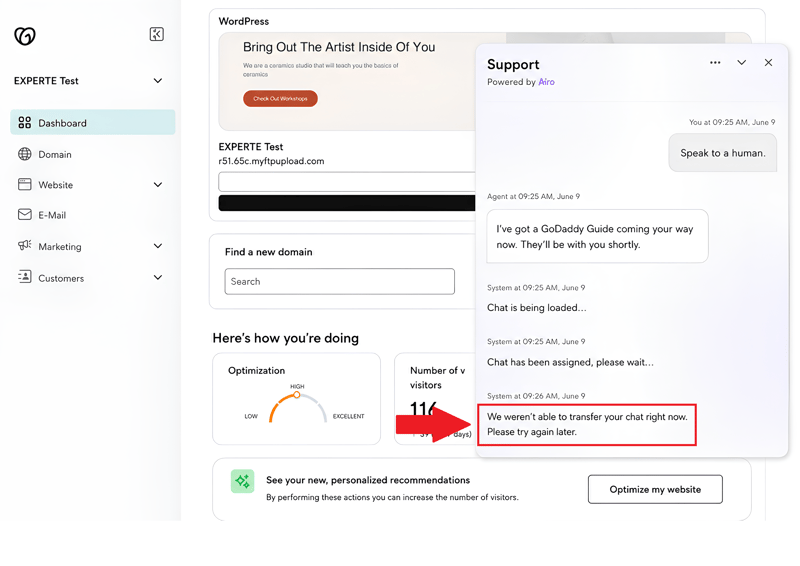
Errors like this in GoDaddy's AI chat are precisely what we want to avoid.
What we dock points for: canned responses, vague answers, or being transferred repeatedly between support tiers. These issues lower a provider's overall score.
Customer feedback and reviews
Finally, we analyze user reviews from real customers. This helps us determine whether our own support interaction was an isolated experience or aligns with broader customer feedback.
Rather than looking solely at overall rating averages, we pay close attention to feedback specifically targeting customer support to spot recurring praise or complaints.
Costs (15%)
First, we take a close look at each provider's hosting plans. Most hosts offer several tiers that differ in the number of supported WordPress sites, allocated storage, server resources, or available features.
Because every host structures its packages differently, listed prices are rarely comparable at face value. To create a level playing field, we evaluate each provider across three standard usage scenarios:
Usage scenario | What we compare |
|---|---|
1 project, 10 GB storage | Cost of running a single WordPress website with at least 10 GB of disk space |
10 projects | Cost of hosting 10 separate WordPress sites on a single account |
50 GB storage | Cost of a plan providing at least 50 GB of storage capacity |
For each scenario, we factor in all available billing terms and calculate the effective monthly cost across a 24-month period. This approach ensures a fair comparison between plans with varying contract lengths or upcoming renewal price hikes.
The comparison table below outlines each provider's effective cost across all three scenarios:
| 1 project, 10 GB storage | 10 projects | 50 GB storage | |
|---|---|---|---|
| $3.49 | $4.49 | $4.49 |
| $6.50 | $65.00 | $20.00 |
| $7.49 | $12.49 | $12.49 |
| $8.49 | $8.49 | $8.49 |
| $11.98 | $46.00 | $11.98 |
| $11.98 | $46.00 | $11.98 |
| $17.99 | $179.90 | |
| $24.00 | $24.00 | $24.00 |
| $32.08 | $119.17 | $302.50 |
| $41.67 | $187.50 | $283.33 |
Evaluating price fairness
Beyond the initial monthly rate, we review important contractual details, such as bandwidth caps and whether prices increase sharply once the primary billing term ends.
Even reputable hosting providers often advertise aggressive promotional pricing, only to raise renewal rates substantially afterward. What matters most is not just the upfront entry price but the total ongoing cost over time. Paid add-ons can also turn a seemingly cheap package into an expensive commitment.
We also check whether domain names remain free long-term, whether restoring backups incurs extra fees, and whether flexible month-to-month contracts are supported.
Finally, money-back guarantees and trial periods add substantial value, letting you evaluate a service thoroughly without financial risk.
Key Takeaways: The Right Host for Every WordPress Project
Finding the right host comes down to what you are trying to build. A simple portfolio requires a completely different setup than a high-traffic e-commerce store, so no single host wins in every scenario.
A higher price tag does not guarantee the best experience. At the same time, opting for the cheapest plan can backfire if performance stutters or critical tools are locked behind paywalls.
- 1.
Hostinger is our top pick overall because it delivers an unbeatable package: affordable pricing, ease of use, modern technology, and a rich set of WordPress features. That makes it a reliable choice for managing both single sites and multiple projects.
- 2.
SiteGround stands out as one of the most well-rounded managed hosts in our comparison. It pairs impressive performance with robust security features and an intuitive, easy-to-navigate dashboard.
- 3.
Cloudways, on the other hand, is tailored to experienced users with more complex projects. This flexible cloud hosting platform offers outstanding speed along with pro-level tools for maximum control.
Naturally, there are plenty of excellent options beyond our top three depending on your goals. The key is finding a host that fits your project today and provides enough headroom to scale as your requirements evolve.